Advertisement
Help Keep Boards Alive. Support us by going ad free today. See here: https://subscriptions.boards.ie/.
https://www.boards.ie/group/1878-subscribers-forum

Private Group for paid up members of Boards.ie. Join the club.
Hi all, please see this major site announcement: https://www.boards.ie/discussion/2058427594/boards-ie-2026

ZyXEL NSA310 1-Bay NAS Media Server (With 500GB HDD) - €90.37 delivered [Dabs.ie]

1131416181926

Comments

  • Registered Users, Registered Users 2 Posts: 3,618 ✭✭✭The Sparrow


    nedd wrote: »
    I am loving my one. Got Plex installed and it is working perfectly. Remotely adding torrents from my Android phone. My wife is even using it a little.

    Did you follow a guide for getting Plex installed? Got this a few weeks ago and have barely had anytime to do anything with it.

    So if anyone has any advice/ guides for how to get the best of it, please share! :)


  • Registered Users, Registered Users 2 Posts: 2,096 ✭✭✭nedd


    There are a couple of steps required to get Plex working.

    1st, install FFP: http://zyxel.nas-central.org/wiki/FFP_as_zypkg
    (basically download web_prefix file and put it in folder \<nas>\admin\zy-pkgs\ go back to package page and refresh. You can then install FFP and Transmission.)

    2nd, assuming you have a bit of Linux knowledge, SSH onto the NAS and use this guide to install Plex:
    http://forum.nas-central.org/viewtopic.php?f=249&t=7603
    (This guide is simple enough really. One point to note, this will downlaod version "0.9.7.12.407" of plex. This is a little old. I installed that version and then a day or two later I did the steps for the upgrade, about 5 posts below)

    3rd, log into plex and point it to your Movies and Tv, leave it for a couple of hours to build your catalogue.

    That said, I have some knowledge of IT and Linux and I was able to dedicate some time to getting it running. I wanted a media player and content downloader and with a little messing I have it set up exactly how I want it.

    Other people can set it up as is and have exactly what they are looking for.

    References:
    Official Zyxel forum:
    http://forum.zyxel.com/viewforum.php?f=35&sid=2d2604f5ce880dd587e5e3213547e66d

    This forum is good for hacking the box:
    http://forum.nas-central.org/viewforum.php?f=249

    German Support forum, they have better support for customising the NAS:
    http://www.zyxelforum.de/


  • Registered Users, Registered Users 2 Posts: 3,618 ✭✭✭The Sparrow


    nedd wrote: »
    There are a couple of steps required to get Plex working.

    1st, install FFP: http://zyxel.nas-central.org/wiki/FFP_as_zypkg
    (basically download web_prefix file and put it in folder \<nas>\admin\zy-pkgs\ go back to package page and refresh. You can then install FFP and Transmission.)

    2nd, assuming you have a bit of Linux knowledge, SSH onto the NAS and use this guide to install Plex:
    http://forum.nas-central.org/viewtopic.php?f=249&t=7603
    (This guide is simple enough really. One point to note, this will downlaod version "0.9.7.12.407" of plex. This is a little old. I installed that version and then a day or two later I did the steps for the upgrade, about 5 posts below)

    3rd, log into plex and point it to your Movies and Tv, leave it for a couple of hours to build your catalogue.

    That said, I have some knowledge of IT and Linux and I was able to dedicate some time to getting it running. I wanted a media player and content downloader and with a little messing I have it set up exactly how I want it.

    Other people can set it up as is and have exactly what they are looking for.

    References:
    Official Zyxel forum:
    http://forum.zyxel.com/viewforum.php?f=35&sid=2d2604f5ce880dd587e5e3213547e66d

    This forum is good for hacking the box:
    http://forum.nas-central.org/viewforum.php?f=249

    German Support forum, they have better support for customising the NAS:
    http://www.zyxelforum.de/

    Cheers... I've no knowledge of Linux but this is as good a time as any to learn!


  • Registered Users, Registered Users 2, Paid Member Posts: 8,864 ✭✭✭ongarite


    I have the 2 bay 325 version of this NAS and my tranfer speeds are maxing out my 100mb LAN connection at around 10-11MB/sec
    Maybe the extra CPU power & RAM of the 325 version helps? What FW are you running on your unit?


  • Registered Users, Registered Users 2 Posts: 1,104 ✭✭✭iPhone.


    Running mine through a Gigabit router and getting 39 to 40 Mb transfer speeds.


  • Advertisement
  • Registered Users, Registered Users 2 Posts: 798 ✭✭✭lucast2007us


    Hey guys wanted to get the NSA 310 and wanted to buy a 3TB HD with it what HD would ye recommend as there is so many to choose from! Should I go with red or green?


  • Registered Users, Registered Users 2 Posts: 1,494 ✭✭✭WeleaseWoderick


    OK! Need a bit of help here!

    I had to reset my router that the NSA310 is connected to and since then, the NAS isn't visible on my network.

    I have tried resetting the NAS itself and also reinstalling the Starter Utility but nothing seems to be getting it to show up.

    Any ideas?


  • Registered Users, Registered Users 2 Posts: 11,137 ✭✭✭✭28064212


    OK! Need a bit of help here!

    I had to reset my router that the NSA310 is connected to and since then, the NAS isn't visible on my network.

    I have tried resetting the NAS itself and also reinstalling the Starter Utility but nothing seems to be getting it to show up.

    Any ideas?
    Do you know the IP address of the 310? If you do, open Windows Explorer and type
    \\<ip-address>
    
    into the address bar

    Boardsie Enhancement Suite - a browser extension to make using Boards on desktop a better experience (includes full-width display, keyboard shortcuts, dark mode, and more). Now available through your browser's extension store.

    Firefox: https://addons.mozilla.org/addon/boardsie-enhancement-suite/

    Chrome/Edge/Opera: https://chromewebstore.google.com/detail/boardsie-enhancement-suit/bbgnmnfagihoohjkofdnofcfmkpdmmce


  • Registered Users, Registered Users 2 Posts: 278 ✭✭Solaris10


    OK! Need a bit of help here!

    I had to reset my router that the NSA310 is connected to and since then, the NAS isn't visible on my network.

    I have tried resetting the NAS itself and also reinstalling the Starter Utility but nothing seems to be getting it to show up.

    Any ideas?

    just type "nsa310" in firefox address bar without " "

    nsa310


  • Registered Users, Registered Users 2 Posts: 15,818 ✭✭✭✭Oat23


    I got mine yesterday, just setting it up now.

    RSS Feeds: Is anyone else having problems with ShowRSS? I have tried entering the URL for my feed, but when it tries to download anything from it I get errors on the torrent download screen and it says 'torrent file invalid'.


  • Advertisement
  • Registered Users, Registered Users 2 Posts: 2,359 ✭✭✭Access


    Oat23 wrote: »
    I got mine yesterday, just setting it up now.

    RSS Feeds: Is anyone else having problems with ShowRSS? I have tried entering the URL for my feed, but when it tries to download anything from it I get errors on the torrent download screen and it says 'torrent file invalid'.

    Showrss takes some of its torrents from pir@te bay... that might be the issue since its now blocked.


  • Registered Users, Registered Users 2 Posts: 15,818 ✭✭✭✭Oat23


    Access wrote: »
    Showrss takes some of its torrents from pir@te bay... that might be the issue since its now blocked.

    TPB is working fine on UPC.


  • Registered Users, Registered Users 2 Posts: 13,178 ✭✭✭✭TheDriver


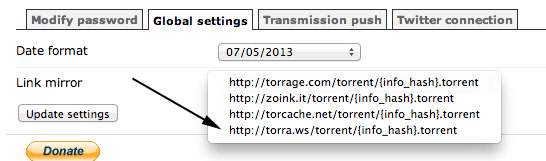
    Click on blog on Showrss website and you will get explanation. The NSA family are having trouble with magnets from the default crowd so you must change the settings, global settings and torra as the cache.


  • Registered Users, Registered Users 2 Posts: 45,423 ✭✭✭✭Basq


    ShowRSS hasn't worked for me for about a month now.. must sort it alright!


  • Registered Users, Registered Users 2 Posts: 1,494 ✭✭✭WeleaseWoderick


    28064212 wrote: »
    Do you know the IP address of the 310? If you do, open Windows Explorer and type
    \\<ip-address>
    
    into the address bar
    Solaris10 wrote: »
    just type "nsa310" in firefox address bar without " "

    nsa310

    No luck with this unfortunately. Still not accessible from my pc and also not available when trying to stream media to my Boxee.


  • Registered Users, Registered Users 2 Posts: 11,137 ✭✭✭✭28064212


    No luck with this unfortunately. Still not accessible from my pc and also not available when trying to stream media to my Boxee.
    Doesn't sound like it's connected to the network tbh. Can you ping it? Open a command prompt window and type:
    ping [I]<ip-address>[/I]
    
    Can you access your router's interface and check whether it's showing up as connected?

    Boardsie Enhancement Suite - a browser extension to make using Boards on desktop a better experience (includes full-width display, keyboard shortcuts, dark mode, and more). Now available through your browser's extension store.

    Firefox: https://addons.mozilla.org/addon/boardsie-enhancement-suite/

    Chrome/Edge/Opera: https://chromewebstore.google.com/detail/boardsie-enhancement-suit/bbgnmnfagihoohjkofdnofcfmkpdmmce


  • Registered Users, Registered Users 2 Posts: 7,498 ✭✭✭quarryman


    Question on power/standby.

    Mine seems to stay on 24/7 even if my PC is off. Is there a way for it to go into standby after a period of time? The background noise of the fan can get annoying if I'm not using it.


  • Registered Users, Registered Users 2 Posts: 13,178 ✭✭✭✭TheDriver


    there is a setting near the bottom of the menu for power management where you can set when it starts up or shuts down. I set mine to shut off at 2am each night which is handy because I just head off to bed and it won't be on 24/7


  • Registered Users, Registered Users 2 Posts: 7,498 ✭✭✭quarryman


    TheDriver wrote: »
    there is a setting near the bottom of the menu for power management where you can set when it starts up or shuts down. I set mine to shut off at 2am each night which is handy because I just head off to bed and it won't be on 24/7

    I noticed that. But it still defeats the purpose of it being a network drive, ie. I might actually need to access it at 2am one night...

    What I really want is that it goes to standby after a period of time (and wakes up when I access it) rather than me declaring when i expect to use it.


  • Registered Users, Registered Users 2 Posts: 11,137 ✭✭✭✭28064212


    quarryman wrote: »
    I noticed that. But it still defeats the purpose of it being a network drive, ie. I might actually need to access it at 2am one night...

    What I really want is that it goes to standby after a period of time (and wakes up when I access it) rather than me declaring when i expect to use it.
    The drives spin down after 15 minutes by default.

    You could also power it off whenever you want, and use Wake-On-Lan to wake it when you need it

    Boardsie Enhancement Suite - a browser extension to make using Boards on desktop a better experience (includes full-width display, keyboard shortcuts, dark mode, and more). Now available through your browser's extension store.

    Firefox: https://addons.mozilla.org/addon/boardsie-enhancement-suite/

    Chrome/Edge/Opera: https://chromewebstore.google.com/detail/boardsie-enhancement-suit/bbgnmnfagihoohjkofdnofcfmkpdmmce


  • Advertisement
  • Registered Users, Registered Users 2 Posts: 2,359 ✭✭✭Access


    28064212 wrote: »
    The drives spin down after 15 minutes by default.

    You could also power it off whenever you want, and use Wake-On-Lan to wake it when you need it

    28064212 is spot on... the drive spins down after 15 by default... this can be changed in the settings.

    The noise of the fan you are hearing is always going to be on as the fan is separate to the hard drive and is on always... it just spins faster or slower dependant on the temp of the inside of the zyxel.

    The zyxel is built to run 24hrs a day. with the hard drive spun down, the zyxel only uses about 3 to 5 watts running. with the hard drive spun up it uses about 17 to 25 watts. (checked with a power meter I have)

    You are talking about a ballpark figure of 8 to 20 euros a year electricty costs to run it for a year... so I won't be powering mine off as there is no need to.

    The zyxel forums are a brilliant place to get help on this machine.

    Users on the forums have swapped out the fan in the zyxel for a silent one, altered the rubber feet to minimise vibration/noise and some have gone to the extreme of drilling multiple 5mm holes in both sides to increase airflow... but to be honest the drive in mine runs well within its temp limits so I don't think I would be doing that.

    Also for the person who was unable to reach their NSA after a reset of the router... I'm sure that was covered earlier in the thread... it is also a common problem on the zyxel forums... mainly something to do with another device having the same ip address as the NSA and conflicting. Might be something as simple as that? try checking the ip address connecting on your router.


  • Registered Users, Registered Users 2 Posts: 7,498 ✭✭✭quarryman


    Access wrote: »
    28064212 is spot on... the drive spins down after 15 by default... this can be changed in the settings.

    The noise of the fan you are hearing is always going to be on as the fan is separate to the hard drive and is on always... it just spins faster or slower dependant on the temp of the inside of the zyxel.

    The zyxel is built to run 24hrs a day. with the hard drive spun down, the zyxel only uses about 3 to 5 watts running. with the hard drive spun up it uses about 17 to 25 watts. (checked with a power meter I have)

    You are talking about a ballpark figure of 8 to 20 euros a year electricty costs to run it for a year... so I won't be powering mine off as there is no need to.

    The zyxel forums are a brilliant place to get help on this machine.

    Users on the forums have swapped out the fan in the zyxel for a silent one, altered the rubber feet to minimise vibration/noise and some have gone to the extreme of drilling multiple 5mm holes in both sides to increase airflow... but to be honest the drive in mine runs well within its temp limits so I don't think I would be doing that.

    Also for the person who was unable to reach their NSA after a reset of the router... I'm sure that was covered earlier in the thread... it is also a common problem on the zyxel forums... mainly something to do with another device having the same ip address as the NSA and conflicting. Might be something as simple as that? try checking the ip address connecting on your router.


    Ah. In that case I'll just leave it on. I assumed the HDD was running when it was "on" and that the fan running was associated with that.

    thanks fort the info. I'll check out the forums too, might help me solve the transfer speed problems.


  • Registered Users, Registered Users 2 Posts: 1,494 ✭✭✭WeleaseWoderick


    28064212 wrote: »
    Doesn't sound like it's connected to the network tbh. Can you ping it? Open a command prompt window and type:
    ping [I]<ip-address>[/I]
    
    Can you access your router's interface and check whether it's showing up as connected?

    It wasn't showing as connected but through a combination of resetting the router, the NAS and trying a new cable, it is back working now!

    Cheers!


  • Registered Users, Registered Users 2 Posts: 492 ✭✭apeking


    Access wrote: »
    28064212 is spot on... the drive spins down after 15 by default... this can be changed in the settings.

    The noise of the fan you are hearing is always going to be on as the fan is separate to the hard drive and is on always... it just spins faster or slower dependant on the temp of the inside of the zyxel.

    The zyxel is built to run 24hrs a day. with the hard drive spun down, the zyxel only uses about 3 to 5 watts running. with the hard drive spun up it uses about 17 to 25 watts. (checked with a power meter I have)

    You are talking about a ballpark figure of 8 to 20 euros a year electricty costs to run it for a year... so I won't be powering mine off as there is no need to.

    The zyxel forums are a brilliant place to get help on this machine.

    Users on the forums have swapped out the fan in the zyxel for a silent one, altered the rubber feet to minimise vibration/noise and some have gone to the extreme of drilling multiple 5mm holes in both sides to increase airflow... but to be honest the drive in mine runs well within its temp limits so I don't think I would be doing that.

    Also for the person who was unable to reach their NSA after a reset of the router... I'm sure that was covered earlier in the thread... it is also a common problem on the zyxel forums... mainly something to do with another device having the same ip address as the NSA and conflicting. Might be something as simple as that? try checking the ip address connecting on your router.

    Have you a link on how to change the fan?? Would be interested in this.


  • Registered Users, Registered Users 2 Posts: 15,818 ✭✭✭✭Oat23


    Basq wrote: »
    ShowRSS hasn't worked for me for about a month now.. must sort it alright!

    If you get yours working, let me know. I've tried changing the settings but I can't get it going :o


  • Registered Users, Registered Users 2 Posts: 865 ✭✭✭Jilm


    Oat23 wrote: »
    If you get yours working, let me know. I've tried changing the settings but I can't get it going :o
    TheDriver wrote: »
    Click on blog on Showrss website and you will get explanation. The NSA family are having trouble with magnets from the default crowd so you must change the settings, global settings and torra as the cache.

    This works.

    It will also download torrents that previously failed to download, so keep an eye on it unless you want several GB of old TV episodes.


  • Registered Users, Registered Users 2 Posts: 13,178 ✭✭✭✭TheDriver


    just go to settings in top right and change global to torra. Then go to feeds and copy the one without magnets. that should work.


  • Registered Users, Registered Users 2 Posts: 45,423 ✭✭✭✭Basq


    TheDriver wrote: »
    just go to settings in top right and change global to torra. Then go to feeds and copy the one without magnets. that should work.
    Cheers..done that now.

    Here's a screenshot for anyone who's unsure:

    6gypH4.jpg


  • Registered Users, Registered Users 2 Posts: 15,818 ✭✭✭✭Oat23


    For some reason it didn't work when I tried it last time, but it started downloading now without changing anything on ShowRSS :)

    Is it possible to set it up with individual feeds that save to different directories? I've tried changing one of my feeds save location but it is changing it for all of them too. I'd like Top Gear to save to /TV Shows/Top Gear and Dexter to save to TV Shows/Dexter etc. Not a big problem anyway, it'll only take a minute to move them.


  • Advertisement
  • Registered Users, Registered Users 2 Posts: 37,310 ✭✭✭✭the_syco


    Question; can you use both USB and ethernet at the same time? Would be using it as an external HDD to the android mini-PC, and would need to connect to it from my PC via ethernet (current cheapo box is ethernet or usb, so is not the best).

    I see the version without the drive is only about a tenner cheaper :/


Advertisement
Advertisement