Advertisement
Help Keep Boards Alive. Support us by going ad free today. See here: https://subscriptions.boards.ie/.
https://www.boards.ie/group/1878-subscribers-forum

Private Group for paid up members of Boards.ie. Join the club.
Hi all, please see this major site announcement: https://www.boards.ie/discussion/2058427594/boards-ie-2026

Zgemma H7s Guide

1109110112114115

Comments

  • Registered Users, Registered Users 2 Posts: 484 ✭✭Leonita


    I updated it. The new image is 6.3.007 is that the most up to date? The timers are all there thankfully. However when I go to download plugins it's saying that I don't have internet access. When I did a network test I do have internet. I think I had this problem when I bought the box.


  • Registered Users, Registered Users 2 Posts: 6,111 ✭✭✭swoofer


    no it should be 6.8 do me a pic like last to check version. Put openvix in google and follow to openvix downloads and that gives versions to upgrade u go via image manager in vix. For network you may have restart like from beginning. It can be a pain

    PS I did an update and everything was retained inc timers.

    Post edited by swoofer on


  • Registered Users, Registered Users 2 Posts: 484 ✭✭Leonita


    This is what I have now. I don't understand why you want me to google openvix how would I get it to the box from the laptop?


  • Registered Users, Registered Users 2 Posts: 6,322 ✭✭✭greasepalm


    It means you can update to latest or under once you reboot box and run a network test.


  • Registered Users, Registered Users 2 Posts: 6,111 ✭✭✭swoofer


    I'll slow down. You dont have internet access on the box so you cant use vix manager, the image you are showing in the box is the same image as you had before so you have to say how you updated. By using google for vix it will show you the latest image.

    click on this link and it may show you what I mean.

    https://www.openvix.co.uk/index.php/downloads/zgemma-images/zgemma-h7/

    Now you have to get internet working on the box so you have to try a few things and the first one is remove lan cable and plug it back in. It should show a flashing light. You then have to go to network wizard and configure your network from scratch, then do network test etc. make take a few attempts. then go to plugins and press green if they downlaod you have internet. now go men setup Vix then vix manager, then yellow and you will see image options, select openvix etc and follow onscreen prompts.


  • Advertisement
  • Registered Users, Registered Users 2 Posts: 484 ✭✭Leonita


    The box will not let me set up internet from scratch.

    I followed your instructions from above to get to where I am for now. TIA


  • Registered Users, Registered Users 2 Posts: 6,111 ✭✭✭swoofer


    The next step is what is called a hard reboot ie power off with remote, then push the white button at rear and release. I wait about 15-20 secs and push white button back box will boot as normal and then go off , use remote to power on then once all back on check internet again, and do a restart then test then try plugins if no go go network wizard etc.

    Does your box have the HDD sticking out at rear?


  • Registered Users, Registered Users 2 Posts: 484 ✭✭Leonita


    I tried that and it is still the same. I also deleted network setting via factory reset. Its saying I have internet. But the plugins say I don't.

    Yes the HDD is sticking out at the rear. TIA


  • Registered Users, Registered Users 2 Posts: 6,111 ✭✭✭swoofer


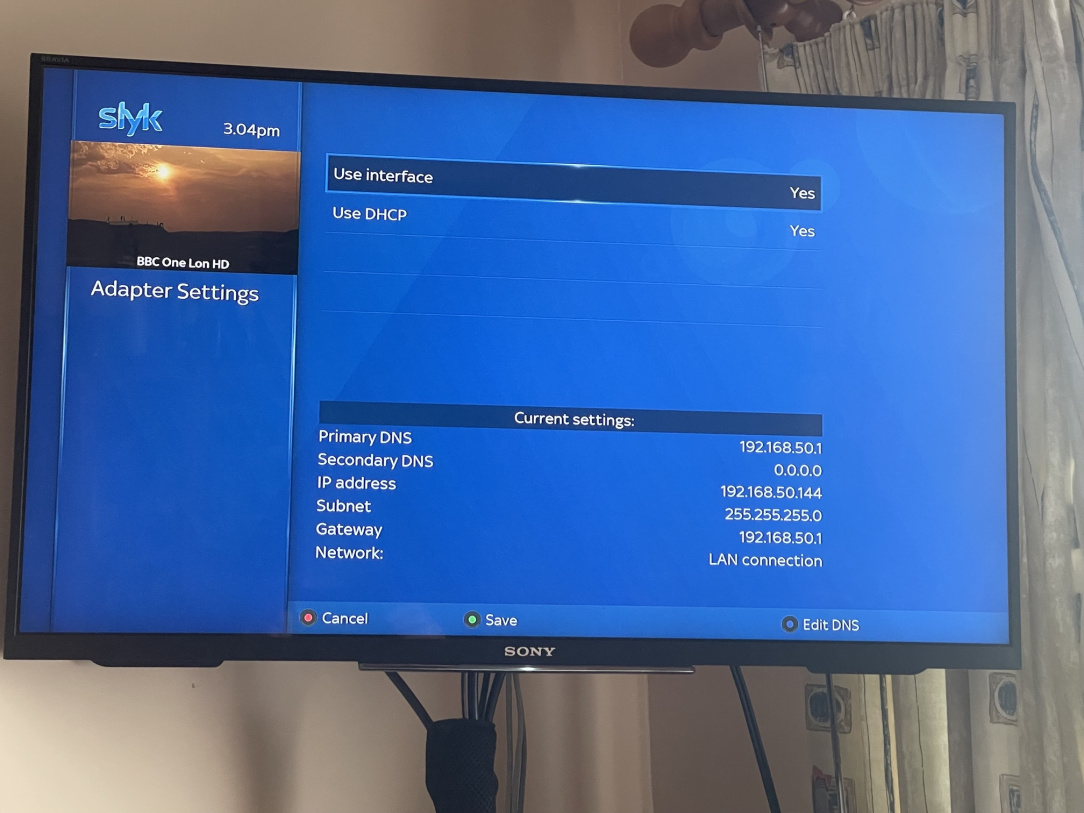
    You have the latest box, which is good, I have a h7s running now and this is what you should have for network

    adapter settings

    then when you do network test, all green ticks. Box may say you have network but u need the ticks

    A factory reset is not a good idea. To get further you will need know how about FTP and setting a pasword for box, i use winscp, others are filezilla.

    Just to say you have not updated the image its still 6.3 and that may be a problem in that VIx are possibly stopping users with old images the use of image manager. We wont know until you get network fixed.

    What router have you got?


  • Registered Users, Registered Users 2 Posts: 6,111 ✭✭✭swoofer


    oops wtaching footie here are pics

    You should look in the router and see if it has allocated an IP to the h7s and make sure you use that by editing network.


  • Advertisement
  • Registered Users, Registered Users 2 Posts: 484 ✭✭Leonita


    I have a virgin media router. I have the same as your photos. With regards to FTP I know absolutely nothing about that process. I can't find the box in my lost of connected devices on the network. TIA


  • Registered Users, Registered Users 2 Posts: 6,111 ✭✭✭swoofer


    What you have to do now is go back into adapter settings and enter manually the ip address that has been allocated under DHCP. say no to dhcp and its possible your box ip will appear save and it will re connect then do test then plugins but vix 6.3 is old and they may have blocked it. But if it does not appear enter it manually. I'll check re vix 6.3

    is your laptop windows?

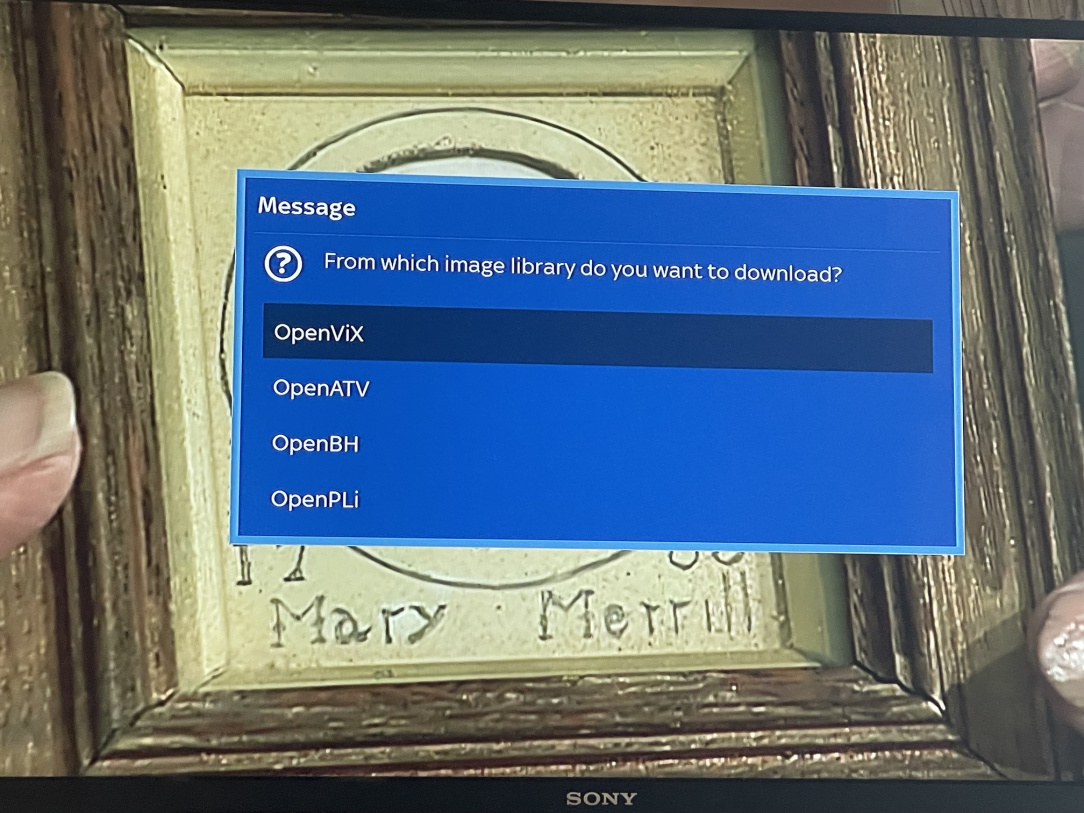
    I want you to try this as well, menu setup vix image manager yellow button and see if it downloads, you should get this pic.


  • Registered Users, Registered Users 2 Posts: 484 ✭✭Leonita


    Yes the laptop is windows. I pressed the yellow button and got the same as you. I hit the yellow button on openvix. It says no images found on the selected download server and then something about a password, TIA


  • Registered Users, Registered Users 2 Posts: 6,111 ✭✭✭swoofer


    No if you got same as my pic you go to open vix and press ok and it opens but ..

    To give box a password do this menu setup network and arrow down to pasword press ok twice and a keboard appears, type in a short PW and arrow across to box in green surround click it and then green, now you have a PW. Go back to image manager and then do a pic of what appears.


  • Registered Users, Registered Users 2 Posts: 484 ✭✭Leonita


    It looks like I'm getting somewhere.


  • Registered Users, Registered Users 2 Posts: 6,111 ✭✭✭swoofer


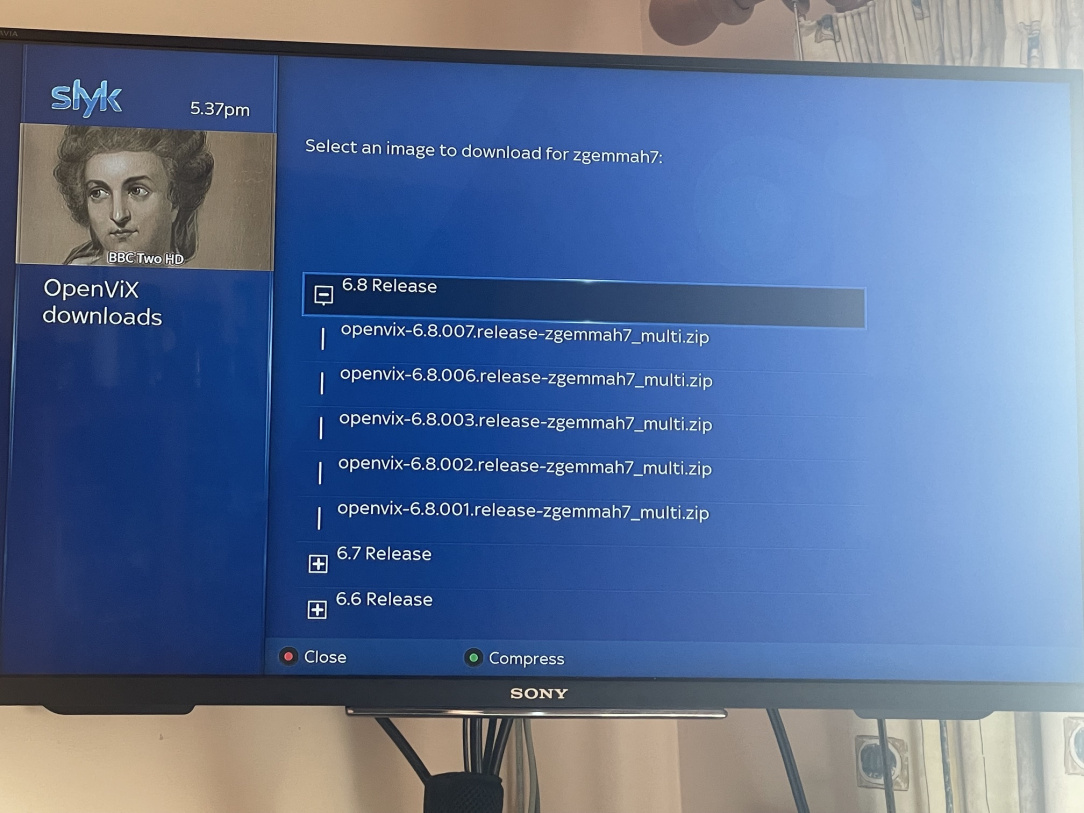
    you got to the flashing stage but you want 6.8 here is a pic of what opens when you select vix after it downloads you dont want 6.3 thats too old and you have it already.

    you need

    Winscp put it in google and download and install it will be needed.

    Post edited by swoofer on


  • Registered Users, Registered Users 2 Posts: 484 ✭✭Leonita


    Finally getting back here. It was a busy week. I've downloaded that now to the laptop.


  • Registered Users, Registered Users 2 Posts: 484 ✭✭Leonita


    So where do I go from here?


  • Registered Users, Registered Users 2 Posts: 6,111 ✭✭✭swoofer


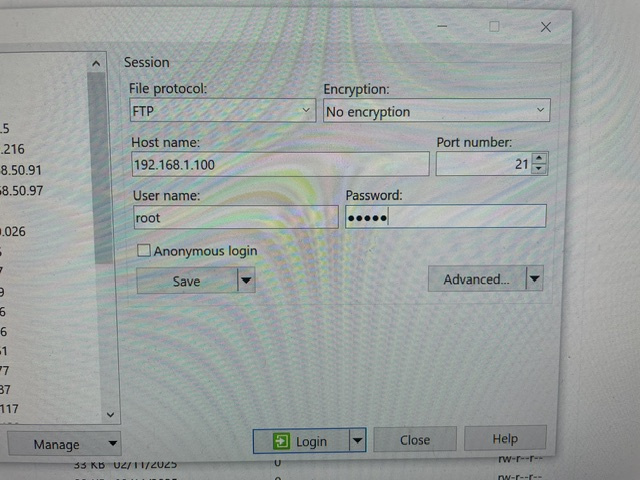
    I dont know how adept you are but the plan is you log on to your box using winscp by putting in the ip of h7 then root then password and under protocol you select FTP. Now when logged on you are in root directory of box and can see all the other directories, on the left will be the laptop with directories. You navigate to where you dowloaded vix zip multi and click on it and drag it accross to the folder imagebackups.

    say when you have done that and do you know about setting tuners, ABM and epg etc


  • Registered Users, Registered Users 2 Posts: 6,111 ✭✭✭swoofer


    Im fixing my PC at the moment so dont be afraid to ask anything as I may miss steps.


  • Advertisement
  • Registered Users, Registered Users 2 Posts: 484 ✭✭Leonita


    I belong in the clueless category unfortunately


  • Registered Users, Registered Users 2 Posts: 6,111 ✭✭✭swoofer


    thats OK I can handle that. What's going to happen you will have the vix image in the box, you then go to box and go menu setup Vix image manager but you have to know how to configure tuners etc. I posted all the steps a while back and will try and find them. But not tonight


  • Registered Users, Registered Users 2 Posts: 484 ✭✭Leonita


    Thank you. It would be fantastic if you could.


  • Registered Users, Registered Users 2 Posts: 6,111 ✭✭✭swoofer


    Right you have to do this first and then come back if I say too much you will get lost.

    1. Have you loaded WINSCP and logged on the H7 and seen where you have saved the Vix image.
    2. On box side click on HDD and you should see a folder named imagebackups.

    NB you have to set a password for the box.

    Report back.


  • Registered Users, Registered Users 2 Posts: 484 ✭✭Leonita


    Ok I'm lost already. All I can see are the files on my laptop.

    The box does not have internet according to download plugins


  • Registered Users, Registered Users 2 Posts: 6,111 ✭✭✭swoofer


    I thought when you did network test you got all green ticks and as you have an old image they have blocked plugins. Did you enter IP adress etc it will give an error message


  • Registered Users, Registered Users 2 Posts: 484 ✭✭Leonita


    Yes all green ticks. I get an error when I type in ip address which actually looks like the router ip address


  • Registered Users, Registered Users 2 Posts: 6,111 ✭✭✭swoofer


    go to box and do menu setup network device ok adapter settings then see the IP AND thats the one you need. did u set a password? This is tedious but its the learning curve😁


  • Registered Users, Registered Users 2 Posts: 484 ✭✭Leonita


    The ip is 192.168.1.100 which does not work in that win thing


  • Advertisement
  • Registered Users, Registered Users 2 Posts: 6,111 ✭✭✭swoofer


    Is your laptop wireless and do u have more that one wi fi network. And when you open winscp are you selecting new site, then ftp then enter details and is the error time out.

    here is a pic


Advertisement
Advertisement