Advertisement
Help Keep Boards Alive. Support us by going ad free today. See here: https://subscriptions.boards.ie/.
https://www.boards.ie/group/1878-subscribers-forum

Private Group for paid up members of Boards.ie. Join the club.
Hi all, please see this major site announcement: https://www.boards.ie/discussion/2058427594/boards-ie-2026

Solar PV Monitoring/Automation Thread

17071727375

Comments

  • Moderators, Home & Garden Moderators Posts: 7,628 Mod ✭✭✭✭graememk


    Whats the options for a solis hybrid inverter with the latest dongle to get data into home assistant?


  • Registered Users, Registered Users 2, Paid Member Posts: 462 ✭✭mjatkey


    Solis api/cloud integration or the Solis modbus which drops the cloud piece unless you do the local rs485 work around.

    The cloud one now offers the inverter control which works well.

    🌞 6.96kWp PV System. West Dublin🌞


  • Registered Users, Registered Users 2, Paid Member Posts: 462 ✭✭mjatkey


    Yeah, got an esp32 all set up and working well with the Seplos BMS, gives me a good enough view of what is going on with the Seplos and the WECO's now.

    As for the Shelly, flashed it with Tamasto then tried flashing ESP32 ota but currently won't upload from HA to the device although it is pingable, tried flashing it through usb but ended up distroying the board so thats work in progress.

    🌞 6.96kWp PV System. West Dublin🌞


  • Registered Users, Registered Users 2, Paid Member Posts: 462 ✭✭mjatkey


    Guys, looking for help.

    I got hold of a Huawei R4850G2, I have the power adaptor and CAN adaptor and have it set up and working..ish.

    I can vary the voltage no problem but all I can get it to output amps wise is 5A.

    Below are the "frames" I have been sending to it, voltage changes work fine.

    I can0 108180FE [8] 01 00 00 00 00 00 E9 16 58.1V not fixed

    can0 108180FE [8] 01 00 00 00 00 00 D5 2A 53.1V not fixed

    can0 108180FE [8] 01 01 00 00 00 00 E9 16 58.1V fixed

    can0 108180FE [8] 01 01 00 00 00 00 D5 2A 53.1V fixed

    can0 108180FE [8] 01 01 00 00 00 00 E4 00 57.00V fixed

    can0 108180FE [8] 01 00 00 00 00 00 E4 00 57.00V not fixed 1024

    can0 108180FE [8] 01 00 00 00 00 00 E3 1C 57.00v not fixed 1020

    can0 108180FE [8] 01 04 00 00 00 00 00 32 50 Amp fixed?

    can0 108180FE [8] 01 04 00 00 00 00 C8 00 50 Amp fixed (1024)

    can0 108180FE [8] 01 04 00 00 00 00 C7 38 50 Amp fixed (1020)

    I have downloaded the USBCAN software, which seems to work fine. (not sure what everything means or does?)

    Found a lot of info online about the Huawei rectifiers but what ever way I am doing it the output current stays fixed.

    I know its only 5amp as I have it temporarily connected to just the Seplos battery and the BMS studio is showing the current going in.

    I have a few bits ordered ESP32 and VP230 so am hoping to integrate it into HA which again hopefully will make it easier to view and make changes.

    Any pointers as to what I am doing wrong currently would be appreciated.

    Thanks

    image.png

    🌞 6.96kWp PV System. West Dublin🌞


  • Registered Users, Registered Users 2, Paid Member Posts: 462 ✭✭mjatkey


    Guys, HA question, adding another Dell Wyse in another location, should I build a fresh HA install and add the integrations, addons etc or could I use a back up from an existing install and just remove the bits I don't need, change the static IP and ducknds? Also does anyone know if you can run integrations on both HA install at same time ie Solis (API) Tyua etc, or would it depend on the integration? Thanks

    🌞 6.96kWp PV System. West Dublin🌞


  • Advertisement
  • Registered Users, Registered Users 2, Paid Member Posts: 10,144 ✭✭✭✭10-10-20


    Another location and new instance of HA to monitor the same devices, or is this an instance for another location and different sensors entirely?


  • Registered Users, Registered Users 2, Paid Member Posts: 462 ✭✭mjatkey


    Bit of both, essentially I want to be able to monitor a Seplos battery hanging off a Solis in an apartment, I figured it was easier and probably no dearer to buy the Dell (£25) then use an ESP32 running the BLE battery management integration then trying to get remote access to the ESP32 (I know it can be done) but the video on YouTube was an hour and a half with god knows how many twists and turns the HA route seemed a lot simpler. (Apart from the last 5 days trying to get HA on the Wyse 3040) but thats another story.

    🌞 6.96kWp PV System. West Dublin🌞


  • Registered Users, Registered Users 2, Paid Member Posts: 10,144 ✭✭✭✭10-10-20


    Ok… still not entirely sure what you're up to, but essentially if you restore the instance onto a new HA then it will start looking to connect to each of your devices to pull the status. In my case it would not work for my z-wave or zigbee devices as the second instance wouldn't have access to the USB dongles, but also Shelly devices as they need to be configured with a single endpoint server (no option for two).

    So I'd say to just go with a new fresh instance from scratch.


  • Registered Users, Registered Users 2, Paid Member Posts: 462 ✭✭mjatkey


    Yeah, I think you are right as I don't have any where near as much memory on this one so the less "stuff" is on it the better. Thanks

    🌞 6.96kWp PV System. West Dublin🌞


  • Registered Users, Registered Users 2, Paid Member Posts: 462 ✭✭mjatkey


    Guys,

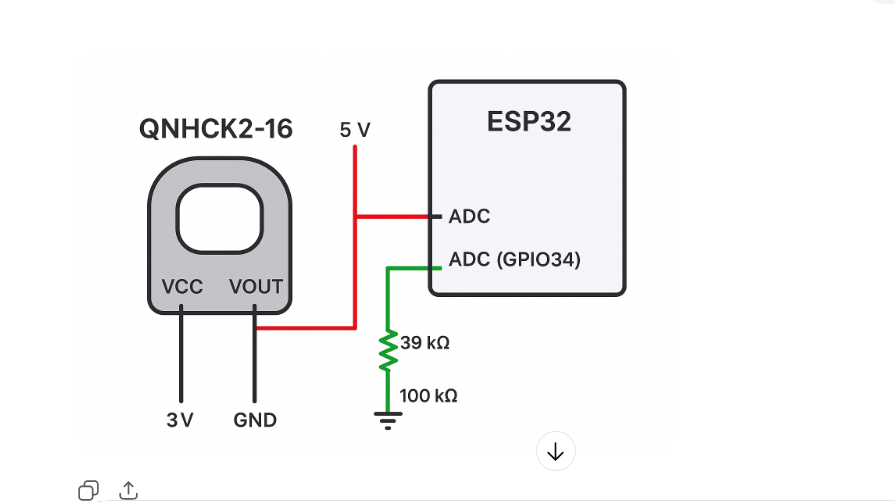
    Has anyone tried building a DC current/voltage monitor for integration into HA using the below items?

    If so did it work?

    Only I'm just looking at a cheaper/simpler alternative to the likes of a Victron shunt.

    Currently I'm using a separate rectifier as well as the inverter to get the batteries to 100% soc during the 4 hour EV window. I was looking at using a shunt but as I have two separate charge sources I figured I'll need two devices to measure total energy going in to the batteries which gets expensive for very little extra info/control that I don't already have.

    I also like the idea of not adding addition hardware, and just passing the DC cables through the ct.

    ChatGPT can supply the yaml for HA, but was looking for a steer as to whether it works/worth it, I have a few ESP32's spare and the QNHCK's don't look expensive.

    Thanks

    image.png

    image.png

    🌞 6.96kWp PV System. West Dublin🌞


  • Advertisement
  • Moderators, Home & Garden Moderators Posts: 7,628 Mod ✭✭✭✭graememk


    A traditional CT can't measure DC current.

    Hall effect sensors that can read dc currents.

    Edit it is a hall effect sensor. Not a CT

    Edit 2: you'd need to use some sort of voltage divider to keep the input below 3.3v on the esp32


  • Registered Users, Registered Users 2, Paid Member Posts: 462 ✭✭mjatkey


    Thanks graememk, yeah Chat has that covered, just wondered if anyone had tried one and did it work?

    ⚡ Option 2: Measured Voltage (dynamic)

    If your DC bus varies (e.g., solar, batteries), you can also add a voltage divider into another ESP32 ADC pin. Example for 0–60 V bus → scaled to 0–3.3 V input:

    🌞 6.96kWp PV System. West Dublin🌞


  • Registered Users, Registered Users 2, Paid Member Posts: 10,144 ✭✭✭✭10-10-20


    How are you planning on creating a voltage-drop on the battery cable without adding in a resistance, or are you going to use the cable as the resistance?

    For the voltage I haven't done it but I don't like using voltage divider on such a high input voltage for a number of reasons. But it can be done.

    https://forum.arduino.cc/t/measuring-up-to-50v-dc-using-arduino-and-a-voltage-sensor/1245052/10

    https://ohmslawcalculator.com/voltage-divider-calculator

    If you do it in ESPHOME then you can map the ADC input voltage to the measured voltage using a linear mapping (calibrate_linear).

    https://esphome.io/components/sensor/#calibrate_linear


  • Registered Users, Registered Users 2, Paid Member Posts: 462 ✭✭mjatkey


    Thanks 10-10-20, to be honest I've not really looked any further than what is a cheap, simple alternative to a Victron shunt.

    Then threw it into ChatGPT to see what it could do in terms of configuration into HA, wiring etc.

    Food for thought.

    🌞 6.96kWp PV System. West Dublin🌞


  • Registered Users, Registered Users 2, Paid Member Posts: 10,144 ✭✭✭✭10-10-20


    It's technically challenging alright, but that's not to say that it can't be done at a DIY level.


  • Moderators, Home & Garden Moderators Posts: 7,628 Mod ✭✭✭✭graememk


    Ask it to do it with a shunt resistor

    I'm using one like this with my zeva https://amzn.eu/d/6apteHO

    Must check the code on the zeva but it's a proportional calculation on the voltage drop across the shunt


  • Registered Users, Registered Users 2 Posts: 2,775 ✭✭✭bullit_dodger


    Hi guys - buddy of mine (also a software engineer) recently got a Solid Hybrid installed. What's the best route to getting this into HA. He was saying that the android phone app is 5 min update frequency. I've a GivEnergy solution myself and there's a REST Api for it - I'm hoping that there's a similar story for Solis?

    Do you need any hardware, or is it just open a ticket with Solis to enable your account and get a API token?

    Thanks folks.


  • Registered Users, Registered Users 2, Paid Member Posts: 10,144 ✭✭✭✭10-10-20


  • Registered Users, Registered Users 2 Posts: 6,673 ✭✭✭championc


    For anyone with an upcoming install, consider asking your installer specifically for the Solis S6 (which replaces the S5). It looks like a rebadged Deye, which therefore allows local access to data from the inverter


  • Moderators, Home & Garden Moderators Posts: 7,628 Mod ✭✭✭✭graememk


    It's similar, but very unlikely to be a rebadge


  • Advertisement
  • Registered Users, Registered Users 2 Posts: 241 ✭✭oaklands


    also check the battery Voltage range + charge/discharge amps or even better read the datasheet in detail.

    (EDIT) Reason: They have a lot of different spec inverters. I think the one being referred to is S6-EH1P(3-8)K-L-PLUS. The specs look very similar to the Sunsynk/Deye equivalents.


  • Moderators, Home & Garden Moderators Posts: 7,628 Mod ✭✭✭✭graememk


    Looked at the manual it's very similar.

    Totally different screen but internal hardware is very similar, (even the 500v max input voltage)


  • Registered Users, Registered Users 2 Posts: 6,033 ✭✭✭GhostInTheRuins


    I've been tracking my electricity costs in home assistant for a few years now, and it was easy enough when I was on a 24hour flat rate.

    template:
      - sensor:
          - name: "Daily electricity cost"
            unit_of_measurement: "€"
            device_class: monetary
            default_entity_id: sensor.daily_cost
            availability: "{{ true }}"
            state: >
              {% set PSOLEVY = 0.1157 %}
              {% set STANDINGCHARGE = 0.723 %}
              {% set export = states('sensor.daily_electricity_export') | float(0) * -0.195 %}
              {% set yield = states('sensor.daily_electricity_import') | float(0) * 0.23812 %}
              {{ (export + yield + STANDINGCHARGE + PSOLEVY) | round(2) }}

    Now I've just moved to a 'smart' plan and have absolutely no idea how to implement different unit rates based on the time of day. Has anybody worked out a solution?

    Post edited by GhostInTheRuins on


  • Registered Users, Registered Users 2, Paid Member Posts: 10,144 ✭✭✭✭10-10-20


    P24 & p25 of the HA thread has some discussion on it - but just note that much of the tariff config was brought over to the GUI, so fewer are using the yaml these days.

    If you end up getting stuck then I'll post mine here if you want.


  • Registered Users, Registered Users 2 Posts: 6,033 ✭✭✭GhostInTheRuins


    Thanks for the offer. I found this YouTube video showing how it's done. you need to run an automation to switch to the different tariffs at different times.

    I've followed his steps so I'll see if it actually works over the next day.


  • Registered Users, Registered Users 2 Posts: 6,033 ✭✭✭GhostInTheRuins


    Well it didn't take long to discover his method doesn't work with solar, it counts power used from solar as imports.

    Edit: Actually it's probably my fault, I may have set the utility meter to source from the wrong sensor.


  • Registered Users, Registered Users 2 Posts: 6,033 ✭✭✭GhostInTheRuins


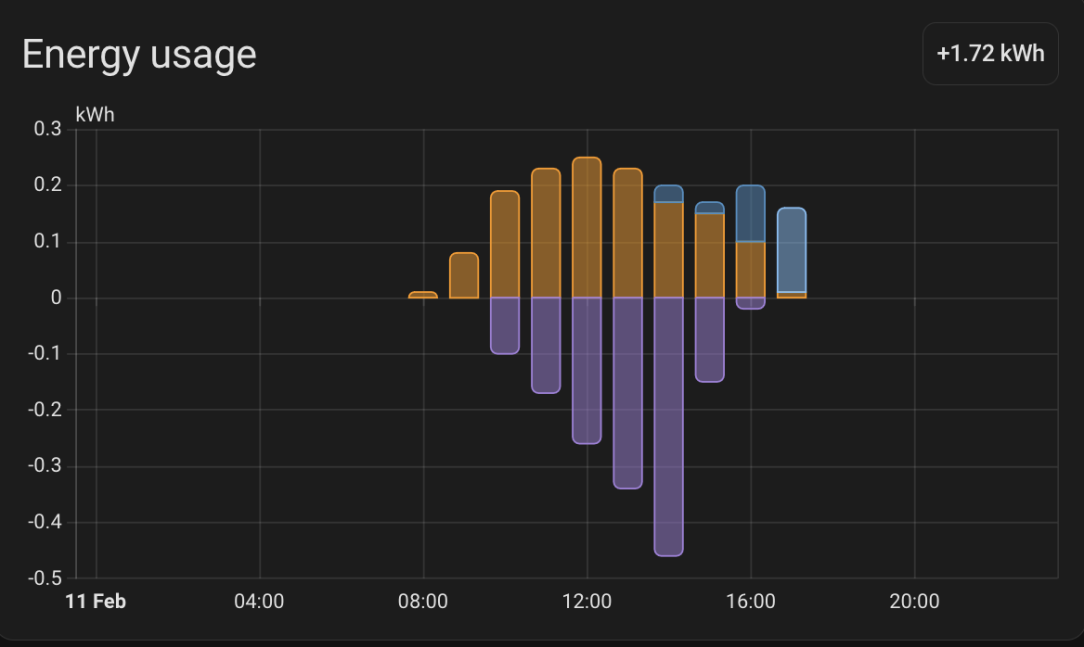
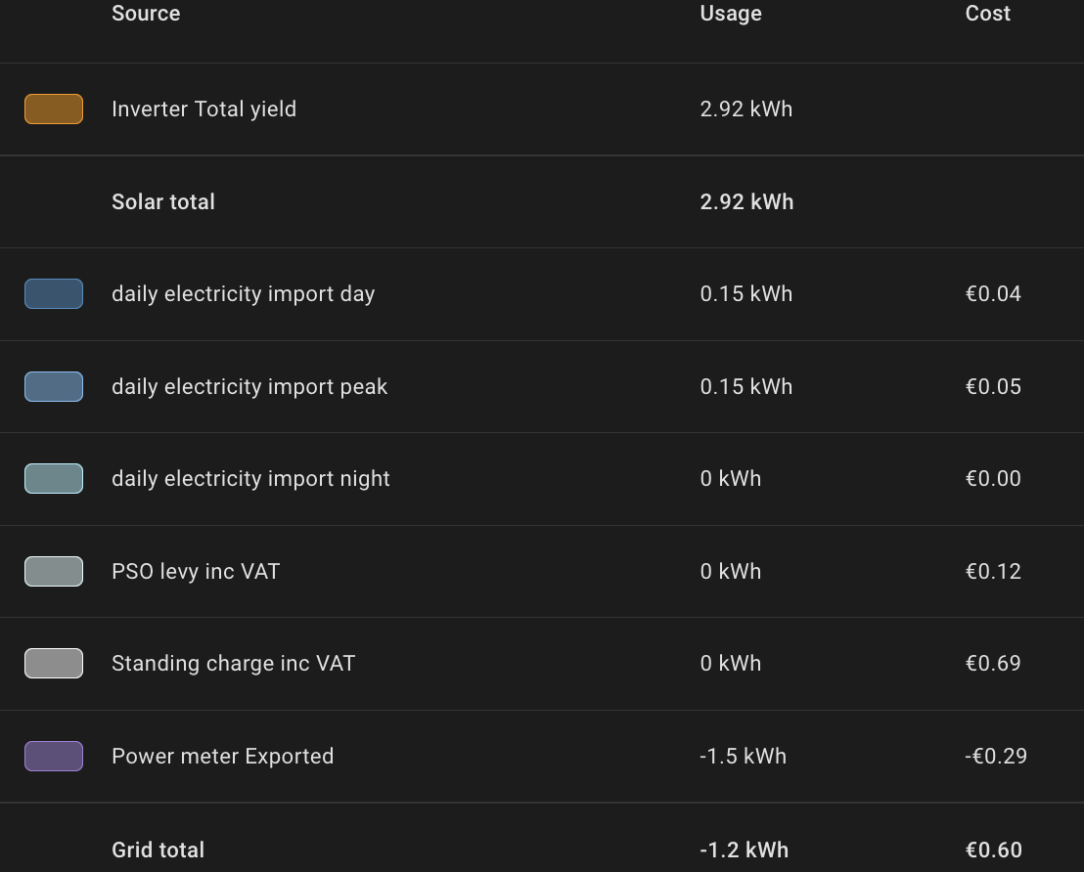
    If anyone else is doing the same as me, moving from a 24hr rate to a smart rate, the method in this video is definitely the way to go. Much easier than I expected. I've lost the last two years of import data but that's my fault because I was pulling the data directly from my inverter instead of through a utility meter helper.

    Screenshot 2026-02-11 at 18.03.10.png


    Screenshot 2026-02-11 at 18.03.24.png

    Now in the sources I have one for each different tariff.


  • Registered Users, Registered Users 2 Posts: 3,324 ✭✭✭irishchris


    Definitely works as have it on mine for last few months with day and ev rates


  • Registered Users, Registered Users 2 Posts: 2,867 ✭✭✭ECO_Mental


    Hi,

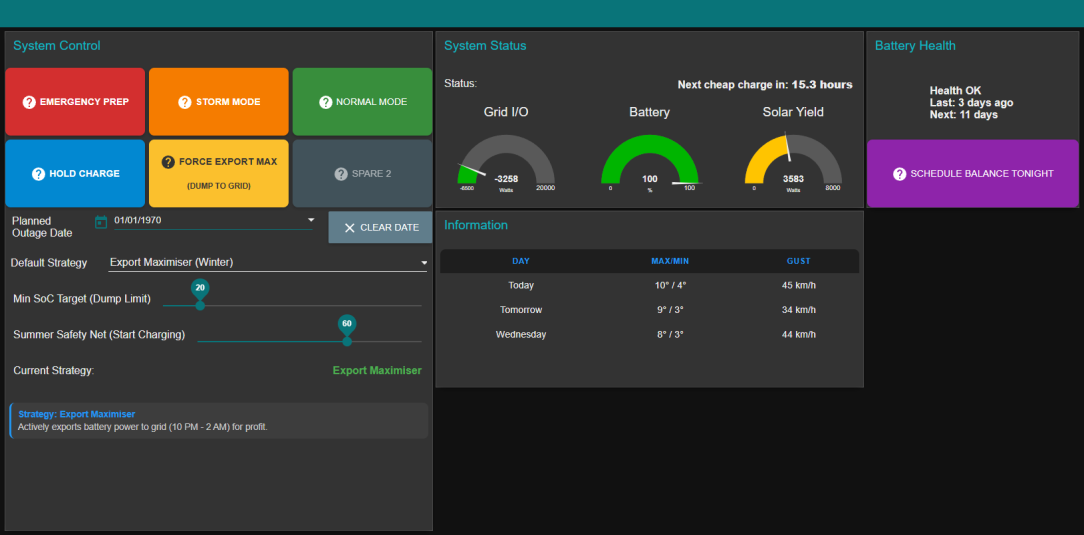
    About 3 months into my new Victron 15 kVA Quattro and Dyness Powerbox (30kWh) system and managing it with NodeRED and its working great. Decided to share

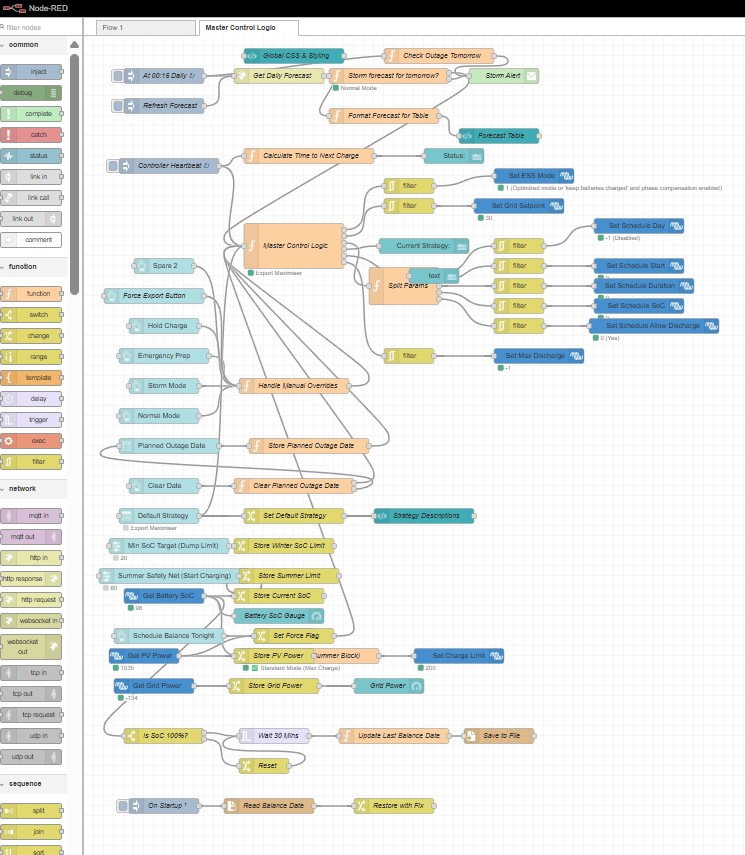
    NodeRED is supported by Victron and can be installed directly onto the CerboGX which is their controller. Decided to keep it on the Cerbo and not on my Home Assistant Rpi4 as it was going to add some complexity. Having it on the CerboGX the latency is instant and the CerboGX is designed to be stable. On my HA I read all the entities available but there is no control on my HA.

    I used Gemini AI to programme all the NodeRED code in JSON and then just copied it into the CerboGX. I think I have it sorted now but I’m always thinking of adding some other features.

    image-5f90602bee2e9-9a46.png

    Basically I have 4 default strategies that I can select

    • Export Maximiser – Charges between 2-5am then discharges down to 10% by 2am. I have a slider to set the SOC limit, for winter Im setting this at 20% because I wasn’t getting back to 100% SOC due to HP space heating demands.
    • Summer Mode – Charges at 2-5am but I have a slider where if the battery is over for example 60% it won’t charge the battery from excess solar it will go straight to grid to save on inverting losses.
    • Self Sufficiency – wont charge from grid just uses PV to charge battery…cant see myself using this but I put it in.
    • Balanced Import – This charges at 2-5am but doesn’t force discharge, this is to minimise my grid import (cant see myself using this much)

    I then have a couple of buttons and functions I can select for other needs

    • Emergency Prep – Starts charging the battery to 100% immediately and then holds, this is for if I get short notice of a power outage or something.
    • Storm Mode – This is for if I notice a storm coming tomorrow, it will charge to 100% at the next 2-5am slot and will hold that charge in anticipation of a power outage.
    • Normal Mode – This just resets back to the default strategy selected
    • Hold Charge – Stops discharging the battery, this again is for short notice of an outage and I have sufficient battery and no need to charge form the grid.
    • Force Export Max – Discharges to the grid at 6kW (I have the old NC6) – I actually use this a few times, primarily to help charge my car. My EV charger is on the grid side so if I have to charge the car outside of the 2-5am slot I dump to the grid and this will take 6kW off the 7kW the car is taking so net I’m only importing 1kW… I’ve used this good bit.
    • Planned Outage - I then have a facility and I’ve used it once, where I got a notice from ESBN that they were doing maintenance on the grid in two weeks. I can enter the date of the outage and the night before it will charge as normal but will hold the charge. Great just in case you forget it’s happening.
    • Balancing – It records the last time the battery was at 100% and if it’s not done within 14 days it will charge and balance the battery after the 2-5am slot.
    • Predictive Storm – I use an API for weather data and if it gusts over 80kmph it will go into storm mode. Sends an email also letting you know its doing it.

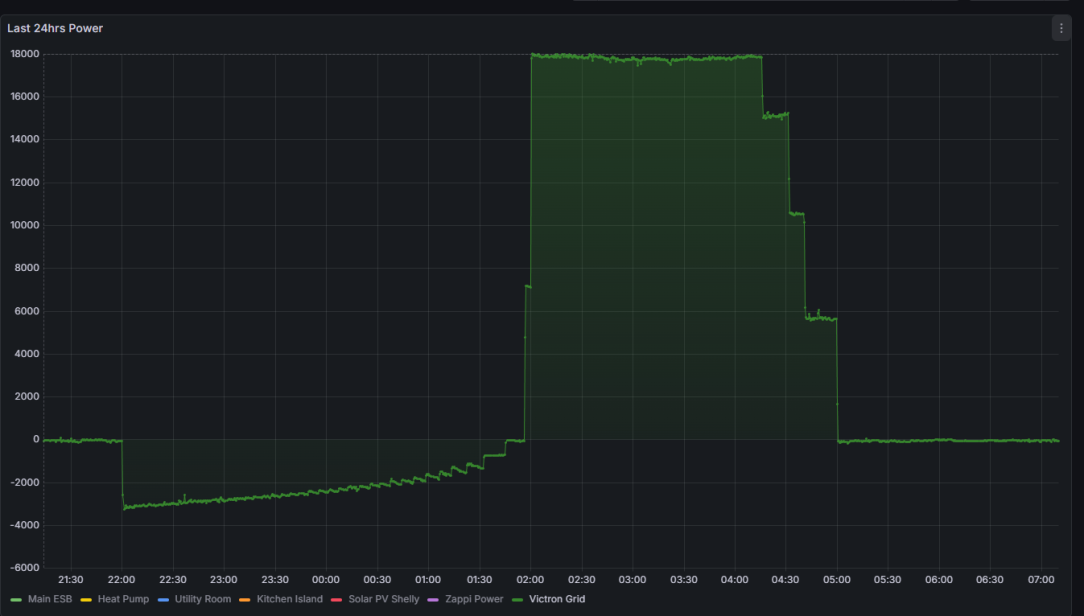
    Really happy with my force discharging logic, at 10pm it calculates how much it needs to discharge to get to the set SOC by 2am. It then recalculates this every minute, so as you can see from yesterday it starts off discharging around 3kW but this slowly decreases to be at zero grid export by 2am…..then boom! 18kW

    image-35805896df397-a319.png

    Anyway a bit of a long post but I’m very happy with what I’ve done, any suggestions comments,

    The next thing is to think about dynamic electricity pricing coming in the summer, but Victron have a very good system already for dynamic energy pricing but that wont stop me from trying to do something in NodeRED.

    image.png

    6.1kWp south facing, South of Cork City


  • Advertisement
  • Registered Users, Registered Users 2 Posts: 6,673 ✭✭✭championc


    Great write-up @ECO_Mental

    The only point I would make with a fixed discharge of 3kW is that if you have a 4kW load during discharge, then everything above 3kW will need to come from the grid.

    So it may suit your usage, but for others it may mean that they need to discharge at 5kW to avoid being caught out.


Advertisement
Advertisement