Advertisement
Help Keep Boards Alive. Support us by going ad free today. See here: https://subscriptions.boards.ie/.
https://www.boards.ie/group/1878-subscribers-forum

Private Group for paid up members of Boards.ie. Join the club.
Hi all, please see this major site announcement: https://www.boards.ie/discussion/2058427594/boards-ie-2026

Seplos mason battery build [Should I get 2 x 5kWh or a 10kWh battery?]

12346

Comments

  • Moderators, Home & Garden Moderators Posts: 7,609 Mod ✭✭✭✭graememk


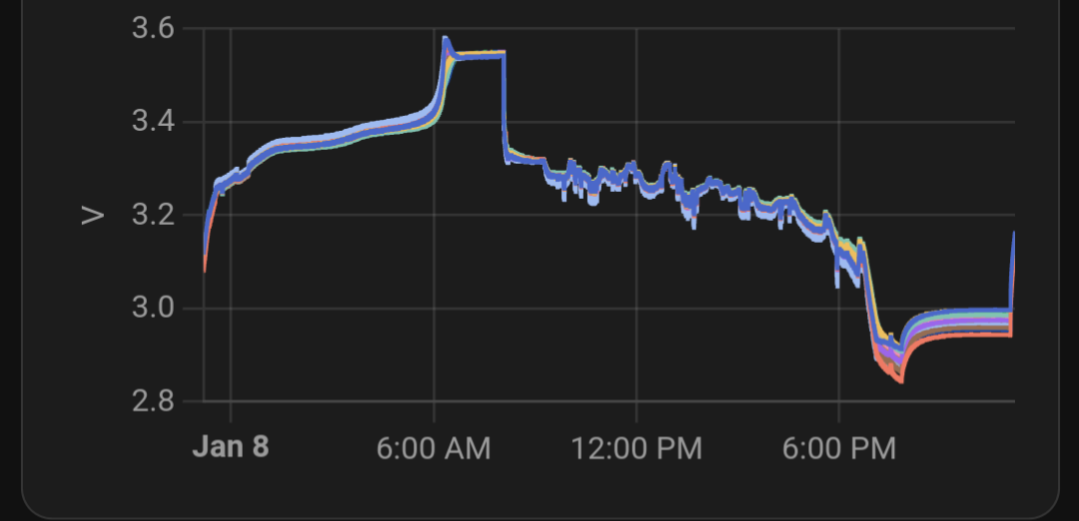
    No it's more of an inferred capacity check. When down at indicated "10%" the cells are at 2.9-2.8v, without any run away cells.

    Performing well, all cells to 3.5 when fully charged, jk has no communication with the inverter

    Screenshot_20250108-231142.png


  • Registered Users, Registered Users 2, Paid Member Posts: 456 ✭✭mjatkey


    Looks good well bunched cells.

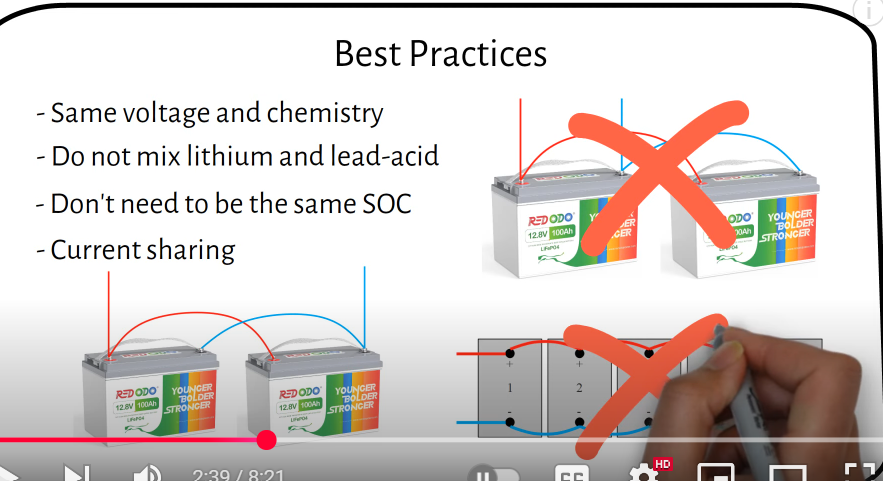
    After watching a couple of video's on paralleling batteries, to me it looks like the guys have connected the two WECO's incorrectly in that the connection to the breaker/inverter should come from both batteries not just the one, probably not a biggy and I'm sure thats probably the way they do all their dual battery connections.

    image.png

    🌞 6.96kWp PV System. West Dublin🌞


  • Registered Users, Registered Users 2 Posts: 789 ✭✭✭nimrod86


    Finally got my batteries delivered, and have built up the unit following Ghost's videos on youtube. Seems be be working, no warnings on the LCD (after the first one because I missed two wires on the BMS… oops). Got the BMS Studio software talking to the BMS too, and have all the parameters set.

    Next issue is the two sets of Pylontech battery cables I ordered from NKON aren't enough to reach my battery! I had intended to snip off the M8 lugs on one side and Radlok connectors on the other, and out a DC breaker in the middle to join them and also to allow me to disconnect the battery from the inverter. Alas, connecting the cables to the inverter they just barely reach into the room below the inverter where I intend to put the battery, not leaving me enough slack place the Circuit Breaker.

    I've sent an email to offgridkit.ie to see if they can make up cables for me, but does anyone have a lead on anywhere else that might be able to make me up a set of cables to length? Last resort will be buying cable, hydraulic crimps, M8 lugs, and trying to source some Radloc connectors to make them all up myself.


  • Registered Users, Registered Users 2, Paid Member Posts: 5,874 ✭✭✭...Ghost...


    Do you think you might be adding another battery at some stage, or is one going to be enough?

    Stay Free


  • Registered Users, Registered Users 2 Posts: 1,634 ✭✭✭Newtown90


    What DC breaker did you go for? Looking at a 125a one in Western Solar at the moment.


  • Advertisement
  • Registered Users, Registered Users 2 Posts: 789 ✭✭✭nimrod86


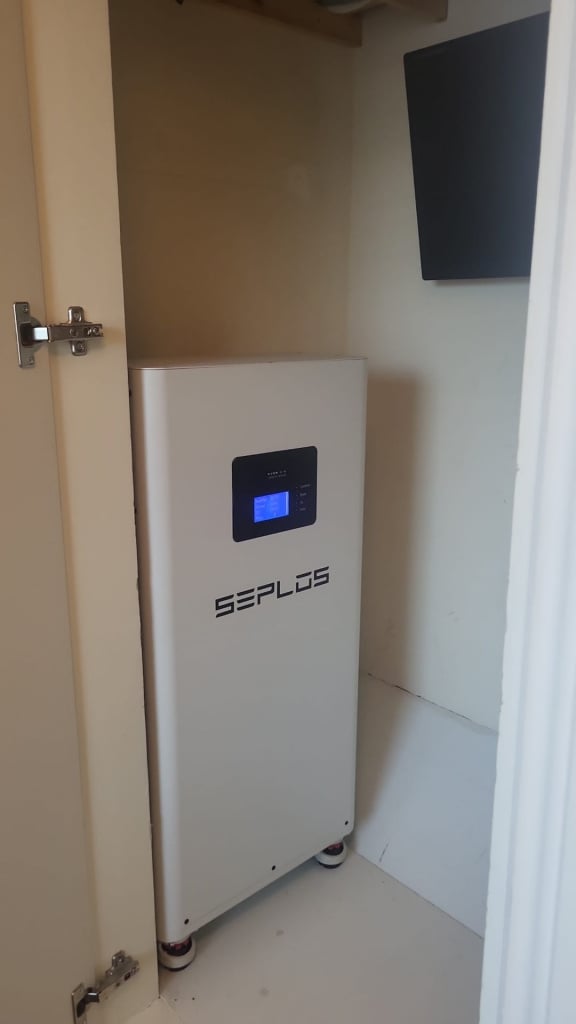
    I think the one will be enough! I'm limited for space as the inverter is in the attic and this battery is going into a small built in wardrobe in the box room above the stairs. At 16kWh capacity that's enough power to run the house for about 2 days so should be plenty for me!

    Untitled.jpg

    I know having a battery inside the house isn't ideal, but putting it outside, or anywhere else for that matter is a no go. The attic is so cramped I couldn't even put it up there!


  • Registered Users, Registered Users 2 Posts: 789 ✭✭✭nimrod86


    I got this one off Amazon. Though just doing some quick maths and it's not gonna be enough at 60A? Ohms law and all saying that at 52V and assuming a 5kW draw from the inverter (which I think is the max) then the current would be 96A…

    Ghost, what rating are the breakers you used with your three batteries?


  • Registered Users, Registered Users 2, Paid Member Posts: 5,874 ✭✭✭...Ghost...


    https://www.amazon.co.uk/dp/B0BFKVXR5C?ref=ppx_yo2ov_dt_b_fed_asin_title

    DC 500V 125A for each battery.

    Also got a 125A 52V inline Mega Fuse before the inverter.

    If one is enough, then no need to buy crimps etc. You can order cables cut to length, but if you want to keep the cable run short as possible, you will need to raise the battery off the ground. A very simple frame using 2x4 would be perfect. Turn it into a storage cabinet with shelves if you want, but it would be a stand for the battery.

    Stay Free


  • Registered Users, Registered Users 2 Posts: 789 ✭✭✭nimrod86


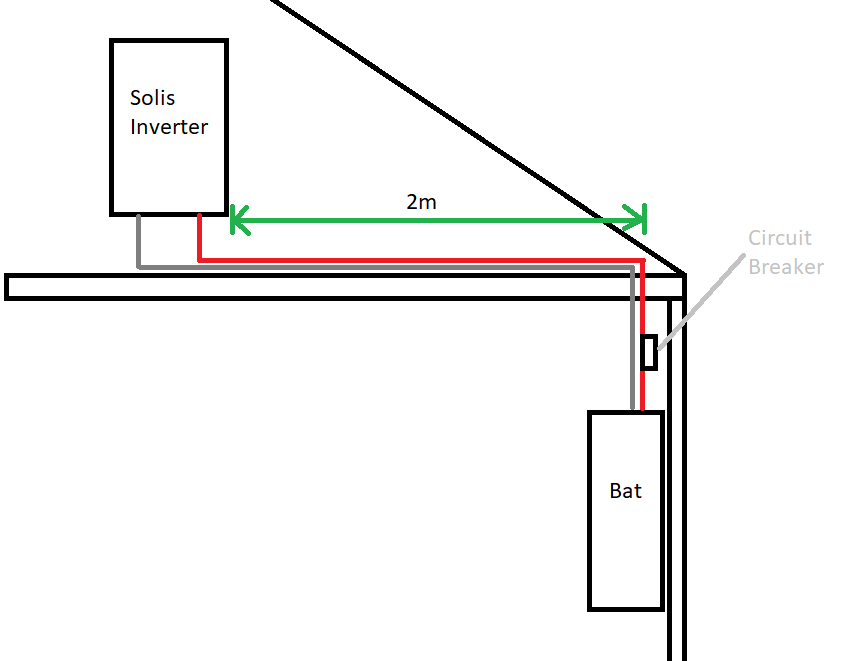
    Any recommendations on where can do cables with the quick connects on them to length? I could and might still raise the battery (though there's some weight in it now so a lot of careful planning needed). I think either way I'll need new cables made to length though as I've already used up most of the 2m cables I have now just getting from the inverter and into the hole in the wardrobe. Quick paint diagram to explain the distances and proposed placement of the Circuit Breaker:

    Inverter.png


  • Registered Users, Registered Users 2, Paid Member Posts: 5,874 ✭✭✭...Ghost...


    You could try cosycampers.ie because they sell the cables and lugs. They might crimp cables cut to length. You would be joining them at the breaker.

    The battery is a pig to lift. I had to use an electric hoist, but mine was in a very awkward spot and I had plans to have several batteries, so it made sense for me to get the equipment and save myself from injury.

    Stay Free


  • Advertisement
  • Moderators, Home & Garden Moderators Posts: 7,609 Mod ✭✭✭✭graememk


    DC MCBs seem to mostly miss, especially ones from Amazon, although it seems the projoy usually are doing ok.

    Because battery and inverter are in different places, id put a DC isolator beside the inverter and one beside the battery, and possibly bump the cable size up one to 35mm2 between the 2 isolators. (Isolator/MCB I mean)

    Reason for both is if you are at the inverter and want to turn off the battery you can.

    If beside the battery and want to isolate the inverter.. you can.

    I've bought cable from truck electrics and if your doing the link between inverters, but I think they only do 10m rolls in 35mm2 nothing shorter. I've used the 50mm2 stuff, it's good cable. Will give you enough to get it to the ground though.

    You would even need to get ends made up, use the ring end from the plyon cable to go onto the battery and the from the battery side isolator and the equivalent on the solis end.

    Some maxi/dado trunking to keep the cables nice and neat/hidden,


  • Registered Users, Registered Users 2 Posts: 789 ✭✭✭nimrod86


    That's a really good idea Graeme! Would save a lot of hassle with crimping yeah, and be a bit cheaper too! So all I'd need for this would be maybe 3m of Red/Black cable to bridge the gap between the two 2m cables I already have. I think we may have a winner here


  • Moderators, Home & Garden Moderators Posts: 7,609 Mod ✭✭✭✭graememk


    Id try and keep the 25mm2 cables as short as possible, and as much of the "trunk" run in the heavier cable because of the longer run.

    I don't like having anything heavy unnecessarily high on the wall, you could have it all at ground level with the heavier cable. So make sure you have enough to do the run right.


  • Registered Users, Registered Users 2, Paid Member Posts: 34,892 ✭✭✭✭listermint


    Why are you over rating the cables ? These have to be terminated into isos and mcbs that most likely won't take that sort of gauge. This makes it either more difficult or youd require special crimper to add reduction fittings to the ends. Also pig to work with these types of gauges.


  • Moderators, Home & Garden Moderators Posts: 7,609 Mod ✭✭✭✭graememk


    Bigger cable is too compensate for the longer run. 35mm2 fits fine in the projoy MCB without issue. It's also fine strand "battery cable" we are working with the batteries, it's a lot easier to work with.

    Taking here about having the battery in a different room to the inverter, and is prefer it on the ground, so a one way cable run would be about 4m, full length about 8m. Not your standard battery run so upside to compensate.


  • Registered Users, Registered Users 2 Posts: 789 ✭✭✭nimrod86


    Thanks to everyone who's advised me on this project :) Got the battery wired up today using Ghost's videos for guidance. I had to go with "User-Defined" battery type due to a "Batname-Fail" alarm on the inverter, but it seems to be drawing power and communicating with the inverter.

    However… around the time I got the battery connected and the system powered back on, my datalogger seems to have stopped working. I have a red power light, green internet light, but the orange inverter COM light is flashing at me (sometimes slowly, sometimes fast), and the inverter is showing as offline in my app.

    Has anyone encountered something like this before? Could I have upset it with a setting when enabling the battery?

    Edit: Found a post for this exact same issue from last year on the diysolar forum from none other than Ghost 😂 Did you get the inverter replaced under warranty in the end? And were there any issues with warranty claim due to installing a DIY battery?

    Post edited by nimrod86 on


  • Registered Users, Registered Users 2, Paid Member Posts: 5,874 ✭✭✭...Ghost...


    😂😂😂

    OK, so there was no issue getting replaced under warranty. I wouldn't tell the installer that it happened at the same time you connected the battery. Mine stopped communicating several hours after battery connection and only after I changed an inverter setting by accident (which shouldn't have caused any issue).

    First try changing the baudrate to 9600 on BMS and Inverter. Then restart the system and see if that resolves it. My baudrate has been at 19600 from the start, as recommended on other forums and by Andy of the off grid garage. Still worth trying to change it.

    Stay Free


  • Registered Users, Registered Users 2 Posts: 789 ✭✭✭nimrod86


    I've opened a ticket with Solis for the data logger issue. Following a troubleshooting guide on their website, I confirmed I'm getting the expected voltages on all 4 pins. The issue must be software related? Something has messed up when I made the changes to the settings for the battery. Hopefully they can provide a fix quickly!


  • Registered Users, Registered Users 2 Posts: 789 ✭✭✭nimrod86


    I can change the baudrate on the Inverter, but I can't find a setting for the BMS other than when connecting to it, and at 9600 I can't connect. Is it in the Parameters or somewhere else I should be looking?


  • Moderators, Home & Garden Moderators Posts: 7,609 Mod ✭✭✭✭graememk


    If you set the inverter to 9600 and unplug the battery, does it start working?

    BMS baud rate is a red herring, BMS inverter communication is over CAN not rs485

    Datalogger (master) talks to inverter (slave) over 485.

    There has been instances a few years ago with the sofar me3000 where you had to snip all wires in the bms cable except the blue/white blue so to only let the can signals talk.

    Rs485 is exposed on the battery port as some batteries communicate over rs485. The seplos is over canbus. But it should be a different rs485 network to the data logger one.


  • Advertisement
  • Registered Users, Registered Users 2 Posts: 789 ✭✭✭nimrod86


    Yep! That was exactly it! Didn't realise that the BMS and data logger talk over different protocols but makes sense now I suppose.

    Changing the baudrate on the inverter back to the default 9600 brought back the datalogger within a minute or so. Between you guys here, and the Seplos BMS thread it all looks to be happy again now.

    Ghost - Maybe can you put a note in your Inverter settings video to not change the baudrate in case this catches someone else out too? I want to say a massive thanks for all your help here, and for the videos you make because without them I don't know if I'd have been brave enough to start this project. Keep them going!


  • Registered Users, Registered Users 2, Paid Member Posts: 5,874 ✭✭✭...Ghost...


    Ghost - Maybe can you put a note in your Inverter settings video to not change the baudrate in case this catches someone else out too?

    Yes. I was waiting to see what the result would be in your case. Glad you got it working by changing baud rate. I'll actually do a short vid so people can find the problem in a search.

    Stay Free


  • Registered Users, Registered Users 2 Posts: 789 ✭✭✭nimrod86


    I wonder was your issue the same when the inverter was replaced? Though you said it was a few hours after so maybe not! Solis responded anyway saying they could see it was now working, and that they upgraded the data logger to the latest version while they were checking it out.

    They also warned me about using DIY batteries, but I'm going to choose to ignore this :D

    Additionally, I noticed that the inverter is set to user_def mode, which indicates the use of a non-compatible battery. Please be informed that for proper functioning, only compatible batteries are allowed to be installed. Using a non-compatible battery may lead to issues such as today's communication drop.

    Kindly note that if any system-related problems arise due to the use of a non-compatible battery, such as communication failures, it could result in challenges with obtaining an inverter replacement under warranty.

    Another video sounds good, the more info out there the better!


  • Registered Users, Registered Users 2 Posts: 446 ✭✭tipping


    Got my Seplos V3 Kit built today. Built with 305Ah Grade B cells from Nkon.

    Followed Ghosts video etc having tired of the terrible instructions.

    I am getting a Warning Capa-Warn when I switch on. Took it apart and double checked the wiring etc.

    I have the Bluetooth App but not the PC cable yet but all the cells are measuring in the range 3.292 to 3.296

    PackVlt: 52.72

    Current: 0.00A

    SOC: 0%

    Any ideas? I think I should have no alarms and some reasonable number for SOC

    Thanks


  • Registered Users, Registered Users 2, Paid Member Posts: 456 ✭✭mjatkey


    Probably need to change these two parameters on the BMS to match the capacity of the batteries, in your case change them to 304, can do it on the APP not sure that you see the numbers in same way.

    image.png

    🌞 6.96kWp PV System. West Dublin🌞


  • Registered Users, Registered Users 2 Posts: 446 ✭✭tipping


    Thanks. I've already changed those settings and it made no difference. Not finding any info on the web really that seems equivalent either. I've ordered the cables for the pc connection but won't have them until Tuesday


  • Registered Users, Registered Users 2, Paid Member Posts: 5,874 ✭✭✭...Ghost...


    Assuming you checked all cell voltages individually before assembly?

    This is not something I have seen with any of my batteries after the build. Wait for the PC cable to arrive and you can connect to the studio and make the necessary changes. That will hopefully clear the warning.

    Stay Free


  • Registered Users, Registered Users 2, Paid Member Posts: 456 ✭✭mjatkey


    And what does the BMS report the capacity as, Warning Capa-Warn is some sort of capacity alarm warning, question is why?

    I think that they calculate SOC based on voltage and capacity, double check the rated and total again, maybe re-enter incase the BMS has not updated from the default 280?

    Maybe dodgy BMS, email Seplos and see what they say?

    image.png

    🌞 6.96kWp PV System. West Dublin🌞


  • Registered Users, Registered Users 2 Posts: 446 ✭✭tipping


    Thanks, yes tested all the voltages individually. As you suggest probably best to wait for PC cable as the info on the BLE app is limited.

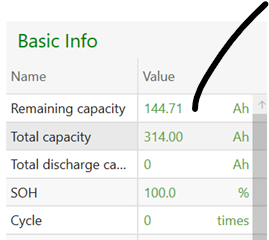
    Capacity is reported as 314 (actually they are the 315Ah batteries). Double checked the numbers and they are fine. I've popped a message onto my supplier indicating that there may be an issue as a just in case.

    I'll report back next week


  • Advertisement
  • Registered Users, Registered Users 2 Posts: 446 ✭✭tipping


    So Seplos Engineers said that it's not really a fault and to charge to 100% and it should resolve itself. So it's currently hooked up and charging (although only @10A, presumably as it thinks the SOC is 0%) and SOC is steadily climbing. Hopefully once charged everything will be working ok again. The CAPA-WARN error did go away as soon as I started charging it so that's promising at least.


Advertisement
Advertisement