Advertisement
Help Keep Boards Alive. Support us by going ad free today. See here: https://subscriptions.boards.ie/.
https://www.boards.ie/group/1878-subscribers-forum

Private Group for paid up members of Boards.ie. Join the club.
Hi all, please see this major site announcement: https://www.boards.ie/discussion/2058427594/boards-ie-2026

Refurbished Acer Aspire E5-411 14" Laptops £100 (€130) delivered

12346

Comments

  • Registered Users, Registered Users 2 Posts: 12,324 ✭✭✭✭Andy From Sligo


    Has anyone else lost the trackpad utility app since installing win 10? I mean the driver has installed correctly and the trackpad is working ok, but when you go in control panel and go to mouse the last tab there should be a elantech or synaptic tab for you to enable gestures etc and scrolling , that tab is missing on mine and there is no icon by the clock on the taskbar either


  • Registered Users, Registered Users 2 Posts: 553 ✭✭✭stdidit


    Has anyone else lost the trackpad utility app since installing win 10? I mean the driver has installed correctly and the trackpad is working ok, but when you go in control panel and go to mouse the last tab there should be a elantech or synaptic tab for you to enable gestures etc and scrolling , that tab is missing on mine and there is no icon by the clock on the taskbar either

    I dont have that tab but the trackpad and all the gestures work for me. Did you check in settings? Search for "Settings" then in there, go to "Devices" and then "Mouse & Touchpad" and I can see all the setting in there for touchpad, gestures, scrolling etc..


  • Registered Users, Registered Users 2 Posts: 3,541 ✭✭✭duridian


    Yeah mine is the same.
    No icon for a touchpad app near clock but driver is installed correctly and all gesture type functioning seems to work fine.
    The only gestures I ever used anyway are the two finger tap for a right click and two finger drag for scrolling pages. I mostly work with a wireless mouse but the gestures are handy if no mouse available.


  • Registered Users, Registered Users 2 Posts: 1,866 ✭✭✭Dr.Winston O'Boogie


    Managed to pick one up in an auction for £110, how do they get posted is it by registered post or just normal post?


  • Registered Users, Registered Users 2 Posts: 937 ✭✭✭jousting with chairs


    Managed to pick one up in an auction for £110, how do they get posted is it by registered post or just normal post?

    They're sent by courier, UPS, took about a week to receive mine but the tracking is very good with them.


  • Advertisement
  • Registered Users, Registered Users 2 Posts: 3,541 ✭✭✭duridian


    Managed to pick one up in an auction for £110, how do they get posted is it by registered post or just normal post?
    They're sent by courier, UPS, took about a week to receive mine but the tracking is very good with them.

    When the package gets near Ireland keep a very close eye on the tracking status from thereon, especially if your location means it is likely to pass through Shannon. (Tamworth, in the UK will normally be the last step before Dublin, then depending on your location onto Shannon.)

    Shannon UPS depot is always holding my stuff up with some "delivery address is not on the building list" cock and bull story. It's all just an excuse to force you into ringing an 1890 number which is outside the "unlimited" calls packages most people tend to have with their phone provider nowadays. If this happen to your package, the proper local landline number for them is 061479850


  • Registered Users, Registered Users 2 Posts: 12,324 ✭✭✭✭Andy From Sligo


    just ordered a 240GB SSD Drive @€;67 including VAT and a 4GB Stick of RAM @€;20 from Memory C for my E5-411 laptop today ... all with free delivery. Good prices.


  • Registered Users, Registered Users 2 Posts: 251 ✭✭Frank11


    just ordered a 240GB SSD Drive ;‚¬67 including VAT and a 4GB Stick of RAM ;‚¬20 from Memory C for my E5-411 laptop today ... all with free delivery. Good prices.

    What's the plan re the SSD, are you going to replace the hard drive or put it in the empty CD tray and use the hard drive for storage?


  • Posts: 19,205 ✭✭✭✭ [Deleted User]


    just got this today (a week to arrive). (won an auction for grade A for £103) and updated to windows 10 - no problems. (except for the trackpad being unusable until I installed the driver). the description of the one in the auction was white but got a black one - but doesn't bother me.
    I find the easiest way to upgrade to windows 10 is to download to a usb drive.
    then just run the setup.exe from the usb drive in windows, in file manager (you don't need to actually boot from usb)
    I did a clean install which seems to have removed the acer bloatware.
    will put in the 8gb ram stick that I had pre-ordered from amazon this eve.
    the only thing that I don't like so far is that the 2 usb ports are all on one side (left side)
    handy to have a usb port on either side (e.g. if right handed - handy to have a usb port for a mouse on the right side).


  • Registered Users, Registered Users 2 Posts: 3,541 ✭✭✭duridian


    glasso wrote: »
    just got this today (a week to arrive). (won an auction for grade A for £103) and updated to windows 10 - no problems. (except for the trackpad being unusable until I installed the driver). the description of the one in the auction was white but got a black one - but doesn't bother me.
    I find the easiest way to upgrade to windows 10 is to download to a usb drive.
    then just run the setup.exe from the usb drive in windows, in file manager (you don't need to actually boot from usb)
    I did a clean install which seems to have removed the acer bloatware.
    will put in the 8gb ram stick that I had pre-ordered from amazon this eve.
    the only thing that I don't like so far is that the 2 usb ports are all on one side (left side)
    handy to have a usb port on either side (e.g. if right handed - handy to have a usb port for a mouse on the right side).
    Are you sure you got the same model?
    My blue E5-411-C5Z7 has a USB 3 port on the left and two USB 2 ports on the right.


  • Advertisement
  • Posts: 19,205 ✭✭✭✭ [Deleted User]


    duridian wrote: »
    Are you sure you got the same model?
    My blue E5-411-C5Z7 has a USB 3 port on the left and two USB 2 ports on the right.

    in my ebay item description it says 3 usb ports, but the model that I got had only 2. (1 usb 3, 1 usb 2). hdmi and ethernet.
    same cpu, ram, hd.

    E5-411-C1RF was the code - different to yours.

    pc seems perfect.

    I might try to contact the seller to see if I can get a few quid refund for diff model, diff colour, 1 usb port short.


  • Posts: 19,205 ✭✭✭✭ [Deleted User]


    it seems that I got this one

    http://www.tesco.com/direct/acer-e5-411-14-intel-celeron-2gb-ram-500gb-hdd-laptop-blue/312-1993.prd?skuId=312-1993&pageLevel=sku

    seems to be the very same except for the 1 less usb port. with all the ports on the left side.


  • Registered Users, Registered Users 2 Posts: 3,541 ✭✭✭duridian


    glasso wrote: »
    in my ebay item description it says 3 usb ports, but the model that I got had only 2. (1 usb 3, 1 usb 2). hdmi and ethernet.
    same cpu, ram, hd.

    E5-411-C1RF was the code - different to yours.

    pc seems perfect.

    I might try to contact the seller to see if I can get a few quid refund for diff model, diff colour, 1 usb port short.
    Interesting. There seems to be a few variants with near the same primary components, and very minor variances, like in the location of the ports, etc.
    I've also seen other E5-411-xxxx models as well from googling around the web at the time in March that I bought mine.
    I wonder why they do this. You'd think it would cost more to manufacture the different designs than they would gain by dropping a USB port.

    Anyway, best of luck with it and I hope you enjoy your new laptop. :-)

    PS. A wireless mouse with one of those little nano receivers, could help if you find having the wired mouse plugged in at the wrong side awkward. I'm working away fine with one that i picked up in LIDL for 7 or 8 quid.


  • Posts: 19,205 ✭✭✭✭ [Deleted User]


    duridian wrote: »
    Interesting. There seems to be a few variants with near the same primary components, and very minor variances, like in the location of the ports, etc.
    I've also seen other E5-411-xxxx models as well from googling around the web at the time in March that I bought mine.
    I wonder why they do this. You'd think it would cost more to manufacture the different designs than they would gain by dropping a USB port.

    Anyway, best of luck with it and I hope you enjoy your new laptop. :-)

    PS. A wireless mouse with one of those little nano receivers, could help if you find having the wired mouse plugged in at the wrong side awkward. I'm working away fine with one that i picked up in LIDL for 7 or 8 quid.

    actually on the back sticker on laptop it's ES1-411-C3W3. so it's not even the model in the ebay listing either.

    re mouse - yes - I usually use a bluetooth mouse as with bluetooth you don't need to take up a usb port.

    this laptop is fine and it's not for me but for a friend. will do fine. just I wasn't sent the item as described.

    won't send it back - will see if they might give me a few quid or something :)

    main difference seems to be 1 less usb port and maybe lower battery life (5h vs 7hrs). lt's a bit lighter also. (1.9kg)


  • Registered Users, Registered Users 2 Posts: 12,324 ✭✭✭✭Andy From Sligo


    glasso wrote: »
    actually on the back sticker on laptop it's ES1-411-C3W3. so it's not even the model in the ebay listing either.

    re mouse - yes - I usually use a bluetooth mouse as with bluetooth you don't need to take up a usb port.

    this laptop is fine and it's not for me but for a friend. will do fine. just I wasn't sent the item as described.

    won't send it back - will see if they might give me a few quid or something :)

    main difference seems to be 1 less usb port and maybe lower battery life (5h vs 7hrs). lt's a bit lighter also. (1.9kg)

    yes thats a different model alright - mine is E5-411 - C5Z7 and has a usb3 socket next to HDMI socket on left hand side. With me I wanted a charger socket on my next laptop to plug in on the left hand side for personal preference, on my E5-411 it plugs in right of laptop, but at least its angled so thats one sweetner - on your ES1-411 it plugs in to charge on the left doesnt it? - did your ES1-411 come with an optical drive too? - I wish mine did, the plan was to put a standard DVD writer into the slot on mine but it must take a really really thin one compared to the standard internal DVD writers I have because they wont fit! - Did yours come with glossy screen or non reflective Matt screen?


  • Registered Users, Registered Users 2 Posts: 12,324 ✭✭✭✭Andy From Sligo


    Frank11 wrote: »
    What's the plan re the SSD, are you going to replace the hard drive or put it in the empty CD tray and use the hard drive for storage?

    I plan to replace my 320gb I put in (going to clone HDD to SSD) - jut wanted really for better speed of SSD, lower power of SSD and quietness of SSD and bit of security should I jog laptop or if (god forbid) the laptop falls off a table or something - SSD's are certainly the way to go with laptops these days , just a shame I couldnt afford a 1TB at least :eek::rolleyes:


  • Posts: 19,205 ✭✭✭✭ [Deleted User]


    yes thats a different model alright - mine is E5-411 - C5Z7 and has a usb3 socket next to HDMI socket on left hand side. With me I wanted a charger socket on my next laptop to plug in on the left hand side for personal preference, on my E5-411 it plugs in right of laptop, but at least its angled so thats one sweetner - on your ES1-411 it plugs in to charge on the left doesnt it? - did your ES1-411 come with an optical drive too? - I wish mine did, the plan was to put a standard DVD writer into the slot on mine but it must take a really really thin one compared to the standard internal DVD writers I have because they wont fit! - Did yours come with glossy screen or non reflective Matt screen?

    yes. power is on the left.
    screen seems to be glossy (will be only used inside in any case so no big deal.)
    no optical drive but it seems like a fairly normal sized slot on the right side.


  • Posts: 19,205 ✭✭✭✭ [Deleted User]


    was tricky enough to get the case off to change the ram. one of the corners was pretty stuck even with all the screws off. got it off eventually and ram worked fine in the end. not a bad little basic laptop. keyboard and trackpad are pretty decent actually.


  • Registered Users, Registered Users 2 Posts: 12,324 ✭✭✭✭Andy From Sligo


    glasso wrote: »
    was tricky enough to get the case off to change the ram. one of the corners was pretty stuck even with all the screws off. got it off eventually and ram worked fine in the end. not a bad little basic laptop. keyboard and trackpad are pretty decent actually.

    Keyboards good - I personally cannot stand these all in one trackpad and like the seperate click left and right buttons, but thats the way they are going these days - I blame apple macbook's who started this trend off :rolleyes:


  • Posts: 19,205 ✭✭✭✭ [Deleted User]


    glasso wrote: »
    actually on the back sticker on laptop it's ES1-411-C3W3. so it's not even the model in the ebay listing either.

    re mouse - yes - I usually use a bluetooth mouse as with bluetooth you don't need to take up a usb port.

    this laptop is fine and it's not for me but for a friend. will do fine. just I wasn't sent the item as described.

    won't send it back - will see if they might give me a few quid or something :)

    main difference seems to be 1 less usb port and maybe lower battery life (5h vs 7hrs). lt's a bit lighter also. (1.9kg)

    they offered me £15 sterling if I keep the original laptop instead of returning it for another one - that will do fine.


  • Advertisement
  • Registered Users, Registered Users 2 Posts: 3,541 ✭✭✭duridian


    glasso wrote: »
    they offered me £15 sterling if I keep the original laptop instead of returning it for another one - that will do fine.

    Good deal made even better then! :)


  • Registered Users, Registered Users 2 Posts: 1,866 ✭✭✭Dr.Winston O'Boogie


    So my laptop arrived, pretty happy with it. However I am still on windows 7 and can't seem to scroll up and down pages using the trackpad? Or am I doing it wrong perhaps. Do you just move your finger up and down the side of the trackpad? That's how it is on my other Acer.

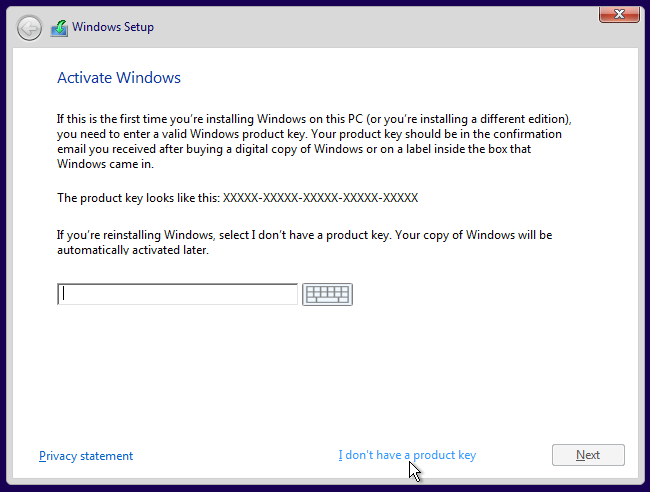
    Also its asking for the product key to activate windows 10? Can't find where I would get that?


  • Registered Users, Registered Users 2 Posts: 3,541 ✭✭✭duridian


    So my laptop arrived, pretty happy with it. However I am still on windows 7 and can't seem to scroll up and down pages using the trackpad? Or am I doing it wrong perhaps. Do you just move your finger up and down the side of the trackpad? That's how it is on my other Acer.

    Also its asking for the product key to activate windows 10? Can't find where I would get that?

    There's no special zone at the side of this touchpad. To scroll on this one you use two fingers together and drag up or down. It basically has the same effect as it you were dragging the page on a touchscreen.

    I don't understand how you are on Windows 7. These laptops shipped with Windows 8.1 with Bing as their OS. In any case, if by some chance your one did come with 7 you would still be entitled to upgrade to Windows 10 by a digital entitlement licence, but there is no key involved in such an upgrade..
    If you look back through the thread, there is a lot of info about this process already posted.


  • Registered Users, Registered Users 2 Posts: 1,866 ✭✭✭Dr.Winston O'Boogie


    Yep sorry I'm actually on Windows 8.

    But when I downloaded Windows 10 today they are asking for a product key? I saw from another poster on this thread that they downloaded lazy key finder, I did that and got the key but it says invalid unfortunately.

    Thanks for the info on the scrolling, works perfectly!


  • Registered Users, Registered Users 2 Posts: 3,541 ✭✭✭duridian


    Yep sorry I'm actually on Windows 8.

    But when I downloaded Windows 10 today they are asking for a product key? I saw from another poster on this thread that they downloaded lazy key finder, I did that and got the key but it says invalid unfortunately.

    Thanks for the info on the scrolling, works perfectly!

    I presume you are trying to do the clean install of Windows 10 as discussed earlier in this thread.

    Forget about keys. You don't need one. Just press "I don't have a product key" and continue installing Windows 10 Home.

    Only Windows 10 Home will activate from the Windows 8.1 with Bing generated GenuineTicket.xml file that you saved before starting so don't accidentally install Pro as it will never activate unless you buy a licence.

    If you don't know what I mean by GenuineTicket.xml then have a look at this older post I made some time ago on another thread. It gives links and some explanation

    385216.png


  • Registered Users, Registered Users 2 Posts: 2,344 ✭✭✭Skill Magill


    I installed win7 just because i'm used to it, I'm only using it for browsing and for €200 its not a bad bit of kit. (250sd and 8gb ram installed)


  • Posts: 19,205 ✭✭✭✭ [Deleted User]


    I installed win7 just because i'm used to it, I'm only using it for browsing and for €200 its not a bad bit of kit. (250sd and 8gb ram installed)

    win 10 is fine imo and very similar to 7 except it looks nicer and has some other improvements.
    8 and 8.1 were terrible with assuming everyone wanted those awful tiles everywhere.


  • Registered Users, Registered Users 2 Posts: 1,866 ✭✭✭Dr.Winston O'Boogie


    Hi all, I bough this laptop, upgraded the Windows on it and it was working great for about a month. However now when I turn it on I can't click into the box to enter my password, is this a trackpad issue maybe that everyone was on about? Was working fine initially.


  • Registered Users, Registered Users 2 Posts: 12,324 ✭✭✭✭Andy From Sligo


    glasso wrote: »
    win 10 is fine imo and very similar to 7 except it looks nicer and has some other improvements.
    8 and 8.1 were terrible with assuming everyone wanted those awful tiles everywhere.

    Classic Shell is the way to go with 8 / 8.1 and with it not only do you get the win 7 start menu look you can turn off edge gestures of 8 and also get it to boot into desktop every time computer starts so you dont even see the Tiles.

    http://www.classicshell.net/

    can even use Classic Shell on windows 10, to get your familiar windows 7 look to the start menu - also download ribbon disabler to bring back the good ol simple looking ribbon from windows 7

    http://winaero.com/request.php?18


  • Advertisement
  • Registered Users, Registered Users 2 Posts: 12,324 ✭✭✭✭Andy From Sligo


    Hi all, I bough this laptop, upgraded the Windows on it and it was working great for about a month. However now when I turn it on I can't click into the box to enter my password, is this a trackpad issue maybe that everyone was on about? Was working fine initially.


    i think there is a fn+ f button to disable/enable trackpad - maybe you might have pressed it accidentally? - maybe that is all it is. try plugging in an external usb mouse as well


Advertisement
Advertisement