Advertisement
Help Keep Boards Alive. Support us by going ad free today. See here: https://subscriptions.boards.ie/.
https://www.boards.ie/group/1878-subscribers-forum

Private Group for paid up members of Boards.ie. Join the club.
Hi all, please see this major site announcement: https://www.boards.ie/discussion/2058427594/boards-ie-2026

Speakers and iTunes not working after Windows 10 download

  • 17-08-2015 02:19PM
    #1
    Registered Users, Registered Users 2 Posts: 421 ✭✭


    I downloaded Windows 10 last week. I have an ASUS laptop that came with Windows 8.

    Everything appeared ok after downloading Windows 10 until I noticed that the sound wasn't working when I played videos.

    I then opened iTunes and clicked to play a song and it doesn't budge past 0.00 secs played so the song never starts.

    Ran a hardware changes check and two detections were found but no solutions were offered to resolve the problems. They are:

    1) Microsoft ISATAP adapter is not working properly and

    2) Microsoft Teredo adapter is not working properly.

    Any ideas what's gone wrong or what I can do to fix this? Shouldn't have bother with Windows 10 :(


Comments

  • Registered Users, Registered Users 2 Posts: 5,125 ✭✭✭mordeith


    Sounds like you need to update / reinstall audio drivers.


  • Registered Users, Registered Users 2 Posts: 12,987 ✭✭✭✭Skerries


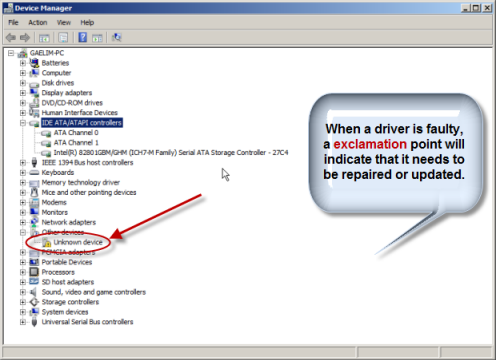
    yep check in device manager to see if it gives any error like this

    DeviceManagerDriverProblemsmaller.png

    you may have to delete whats there and reinstall the proper audio driver from the pc manufacturer


  • Registered Users, Registered Users 2 Posts: 707 ✭✭✭Bayberry


    1) Microsoft ISATAP adapter is not working properly and
    2) Microsoft Teredo adapter is not working properly.
    These are both network related issues (IPv6) and they don't have anything to do with your audio issues - it's probably safe to ignore them entirely for now.

    If you fire up Device Manager, what does it show under "Sound, video and game controllers"?


  • Registered Users, Registered Users 2 Posts: 421 ✭✭tomhenryford


    Thanks guys. I uninstalled the audio inputs and outputs and the sound, video and game controllers in the device manager and restarted and everything seems to be working now. Thank you.


Advertisement
Advertisement