Advertisement
Help Keep Boards Alive. Support us by going ad free today. See here: https://subscriptions.boards.ie/.
https://www.boards.ie/group/1878-subscribers-forum

Private Group for paid up members of Boards.ie. Join the club.
Hi all, please see this major site announcement: https://www.boards.ie/discussion/2058427594/boards-ie-2026

Hdmi from laptop to tv- Alternative

  • 29-10-2014 08:20PM
    #1
    Registered Users, Registered Users 2 Posts: 3


    Hi.

    Forgive me for my absolute lack of knowledge here!

    I'm wondering is there a cable out there to watch DVDs on the laptop and show it on the tv. We can't use a hdmi.

    There's a hdmi jack in the back of our tv but it's mounted and a real effort to move.

    Is there another way to do it that's not very expensive. I know there's the three audio/visual car thing in the side of the tv if that can be used.

    Thanks!


Comments

  • Registered Users, Registered Users 2, Paid Member Posts: 19,562 ✭✭✭✭Mantis Toboggan


    LRH92 wrote: »
    Hi.

    Forgive me for my absolute lack of knowledge here!

    I'm wondering is there a cable out there to watch DVDs on the laptop and show it on the tv. We can't use a hdmi.

    There's a hdmi jack in the back of our tv but it's mounted and a real effort to move.

    Is there another way to do it that's not very expensive. I know there's the three audio/visual car thing in the side of the tv if that can be used.

    Thanks!

    Is a chromecast a possibility?

    Free Palestine 🇵🇸


  • Registered Users, Registered Users 2 Posts: 2,089 ✭✭✭henryporter


    I think chrome cast is a hdmi interface?

    What have you on the laptop to plug into? Hdmi or just an ordinary monitor out connection? That will dictate what you need. If you have the red/yellow/white jacks on the TVs you might be able to get a connection, but it depends on the other end.


  • Registered Users, Registered Users 2 Posts: 3 LRH92


    The laptop has a hdmi jack


  • Registered Users, Registered Users 2 Posts: 26,063 ✭✭✭✭coylemj


    DVD drives are dirt cheap these days. You could probably connect to those three ports (audio left and right and a yellow video port) on the side of the TV but the picture quality would be poor - a single video connection is the worst possible way to feed a picture to a TV. Are there other connections on the back of the TV like component?

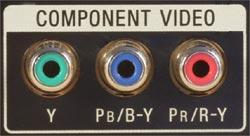
    This is what component connections look like, it uses three leads for the video signal and you'd get a picture almost as good as with HDMI.....

    compjack250.jpg


  • Moderators Posts: 6,959 ✭✭✭Spocker


    Whats the model of the TV, so we can find out all of the connections it has?


  • Advertisement
Advertisement
Advertisement