Advertisement
Help Keep Boards Alive. Support us by going ad free today. See here: https://subscriptions.boards.ie/.
https://www.boards.ie/group/1878-subscribers-forum

Private Group for paid up members of Boards.ie. Join the club.
Hi all, please see this major site announcement: https://www.boards.ie/discussion/2058427594/boards-ie-2026

Lidl cycling offers - General thread

124

Comments

  • Registered Users, Registered Users 2 Posts: 6,440 ✭✭✭cdaly_


    touts wrote: »
    Wont get in until after work. Any tyres suitable for road bikes in the winter?
    No. The tyres are MTB or fat (40mm) hybrid type.
    Was tempted to get a set of bib tights for winter too.

    Wouldn't bother with the bibs. Chamois poor by all accounts. Spend GBP40 on a DHB set from wiggle instead - your ass is precious...


  • Moderators, Sports Moderators Posts: 8,767 Mod ✭✭✭✭mossym


    cdaly_ wrote: »
    your ass is precious...

    ah here, lads, seriously, this is a family forum. get a room


  • Registered Users, Registered Users 2 Posts: 695 ✭✭✭Get In There


    J o e wrote: »
    I mounted the GPS computer onto the bike at gave it a test...

    I'm currently charging my device after my colleague was able to get it for me earlier today. Could you give me a dummy's guide on how to record rides? It doesn't seem so obvious when I play around with the device?!

    Feeling rather silly here!


  • Closed Accounts Posts: 3,689 ✭✭✭joeKel73


    I'm currently charging my device after my colleague was able to get it for me earlier today. Could you give me a dummy's guide on how to record rides? It doesn't seem so obvious when I play around with the device?!

    Feeling rather silly here!

    Use the button on the right of the device to step back in the menu until you have screens with speed, distance etc that you can scroll left/right.

    Then hold the middle button down for 3 seconds and you'll get three buttons for play (means record), pause or stop. When recording you can access those buttons again to pause or stop recording.

    Decent page on it in the manual.


  • Registered Users, Registered Users 2 Posts: 6,817 ✭✭✭touts


    I'm currently charging my device after my colleague was able to get it for me earlier today. Could you give me a dummy's guide on how to record rides? It doesn't seem so obvious when I play around with the device?!

    Feeling rather silly here!

    You need to read the manual. You are not going to work it out. It has potential to be a bargain but it is not intuitive for a new user. Read the manual. Then print out JOEs excellent posts above and staple them to the back of the manual which you should store in your helmet between rides. I get the feeling that in time this will seem like a bargain but the first few attempts at using the GPS and especially importing into strava will be frustrating.


  • Advertisement
  • Registered Users, Registered Users 2 Posts: 695 ✭✭✭Get In There


    touts wrote: »
    You need to read the manual. You are not going to work it out. It has potential to be a bargain but it is not intuitive for a new user. Read the manual. Then print out JOEs excellent posts above and staple them to the back of the manual which you should store in your helmet between rides. I get the feeling that in time this will seem like a bargain but the first few attempts at using the GPS and especially importing into strava will be frustrating.

    After Joe's post, I've done a test and recorded a walk around the block. However uploading onto Strava is indeed proving frustrating, I've followed Joe's steps but I'm going wrong somewhere as strava keeps saying the file is unrecognised.

    I think I'll return it to the Lidl at the weekend, too much hassle for a dummy like me. Prob best to just stick to using strava on my phone.

    Joe- Thanks for your help and your useful post. You're a star! :)


  • Registered Users, Registered Users 2 Posts: 6,817 ✭✭✭touts


    J o e wrote: »
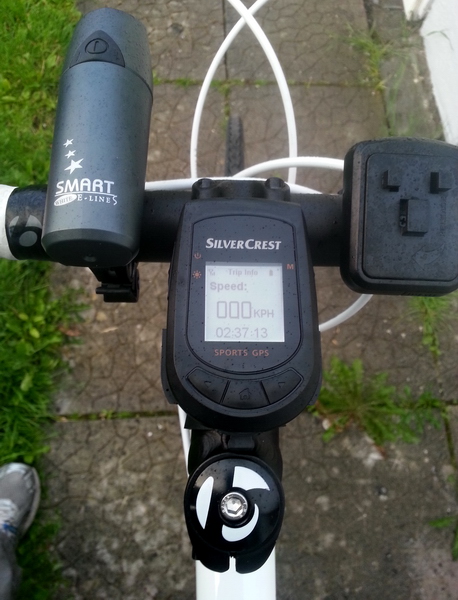
    I mounted the GPS computer onto the bike and gave it a test...

    It mounts well on the bike, clicks nicely into the mount and stays in place.

    87iUuT.jpg

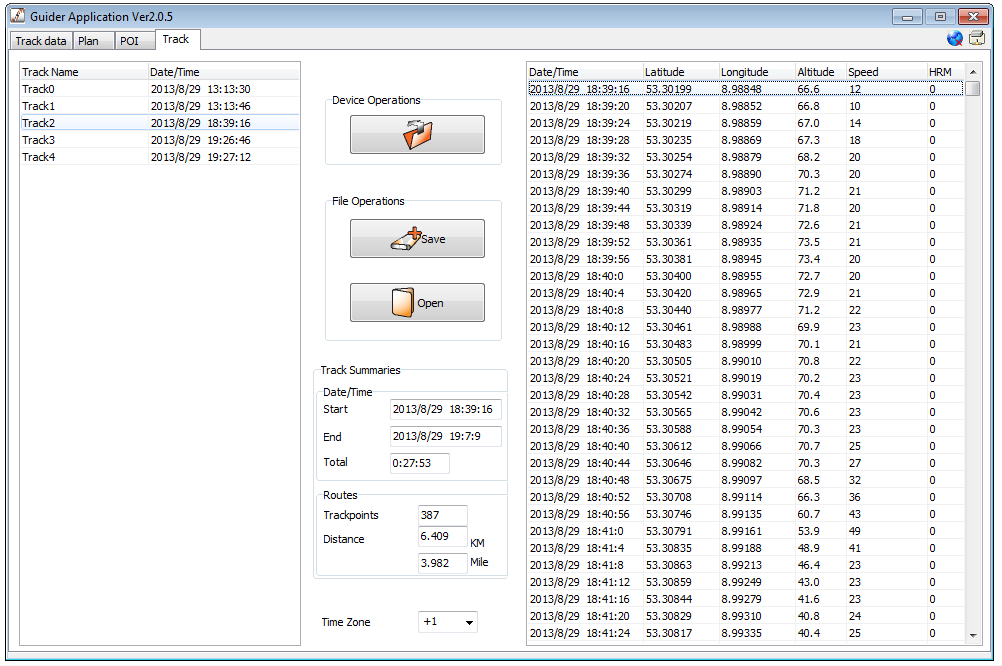
    The software is very basic, just usable for transferring data over and back from the computer. Even route-planning has to be done in Google Earth (save as kml) and passed through the software.

    68PB3X.jpg


    It can export files as KML or GPX standard formats but there are a few big issues with the files it saves....
    • It saves ALL your tracks into the one file, even if you select one. Odd.
    • Longitude values are positive instead of negative, so it maps a mirror image of the route in Germany. Was probably only tested in Germany, they may issue a firmware fix if possible and intend to sell in future.
    • Strava can't import the GPX file due to "formatting" problems.

    So to get around this and test the output I did the following;
    1. Use this site to convert from GPX to GPX. :p It sorts the formatting.
    2. Now open in a plain text editor and you'll see your routes between the <trk> </trk> tags. Delete all the tracks apart from the one you wanted, they're named as they appear in the software.
    3. Do a find/replace and find lon=" and replace with lon="- .
    4. Upload to Strava.
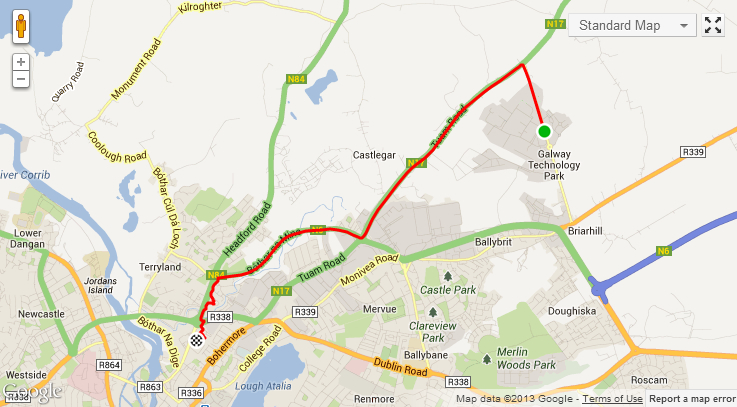
    The resulting data is actually pretty good. :) The wobbly path at the end is true, I called into two car parks and the loop at the end was when I took it off the bike and went through the shopping center... how it maintained GPS signal inside I don't know!! :confused:

    6tH2Gc.jpg

    View here: http://www.strava.com/activities/78503516

    Hopefully I'll get time this weekend to put together a file converter to do all the tidying up and filtering of the files it produces. Something web-based I'd say, unless people prefer desktop app.

    Hi Joe,
    Firstly thanks for your excellent work so far. It's really appreciated.

    I followed your steps above and they worked. However the one thing I would add is to warn people to make sure they change the file type from .kml to .gpx when saving the Track. As I discovered when I uploaded to strava .kml does not contain time data so Strava won't accept it. .gpx does so strava will accept it.

    A file converter would be great. In terms of web-based or a desktop app I don't really mind. I'm just delighted someone is putting one together to help us get the most out of this GPS. Lidl should hire you!

    Thanks Again!


  • Registered Users, Registered Users 2 Posts: 436 ✭✭bren_mc


    gaffmaster wrote: »
    Couldn't see any GPS computers in Moore Street, Dublin around 9.30am. Don't think they were stocked there as I couldn't see any price-boards or empty shelves.

    i was in there this morning and there were 4 or 5 of them left


  • Registered Users, Registered Users 2 Posts: 723 ✭✭✭gaffmaster


    bren_mc wrote: »
    i was in there this morning and there were 4 or 5 of them left

    Were they out on the shelves or did you have to ask for them?


  • Registered Users, Registered Users 2 Posts: 436 ✭✭bren_mc


    gaffmaster wrote: »
    Were they out on the shelves or did you have to ask for them?

    they were in a separate display but right next to the cycling stuff - towards the back of the store. I think they might have been inside a glass case similar to some of the other electronic stuff - can't remember for sure as it's been two hours ago.:o


  • Advertisement
  • Registered Users, Registered Users 2 Posts: 723 ✭✭✭gaffmaster


    bren_mc wrote: »
    they were in a separate display but right next to the cycling stuff - towards the back of the store. I think they might have been inside a glass case similar to some of the other electronic stuff - can't remember for sure as it's been two hours ago.:o

    Haha. Thanks.


  • Registered Users, Registered Users 2 Posts: 6,817 ✭✭✭touts


    They might also be in the office. I asked for them and the cashier had to go and get one in the office.


  • Registered Users, Registered Users 2 Posts: 7,224 ✭✭✭alaimacerc


    In the Togher branch, there was a glass case in the middle of an aisle of the offers/non-food, with just one "display model" of each (GPS BC, phone cover thingie, external HD drive, and so on). So I assume you have to ask a cashier in any event, to fetch the actual stock from the office/backstore.


  • Registered Users, Registered Users 2 Posts: 589 ✭✭✭BofaDeezNuhtz


    Anybody have loads of protein bars/shakes tubs of whey & protein powder in their shop too?

    Over priced stuff tho.

    Single protein bar €2
    Single protein cookie €2

    ehh no.


  • Registered Users, Registered Users 2 Posts: 21,828 ✭✭✭✭Squidgy Black


    Anybody have loads of protein bars/shakes tubs of whey & protein powder in their shop too?

    Over priced stuff tho.

    Single protein bar €2
    Single protein cookie €2

    ehh no.

    Yeah the new store in Artane was packed with the stuff, prices on the whey protein were fair enough I thought, 1kg for 17 euro.


  • Registered Users, Registered Users 2 Posts: 6,817 ✭✭✭touts


    OK I used the GPS over the weekend. It does the job. It tracks the location, Speed, elevation and time. While riding I frequently looked at the speed on it and on my old wireless cat-eye and they seemed to match. If anything I would speculate that the GPS was more accurate as it seemed to record decelerations faster on a descent. Looking at the data on the software it came with it all looks pretty well recorded.

    However after several attempts I can't get the data into Strava properly. As Joe listed above I exported the data as GPX, ran it through the website and fixed the positive to negative. Then imported into Strava.

    Initally it looked good. The map showed where I was. Even showed the slight difference from one side of the road to the other on my journey to and from the ride. But then when I looked at the segments and performance I noticed problems. The elevation data didn't go into Strava properly and the .gpx files didn't contain any speed info.

    If you export as a .trk file it seems to contain all the info while .gpx and .kml only contains some info. However Strava won't accept .trk and the online conversion site doesn't recognise the data. Anyone know a way to get the full data into Strava?

    So on balance it is not perfect in relation to Strava but it never claimed it would be. In terms of what it says on the box it seems to do that fairly well. But they could really do with better software or a link to Strava.


  • Closed Accounts Posts: 3,689 ✭✭✭joeKel73


    touts wrote: »
    The elevation data didn't go into Strava properly and the .gpx files didn't contain any speed info.

    I haven't had a chance to look at this since, hopefully will do soon. Hadn't noticed any issue with the elevation, must check that.

    Don't think it needs any speed data though - it can calculate that from distance covered between sampling times. If it is required it could be calculated in the converter.


  • Registered Users, Registered Users 2 Posts: 3,508 ✭✭✭TheBlaaMan


    touts wrote: »
    OK I used the GPS over the weekend. It does the job. It tracks the location, Speed, elevation and time. While riding I frequently looked at the speed on it and on my old wireless cat-eye and they seemed to match. If anything I would speculate that the GPS was more accurate as it seemed to record decelerations faster on a descent. Looking at the data on the software it came with it all looks pretty well recorded.

    However after several attempts I can't get the data into Strava properly. As Joe listed above I exported the data as GPX, ran it through the website and fixed the positive to negative. Then imported into Strava.

    Initally it looked good. The map showed where I was. Even showed the slight difference from one side of the road to the other on my journey to and from the ride. But then when I looked at the segments and performance I noticed problems. The elevation data didn't go into Strava properly and the .gpx files didn't contain any speed info.

    If you export as a .trk file it seems to contain all the info while .gpx and .kml only contains some info. However Strava won't accept .trk and the online conversion site doesn't recognise the data. Anyone know a way to get the full data into Strava?

    So on balance it is not perfect in relation to Strava but it never claimed it would be. In terms of what it says on the box it seems to do that fairly well. But they could really do with better software or a link to Strava.

    Perhaps Strava would do a better job with managing the data it is sent if you first convert the file into a .fit format (ie the format in which Garmins record a track)? I see a few tools online to do the .gpx to .fit conversion, but haven't used them. At the end of the day (as Roy would say...) if the elevation data recorded by the device is rubbish, nothing is going to make it less so, and Strava can only be expected to work with what it is given......


  • Registered Users, Registered Users 2 Posts: 2,497 ✭✭✭ezra_pound


    Typically gps elevation data is not accurate.


  • Registered Users, Registered Users 2 Posts: 6,817 ✭✭✭touts


    J o e wrote: »
    I haven't had a chance to look at this since, hopefully will do soon. Hadn't noticed any issue with the elevation, must check that.

    Don't think it needs any speed data though - it can calculate that from distance covered between sampling times. If it is required it could be calculated in the converter.

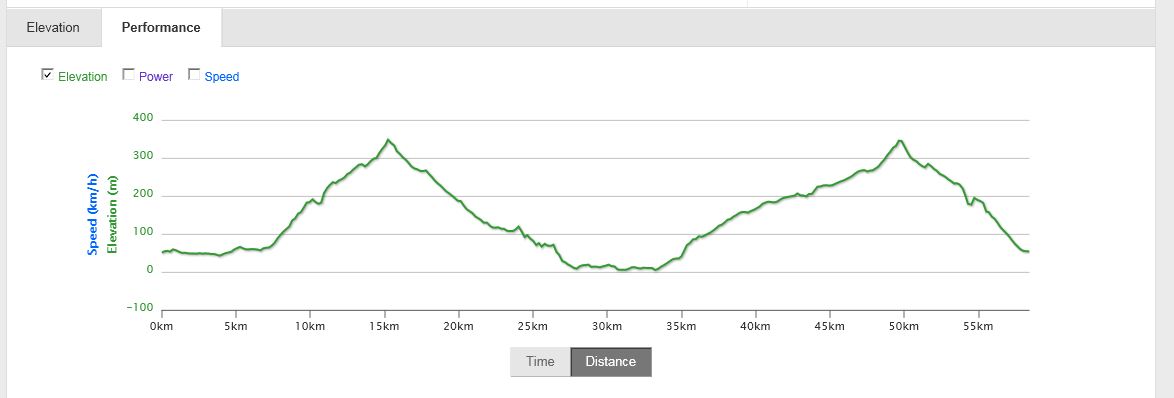
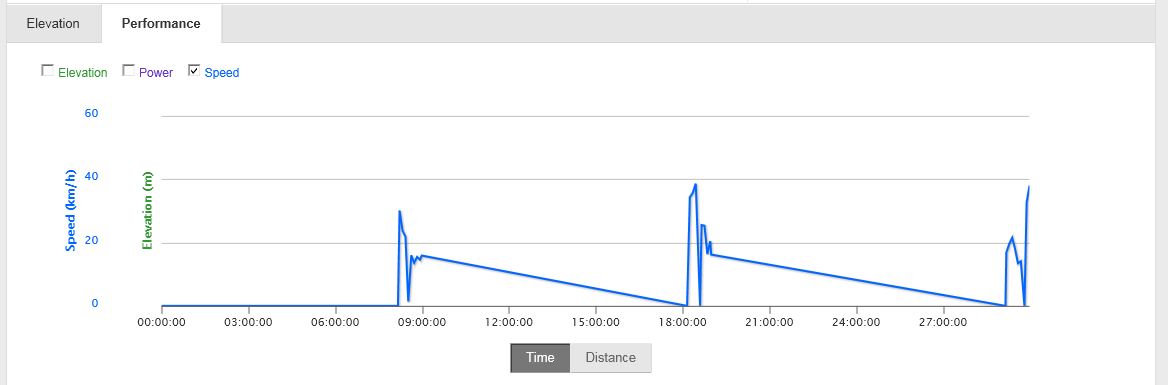
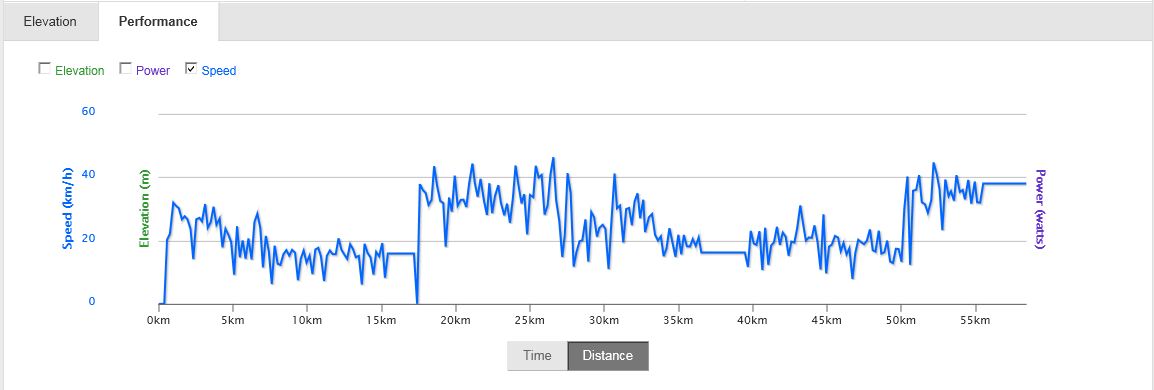
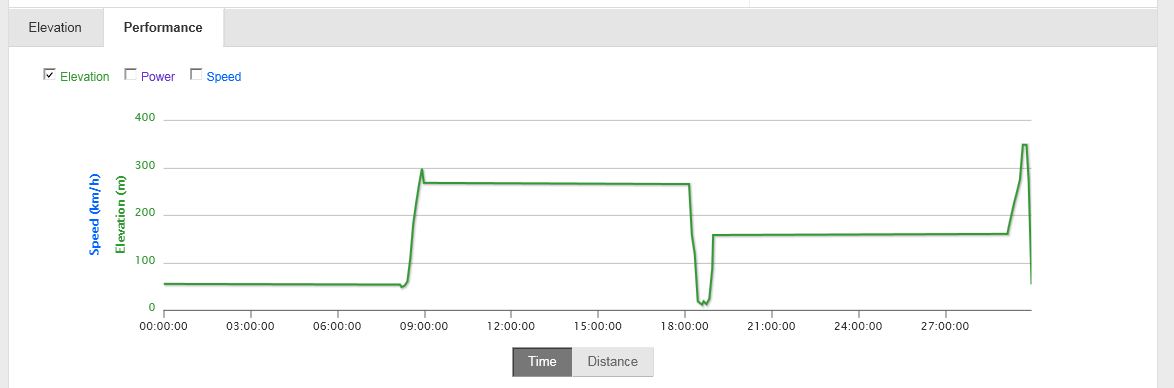
    Actually I've discovered that the Speed and Elevation information has gone into Strava. It is the Time data that seems to be the problem. When I click on performance and leave it on time only a handful of data points seem to have come into Strava. BUT if I click on Distance rather than time then the Speed and elevation data appears. So the problem is how it reads the time.

    Here have some images of the graphs to display what I mean. I'm a beginner to Road cycling so be kind when looking at how fast/slow I got up the climbs :-)


    And here is the .gpx file I uploaded. I notice also that even though the unit was set to GMT+1 it recorded the as GMT

    Vee Sept 1 2013 formatted.gpx


    Update: Trying to fix the uploaded photos:

    Vee Sept 1 2013 formatted.gpx


    performance TIME elevation.JPG

    performance DISTANCE elevation.JPG

    performance TIME speed.JPG

    performance DISTANCE speed.JPG


  • Advertisement
  • Registered Users, Registered Users 2 Posts: 481 ✭✭Mechanic365


    touts wrote: »
    Actually I've discovered that the Speed and Elevation information has gone into Strava. It is the Time data that seems to be the problem. When I click on performance and leave it on time only a handful of data points seem to have come into Strava. BUT if I click on Distance rather than time then the Speed and elevation data appears. So the problem is how it reads the time.

    Here have some images of the graphs to display what I mean. I'm a beginner to Road cycling so be kind when looking at how fast/slow I got up the climbs :-)

    Attachment not found.

    Attachment not found.

    Attachment not found.

    Attachment not found.

    And here is the .gpx file I uploaded. I notice also that even though the unit was set to GMT+1 it recorded the as GMT

    Vee Sept 1 2013 formatted.gpx

    Not being rude but the photos arent there on my phone anyways just a few numbers. That is a royal pain but it sounds like a problem with the conversion process judging by the last few posts..


  • Registered Users, Registered Users 2 Posts: 481 ✭✭Mechanic365


    ezra_pound wrote: »
    Typically gps elevation data is not accurate.

    I have the Garmin 510 and my last spin ended up at a 900meter elevation gain but when i checked strava after uploading. (auto upload) it said 1200. but the graph didnt have any irregularities or maybe it uses data from google maps for elevation


  • Registered Users, Registered Users 2 Posts: 6,817 ✭✭✭touts


    Not being rude but the photos arent there on my phone anyways just a few numbers. That is a royal pain but it sounds like a problem with the conversion process judging by the last few posts..

    I think the upload of the photos didn't work. I uploaded them again.


  • Registered Users, Registered Users 2 Posts: 1,012 ✭✭✭route66


    touts wrote: »
    I think the upload of the photos didn't work. I uploaded them again.

    GPX attachment still broken ...


  • Registered Users, Registered Users 2 Posts: 643 ✭✭✭rab!dmonkey


    TheBlaaMan wrote: »
    At the end of the day (as Roy would say...) if the elevation data recorded by the device is rubbish, nothing is going to make it less so, and Strava can only be expected to work with what it is given......
    Strava knows that GPS-calculated elevation is not great, so they have their own elevation databases which they use. There are a few articles on it in their support pages.


  • Registered Users, Registered Users 2 Posts: 14,371 ✭✭✭✭jimmycrackcorm


    I'm confused about the GPS computer - can you actually use it for navigation - i.e. plan and set up a route and will it somehow give you turn directions? Or is it simply a GPS tracker


  • Registered Users, Registered Users 2 Posts: 7,224 ✭✭✭alaimacerc


    Haven't used it myself, so this might be blind leading the blind here, but my understanding is that it directs you via pointers and distances to waypoints. So as far as using it for navigation, it's exactly as good as the number and quality of the waypoints you program it with, relative to the trickiness/twistiness of the route.


  • Registered Users, Registered Users 2 Posts: 695 ✭✭✭Get In There


    Dropped the device over the weekend and now I can't return it due to a minor crack in the screen. It's a good thing in a way cos I then had to learn to use it.

    I followed Joe's instructions on how to upload to Strava. I failed a couple of times owing to the fact I had a number of tracks on the device. I couldn't get to grips with deleting the tracks except the one I wanted. Everytime I did that, my attempt to upload onto Strava was unsuccessful. So I deleted all the tracks and started with the one ride. And with that data, I followed Joe's steps and it worked! Cheers Joe!!

    The moving time, I'm not sure about... Usually when I go out and cycle, there's about <50 seconds difference between the elapsed time and the actual moving time. However the data on Strava shows them both to be identical. I'm pretty sure when I arrived in Ashbourne, I forgot to stop the recording until about a minute later. I'll take it to assume that the device is not able to calculate your moving time?


  • Closed Accounts Posts: 39 yosserhughes


    BadCharlie wrote: »
    Is the Crivit Sports Upright Floor Pump any good ? Its so cheap at €7 it might not last long im thinking.
    Waste of money!


  • Advertisement
  • Registered Users, Registered Users 2 Posts: 14,371 ✭✭✭✭jimmycrackcorm


    alaimacerc wrote: »
    Haven't used it myself, so this might be blind leading the blind here, but my understanding is that it directs you via pointers and distances to waypoints. So as far as using it for navigation, it's exactly as good as the number and quality of the waypoints you program it with, relative to the trickiness/twistiness of the route.

    I think I'll stick to using my phone with a battery extender so


Advertisement
Advertisement