Advertisement
Help Keep Boards Alive. Support us by going ad free today. See here: https://subscriptions.boards.ie/.
https://www.boards.ie/group/1878-subscribers-forum

Private Group for paid up members of Boards.ie. Join the club.
Hi all, please see this major site announcement: https://www.boards.ie/discussion/2058427594/boards-ie-2026

Ibood: Iomega StorCenter Dual Bay NAS server with 4TB €269.95

Comments

  • Registered Users, Registered Users 2 Posts: 31 sv650


  • Registered Users, Registered Users 2 Posts: 1,267 ✭✭✭00sully


    oooh how quick is ibood to answer emails? if this is 4tb it'll be my first ibood!!


  • Registered Users, Registered Users 2, Paid Member Posts: 8,366 ✭✭✭Soarer


    All well and good lads, but is it any good?

    Thought Iomega were supposed to be fairly unreliable? Wouldn't be happy with losing 4tb of data!:eek:


  • Registered Users, Registered Users 2 Posts: 1,267 ✭✭✭00sully


    read a few reviews since I saw this alert - seems to get good'uns to be fair!

    http://www.techreviewsource.com/networking/iomega-storcenter-ix2-200-4tb

    http://reviews.cnet.com/network-storage/iomega-storcenter-ix2-200/4505-3382_7-33788177.html

    seems to run quite hot tho which im fine with. 3 year warranty too - I've had drives fail on me before and got the data back without too much hassle on the warranty :)

    think I'll plump for this - it does inc the 4tb by all accounts (still haven't gotten that confirmed with ibood tho im 99% sure)


  • Registered Users, Registered Users 2 Posts: 33 dricco


    It's only a 2 bay nas box. Which means you have to use raid 1. So you'll only get 2tb of real space. Better buy a 4 bay box and use raid 5, way less space lost


  • Advertisement
  • Registered Users, Registered Users 2 Posts: 1,267 ✭✭✭00sully


    you got one to recommend drico?

    I think you can put this one in Raid0 to utilise the 4tb, means you lose redunancy but sure it's a double redundancy for me so I think I can live with that.


  • Registered Users, Registered Users 2 Posts: 33 dricco


    I'm sure you can but if a hd fails you loose everything. I lost all my data before and I'll never make the same mistake again.

    Personally I would go for this - http://www.serversdirect.co.uk/HP_ProLiant_Neo_N36L_Micro_Server__612275-421/version.asp?
    or this
    http://www.kikatek.com/product_info.php?products_id=40152

    and add the drives myself.


  • Closed Accounts Posts: 6,706 ✭✭✭Voodu Child


    Soarer wrote: »
    Thought Iomega were supposed to be fairly unreliable? Wouldn't be happy with losing 4tb of data!:eek:

    Iomega don't make hard-drives, they use various brands of HDD in their products. This probably has Seagate drives in it.


  • Registered Users, Registered Users 2 Posts: 116 ✭✭smiddyboy


    Gone for this! I have been after some network storage for a while and this ticks all the boxes for me.

    Thanks to the OP.


  • Registered Users, Registered Users 2, Paid Member Posts: 1,135 ✭✭✭user1842


    Just before I checked iBood this morning I bought the below on Amazon:

    1 X D-Link ShareCenter Pulse 2-bay Network Storage Enclosure

    2 X Samsung F4 EcoGreen 2TB 32MB 5400RPM 3.5 inch SATA-II Internal Hard Drive - OEM

    Total was £204.62 which is approx €242.19 and free postage.

    Did I get a better deal or is the iomega a better NAS?, kinda kicking myself but at least I got it cheaper.


  • Advertisement
  • Registered Users, Registered Users 2 Posts: 31 sv650


    imho, RAID in a NAS box is pointless for home users. I only use it as a backup of data held on my main machine.
    RAID is designed for constant availability- it is not a backup solution.


  • Registered Users, Registered Users 2, Paid Member Posts: 1,135 ✭✭✭user1842


    sv650 wrote: »
    imho, RAID in a NAS box is pointless for home users. I only use it as a backup of data held on my main machine.
    RAID is designed for constant availability- it is not a backup solution.

    I would not say that. As you could be using a NAS as a media hub supplying your TV, computer etc, but you dont want a separate backup solution. Hence RAID 1 is a good solution as you never need to schedule backups and if a failure happens you have instant access to all your recent data.

    Although I do agree that RAID's main purpose is for high availability but backup is a nice feature for home users especially now you can get cheap RAIDs


  • Registered Users, Registered Users 2 Posts: 31 sv650


    I would not say that. As you could be using a NAS as a media hub supplying your TV, computer etc, but you dont want a separate backup solution. Hence RAID 1 is a good solution as you never need to schedule backups and if a failure happens you have instant access to all your recent data.

    Although I do agree that RAID's main purpose is for high availability but backup is a nice feature for home users especially now you can get cheap RAIDs
    Yes but it's not just disk failure. Failure of the NAS itself could easily happen: power supply, fan, controller board etc- RAID won't save you from that.
    And if a drive did fail it could take a couple of days to complete a rebuild.
    I'm not saying RAID is a bad idea, just that it makes no sense for my needs... RAID and backup are 2 different things....


  • Registered Users, Registered Users 2, Paid Member Posts: 1,135 ✭✭✭user1842


    sv650 wrote: »
    Yes but it's not just disk failure. Failure of the NAS itself could easily happen: power supply, fan, controller board etc- RAID won't save you from that.
    And if a drive did fail it could take a couple of days to complete a rebuild.
    I'm not saying RAID is a bad idea, just that it makes no sense for my needs... RAID and backup are 2 different things....

    True your RAID could fail but at least your data would still be intact unless it blew up or something :)

    Do most RAID's not have auto recovery now. Like if a drive fails, it informs you and you just swap it for a new one with no downtime. I could be wrong on this though?


  • Registered Users, Registered Users 2, Paid Member Posts: 3,456 ✭✭✭dnme


    If your data becomes corrupt, RAID will duplicate the corruption onto both disks :eek:


  • Registered Users, Registered Users 2, Paid Member Posts: 3,456 ✭✭✭dnme


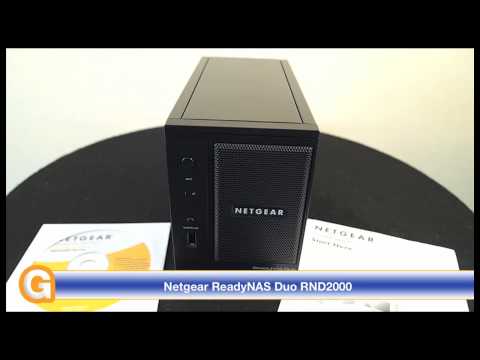
    Product Comparison: ix2-200 v Netgear ReadyNAS Duo RND2000


Advertisement
Advertisement