Advertisement
Help Keep Boards Alive. Support us by going ad free today. See here: https://subscriptions.boards.ie/.
https://www.boards.ie/group/1878-subscribers-forum

Private Group for paid up members of Boards.ie. Join the club.
Hi all, please see this major site announcement: https://www.boards.ie/discussion/2058427594/boards-ie-2026

Master Boot Record? How do I...?

  • 19-07-2010 08:08PM
    #1
    Moderators, Motoring & Transport Moderators, Music Moderators Posts: 12,615 Mod ✭✭✭✭


    I have several hard drives in my computer. The main drive is a 750gb sata, but I made a 50gb partition for the C drive. 700gb is the D drive for my documents etc.

    Usually every 6 months or so I reinstall xp - I can do that really quickly because of the partitons. I went to try to do this again but basically C & D do not appear as they normally would. I think this is because I gave Windows 7 a try and installed it onto a separate IDE hard drive I have for backup (F). I have done this before and it did not have this problem.

    I'm told I might have a problem with my master boot record. I had a virus a while back so this could have affected it.

    I'm wondering what I can do to fix this and get it back to my C drive with XP and my D drive with My Documents.

    Any ideas?


Comments

  • Closed Accounts Posts: 23,717 ✭✭✭✭JonathanAnon


    If you have a copy of fdisk and run fdisk /mbr this should do the job..

    http://support.microsoft.com/kb/69013

    What makes you think it is a problem with the MBR.. ?


  • Moderators, Motoring & Transport Moderators, Music Moderators Posts: 12,615 Mod ✭✭✭✭Zascar


    Thanks for that. OK how exactly do I use fdisk? from the command prompt?

    I was told it could be the MBR. If not, what else could it be??


  • Registered Users, Registered Users 2 Posts: 5,114 ✭✭✭corkcomp


    Zascar wrote: »
    basically C & D do not appear as they normally would.

    what exactly is the issue? are the partitions showing as different drive letters, or not at all?


  • Moderators, Motoring & Transport Moderators, Music Moderators Posts: 12,615 Mod ✭✭✭✭Zascar


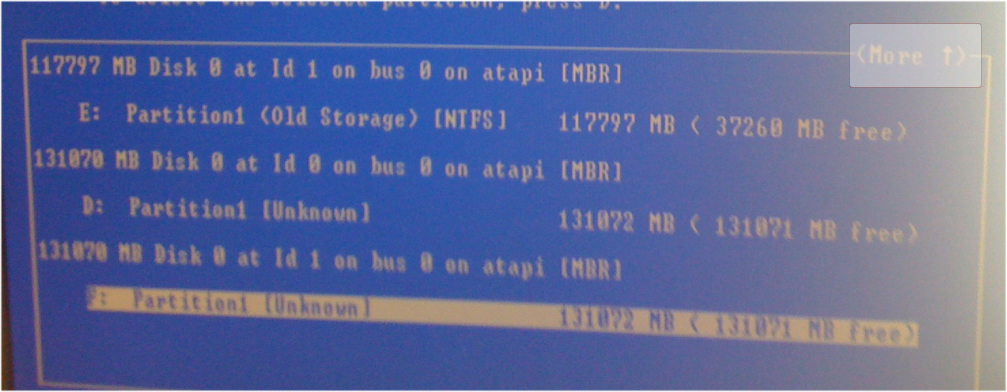
    This is what it looks like when I try to install
    bootrecord.jpg

    Usually there is C: (50gb), D: (700gb) and then E & F which are 120/180gb
    This is the pic from My Computer
    drives.jpg


  • Closed Accounts Posts: 23,717 ✭✭✭✭JonathanAnon


    If you hit the up arrow on that screen will it show you the other partitions..? there seems to be a MORE option to the right of the screen

    moresign.jpg


  • Advertisement
Advertisement
Advertisement