Advertisement
Help Keep Boards Alive. Support us by going ad free today. See here: https://subscriptions.boards.ie/.
https://www.boards.ie/group/1878-subscribers-forum

Private Group for paid up members of Boards.ie. Join the club.
Hi all, please see this major site announcement: https://www.boards.ie/discussion/2058427594/boards-ie-2026

Google searches being hijacked?

  • 01-05-2010 06:55PM
    #1
    Registered Users, Registered Users 2 Posts: 236 ✭✭


    Hi All,
    Using google searches on firefox, and when I click into the link I'm searching the page gets redirected to this other search website or to some other spam website. Clearly something infected the computer, but AVG says everything is clean.

    Any suggestions?Any way I can reboot or reload firefox or will this help?

    Thanks


Comments

  • Site Banned Posts: 1,167 ✭✭✭ASJ112


    Download ComboFix here :

    Link 1
    Link 2


    * IMPORTANT !!! Save ComboFix.exe to your Desktop


    • Disable your AntiVirus and AntiSpyware applications, usually via a right click on the System Tray icon. They may otherwise interfere with our tools. Here is a guide on how to disable them

      Click me

    • Double click on ComboFix.exe & follow the prompts.

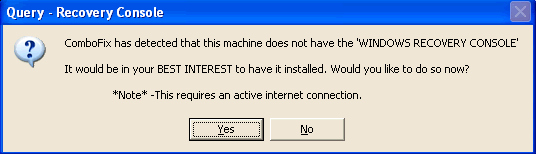
    • As part of it's process, ComboFix will check to see if the Microsoft Windows Recovery Console is installed. With malware infections being as they are today, it's strongly recommended to have this pre-installed on your machine before doing any malware removal. It will allow you to boot up into a special recovery/repair mode that will allow us to more easily help you should your computer have a problem after an attempted removal of malware.

    • Follow the prompts to allow ComboFix to download and install the Microsoft Windows Recovery Console, and when prompted, agree to the End-User License Agreement to install the Microsoft Windows Recovery Console.


    **Please note: If the Microsoft Windows Recovery Console is already installed, ComboFix will continue it's malware removal procedures.

    RcAuto1.gif


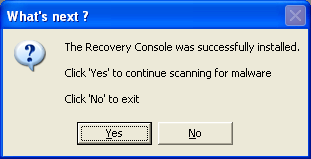
    Once the Microsoft Windows Recovery Console is installed using ComboFix, you should see the following message:

    whatnext.png


    Click on Yes, to continue scanning for malware.

    When finished, it shall produce a log for you. Please include the C:\ComboFix.txt log in your next reply.


Advertisement
Advertisement