Advertisement
Help Keep Boards Alive. Support us by going ad free today. See here: https://subscriptions.boards.ie/.
https://www.boards.ie/group/1878-subscribers-forum

Private Group for paid up members of Boards.ie. Join the club.
Hi all, please see this major site announcement: https://www.boards.ie/discussion/2058427594/boards-ie-2026

Logitech cordless keyboard+mouse

  • 04-12-2006 10:36PM
    #1
    Registered Users, Registered Users 2 Posts: 3,852 ✭✭✭


    Hey guys.

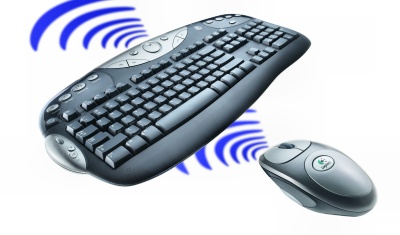
    My friend [that lucky rich mofo] today bought a new 24 imac, complete with wireless mouse and keyboard etc. Anyway, he gave me his old Logitech wireless keyboard and mouse for a tenner, which seemed reasonable.

    Ive no idea what models they are but suspect they came paired.

    They look like this:

    4-ondes.jpg

    .. and everything works fine, accept annoyingly, alt and apple are reversed.

    Anyways, there are loads of extra media buttons. The volume one works, as does the little scroll wheel on the left.

    I had a look here:
    http://www.logitech.com/index.cfm/downloads/categories/CA/EN,CRID=1796

    but cant find the keyboard/mouse listed. I was hoping to get the drivers which might give me more functionality from the media buttons aswell as the 3rd mouse button. Anyone any ideas?

    Thanks.


Comments

  • Registered Users, Registered Users 2 Posts: 3,852 ✭✭✭condra


    or even if anyone knew how i could somehow swap the apple and alt buttons. that would be super kool.


  • Closed Accounts Posts: 2,784 ✭✭✭Urban Weigl


    Google. :)


  • Registered Users, Registered Users 2 Posts: 3,852 ✭✭✭condra


    Urban Weigl your reply is unhelpful and patronising.

    I know what google is and couldnt get the information I needed, hence I came here.

    You may not have realised but forums are often used by people who have questions when looking for help solving specific problems. By the way, patronising means talking down to people.

    __

    I figured out how to swap the alt and apple buttons, so thats brill.

    Still curious as to wether or not I might be able to make some use of the many media buttons, but cant find the appropriate drivers.
    Either way Im chuffed that the keyboard works so well.


  • Closed Accounts Posts: 58 ✭✭Fergob


    Hi Womoma,

    If you're having trouble looking for the drivers, phone the Logitech support line @ 01-6058357 and they'll sort you out.

    Regards,

    Ferg


Advertisement
Advertisement