Advertisement
Help Keep Boards Alive. Support us by going ad free today. See here: https://subscriptions.boards.ie/.
https://www.boards.ie/group/1878-subscribers-forum

Private Group for paid up members of Boards.ie. Join the club.
Hi all, please see this major site announcement: https://www.boards.ie/discussion/2058427594/boards-ie-2026

GoMo Fibre Broadband €29.99pm for Life

1567810

Comments

  • Registered Users, Registered Users 2 Posts: 1,728 ✭✭✭NotShero


    Yeah maybe just wait to see what GoMo say tomorrow. If they are still not being helpful, you could maybe try raising a complaint -

    Email - complaints@gomo.ie

    Phone - 1800 223 212

    https://gomo.ie/code-of-practice


  • Registered Users, Registered Users 2 Posts: 2,207 ✭✭✭leche solara


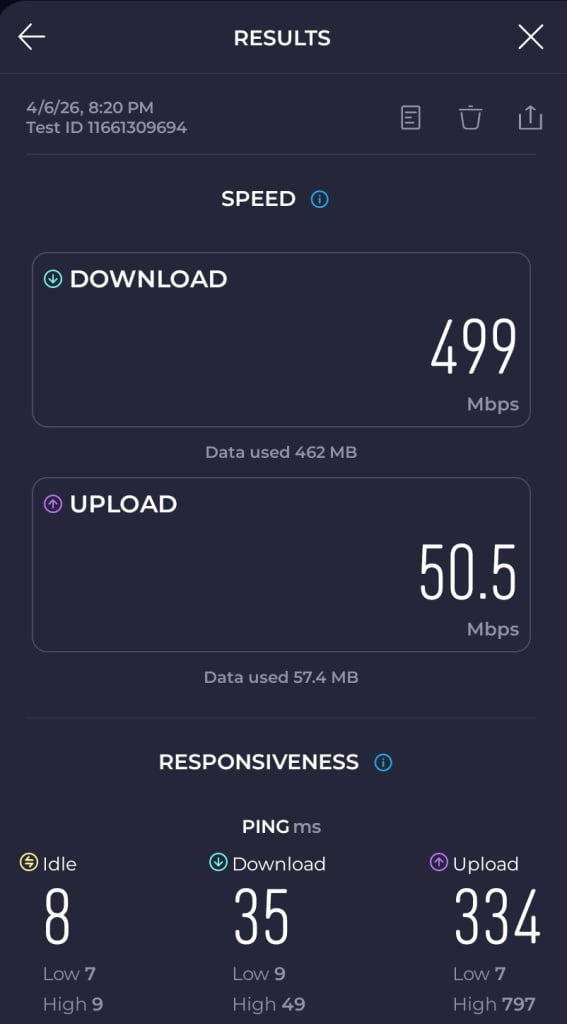
    Had my installation today and this is a WiFi speed test. Very happy with that. I don't think I'll need the booster.

    1000057161.jpg
    Post edited by leche solara on


  • Registered Users, Registered Users 2 Posts: 135 ✭✭MrSing


    I switched back to the vodafone router this evening and all looked good for about 30 minutes then the game became unplayable again.

    As I said already, everything was fine with vodafone but its not with gomo.

    When I got my new connection with gomo, they put in a new line. This new line has now been isolated as my problem.

    For €10 extra PM, Vodafone is obvioulsy the correct choice when it comes to having a BB connection that works, not some cheap BB provider that cuts costs hoping that you wont notice.

    On a sidenote, something that I have copped, If the ISP charges an install fee and has a 30 day rolling contract, stay away. This was a waste of my time and cost me more than I saved.


  • Registered Users, Registered Users 2 Posts: 135 ✭✭MrSing


    Put the VF router back in, same results.


  • Registered Users, Registered Users 2 Posts: 10,805 ✭✭✭✭CoBo55


    Obviously there's a problem with the new line that was installed. They aren't a cheap BB provider cutting costs they're reselling eir BB. Why was a new line installed?


  • Advertisement
  • Registered Users, Registered Users 2 Posts: 5,613 ✭✭✭wassie


    But its not the same as eir BB. Eir is a full reatil service, that also comes with things like human support and static IP if needed. Gomo is a fixed service offering, essentially a no frills version of eir including digital only support.

    For the average user this will be more than adequate. But this is still a good thing and hopefully it spurs more competition.


  • Registered Users, Registered Users 2 Posts: 675 ✭✭✭macguru


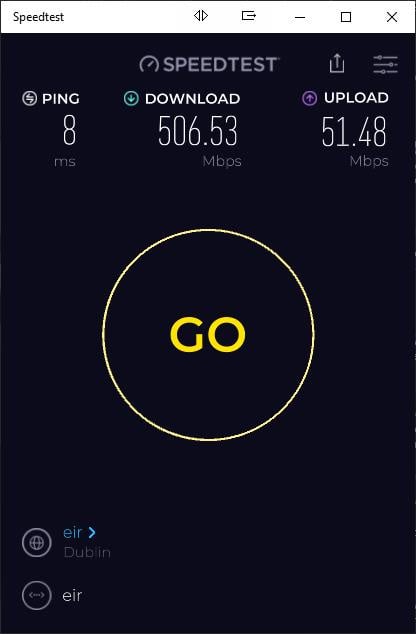
    Likewise, had it provisioned yesterday, getting 506Mbps down and 50Mbps up.

    M


  • Registered Users, Registered Users 2 Posts: 1,728 ✭✭✭NotShero


    It would have been the same expierence if you had went with eir themselves like CoBo55 has said. You might have gotten more help over the phone with eir but the connection itself will be the same. You could maybe ask GoMo to send out an engineer again to have a look. Did you have Vodafone through SIRO, NBI, Virgin FTTP before? As you've said, you've isolated the problem.


  • Registered Users, Registered Users 2 Posts: 135 ✭✭MrSing


    Siro but cant say that I have isolated the problem but it sure does seem that way.

    The existing line was put in for VF, GOMO put in their own. This is a 10 meter run to the manhole. I dont know why they put in a new line but they did.


  • Registered Users, Registered Users 2 Posts: 11 okwokw


    @MrSing in the fast.com test image it can be seen that you have an IPv6 IP address. I'm not sure if GoMo does CGNAT for IPv4 but if it does, that might explain what you're experiencing.

    When I was a VM customer, every year after getting a new contract I needed to ask support over their chat to get IPv4 instead of DS-LITE and also configured their modem in bridge modeand used my own router with OpenWRT.


  • Advertisement
  • Registered Users, Registered Users 2 Posts: 1,728 ✭✭✭NotShero


    We've determined a few posts up that like eir, there isn't CGNAT.


  • Registered Users, Registered Users 2 Posts: 1,728 ✭✭✭NotShero


    SIRO and open eir are separate networks, they don't use each other's fibre, ONT etc.

    GoMo is only available through open eir FTTP.

    The next step, if open eir was the only network available to you, would be to switch provider through open eir. This would rule out if it was a core network issue with eir for you or your connection to the handover point.

    But because you already have a working SIRO connection, you won't want to go through all that.


  • Registered Users, Registered Users 2 Posts: 135 ✭✭MrSing


    So, the issue that I am having can't be resolved while on GOMO?


  • Registered Users, Registered Users 2 Posts: 1,728 ✭✭✭NotShero


    No it could be, but it would be easier to narrow down with a switch of provider through open eir. It changes things when you haven't had a provider through open eir before, there's more variables.

    I'd maybe ask GoMo to send out an engineer to double check the connection again.

    You could maybe try running a continuous ping with CMD on Windows - ping -t 8.8.8.8

    Or download PingPlotter or Orb to monitor, on a wired connection.

    https://www.pingplotter.com/download/

    https://orb.net/get-orb

    Post edited by NotShero on


  • Registered Users, Registered Users 2 Posts: 8,583 ✭✭✭Gadgetman496


    What do people think GoMo’s next move will be after the dust settles on their broadband introductory offer?

    Will they introduce a speed increase to 1GB similar to what they eventually did with their mobile offering?

    Will they ever introduce a VOIP phone option?

    "Everybody is a genius. But if you judge a fish by its ability to climb a tree, it will live its whole life believing that it is stupid."


  • Registered Users, Registered Users 2 Posts: 675 ✭✭✭macguru


    They may do similar to the mobile offering, as in, increase the price slightly but still offer it for life, they may offer a VOIP call option as their routers support it (they still have the Eir SIP profile on the FXS ports) this is locked down and not editable, I will log a support call to see if they can be unlocked so I can use it instead of my current ATA (not at all hopeful though).

    M


  • Moderators, Regional Abroad Moderators Posts: 2,647 Mod ✭✭✭✭Nigel Fairservice


    We have a Siro ONT box in our living room. The ESB meter box is just behind where it is on the outside of the house. The Gomo website says their internet is available at my house. Is it just a case of having the ONT box replaced with an Eir one? The house is new and I'm not mad on any extra holes being drilled in the walls.


  • Registered Users, Registered Users 2 Posts: 1,728 ✭✭✭NotShero


    No the SIRO ONT won't be replaced, you will need another fibre cable and ONT installed for open eir FTTP. It probably will follow the phone line into your house or up into your telecom ETU box on the outside of your house. The fibre cable won't come up into the ESB meter box like SIRO.


  • Registered Users, Registered Users 2, Paid Member Posts: 41,951 ✭✭✭✭Hotblack Desiato


    These days the average user needs gaming so it seems strange if it doesn't "just work".

    I wonder would the outcome be any different with an actual Xbox (or PS) rather than the Xbox app on PC.

    I'm partial to your abracadabra
    I'm raptured by the joy of it all


  • Registered Users, Registered Users 2 Posts: 10,805 ✭✭✭✭CoBo55


    Gaming is being done here without any complaints, believe me Kidults can whine for Ireland, if there was anything wrong I'd be hearing about it.


  • Advertisement
  • Registered Users, Registered Users 2 Posts: 675 ✭✭✭macguru


    Not a runner, they won't unrestrict the FXS templates (currently have an Eir config on them) response from GoMo below:

    "Unfortunately we cannot change the modems or un-restrict them from this side, how they come are how we intend to currently have them. Apologies for any inconvenience"

    M


  • Registered Users, Registered Users 2 Posts: 1,121 ✭✭✭wheresmybeaver


    Registered last week for Gomo fibre and had the install today.

    Had actually still been using FTTC (VDSL) with Vodafone for years, at 50 euro per month. Might have been the last one in the estate to move to full FTTH but the VDSL suited fine for years. The Openeir engineer did a very neat install

    It's behaving pretty reliably at the moment - the ONT works fine with my Unifi UDR using DHCP and VLAN tag 10.

    No issues with XBOX gaming, and performance is reliably around 450Mb down / 50Mb up. Might need a few weeks or months to make a final impression but for now this seems to be really good value.


  • Registered Users, Registered Users 2 Posts: 5,613 ✭✭✭wassie


    Your latency (ping) should be improved for your gaming. FTTH also more stable than VDSL. You wont look back!


  • Registered Users, Registered Users 2 Posts: 8,583 ✭✭✭Gadgetman496


    Finally got around to installing a new network cable from beside the ONT in the hall to my desk at the location I originally hoped to have the router installed, using two Keystone jack faceplates and back boxes. I now have the option to place the router in either location. I can now have a wired Ethernet connection to my Desktop regardless of which location the router is placed.

    Desktop wired speed test at my desk via new cable:

    GoMo Speeds on Cable.JPG
    Post edited by Gadgetman496 on

    "Everybody is a genius. But if you judge a fish by its ability to climb a tree, it will live its whole life believing that it is stupid."


  • Registered Users, Registered Users 2 Posts: 10,805 ✭✭✭✭CoBo55


  • Registered Users, Registered Users 2 Posts: 1,822 ✭✭✭youngblood


    Maybe someone here can help with a few questions.

    I upgraded with Eir last year, they installed a line, drilled hole and put in a little box. They supplied a modem but at the time it would not connect with either my Chromecast or other WiFi plugs so I ended up plugging back in my old modem. It's been relatively reliable for streaming, fire stick etc.

    If I change you gomo will they need to drill another line in?

    Will they supply a different modem/router?

    If they do supply a modem/router can I presume they operate on a 2.5g WiFi? That's what I think the plugs etc used as they wouldn't connect to the"new" modem which only had 5g WiFi (hence I went back to old modem)

    Anything else I should be aware of making the switch?

    You may gather I'm not that techie

    Any info appreciated


  • Registered Users, Registered Users 2 Posts: 1,728 ✭✭✭NotShero


    It depends if you have eir through open eir or NBI. There might be a logo on the ONT box on the wall. If you want to post a picture of it, I'll be able to identify which it is.

    If you have eir through NBI currently, you'll need another fibre cable and ONT installed. But if you have eir through open eir, you'll just provide your UAN/CRN listed on the bill and it will just be a simple switch.

    You can check the ComReg broadband checker here also -

    https://www.comreg.ie/broadbandchecker

    The router will be the same router previously provided by eir, the F3500. Yes, you can't split the 2.4 and 5GHz bands on that router so some smart devices struggle to connect to it. You can continue using the router you are using now or get your own router/mesh.

    You can instead try disabling the 5GHz temporarily on the eir router provided, to connect your smart devices on 2.4GHz, and then re-enable it, that might work.


  • Registered Users, Registered Users 2 Posts: 10,805 ✭✭✭✭CoBo55


    An easier way is to create a new 2.4ghz guest network if you have problems, I've used that method with an oil tank monitor and it works perfectly. Also to guarantee that my laptop gets a 5ghz connection particularly when downloading torrents etc I also created a second 5ghz guest network.


  • Registered Users, Registered Users 2 Posts: 1,728 ✭✭✭NotShero


    The devices like the Chromecast mightn't be able to see devices on the main network though when connected to the guest network I would think.

    Edit: I suppose you could just connect all devices to the 2.4GHz & 5GHz guest networks instead, if they can both see each other's devices.

    Post edited by NotShero on


  • Advertisement
  • Registered Users, Registered Users 2 Posts: 675 ✭✭✭macguru


    The 3500 works fine on 2.4 GHz, you can name the networks differently or the same, I have an assortment of plugs, bulbs etc. in use and all working fine with the GoMo router (you could also just plug your old router into a LAN port of the 3500 and have both in play).

    M


Advertisement
Advertisement