Advertisement
Help Keep Boards Alive. Support us by going ad free today. See here: https://subscriptions.boards.ie/.
https://www.boards.ie/group/1878-subscribers-forum

Private Group for paid up members of Boards.ie. Join the club.
Hi all, please see this major site announcement: https://www.boards.ie/discussion/2058427594/boards-ie-2026

New home, old Phonewatch HKC system, how do we take control of it?

  • 20-05-2026 09:40AM
    #1
    Registered Users, Registered Users 2 Posts: 18


    Hello, thanks for reading,

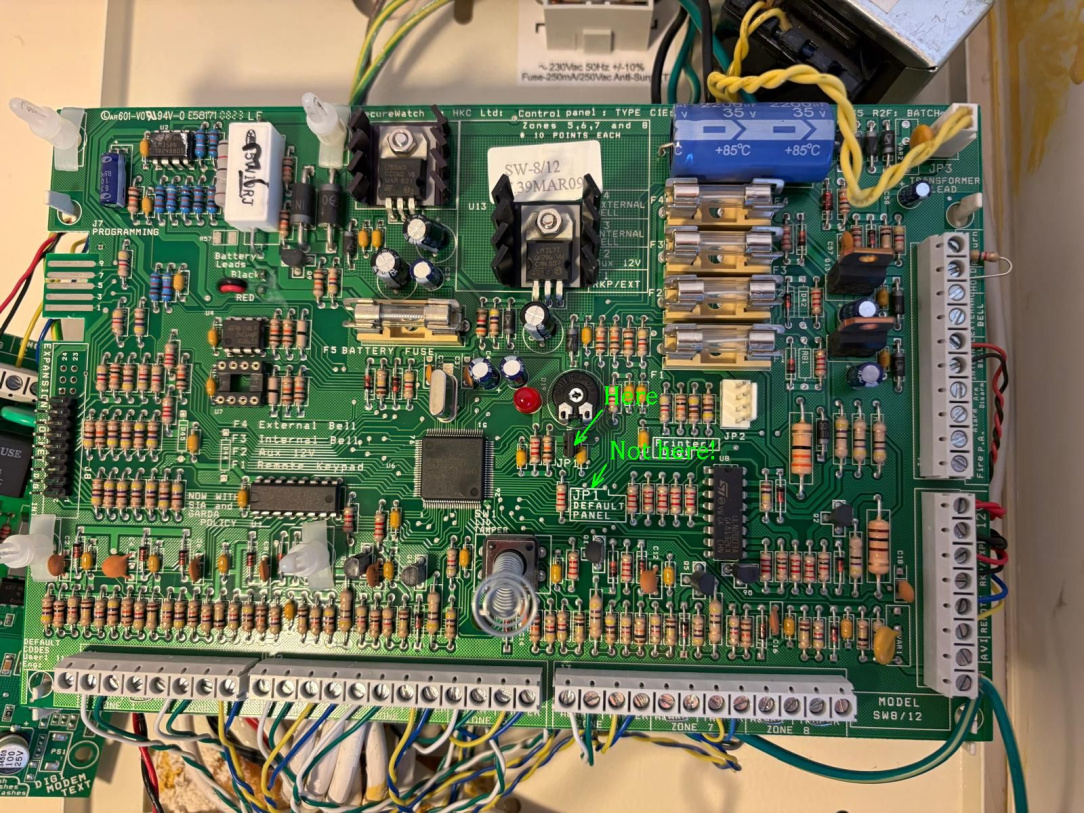
    My son and fiancee have bought their first home recently and it came with an old Phonewatch alarm in place. They can't afford to replace it or call an engineer yet. I believe it is a HKC SecureWatch 8/12 control system (running early v7 firmware). Control panel image attached.

    It has some errors, of course, and I'm researching before I visit them to help.

    3 of the errors I believe relate to low batteries. Zone beam errors and incorrect date and time. So when I replace the sensor and panel batteries I should be able to clear them up.

    The problem error I think I face is a "Line Fault" error. The error is no surprise, there's no phone line connected/live anymore! So we would like to turn modem/phone service off.

    We can't find or get an account code, which might help find the engineer code. I have read how to reset, default, the panel and code. But, I have also read that there could be a risk doing that! One article says that…

    "PhoneWatch routinely programmed an "Engineer Lock" into their software. If Engineer Lock is turned on, a hardware reset will completely clear the user settings, but it will not reset the installer code or unlock the panel. It will lock you out completely."

    Is this true?

    I'm not incompetent with home alarms. Years ago I installed my own hybrid system and maintained it for many years. I have the installation manual and could reprogram the system. But only if I'm not locked out completely!

    All help and advice about free options would be gratefully received. 🙂 As a young couple now with a mortgage, money is very tight! They just want to try and get this HKC running at its basic.

    Thanks again for your time and consideration,

    Martin

    Tagged:


Comments

  • Registered Users, Registered Users 2 Posts: 12,107 ✭✭✭✭altor


    For the line fault, you would need engineer access to disable.

    A default of the system will put the system back to default, worse case would be engineer locked.

    Then you would need to know what you are doing to default the system but it is doable regardless of what P.W. say.


  • Registered Users, Registered Users 2 Posts: 18 Greeb


    Thanks Altor,

    So if I default the system it is a real possibility that it could still be engineer locked? It's possible that the default Eng. code wont work and I wont be able to set the system and wireless PIR sensors back up?

    Darn! P.W. are harsh! I'll just have explain the risk and see if my son wants to take the gamble or not. If I clear up the other errors maybe they can live with the line fault.

    Thanks again


  • Registered Users, Registered Users 2 Posts: 12,107 ✭✭✭✭altor


    The system is not always locked but no harm in trying.

    If you have the user code, this will work on the power back up if it is locked, not locked, default codes.

    The PIR on the Securewatch panel would be wired, unless some sort of quickbridge was used.


  • Registered Users, Registered Users 2 Posts: 18 Greeb


    You were right of course Altor,

    My son didn't know what he was talking about! The PIR's are wired. He made an assumption, and gave me that assumption as fact! Just because he couldn't see the wires!

    After my first visit and seeing the system first hand I found too that the other "errors" he said it had were not errors at all, just information!

    The only true error is the line fault. They will live with it until I find a solution or they can afford to get P.W. back in or another installer.

    It turned out too that I couldn't default the system. I was expecting to see a couple of pins to jump for a reset, but I didn't! 'll try to do some more research. But we can take our time now.


  • Registered Users, Registered Users 2 Posts: 18 Greeb


    I found the "default Panel" place already. Using pictures I took I can see it clearly now on big screen!
    I was looking for jumper pins with the text. When I should have been looking for text first! JP1, and it's just two solder filled holes.
    Time to get out the soldering iron! To add something a bit easier to use as a jumper.


  • Advertisement
  • Registered Users, Registered Users 2 Posts: 270 ✭✭davidconroy46


    It is a hardwired system, 610 or 812. Th

    if the panel will not be locked. You will remove default jumper. Default panel unfortunately you will loose everything. It will need to be reprogrammed. If hardwired you will more than lightly have ID sensors on doors and windows possibly a standard pir. Check zones in panel . Best of look


  • Registered Users, Registered Users 2 Posts: 12,107 ✭✭✭✭altor


    The JP1 should have a tab over the 2 pins that pulls off.

    Once you remove this link, then down power the system, battery and mains, and power back up with the link removed, the system will either give you the option to default or say engineer locked on the keypad.

    Default codes will work also if not engineer locked.


  • Registered Users, Registered Users 2 Posts: 18 Greeb


    Doh! I see it now!

    I was looking at the full text "JP1 DEFAULT PANEL". When there is a link at "JP1" just above it.

    Make so much more sense, I'd never seen a board were easy links (jumpers) weren't easy to add or remove. Usually I find too that you have to add a link, so I was looking for empty pins. It's nice to learn new things 🙂

    Thanks again Altor!

    AL5 JP1 Real Place.jpg


  • Registered Users, Registered Users 2 Posts: 12,107 ✭✭✭✭altor


Advertisement
Advertisement