Advertisement
Help Keep Boards Alive. Support us by going ad free today. See here: https://subscriptions.boards.ie/.
https://www.boards.ie/group/1878-subscribers-forum

Private Group for paid up members of Boards.ie. Join the club.
Hi all, please see this major site announcement: https://www.boards.ie/discussion/2058427594/boards-ie-2026

Solis inverter settings

12526272931

Comments

  • Registered Users, Registered Users 2 Posts: 108 ✭✭AntonP


    what is the BMS telling to the inverter ? Is this the battery’s BMS or what? If you see 7A BMS then the batteries controller is the problem not the inverter


    note that from certain percentage the batteries limit what you can charge to them. Currently my batteries from 95% upwards report the usual max charge but the inverter will only push 50% of that total the batteries. I have a ticket with them to get that solved as that is their firmware new behaviour ( that is not good ! )


  • Registered Users, Registered Users 2 Posts: 440 ✭✭nephster


    For the archive… this now seems to be fixed. From what I can tell, I can now charge and discharge at 100A (or close to) - will keep an eye on what happens when nearing full.

    Fixing this took my installer's wholesaler agent (Daniel in Solartricity) contacting Solis as I was getting no joy directly with Solis on my ticket. He says that there must have been a hidden setting turned on somewhere in this new firmware.


  • Registered Users, Registered Users 2 Posts: 108 ✭✭AntonP


    charging from 95% onwards will only happen at 50% of what the BMS allows. They have a bug in the firmware.


  • Registered Users, Registered Users 2 Posts: 1,035 ✭✭✭homewardbound11


    IMG_4603.jpeg

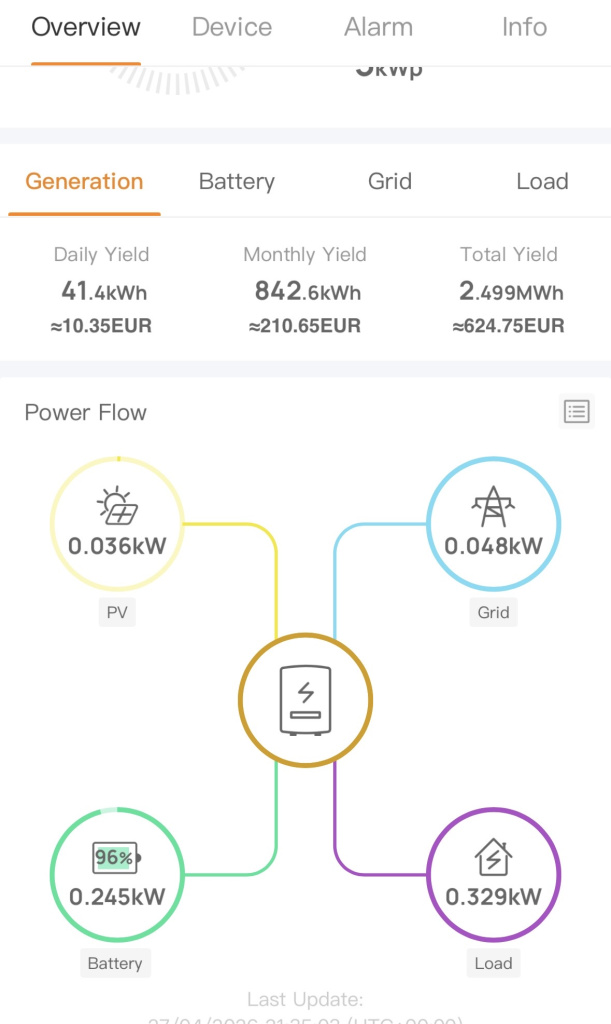
    Since a recent upgrade , the solis s5 inverter has started allowing 0.048 kw from the grid when the battery should be providing everything . Last time the grid calibration of -10 seemed to work . This time it’s not stopping the trickle power of 48 w being drawn from the grid . Any ideas?


  • Registered Users, Registered Users 2 Posts: 70 ✭✭dessertspoon


    Hi

    I had the same issue that is now solved but I forgot to update this thread.

    You need to disable “Battery Saving” in the Battery settings section.

    For some reason, it defaults to Enabled in the latest firmware update.

    As far as I understand it; this setting allows the inverter to use the grid to power itself rather than taking battery power to do it, hence the name “Battery Saving”.

    Once disabled, I found a grid Export Calibration offset value of 5W is perfect to ensure there is no unwanted import from the grid.


  • Advertisement
  • Registered Users, Registered Users 2 Posts: 1,035 ✭✭✭homewardbound11


    unfortunately battery saving was disabled on mine . I’ve my calibration set to 10w. I hadn’t noticed in battery settings a new item “recovery” it is set at 1% but I don’t know what’s it purpose .


  • Registered Users, Registered Users 2 Posts: 70 ✭✭dessertspoon


    Hi guys

    Trying to configure my solis to discharge the battery to 10% right before the cheap pinergy ev window at 2am.

    Ive set a discharge period of 00:30 to 02:00. There are two scenarios I’d like a solution to:

    1. Discharge window insufficient to fully discharge battery. Eg. SOC goes from 80% to just 30%. I can extend the window but that increases the occurrence of scenario 2 below…
    2. Battery SOC started the window lower at say 50% and discharges to 10% well before 2am which means the house load gets supported by the expensive grid import.

    Any suggestions? Can I use the SolisCloud API to change the window daily?


  • Registered Users, Registered Users 2 Posts: 4,125 ✭✭✭pureza


    I think that will bring your battery up to 10% or whatever level that’s needed as a base level and it will do it from grid power if there’s no solar

    I don’t know though


  • Registered Users, Registered Users 2 Posts: 440 ✭✭nephster


    I'm using Home Assistant to do this; normal discharge time is from 00:30 to 1:59, to 10% (my Wecos will drop to this from say 70% within the time), but I have an automation that stops this if the time is before 1:30 and the charge hits 15% to leave some juice. So if it is already below 15% at 00:30 it won't force discharge at all.


  • Registered Users, Registered Users 2 Posts: 70 ✭✭dessertspoon


    Thanks that is good to hear it is possible.

    I assume HA is using the SolisCloud API?

    Can I ask; to prevent the discharge in your scenario (15% floor), do you disable that discharge slot? And then have to re-enable it the next day or when? Or is it not done through the slots?


  • Advertisement
  • Registered Users, Registered Users 2 Posts: 440 ✭✭nephster


    Have been using the Solis integration at https://github.com/hultenvp/solis-sensor until now; after an inverter and datalogger update I have had lots of trouble with SolisCloud timing out so will be moving to local control with a diiferent integration imminently using the older datalogger than allows this. The firmware I used to be on switched slots off by having the same start/end time, so the "turn off" automation sets the end time to 00:30 to match the start time. And then I have an automation that runs the next day to pop it back to 1:59. I now have that repeat later in the day in case my datalogger has a wobble the first time.

    On the new firmware with six slots and an on/off switch now so may move to using the switch if that is exposed rather than my current end time approach. Am VERY much looking forward to local control and real-time reporting.

    Here's the automation that set's the end slot to 00:30 (was done using the GUI, originally):

    alias: Solis - set discharge time to 00:30
    description: ""
    triggers:

    • trigger: numeric_state
      entity_id:
      • sensor.solis_remaining_battery_capacity
        below: 15
        enabled: true
        conditions:
    • condition: time
      after: "18:30:00"
      before: "01:30:00"
      actions:
    • action: time.set_value
      metadata: {}
      data:
      time: "00:30:00"
      target:
      entity_id: time.solis_timed_discharge_end_1_2
    • action: button.press
      metadata: {}
      target:
      device_id: MYIDNUMBERWASHERE
      data: {}
      mode: single


  • Registered Users, Registered Users 2 Posts: 66 ✭✭Midlakelands


    Hi,

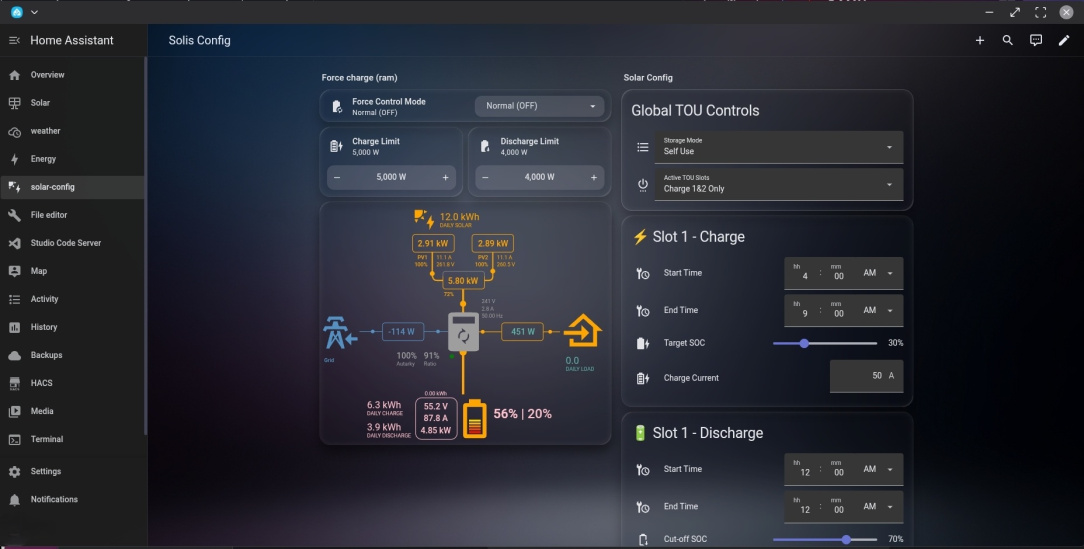
    I'm using that newer firmware like @nephster also,I was recently experimenting with registers to force the solis to charge/discharge through ram. That way you don't keep on flashing the chips which can lead to trouble (if you happen to do it a lot like say 1000's of times tbf) Anyway the way it works you can turn the device to charge/discharge for up to 5 minutes before it defaults back to whatever previous mode it was in. The 5 minutes is kind of like a deadmans switch in case your home assistant (or whatever controller) crashes so long story short you can hand over some or all of your control to home assistant.

    I have it rigged to run a default charge cycle and then if I feel like it I can write a cycle that overrides it until my specific target is met (ie keep on resetting the force charge deadman timeout). I currently have it setup in a gui for playing with.

    1000034756.jpg

    Heres the yaml that works for my S5 series solis inverter. Registry values might be different depending exactly on your model so please use with caution

    Integration used: github.com/davidrapan/ha-solarman with older datalogger that works with soliscloud and local access

    YAML snippet (I'm on a mobile so this isnt pasting great but I can attach my yaml file if anyone is interested)

    • group: Remote EMS Control (RAM)

    items:

    ◦ name: "Remote Control Force State"

    platform: select

    rule: 1

    code:

    read: 0x03

    write: 0x06

    registers: [43135]

    lookup:

    ▪ key: 0

    value: "Normal (OFF)"

    ▪ key: 1

    value: "Force Charge"

    ▪ key: 2

    value: "Force Discharge"

    icon: "mdi:battery-sync"

    - name: "Remote Force Charge Power"

    platform: number

    state_class: "measurement"

    uom: "W"

    scale: 10

    rule: 1

    code:

    read: 0x03

    write: 0x06

    registers: [43136]

    configurable:

    min: 0

    max: 10000

    step: 10

    icon: "mdi:battery-charging-high"

    - name: "Remote Force Discharge Power"

    platform: number

    state_class: "measurement"

    uom: "W"

    scale: 10

    rule: 1

    code:

    read: 0x03

    write: 0x06

    registers: [43129]

    configurable:

    min: 0

    max: 10000

    step: 10

    icon: "mdi:battery-arrow-down"


  • Registered Users, Registered Users 2 Posts: 70 ✭✭dessertspoon


    Thanks to you both, really appreciate the detail.

    Unfortunately I have the newer data logger which does not support RS485 over TCP.

    Is the SolisCloud API that bad as to be not fit for purpose?


  • Registered Users, Registered Users 2 Posts: 321 ✭✭ptogher14


    Are any of you using Com port 1 for local control? I have an S5 inverter and I believe com port 1 might expose modbus while still leaving the datalogger in place. I have a lilygo Canbus/modbus card ordered to trial it.

    @dessertspoon I wouldn't say the app is not fit for purpose. It can be a bit flaky though. I wrote script for sending commands, which waits until the entity is available before sending and then verifies it has been received. I found it works 99% of the time, but will still look it move to a local solution.


  • Registered Users, Registered Users 2 Posts: 3,352 ✭✭✭naughtysmurf


    Quick question please, on the solis app I can see that the charge time slot is between 02.00 - 06.00, if I change that to 02.00 - 08.00 will that ensure that the battery doesn’t allow discharge before 08.00 or is there another way to do it.

    A few of us are in the house & well up before 08.00 to shower / breakfast so I’m thinking no need to be taking anything from the battery before 08.00 as the same tariff is available from the grid that I used to charge the battery overnight

    Thanks


  • Registered Users, Registered Users 2 Posts: 66 ✭✭Midlakelands


    Hi @dessertspoon sorry just have not tried the remote cloud api as I wanted something local and with fast updates. No harm trying a few calls with it to see if it can work. You could go down the hardware hack path and create a device that will allow you to continue to use your datalogger and also have a local port to connect modus to as I've seen some mention of people doing it online but might be a bit of overkill for you.


  • Registered Users, Registered Users 2 Posts: 9,987 ✭✭✭micks_address


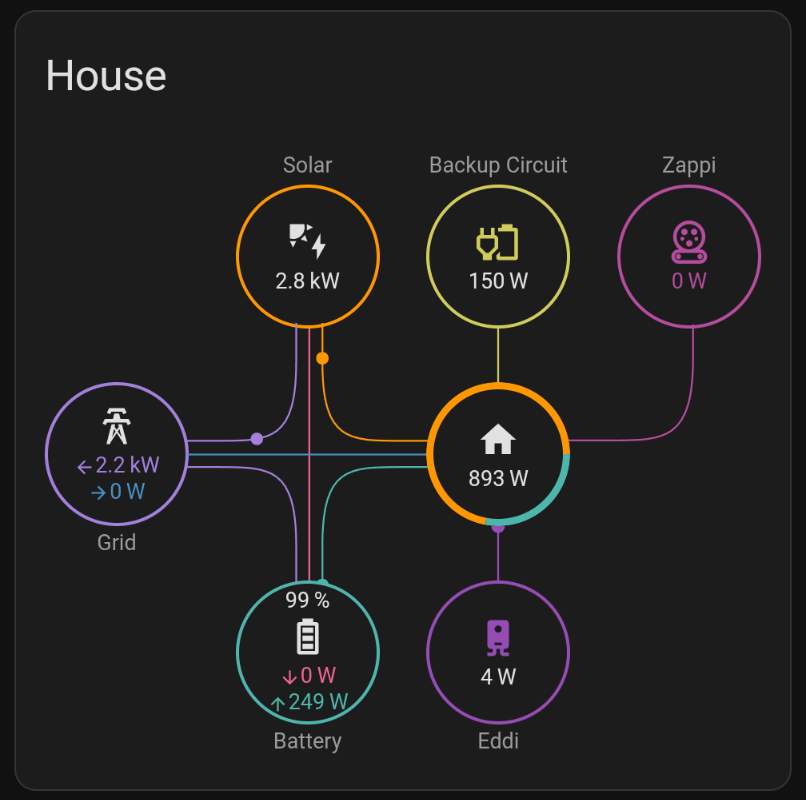
    What value do folks use for house load in home assistant for Solis?

    I'm using sensor.solis_inverter_123_solis_plant_total_consumption_power (123 replaced with my device) it doesn't always appear to accurately reflect the house load though

    1000037291.png


  • Moderators, Home & Garden Moderators Posts: 7,732 Mod ✭✭✭✭graememk


    you can calculate it.
    Grid should be Positive for import, Negative for export, battery can be combined to one +- number too if suitable.
    Its House load = grid[+-] + solar + battery discharge - Battery charge

    Example, your exporting 500w, solar is 3000w, battery charging at 2000w

    house load = -500 +3000 + 0(battery discharge) - 2000
    =500


  • Registered Users, Registered Users 2 Posts: 9,987 ✭✭✭micks_address


  • Registered Users, Registered Users 2, Paid Member Posts: 487 ✭✭mjatkey


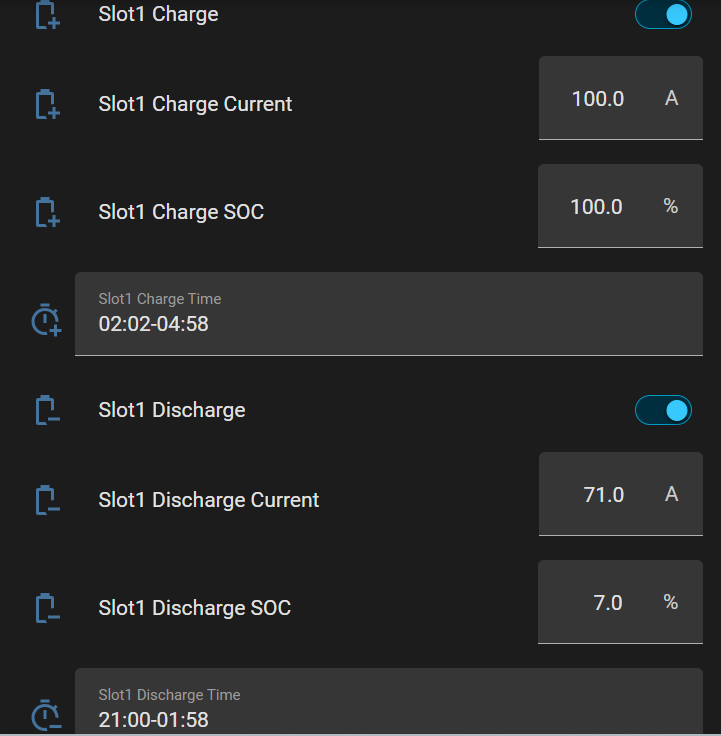
    If you update to the newest firmware you should get settable charge and discharge soc's.

    I don't use them (so not sure if they do actually work) as I use scripts on HA to set discharge current based on remaining battery and house loading.

    image.png

    🌞 6.96kWp PV System. West Dublin🌞


  • Advertisement
  • Registered Users, Registered Users 2 Posts: 440 ✭✭nephster


    They do work, but a wrinkle is that once you hit the stated SOC it is then going to start pulling from the grid to cover load for the rest of the slot, rather than continuing to keep discharging from battery to load down to your entry for the battery's limit of SOC as you might think. Or at least it did for me. Hence the need to responsively turn off the discharge slot in some way via an automation.

    Would like to see those scripts!


  • Registered Users, Registered Users 2 Posts: 9,987 ✭✭✭micks_address


    I have a simple enough automation that just disables the discharge slot once the soc goes below a certain value.. avoids the situation where you end up importing from the grid


  • Registered Users, Registered Users 2, Paid Member Posts: 487 ✭✭mjatkey


    Attached are the scripts I use, very basic just does a calculation first then sets the discharge based on remaining battery soc.

    There are probably much better ways of doing it but these work for me most of the time.

    Now I only use the web API to control the Solis (@60secs update) which like all things internet can be a bit flakey.

    As the apartment is not in constant use a lot of the time the set script is disabled.

    On the house in Dublin I do similar but with two ( really3) batteries the script uses the highest soc to do its current calculation.

    At the house the WECO's will discharge to 10% but the Seplos will only get to 15% which is fine as I can then get 23-24KwH back into them.

    I find ChatGPT very good and am sure I could probably improve the automation but currently it works out ok, might be different when/if we get dynamic pricing.

    🌞 6.96kWp PV System. West Dublin🌞


  • Registered Users, Registered Users 2, Paid Member Posts: 16,043 ✭✭✭✭josip


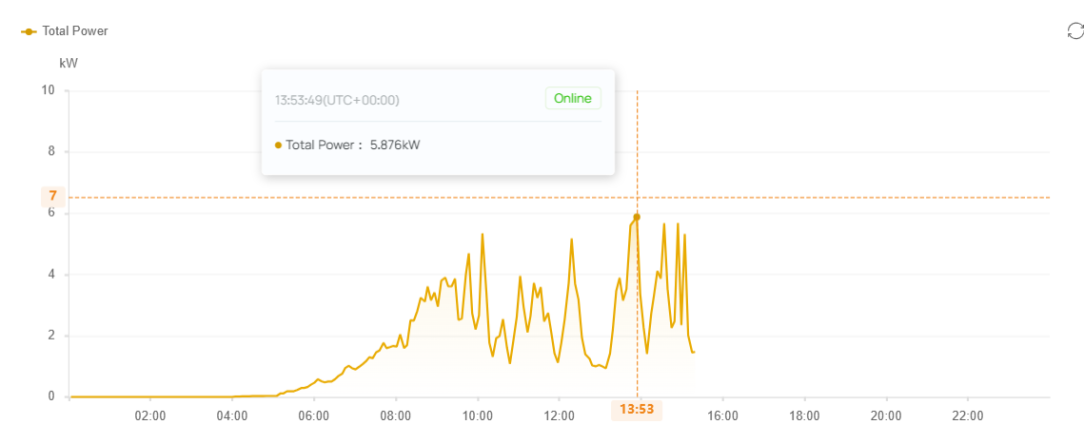
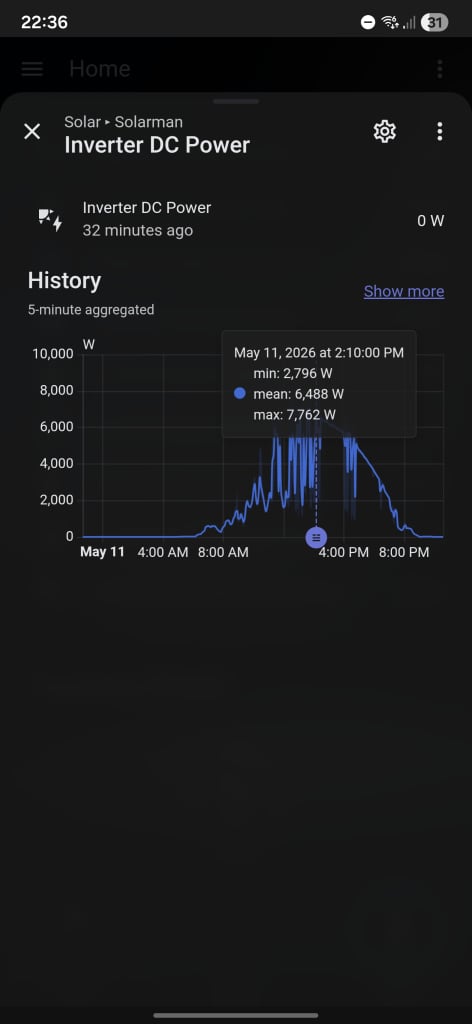
    I've noticed on my sister's recent Solis S5 inverter that she is generating over 6 kW at times.

    image.png

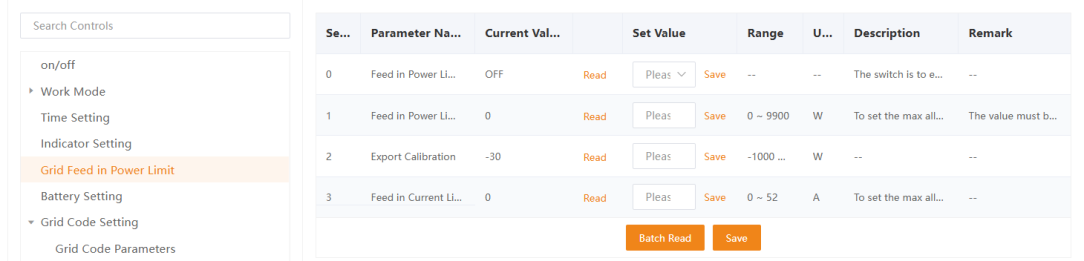
    I've only got today's data to view. Not sure if the spiky peaks are due to clouds or something else. These are her grid feed in power settings, should they be set or is that controlled from elsewhere?

    image.png

    Grid Code is set to EN50549IE

    Also, the graph data is 1 hour behind. Does that indicate the timezone is set incorrectly?

    Post edited by josip on


  • Registered Users, Registered Users 2 Posts: 11,484 ✭✭✭✭Ush1


    Is there a way to show actual daily profit in the android app. So like after all exports minus imports, it has all the info about my tariff and times.


  • Registered Users, Registered Users 2 Posts: 9,987 ✭✭✭micks_address


    I don't know in the app but I have it in home assistant with utility meters


  • Registered Users, Registered Users 2, Paid Member Posts: 487 ✭✭mjatkey


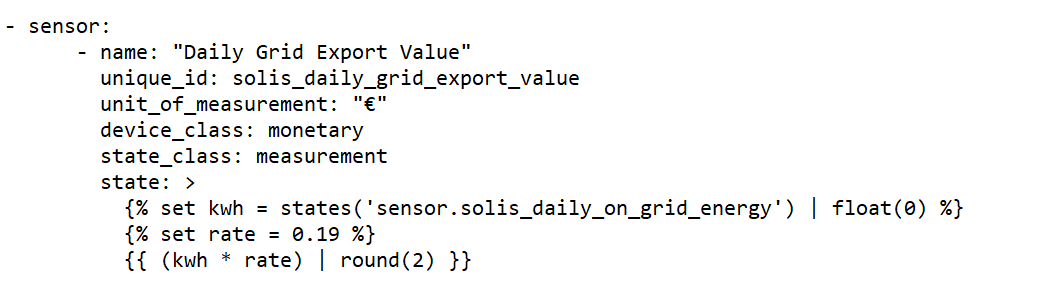
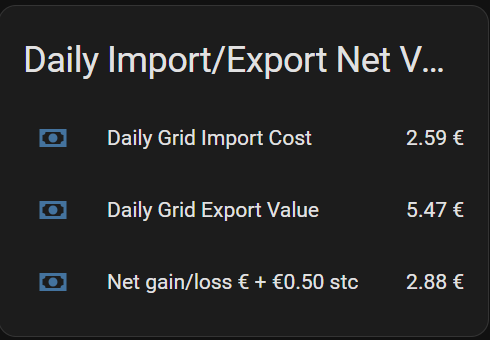
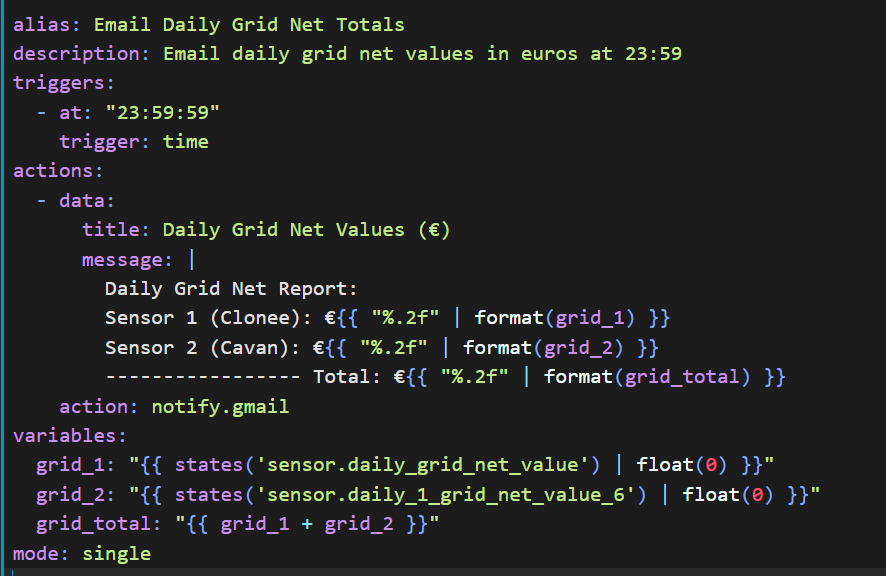
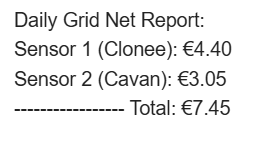
    If you want to do some calculations automatically you will need to create some sensors in HA for the automation to work, its bit fiddly but with AI help and a few trail and errors you should get there.

    image.png

    type: entities
    title: Daily Import/Export Net Value
    entities:

    • entity: sensor.daily_grid_import_cost
    • entity: sensor.daily_grid_export_value
    • entity: sensor.daily_grid_net_value
      name: Net gain/loss € + €0.50 stc

    image.png image.png

    image.png

    HA can be a bit time consuming but with persistence you should get there. Well…ish.

    🌞 6.96kWp PV System. West Dublin🌞


  • Registered Users, Registered Users 2 Posts: 9,987 ✭✭✭micks_address


  • Registered Users, Registered Users 2 Posts: 66 ✭✭Midlakelands


    Yeah @josip the inverter can spike when you get a mix of sun and clouds at peak. Plus when you have spare capacity in the battery and an oversized array it's inclined to go above the listed output specification as it can push dc load to the battery with spare capacity for ac . Today I had a few periods of over 7 kw

    1000034866.jpg


  • Advertisement
  • Moderators, Home & Garden Moderators Posts: 7,732 Mod ✭✭✭✭graememk


    If there is a battery that normal.

    Only 5kW can leave the inverter, but you could put 5 into the battery and 1kw to the grid.

    Also when sun hits cold panels, you'll generate more for a brief period


Advertisement
Advertisement