Advertisement
Help Keep Boards Alive. Support us by going ad free today. See here: https://subscriptions.boards.ie/.
https://www.boards.ie/group/1878-subscribers-forum

Private Group for paid up members of Boards.ie. Join the club.
Hi all, please see this major site announcement: https://www.boards.ie/discussion/2058427594/boards-ie-2026

TV and sky settings for hurling

  • 28-04-2026 05:37PM
    #1
    Registered Users, Registered Users 2 Posts: 6,567 ✭✭✭


    Hello,

    I recently bought this TV: TCL 65C7K (6Yr)

    65 Inch. QD-Mini LED. 144 Hz display.

    Now I want to make sure I am optimizing it for watching sport (hurling) to try and minimize blur of the ball and to try and get the best setting possible so I can see the fast moving ball as best I can etc - hurling obviously very fast etc

    I just have a standard Sky Q 1TB box. I am using the supplied sky HDMI cable and its connected to HDMI port 1 on the TCL TV (Labelled 4K/144Hz eARC)

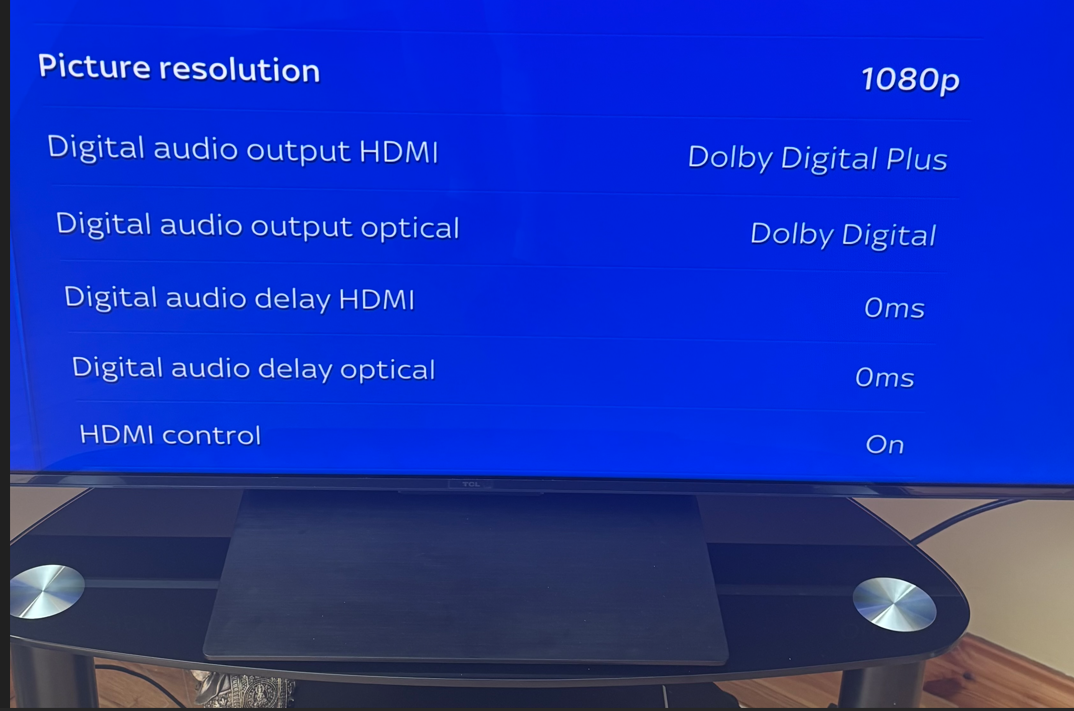
    The hurling is mainly on RTE. When I go to sky settings > audio and visual, I am presented with below.

    Any thoughts on what settings to choose for Picture resolution? options are: 2160p (UHD), 1080p, 1080i, and 720p.

    Or any thoughts on the other settings also

    This is only on the sky end.
    Then on the TV side, there are loads of settings to play with, its like a minefield trying to figure this out

    image.png
    Post edited by obi604 on


Comments

  • Registered Users, Registered Users 2 Posts: 6,111 ✭✭✭swoofer


    new tv’s have a multitude of settings, as it’s saorview for rte they transmit on 1440 resolution and the tv will upscale to 4k . Filmaker mode is suggested for sport.


    do a google and if you know Ai or chat gpt these will give loads of suggestions. Then try u tube.not many people will have this tv and don’t sit too close.


  • Registered Users, Registered Users 2 Posts: 6,567 ✭✭✭obi604


    thanks. Yeah, I’ve actually run this through a few AI tools and got different info from each. I just thought I’d post here too in case anyone with a good knowledge of these things could provide more real world info.


  • Registered Users, Registered Users 2 Posts: 6,111 ✭✭✭swoofer


    I did a google for you and this one makes sense.

    https://www.tomsguide.com/tvs/5-tcl-tv-settings-to-change-for-the-best-possible-picture

    AI was rubbish.

    go to avforums, need to join and you may fine someone with same TV but for hurling it would test any tv. The best for motion to me is plasma and that is why i have a 17year old one.

    You have to keep tweaking but with 4k and 65 ins screen its going to be tricky.

    let us know how you got on.

    Post edited by swoofer on


  • Registered Users, Registered Users 2 Posts: 6,567 ✭✭✭obi604


    after checking a few articles and links as above, and playing with AI, this is what it suggests, nice and simple!!

    ⚡ FULL MENU WALKTHROUGH (DO THIS EXACTLY)

    🔹 1. Open Picture Settings

    Press:

    • ⚙️ Settings → All Settings → Picture

    🧱 2. Base Setup

    ➤ Picture Mode

    • Picture → Picture Mode → Standard

    👉 This avoids fake sharpening from Sports mode but keeps brightness

    🎯 3. Motion (MOST IMPORTANT SECTION)

    Path:

    • Picture → Advanced Settings → Motion

    Set:

    • Motion Enhancement → Custom

    Then:

    • Blur Reduction → 9
    • Judder Reduction → 2
    • LED Motion Clear → Off

    ✔ Why this works

    • Blur high = less smear on sliotar
    • Judder low = avoids ghost trails from Sky compression
    • Not maxed blindly → reduces artifacts risk

    🧼 4. Disable motion-breaking processing

    Path:

    • Picture → Advanced Settings

    Turn OFF:

    • Dynamic Contrast → Off
    • Black Stretch → Off
    • Dynamic Brightness → Off

    If present:

    • Local Contrast → Low or Off

    🔍 5. Sharpness (critical for ball visibility)

    Path:

    • Picture → Clarity (or Sharpness)

    Set:

    • Sharpness → 3–5

    👉 Prevents:

    • halo around ball
    • shimmering edges during motion

    📺 6. Noise Reduction (Sky-specific tweak)

    Path:

    • Picture → Advanced Settings → Noise Reduction

    Set:

    • Noise Reduction → Off
    • MPEG Noise Reduction → Off

    👉 Then test:

    • If grass shimmers → switch both to Low

    💡 7. Brightness & Contrast

    Path:

    • Picture → Brightness

    Set:

    • Backlight → 90–100
    • Contrast → 85–90
    • Black Level → 50 (default)

    🎨 8. Colour (keep stable)

    • Colour Temperature → Warm 1
    • Colour → Default

    👉 Avoid over-saturated green (hurts ball visibility)

    ⚡ 9. Disable auto-dimming (IMPORTANT)

    Path:

    • ⚙️ Settings → System → Power & Energy

    Turn OFF:

    • Energy Saving
    • Ambient Light Sensor
    • Auto Brightness

    🔌 10. HDMI / Sky Q optimisation

    On TV:

    • Settings → Channels & Inputs → Inputs → HDMI (Sky Q)
      HDMI Mode → Enhanced Format

    On Sky Q box:

    • Set resolution to:
      • 1080i or 1080p (NOT 4K)

    🧪 LIVE MATCH MICRO-TUNING (THIS IS KEY)

    While watching hurling:

    If the sliotar is blurry:

    Blur Reduction → 10

    If you see ghost trails / double edges:

    Judder Reduction → 1

    If grass shimmers or breaks up:

    Noise Reduction → Low

    If outlines look harsh or “glowy”:

    Sharpness → 0–3

    🧠 Reality check (honest bit)

    Even with all this:

    • RTÉ on Sky = compressed 50Hz
    • Hurling = worst-case motion scenario

    So success =
    👉 you can follow the sliotar most of the time without losing it

    —not perfect crispness.

    🏁 Final locked version (safe baseline)

    If you want a “set and forget”:

    • Mode: Standard
    • Motion: Custom
      • Blur: 9
      • Judder: 2
    • Sharpness: ~3
    • Dynamic processing: All OFF
    • Noise Reduction: Off (Low if needed)
    • Brightness: High


Advertisement
Advertisement