Advertisement
Help Keep Boards Alive. Support us by going ad free today. See here: https://subscriptions.boards.ie/.
https://www.boards.ie/group/1878-subscribers-forum

Private Group for paid up members of Boards.ie. Join the club.
Hi all, please see this major site announcement: https://www.boards.ie/discussion/2058427594/boards-ie-2026

Boards.ie Cleaner ~ V2 nocode | Chromium & Firefox extension. | not official.

  • 11-04-2026 05:31PM
    #1
    Registered Users, Registered Users 2, Paid Member Posts: 9,594 ✭✭✭


    image.png

    Boards.ie helper that cleans up layout, smooths the overlay, and adds handy tools and shortcuts for easier browsing on desktop and Firefox for Android.

    I have stripped out some features from Paid Members version (ad blocking and hiding of site alerts).

    Nocode:- Means there is no activation code in this version, mobile icon to trigger delay and overlay message edits.

    The store listing have been updated with this version, members version still available as manual install.

    Here is the links to the stores:-

    https://addons.mozilla.org/en-US/firefox/addon/boards-ie-cleaner/

    Chrome webstore should probably be available here ~ Edit now available.

    Manual Install

    For chrome desktop unpack the zip and point 'Load unpack' in chrome at the folder.

    For Mobile Quetta/Firefox nightly just change the filename to .xpi and point your installers to that file.

    As i can now test mobile extensions on Firefox Nightly, I may build on the extension and add theming for different forums as suggested below, If people are interested.

    "Those who cannot remember the past are condemned to repeat it." ~ George Santayana
    "But that's balanced out by the fact that it's a mandate not to do very much." ~ Prof. Eoin O'Malley

    Post edited by corkie on


Comments

  • Registered Users, Registered Users 2, Paid Member Posts: 9,594 ✭✭✭corkie


    Bug reported on the above release, has been patched and posted to the stores. Mozilla is live chrome might take the day!

    Post edited by corkie on

    "Those who cannot remember the past are condemned to repeat it." ~ George Santayana
    "But that's balanced out by the fact that it's a mandate not to do very much." ~ Prof. Eoin O'Malley


  • Registered Users, Registered Users 2, Paid Member Posts: 9,594 ✭✭✭corkie


    Work In Progress

    Boards.ie Cleaner — Theme Engine User Manual

    What the theme engine does

    The theme engine lets you apply a custom visual style to any specific forum on boards.ie, without affecting the rest of the site. Each forum gets its own independent theme. You can use a built-in pre-set, write your own CSS, or combine both.

    How it works

    When you visit any boards.ie page the engine:

    1. Detects which forum you are on from the URL or breadcrumb trail
    2. Checks your saved settings to see if that forum has a theme enabled
    3. Loads the preset CSS file if one is selected
    4. Injects your custom CSS on top if you have written any
    5. Applies a scoped class to the page so styles only affect that forum

    All of this happens automatically on every page load and navigation. You do not need to do anything once a theme is saved. ~ Full Manual in zip!

    Notes: -

    Initial Load has a built in After Hours theme hard code at present. Some console logs for bug testing still in the code.

    I hoping that the switch to vanilla doesn't strip out on this work. The underline code will probably remain the same.

    Maybe the community on here, can get behind creating and sharing various themes for this, for the forums?

    DIST: -

    Manual install only at present until I fine tune things.

    "Those who cannot remember the past are condemned to repeat it." ~ George Santayana
    "But that's balanced out by the fact that it's a mandate not to do very much." ~ Prof. Eoin O'Malley


  • Registered Users, Registered Users 2, Paid Member Posts: 9,594 ✭✭✭corkie


    Still very much a work in progress.

    I went down a development path of trying to create a paid members section in the extension, but hit a brick wall when what I was trying to do was not feasible due to limits of extensions.

    Theme for it so far have two options and to 2 specific forums, next development is creating a set of preselect that could be applied to forums of your choosing.

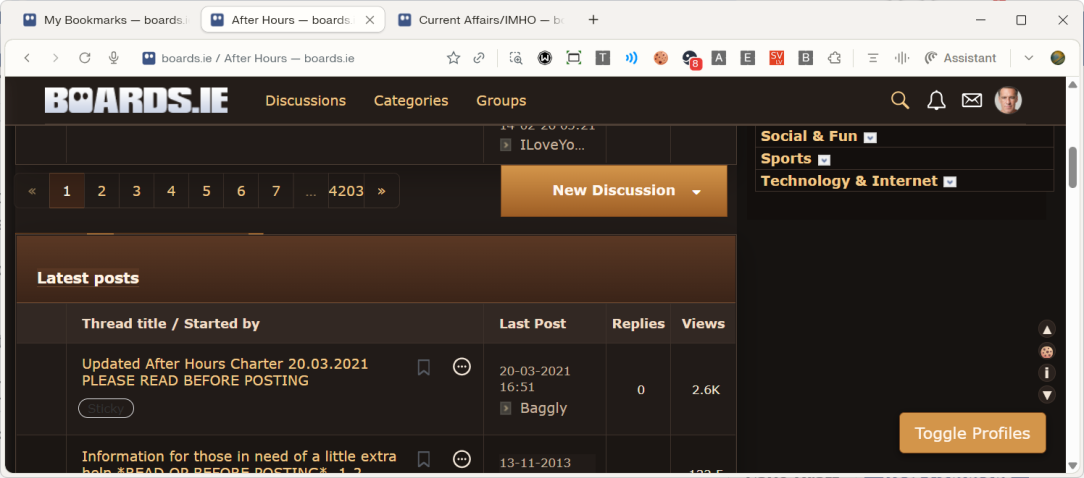
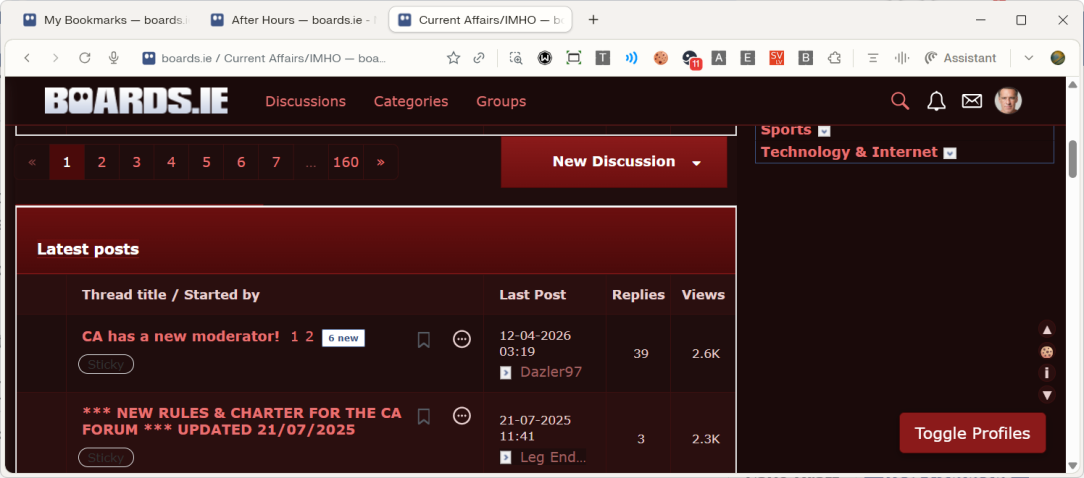
    The two themes below:-

    • After Hours
    image.png
    • Current Affairs
    Screenshot 2026-04-15 222614.png

    "Those who cannot remember the past are condemned to repeat it." ~ George Santayana
    "But that's balanced out by the fact that it's a mandate not to do very much." ~ Prof. Eoin O'Malley


  • Registered Users, Registered Users 2, Paid Member Posts: 9,594 ✭✭✭corkie


    Made some improvements and rewrites of the extension.

    The '🍪' icon now used to set overlay message and delay across mobile and desktop.

    Clean up some code and changed from local storage to sync storage for settings etc.

    Hardcode theme is removed. Check options in the extension menu to apply two in built themes above.

    No new themes as preselect generated yet.

    Decided to focus, on getting Subbed Members enable again on this version, through an alternative activation system.

    More details in there soon.

    ^ Change the .zip to .xpi for install on Firefox.

    Mainly tested on Chromium Browsers and briefly on mobile.

    image.png

    "Those who cannot remember the past are condemned to repeat it." ~ George Santayana
    "But that's balanced out by the fact that it's a mandate not to do very much." ~ Prof. Eoin O'Malley


  • Registered Users, Registered Users 2, Paid Member Posts: 9,594 ✭✭✭corkie


    icon128.png

    Note: WIP means work in progress and I am just sharing experimental builds as I continue to tweak and add features to the extension!

    As I have expanded from the simple content.js script I can include more features. Some dev paths I try don't bear fruition and I don't share here.

    Some recent developments include: -

    • Global colour shift system ~ On by default, but can easily be switch. | Main purpose is to show the extension is active.
    • Icons for extension added
    • Toast / popup improvements ~ Notification triggered by the extension are more identifiable.
    • Paid Member (or admin, moderator and owner) ~ Added to membership role detection for on going addition to them features.
    • Possibly more as well ~ Due to abandoned paths taken, not sure of features left in due to roll backs to working code.

    Extension mainly tested on chromium browsers, mobile Firefox needs some bug fixes (Nightly or Dev on desktop).

    Theme engine development stalled at present, needs to be refactored to a more easier system, current is mainly a manual edit of templates and install by the user. Plus dreading the switch to Vanilla which means it may need tweaking to work on that system.

    ZIP/XPI For Manual Install: -

    Edit: - 22:07 New files updated below, targeted only desktop with colour shift which had a conflicting effect on mobile.

    ^ Different packages with different manifest for each to eliminated error reporting in chrome.
    ^ Change the .zip to .xpi for install on Firefox.

    Disclaimer: - My Extension is not official and not sanctioned by boards.ie.

    Post edited by corkie on

    "Those who cannot remember the past are condemned to repeat it." ~ George Santayana
    "But that's balanced out by the fact that it's a mandate not to do very much." ~ Prof. Eoin O'Malley


  • Advertisement
  • Registered Users, Registered Users 2, Paid Member Posts: 9,594 ✭✭✭corkie


    icon128.png

    Okay! Had a quiet and undistracted few hours today, to which I got around to refactor my theme engine of my extension.
    I thought the process would be more difficult but achieved a good bit with it today.

    The engine now has 3 Pre set options that can be applied to any forum of your choosing. Plus a sample file that can be edited and pasted into the custom css field in the options menu (see templates folder). Theme names where inspired by the forums I was targeting.

    image.png

    Also yesterday I managed to target placeholder divs and layers margin sizes to reduce empty spaces from non displayed areas form adblockers, membership etc.

    Also hid the very top nav bar, that you could only use from the top of the page. Now has a new smaller hamburger toggle near your profile. To click them items. accessible any where on the page as the bar is sticky?

    Haven't tested completely across browsers. There is still things to clean-up in the main content.js like hardcode button colours from my extension. Some console logs have to be removed as well. So a good bit of work to do before I submit this to the stores.

    DIST

    ^ Different packages with different manifest for each to eliminated error reporting in chrome.
    ^ Change the .zip to .xpi for install on Firefox.

    Disclaimer: - My Extension is not official and not sanctioned by boards.ie.

    Note: - It is a thing, that themes should have been a bonus feature of membership, so people don't need a third party extension.
    The features of the extension does things that other widely available extensions also can do? @Boards.ie: Odhran @Boards.ie: Mike

    @circadian Hope you find this updated version to your liking with the themes been applied to any forum of choosing?

    @smuggler.ie Was able to solve some of the spacing issues you called out on here?

    Edit 27/04 11:44: -

    All though I didn't target mobile browsers with the themes, they also work there. Easy method to get them on mobile, is to set themes on desktop, export them and import again on mobile. Example file you could import to get started.

    ^^ Just scan the file to see I am not hacking your browser, remove '.txt' and import to have the theme engine setup with: -

    [Example only, I have patched things since for hardcoded colours and declarations.]

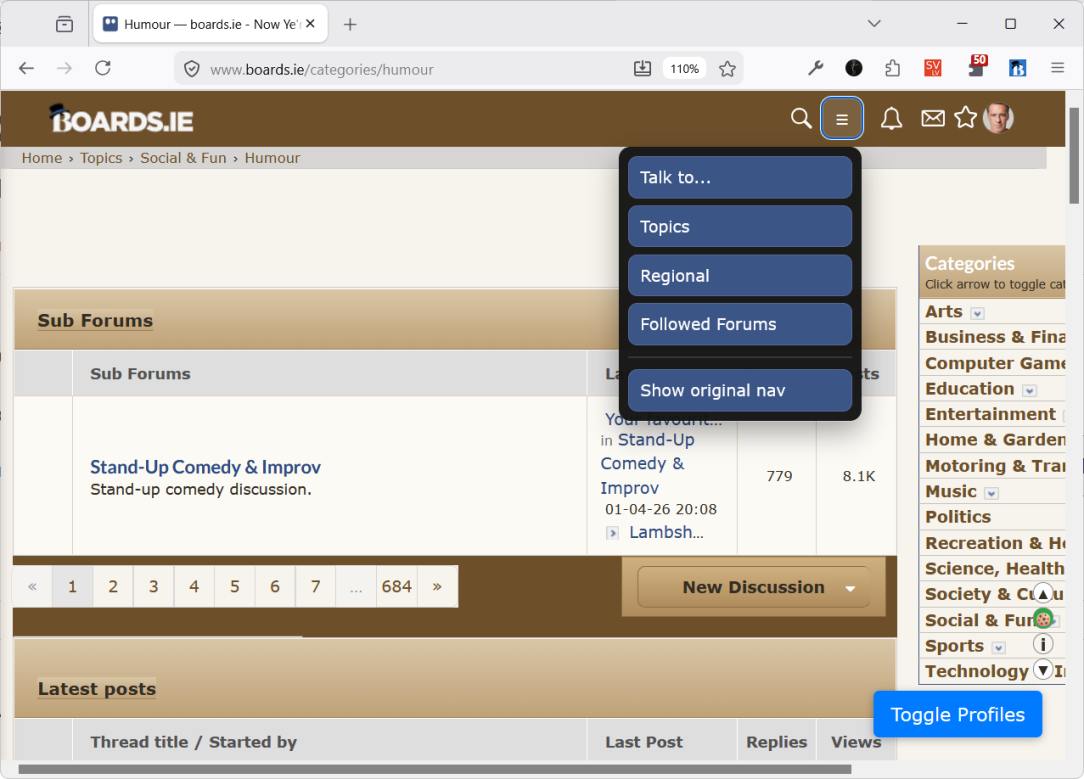
    • after-hours — preset: afterhours-dark
    • current-affairs-imho — preset: current-affairs-imho
    • forestry — preset: forest
    • humour — preset: none, custom CSS « Paper Theme | Sample included in zip.
    • television-general — preset: none, custom CSS « Sepia Theme

    ^ Sepia theme not included in zip yet, but here it is so you can use the custom css field to apply it to forum of your choosing. Below is the patched version of it.

    If this gains traction user's (or community) could share themes they create themselves or get AI to create?

    For AI, give the above as an example and prompt the AI like this:

    • Base on this sepia theme, please create an orange based one with a dark background?
    Post edited by corkie on

    "Those who cannot remember the past are condemned to repeat it." ~ George Santayana
    "But that's balanced out by the fact that it's a mandate not to do very much." ~ Prof. Eoin O'Malley


  • Posts: 0 [Deleted User]


    Hey corkie just installed the latest update. I didn't even realise this is something I'd have needed but I appreciate the effort. Could very well be a use case of user generated themes that can be bundled in for each subforum etc.


  • Registered Users, Registered Users 2, Paid Member Posts: 9,594 ✭✭✭corkie


    Thanks for the comments.

    As I could still edit the message above I attached updated zips with only 5 files changed to handle some hardcoded colours.

    "Those who cannot remember the past are condemned to repeat it." ~ George Santayana
    "But that's balanced out by the fact that it's a mandate not to do very much." ~ Prof. Eoin O'Malley


  • Registered Users, Registered Users 2, Paid Member Posts: 9,594 ✭✭✭corkie


    Typical the change to content.js introduced a small bug where the 'Edit in Modal' button broke.

    Not going to update the zips again, It can be sorted in the next update.


    Glad I labelled these zips as WIP, If I can clean up a few things, it maybe worthwhile updating the store version tonight.

    "Those who cannot remember the past are condemned to repeat it." ~ George Santayana
    "But that's balanced out by the fact that it's a mandate not to do very much." ~ Prof. Eoin O'Malley


  • Registered Users, Registered Users 2, Paid Member Posts: 9,594 ✭✭✭corkie


    icon128.png

    Submitted to the stores and posted on my repo as well now! « @circadian Will PM a repo link.

    https://chromewebstore.google.com/detail/boardsie-cleaner-v2-nocod/dfpolphhjaahfbbeagglbjckkbegnjln « Awaiting for review look for version 2.0.5 with above icon!

    https://addons.mozilla.org/en-US/firefox/addon/boards-ie-cleaner/ « Already live.

    "Those who cannot remember the past are condemned to repeat it." ~ George Santayana
    "But that's balanced out by the fact that it's a mandate not to do very much." ~ Prof. Eoin O'Malley


  • Advertisement
  • Registered Users, Registered Users 2, Paid Member Posts: 9,594 ✭✭✭corkie


    Sorry for the late posting, but what a day I have had with this!

    Started out testing my theme engine capabilities to see how well the custom css field was working to try and create some example samples so others would have a starting point to tweak to there own liking.

    Didn't get around to developing one worth sharing, as good as the pre sets along with sepia version. Note just swapping variables only create variations in the colours but you need declarations matching to get good themes.

    But it did reveal oversights and shortcomings with the code and trying to develop styles for the boards system with the bloody transparent logo that doesn't show on light based themes.

    I did also spot some hardcoded colours breaking through. So have updated After Hours theme (original from version 1 of the engine) to the same template as CA and Forest. Forum navigation top and bottom will also pickup the colours from themes if the right variables are passed and used.

    Back to dealing with the LOGO, I create an new option in settings to give it a blue background. But in the coarse of creating a function for it, I put it in the wrongs place which led to hours of a debug session, To figure out why it broke the saving and applying of all settings.

    I have admit before that I use 'VIBE' coding to create my extensions, if anyone thinks that is an easy process, they probably have never done it on complicated code like this. I told it a few times something broke with the edits we made tonight and it wasn't listening and provided me other patches to try and solve the problem. Code I knew shouldn't have been required and proven correct in the end. At the time I hadn't notice another dependant function of the script as a whole had been render defunct and wasn't doing what it was suppose to do. Once I realised that the solution was easy enough as moving the function above another.

    Sorry this is getting a bit longwinded so here is the good part, a new 'WIP' release, available here only, want to keep my repo as the working source copy of the store version.

    Improvements:-

    • Toggle for the logo
    • Streamline Pre set themes
    • Hardcode colours reduce so themes apply the right versions.
    • CustomCSS Samples (My powershell build scripts excluded them).
      • Try Contrast+ Light to see the issues with the logo, script has lines comment out
        for other ways to force it or change header to default site colours.
    • Possibly other tweaks, I have neglected to mention.

    Edit Note: - Firefox applies themes differently to chrome, so things may vary to what I see compared to what your browser shows. Annoyingly more patches for content.js in the works. Disable that in extension options and both browsers get the same theme results. Conflicting code between extension code and theme engine code, glad I built in that switch.

    Edit 22:12 on 30th: - Patched the above conflict today with:-

    • Identified a real clash between content.js styling and the theme engine, most visible in Firefox testing.
    • Added/confirmed guard logic so themes are not unintentionally restyled by the normal colour-shift path.
    • Settings an optional way to force the blue nav/header override on top of themes when wanted.

    ^ Changes only in that, so remove '.txt' and overwrite the one from zip!

    Post edited by corkie on

    "Those who cannot remember the past are condemned to repeat it." ~ George Santayana
    "But that's balanced out by the fact that it's a mandate not to do very much." ~ Prof. Eoin O'Malley


  • Registered Users, Registered Users 2, Paid Member Posts: 9,594 ✭✭✭corkie


    For more control of my provided builds as an experiment, I think I will provided WIP builds on GitHub, where I can delete or update them longer than the 24 hour window on boards. @circadian

    "Those who cannot remember the past are condemned to repeat it." ~ George Santayana
    "But that's balanced out by the fact that it's a mandate not to do very much." ~ Prof. Eoin O'Malley


  • Registered Users, Registered Users 2, Paid Member Posts: 9,594 ✭✭✭corkie


    A store release today with many of the developments discussed above. Inclusive of GitHub WIP builds.

    https://chromewebstore.google.com/detail/boardsie-cleaner-v2/dfpolphhjaahfbbeagglbjckkbegnjln « Look for v 2.0.6 « available.

    https://addons.mozilla.org/en-US/firefox/addon/boards-ie-cleaner/ « Already available.

    Manual Install v 2.0.6: - Chrome: zip | Firefox: .xpi or .zip

    Source: - See my GitHub repo

    image.png

    ^^ Bookmark system for styled forums: If you don't select a pre set and leave custom css blank, it just becomes a bookmark that will override the default colour swap of the extension (if enabled).

    Post edited by corkie on

    "Those who cannot remember the past are condemned to repeat it." ~ George Santayana
    "But that's balanced out by the fact that it's a mandate not to do very much." ~ Prof. Eoin O'Malley


  • Registered Users, Registered Users 2, Paid Member Posts: 9,594 ✭✭✭corkie


    New WIP build posted to github repo issues thread!

    This version is a complete refactor into modular js files. With a good few enhancements include in the process.

    @igCorcaigh If you haven't tried the extension yet this maybe the manual install version to begin with?

    @Addmagnet The ugly 'Edit in modal' & 'toggle profile' buttons have been replaced with icons in the right-hand side utility bar.

    @sligeach PM Date and timestamps tweak is active and working in this version.

    Post edited by corkie on

    "Those who cannot remember the past are condemned to repeat it." ~ George Santayana
    "But that's balanced out by the fact that it's a mandate not to do very much." ~ Prof. Eoin O'Malley


  • Registered Users, Registered Users 2, Paid Member Posts: 9,594 ✭✭✭corkie


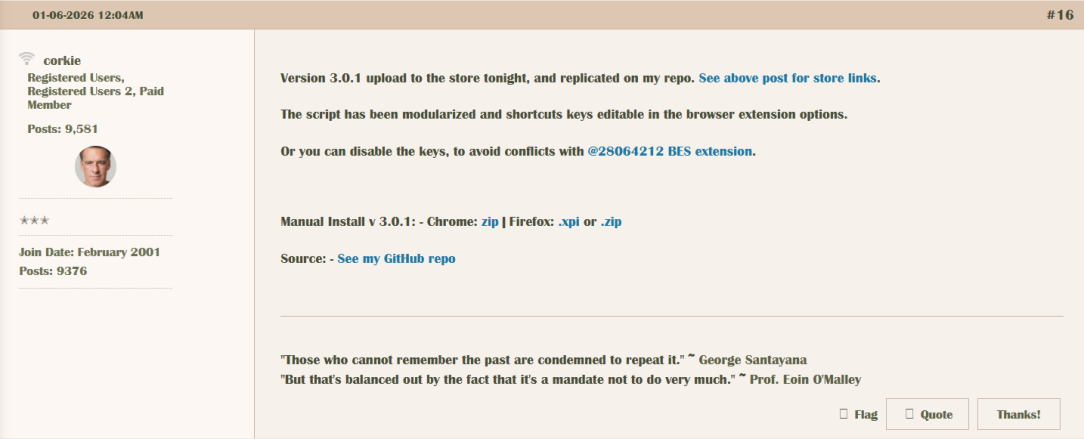
    Version 3.0.1 upload to the store tonight, and replicated on my repo. See above post for store links.

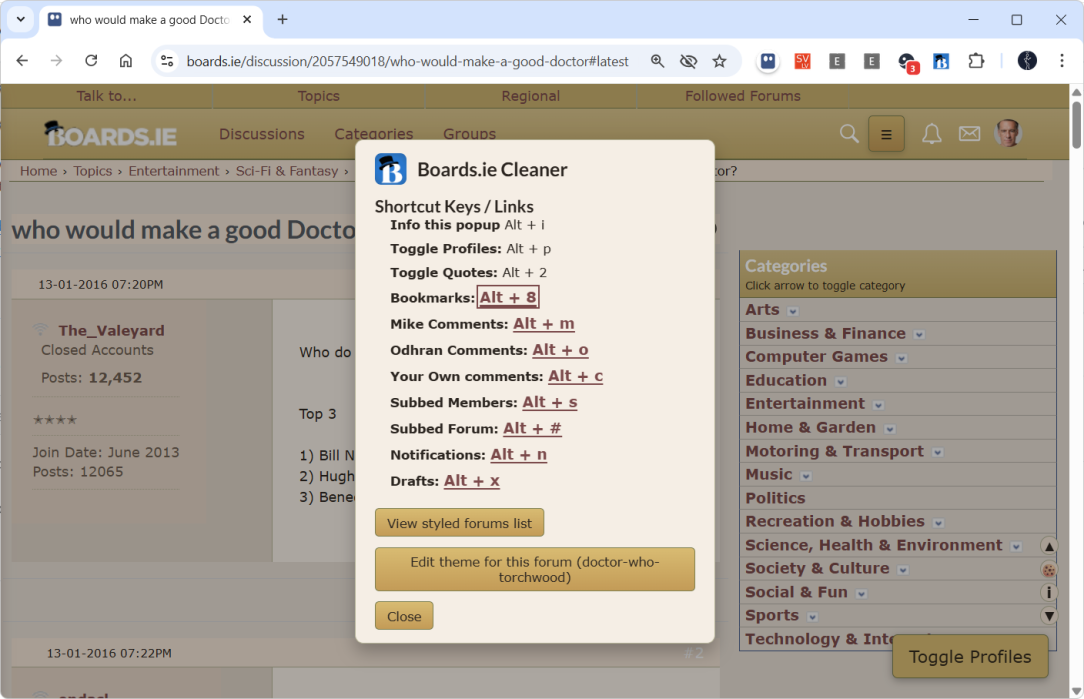
    The script has been modularized and shortcuts keys editable in the browser extension options.

    Or you can disable the keys, to avoid conflicts with @28064212 BES extension.

    Manual Install v 3.0.1: - Chrome: zip | Firefox: .xpi or .zip

    Source: - See my GitHub repo

    "Those who cannot remember the past are condemned to repeat it." ~ George Santayana
    "But that's balanced out by the fact that it's a mandate not to do very much." ~ Prof. Eoin O'Malley


  • Registered Users, Registered Users 2, Paid Member Posts: 9,594 ✭✭✭corkie


    A reddit post led me down a path of experimenting with fonts.

    image.png

    My theme engine can already handle assigning different fonts to specific forums if needed (without any changes to the extension scripts).

    Just use the custom css field and append/or add to the style the below code: -

    /* Global font override, but avoid common icon/text-special cases /
    html body :not(code):not(pre):not(kbd):not(samp)
    :not([class
    ="fa-"]):not(.fa):not(.fas):not(.far):not(.fal):not(.fab)
    :not([class*="material-icons"]):not(.material-icons):not(.material-symbols)
    :not([class*="mdi-"]):not(.mdi)
    :not([class*="icon-"]):not(.icon)
    :not([role="img"]) {
    font-family: "Britannic", Georgia, serif !important;
    }

    /* Restore common icon fonts on pseudo-elements */
    html ::before,
    html ::after {
    font-family:
    "Font Awesome 6 Free",
    "Font Awesome 5 Free",
    "Font Awesome 6 Brands",
    "Font Awesome 5 Brands",
    FontAwesome,
    "Material Icons",
    "Material Symbols",
    "Material-Design-Iconic-Font",
    icomoon,
    Flaticon,
    icons,
    sans-serif !important;
    }

    "Those who cannot remember the past are condemned to repeat it." ~ George Santayana
    "But that's balanced out by the fact that it's a mandate not to do very much." ~ Prof. Eoin O'Malley


Leave a Comment

Rich Text Editor. To edit a paragraph's style, hit tab to get to the paragraph menu. From there you will be able to pick one style. Nothing defaults to paragraph. An inline formatting menu will show up when you select text. Hit tab to get into that menu. Some elements, such as rich link embeds, images, loading indicators, and error messages may get inserted into the editor. You may navigate to these using the arrow keys inside of the editor and delete them with the delete or backspace key.

Advertisement
Advertisement