Advertisement
Help Keep Boards Alive. Support us by going ad free today. See here: https://subscriptions.boards.ie/.
https://www.boards.ie/group/1878-subscribers-forum

Private Group for paid up members of Boards.ie. Join the club.
Hi all, please see this major site announcement: https://www.boards.ie/discussion/2058427594/boards-ie-2026

Sig Energy programming help

  • 22-03-2026 11:15AM
    #1
    Registered Users, Registered Users 2, Paid Member Posts: 232 ✭✭


    Does anyone have a Sig Energy inverter/battery/car charger set up? I would like some assistance in setting up the system for best results.

    Thanks in anticipation.
    Dave


Comments

  • Registered Users, Registered Users 2 Posts: 1,165 ✭✭✭db


    Have you tried AI mode? It uses the tariffs you enter, weather forecast inputs and your usage patterns to decide when to charge and use the battery.


  • Registered Users, Registered Users 2, Paid Member Posts: 232 ✭✭steamdave


    My problem is in setting up the tariff in the set up. I want to set the night time at 23.00 and end at 08.00. There is a scroll wheel to set the times but I can't get it to stop at 23.00. It goes from 21.00 to 24.00. Same problem for the end of period. I want 08.00 but the times go from 06.00. I can't get the scroll to stop at 08.00. Very frustrating!

    Dave


  • Registered Users, Registered Users 2 Posts: 2,862 ✭✭✭ECO_Mental


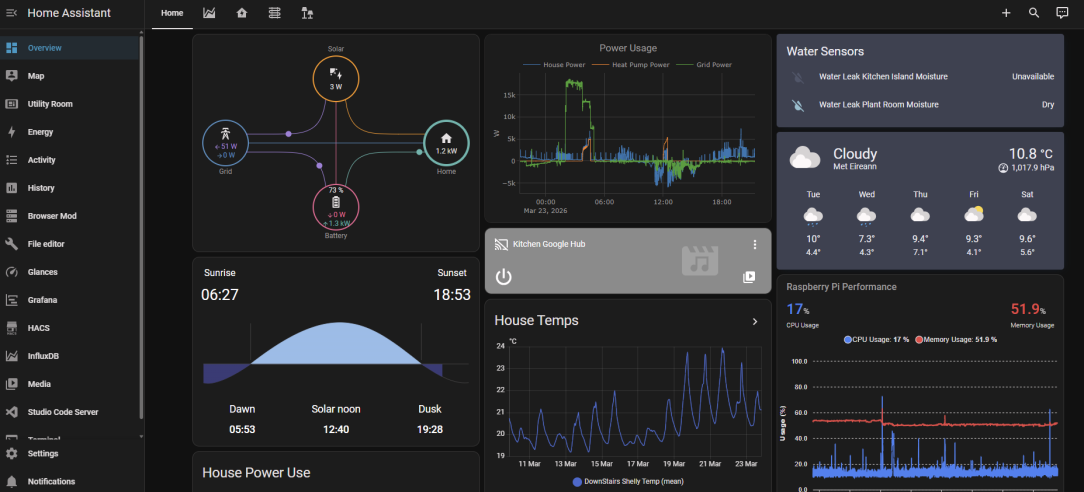
    I think there is a Signergy integration in Home Assistant. https://community.home-assistant.io/t/sig-energy-system-integration/760448/235 . Briefly looking at its possible using Modbus or MQTT. If you can get it on HA then that opens up all sorts of automations including NodeRed etc

    6.1kWp south facing, South of Cork City


  • Registered Users, Registered Users 2, Paid Member Posts: 232 ✭✭steamdave


    Complete gobbleydegook! But thanks for the reply.

    Dave


  • Registered Users, Registered Users 2 Posts: 2,862 ✭✭✭ECO_Mental


    Appolgies .😊 when replying on here and on other forums as we are the nerdy types I go into that mode and I forget sometimes that some people are not…

    Basically Home Assistant (HA) is a home automation programme as such, that runs on a small computer in your house that can intergate and join up all your smart devices in your house. You can then run automations for example to turn on a smart plug when you arrive home (skys the limit..) https://www.home-assistant.io/ its totally free all you need is small computer and a small bit of tech knowledge to set it up intially.

    Anyway the HA community (and manufactures) worldwide develope these intergrations for all manner of things in your house such as you coffee machine etc etc and one of these intergartions can control your Sigenergy inverter. https://github.com/TypQxQ/Sigenergy-Local-Modbus

    You just install this on to your HA computer and this will allow you to externally control your Sigenergy inveter and do all sorts of fancy automations. HA then has other programes such as NodeRED which is a programming aid that allows you set up very complex or simple automations, HA also has simple tools to set up automations every easily without any prgramming knowledge.

    There is a bit of a learning curve in getting this all set up but between youtube and ChatGPT/Gemini AI helping its not that hard. But learnning how to do all this is half the fun and would be better in the long run.

    image.png

    6.1kWp south facing, South of Cork City


  • Advertisement
  • Registered Users, Registered Users 2, Paid Member Posts: 8,366 ✭✭✭Soarer


    It's not very intiuative. I'd suggest delete the schedules and start again.

    Even if you want your night to go from 23:00 - 08:00, you need to set up 2no. nights. First from 23:00-00:00, and then from 00:00-08:00.

    And once you have something setup, it won't allow a new time slot to cross a current one.

    So if I were you….
    - Delete what you've setup
    - Start at 00:00 and go to 08:00 for your night.
    - Then go from 08:00 to 23:00 for your day.
    - Then 23:00 to 00:00 as a second night, but it'll roll into the first one you created.

    Hope that makes sense.


  • Registered Users, Registered Users 2, Paid Member Posts: 232 ✭✭steamdave


    Thanks for that. It all makes sense, but…
    I've started from scratch to set the times but I'm still facing the same problem. e.g. I want to start the Day rate from 08.00. When I try to scroll down from the opening time of 00, the time goes from 00 to 03 to 06 to 09. I can see 02, 04, 08 greyed out but I cannot stop at any of those times.

    Dave


  • Registered Users, Registered Users 2, Paid Member Posts: 8,366 ✭✭✭Soarer


    Oh, I'm not sure so.

    I programmed all mine nearly 12 months ago and haven't looked at it since. There's been numerous updates to the app in the interim so maybe they've changed things?

    Did you ask the AI? Or even in the community in the app? They're very helpful.


Advertisement
Advertisement