Advertisement
Help Keep Boards Alive. Support us by going ad free today. See here: https://subscriptions.boards.ie/.
https://www.boards.ie/group/1878-subscribers-forum

Private Group for paid up members of Boards.ie. Join the club.
Hi all, please see this major site announcement: https://www.boards.ie/discussion/2058427594/boards-ie-2026

Computer questions you'd be embarrassed to ask any where else!

17172737476

Comments

  • Moderators, Arts Moderators, Recreation & Hobbies Moderators, Social & Fun Moderators Posts: 81,084 Mod ✭✭✭✭New Home


    Have you lots of tabs open in normal (not incognito) mode? Is it possible you've the email accout open in another tab? Because if you do that would leave a trace in the cache.


  • Registered Users, Registered Users 2 Posts: 1,127 ✭✭✭enfield


    Thank you New Home. I opened a new window and signed in to hotmail and it was the same.


  • Registered Users, Registered Users 2 Posts: 1,127 ✭✭✭enfield


    A new incognito window that is.


  • Registered Users, Registered Users 2 Posts: 6 fibbs019


    hi, I’m not sure if you can help me and I’m relatively new to Board.ie. Here goes. I have a new IPhone 16 and no matter what I do I cannot get it to sync with my hands free in the car. Switched both off, switched back on… problem is probably the car kits a 2016 and screen for the radio/hansfree mostly doesn’t work it’s frozen. Again I tried to hold the power button down to restart the hands free but no joy, I’ve checked online with Toyota and the software is probably out of date but so don’t know how to update it. Am I destined to use my lovely new phone with earphones in the car until I win the lotto and change the car?


  • Registered Users, Registered Users 2 Posts: 18,536 ✭✭✭✭Thargor


    Does the car kit show up in the bluetooth section of the iphone?

    Might be better off making a thread over in motors:

    https://www.boards.ie/categories/motors


  • Advertisement
  • Registered Users, Registered Users 2, Paid Member Posts: 41,951 ✭✭✭✭Hotblack Desiato


    If all else fails get an FM transmitter that plugs into the ciggy socket, it syncs to your phone over Bluetooth and then you just tune in whatever is playing on your phone on the car radio like a normal radio station.

    Our car is 22 years old and that's what I use 😎

    I'm partial to your abracadabra
    I'm raptured by the joy of it all


  • Registered Users, Registered Users 2 Posts: 2,259 ✭✭✭RiderOnTheStorm


    this looks very annoying. did you get sorted? to me, it looks like there are rules running, eg "move email to trash if its from xyz" , or something like that. And maybe there are so many rules / emails to action that it takes a second .

    And it looks like you are running Outlook, so a quick google says:

    This issue usually occurs because the local cache (OST file) of your Outlook profile is out of sync or corrupted, causing it to display cached data briefly before updating to the "correct" (but empty) view from the server. Other common causes include aggressive view filters, active rules, or a corrupted user profile.

    Here are the most effective solutions, ordered from simplest to most advanced:

    1. Reset the Inbox View (Most Likely Fix)
    2. Disable "Focused Inbox" and Check "Other"
    3. Check for "Offline" or "Disconnected" Status
    4. Adjust Cache/Sync Settings (For Older Mail)
    5. Run Outlook in Safe Mode (Check for Add-ins)
    6. Create a New Outlook Profile (If Above Fails)

    ….dont like the sound of #7 :-(

    if any sound plausible, do a quick google on how to action (or try ChatGPT - its good at this sort of thing)

    Good luck!


  • Registered Users, Registered Users 2 Posts: 6 fibbs019


    thank you I will change it to motors 🙏


  • Registered Users, Registered Users 2 Posts: 6 fibbs019


    many thanks for that suggestion. I will try it 👌


  • Registered Users, Registered Users 2, Paid Member Posts: 2,812 ✭✭✭niallb


    I have a new IPhone 16 and no matter what I do I cannot get it to sync with my hands free in the car. Switched both off, switched back on… problem is probably the car kits a 2016 and screen for the radio/hansfree mostly doesn’t work it’s frozen.

    Hi @fibbs019 . What does the kit look like? You said it's a 2016 and a Toyota, but not sure if that was the kit or the car.
    Is it part of the original head unit? If the screen is damaged it might be sending unfortunate signals at just the wrong moment.

    Am I right in saying that you did get it to pair for a time? Was the screen already damaged then, or was it more recent?

    If you can still tune the radio, I'd go in the same direction as @Hotblack Desiato with the FM transmitter.

    There are units available that have a screen with Carplay built in for under a hundred euro and also transmit to your FM radio.
    I got one for my daughter the Christmas before last and she's still pleased with it. Added bonus is you can take it with you when you change the car too!


  • Advertisement
  • Registered Users, Registered Users 2, Paid Member Posts: 41,951 ✭✭✭✭Hotblack Desiato


    The yoke I have was about 20 quid on Amazon.

    I'm partial to your abracadabra
    I'm raptured by the joy of it all


  • Registered Users, Registered Users 2 Posts: 1,940 ✭✭✭dball


    would these products from Eir have equivellant or similar products from amazon or the likes of?
    Im looking to boost a wifi signal in the house.

    If anyone can recommend alternatives?

    eir Smart WiFi Hub 6:


    eir WiFi 7 booster.


  • Registered Users, Registered Users 2 Posts: 1,264 ✭✭✭sundodger5


    TP Link Deco range but any mesh wifi will do the job


  • Registered Users, Registered Users 2, Paid Member Posts: 41,951 ✭✭✭✭Hotblack Desiato


    Wifi boosters are a cod. They'll literally halve the speed of your whole wifi network, not just the room the booster is in

    What you need is mesh repeaters linked back to your router by ethernet cable.

    But if you really must… don't put it in the room that needs a boosted signal, put it between there and the main router. It needs to be in a good signal area of the main router while still being within reach of the target area

    I'm partial to your abracadabra
    I'm raptured by the joy of it all


  • Registered Users, Registered Users 2, Paid Member Posts: 31,680 ✭✭✭✭looksee


    Don't know if anyone else is interested, but I found a video with the clearest instructions ever to close down OneDrive - not uninstall as it will just reinstall as soon as there is an update, but hopefully completely closed down. Possibly/probably some of you use it and can't understand my angst, but I find it a nuisance and confusing. Anyway, here it is , if I can follow it, anyone can. Don't mind yer wan, she doesn't feature in the video.


  • Registered Users, Registered Users 2, Paid Member Posts: 566 ✭✭✭HorseSea


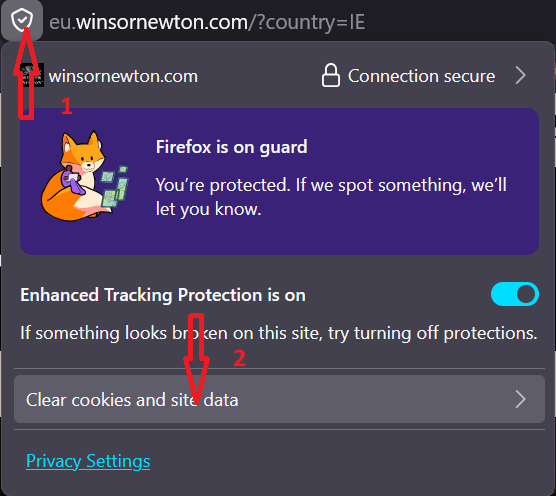
    This is driving me nuts, I want to visit https://uk.winsornewton.com/ but it keeps redirecting me to eu site. On first visit it did pop up asking me to confirm I was in Ireland, I did, but at that stage I did not realise their full product range would not appear and I need to get to the original UK site, but can't. I don't have a VPN. TIA.


  • Registered Users, Registered Users 2, Paid Member Posts: 8,037 ✭✭✭jj880


    Clear site data, close browser or tab and re-open the link (this is using firefox):

    Screenshot 2026-05-31 222354.png

    >>> BOARDS IS IN TROUBLE - SUBSCRIPTIONS NEEDED <<<

    Info 👉️ Important News!!

    Progress 👉 https://keepboardsalive.com/

    Subscribe 👉️ https://subscriptions.boards.ie/


  • Moderators, Arts Moderators, Recreation & Hobbies Moderators, Social & Fun Moderators Posts: 81,084 Mod ✭✭✭✭New Home


    Close the tab, clear the cookies and the cache and try again.

    Actually, if you scroll to the very bottom of the page, you'll find a drop down menu where you should be able to change the location.


  • Registered Users, Registered Users 2, Paid Member Posts: 566 ✭✭✭HorseSea


    Thank you the location drop down at the bottom solved the issue, I hadn't seen it. Many thanks. It's the simple things that annoy me :-)


  • Registered Users, Registered Users 2 Posts: 1,025 ✭✭✭gubby


    hope someone here can help. I have a 2023 computer cant remember the name. Now I find it soooo slow ( I have a laptop in the kitchen which is years older and flying away goodo) this computer keeps telling me I am running out of space. can I, or should I just delete everything. I am afraid I will delet something inportaint. any advice


  • Advertisement
  • Registered Users, Registered Users 2, Paid Member Posts: 31,680 ✭✭✭✭looksee


    Do you have McAfee or similar virus programme? They eat space.


  • Moderators, Arts Moderators, Recreation & Hobbies Moderators, Social & Fun Moderators Posts: 81,084 Mod ✭✭✭✭New Home


    Look up the name (brand/model) of the computer on the label. In theory it should tell you how much GB storage it has. You could get an external hard drive, or a USB stick, and start moving (not copying, moving) files from the Desktop, the My Documents folder, the Downloads folder, etc. Before doing that you could defrag it. When the system prompts you to make some room, it usually offers some suggestions on how to do it. If you have an antivirus installed, sometimes you also get suggestions of how to make space from it, too.

    Oh, and before that, clear the internet cache, history, cookies, etc.

    Post edited by New Home on


  • Registered Users, Registered Users 2 Posts: 14,783 ✭✭✭✭LambshankRedemption


    A computer like a human uses 2 types of memory. Long term and short term, long term is storage, so where your files are located. Short term is used for running programs, in the same way you remember to put a teabag in your cup before adding the hot water. To improve efficiency, a computer also uses something called swap memory. This is short term memory stored on the disk.

    If your hard drive is running out of space, you won't have as much swap memory at your disposal and so will be slower.

    So yes, the solution is to make some space.

    The first thing I would do is look at installed programs and remove any you don't use. Computers often come with a load of extra programs you don't need or use. Also programs tend to be much bigger than regular files.

    Do you know what version of Windows you are using?


  • Moderators, Computer Games Moderators, Technology & Internet Moderators, Help & Feedback Category Moderators Posts: 27,096 CMod ✭✭✭✭Spear


    You can run programs like Treesize to find where the space is being lost before you touch anything:

    https://apps.microsoft.com/detail/xp9m26rsclnt88?hl=en-US&gl=IE

    It may be something harmless like temp files not being cleaned up, but best to check before you go nuking irreplaceable or important stuff.


  • Registered Users, Registered Users 2 Posts: 818 ✭✭✭ottolwinner


    are those things you see offered for sale that plug them in will find and sort all your photos on a laptop too good to be true?


  • Moderators, Computer Games Moderators, Technology & Internet Moderators, Help & Feedback Category Moderators Posts: 27,096 CMod ✭✭✭✭Spear


    Never heard of them, but it sounds flaky on the surface. There's nothing they can do that can't be run locally. Got a link to one?


  • Registered Users, Registered Users 2 Posts: 818 ✭✭✭ottolwinner


    this is one type i haven’t gotten adds for them in a while

    can’t seem to embed the link but photo stick would be one of them. I’d like to collect all photos from my mams home computer before it’s totally obsolete


  • Registered Users, Registered Users 2, Paid Member Posts: 41,951 ✭✭✭✭Hotblack Desiato


    I thought disk defragging went out with the Ark!

    Unlikely to provide any benefit, certainly on a computer only 3 years old.

    Here's how to free up drive space, once it gets low it will cause the computer to slow down. It'll suggest what you can safely delete (temporary files and stuff)

    https://support.microsoft.com/en-us/windows/free-up-drive-space-in-windows-85529ccb-c365-490d-b548-831022bc9b32

    Also what anti-virus is running on the PC? Windows Defender (which is free, and installed by default) is all that is needed, if there is McAfee or Norton or any of that other crap then uninstall it. Having more than one anti-virus running is disastrous for performance (having McAfee on its own is bad enough)

    Once the above is done and there is sufficient drive space, then run Windows Update and apply all updates, then update apps (on Windows 11, open the App Store, go to Library and search for updates)

    I'm partial to your abracadabra
    I'm raptured by the joy of it all


  • Registered Users, Registered Users 2, Paid Member Posts: 41,951 ✭✭✭✭Hotblack Desiato


    Just plug in a USB hard drive and copy them over.

    In theory they could be anywhere but most people will put their photos into a folder on the desktop, or in "My Pictures"

    I'm partial to your abracadabra
    I'm raptured by the joy of it all


  • Advertisement
  • Moderators, Computer Games Moderators, Technology & Internet Moderators, Help & Feedback Category Moderators Posts: 27,096 CMod ✭✭✭✭Spear


    All they do is search for a bunch of pre-defined filetypes and folders and copy them to the USB stick. You could do all that yourself in a few minutes, they're a waste of money.


Advertisement
Advertisement