Advertisement
Help Keep Boards Alive. Support us by going ad free today. See here: https://subscriptions.boards.ie/.
https://www.boards.ie/group/1878-subscribers-forum

Private Group for paid up members of Boards.ie. Join the club.
Hi all, please see this major site announcement: https://www.boards.ie/discussion/2058427594/boards-ie-2026

Saorview Changes - 2026

1246789

Comments

  • Registered Users, Registered Users 2, Paid Member Posts: 15,602 ✭✭✭✭josip


    Been there at least 50 times by now. You wouldn't believe how much time we've spent on this :(


  • Registered Users, Registered Users 2, Paid Member Posts: 15,602 ✭✭✭✭josip


    I'd agree with you regarding indoor rabbit ears, although i went up to the attic to get the best signal I could.

    But the nursing home has an external aerial on the roof. And the Ideal TV that is already there can get the subtitles ok.

    If my conversation with Samsung support is unfruitful, my options I think are either signal booster or perhaps get the shop to exchange the Samsung for a similarly-sized Ideal model.


  • Registered Users, Registered Users 2, Paid Member Posts: 24,508 ✭✭✭✭dxhound2005


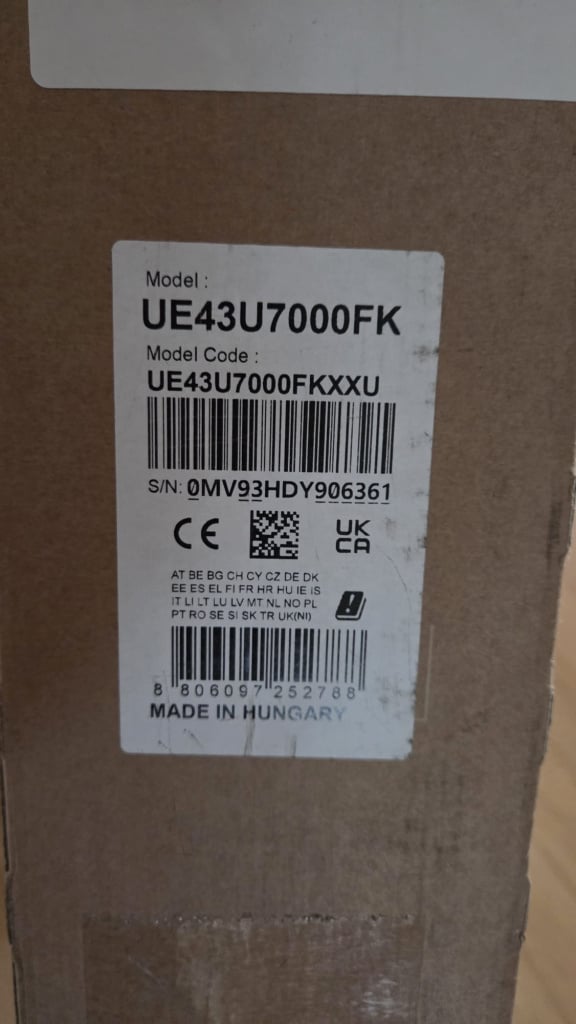
    The model number you gave is possibly missing a letter J ?. When I googled to find out about signal measuring, I got this.

    "To access the signal strength and quality menu on a Samsung UE43JU7000 (JU7000 series), you need to navigate through the Self Diagnosis menu. The signal information provides a meter to check for optimal antenna positioning."

     But you probably did that already, from what you say about your visit to the attic?


  • Registered Users, Registered Users 2 Posts: 2,937 ✭✭✭Ten Pin


    Is it all channels or just RTE?
    Samsung TV might have been using MHEG5 for subtitles but with Aertel gone, it doesn't know where to get the subtitles from, there might be a menu setting to change subtitle decoding method (speculation on my part). Digital Bitrate shows "TELETEXT" in one of the columns for all of the RTE/VM/TG4 channels so it's a matter of finding if the TV can display the subtitles that way.

    Other suggestions...

    • Try changing the country setting (although this might mess with channel numbering).
    • Try using the teletext button on the remote and dial 888 (a bit non user friendly but will help identify the issue).

    AIUI with digital TV it's all or nothing, so if the picture & sound are there then subtitles are there too.
    If going back to shop then ask them to show a similar model with subtitles working.


  • Advertisement
  • Registered Users, Registered Users 2 Posts: 1,553 ✭✭✭StreetLight


    Subtitles used to be available as a shortcut on the Teletext button, but it's a function being removed by manufacturers as it's now obsolete.

    There should be a button towards the bottom of the remote labelled something like "AD/SUB" or "LANG". Pressing it should bring up a sub-menu with options for Audio Description and Subtitles. Scroll up or down to Subtitles and press the "AD/SUB" button again to activate it.

    If that doesn't work, I'm almost sure if you go back into the General Menu system, you'll find the option for Subtitles within the Language or Audio Description settings.


  • Registered Users, Registered Users 2, Paid Member Posts: 24,508 ✭✭✭✭dxhound2005


    All or nothing sort of. All at 100% Quality reading, and maybe as low as 50%. But nothing at 48% and under. In between there is a point at which other elements of the stream apart from sound and vision is lost. If what I found out is valid.


  • Registered Users, Registered Users 2, Paid Member Posts: 15,602 ✭✭✭✭josip


    No, the model isn't the J one you suspected (unfortunately)

    WhatsApp Image 2026-02-09 at 15.42.44.jpeg


  • Registered Users, Registered Users 2, Paid Member Posts: 15,602 ✭✭✭✭josip


    Tried the old 888 teletext button out of curiosity while we were working on this. Did nothing. Brought back memories though.


  • Registered Users, Registered Users 2, Paid Member Posts: 15,602 ✭✭✭✭josip


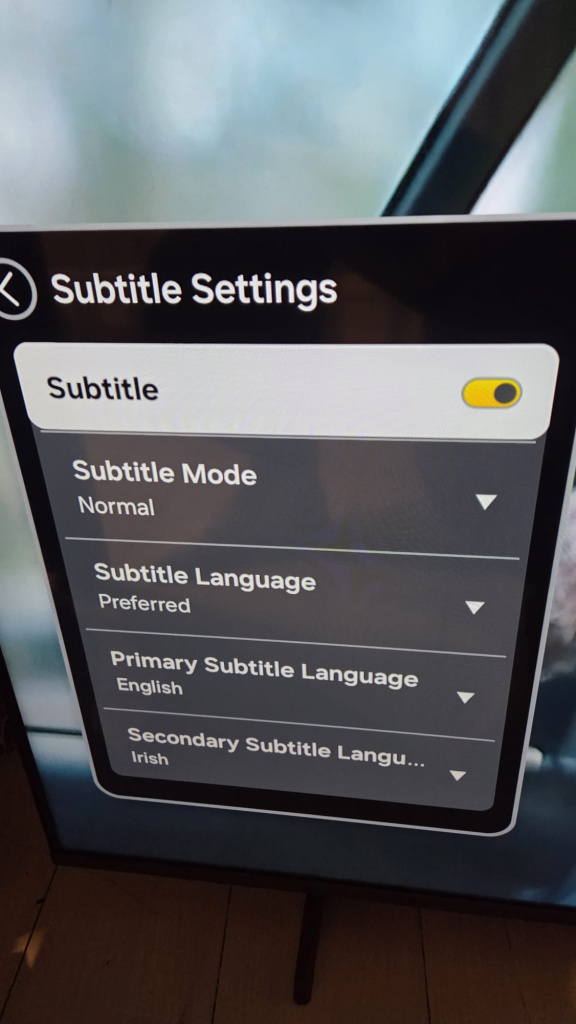
    Thanks for all the replies so far, really appreciate the various suggestions. Subtitles are well and truly on according to the on screen settings.

    WhatsApp Image 2026-02-09 at 15.40.24.jpeg


  • Advertisement
  • Registered Users, Registered Users 2, Paid Member Posts: 15,602 ✭✭✭✭josip


    When I use the AD/Subtitle button on the Samsung remote it says they are turned on but then I get a little spinner that doesn't inspire confidence. (The TV isn't networked because my mother doesn't have wifi in her room)

    WhatsApp Image 2026-02-09 at 15.57.23.jpeg


  • Subscribers Posts: 17,114 ✭✭✭✭copacetic


    subtitles work perfectly on a Samsung here. That AI invention of subtitles not working due to an iffy signal is just that. It has to be a setting or a problem with the TV really. About half the Samsung TVs here are Saorview approved and half aren’t so possibly a tricky setting. I’d go straight back to the shop with it if possible.

    You’ve probably tried the preferred settings for others and changing the primary language to Irish etc etc.


  • Registered Users, Registered Users 2, Paid Member Posts: 16,493 ✭✭✭✭The Cush


    The only time I've seen Irish subtitles not working is when the receiver was set to UK/Freeview, as both countries subtitles standards are different.

    I don't see it as a signal issue if the audio and video are present.


  • Registered Users, Registered Users 2, Paid Member Posts: 3,527 ✭✭✭Glaceon


    As far as I remember, Saorview still uses the old teletext subtitle standard rather than the DVB standard. So I guess it's possible that some modern TVs won't support it.


  • Registered Users, Registered Users 2, Paid Member Posts: 168 ✭✭Aidan McCarthy


    Hi.Just wondering. Dose your mother have hearing aids with Bluetooth connection. The only reason I was asking because if you can not get subtitles on the television. Try and see if the television has a Bluetooth connection built in to the television. Here is another thing I am going to say is if your mother has a Samsung television with no subtitles or Bluetooth connection. I have a Sony tv and it has subtitles on the tv. Just helping out with the problem with the television you have


  • Registered Users, Registered Users 2, Paid Member Posts: 15,602 ✭✭✭✭josip


    Thanks to all for your various suggestions. I called Samsung yesterday. We went through the phases. They were able to view what was happening on the TV via my phone camera after first sending me a link. It made the process relatively painless. They could see that although subtitles were set, nothing was showing on any channel.

    I then networked the TV so that they could remotely connect and do some further checks. There was again confirmation that everything was set ok but no subtitles and they asked me to do a factory reset which I did but no change in behaviour. Cue a further 10 minute pause while the issue was referred to an expert who reverted to say that the TV needed an internet connection to show subtitles. I don’t know if it was just that model, a subset of Samsung models or all of their TVs with this limitation. When I pointed out that I had networked the TV in order for them to connect remotely and we still hadn’t seen the subtitles, they said that a minimum of 15 Mbps is needed and at the time the TV only had 4 Mbps (hotspotted from my phone).

    So the plan now is to go back to the shop where I got it and look for another brand of TV that does not have the same limitation as Samsung. I’m not convinced that the internet connection is 100% accurate, the problem might actually be a quality of signal. Although my rabbits ears have line of sight to 3 rock. Nevertheless I’m not going down the signal-boosting route now that Samsung have given me a justifiable reason to return the TV to the shop.

    I’ll be asking the shop to showing working subtitles from a terrestrial aerial on the next TV before I take it, but I would also appreciate if anyone on here with a non-networked TV connected to a terrestrial aerial, could confirm if they can get subtitles?

    One option might be a Hisense, 43” E7Q 43'' 43E71Q .


  • Registered Users, Registered Users 2 Posts: 13,905 ✭✭✭✭thesandeman


    I've a couple of Walkers and they do but they are five or six years old.


  • Registered Users, Registered Users 2 Posts: 6,150 ✭✭✭JDxtra


    Sounds like Samsung support were fobbing you off. There should no requirement for an internet connection for subtitles - let alone 15Mbps!


  • Registered Users, Registered Users 2, Paid Member Posts: 3,527 ✭✭✭Glaceon


    I don't think it's the signal, the bandwidth required for subtitles is nothing compared to the video itself. I'd be confident enough to say that you'd see picture breakup before losing subtitles with a weak signal. I personally suspect that the Samsung doesn't have a teletext decoder so can't read the subtitle format used by Saorview.


  • Subscribers Posts: 17,114 ✭✭✭✭copacetic


    that’s disappointing from Samsung ‘expert’ there can’t be any reason to need an internet connection to have subtitles. I have a Samsung without one showing it. Subtitles are embedded in the broadcast stream, they don’t come over the network.


  • Advertisement
  • Registered Users, Registered Users 2, Paid Member Posts: 24,508 ✭✭✭✭dxhound2005


    The manual can be downloaded here, the 4.26 MB file 314 pages. I see an upgrade file there dated 09 February as well, don't know what that is for.

    https://www.samsung.com/ie/support/user-manuals-and-guide/ Put UE43U7000FK in the search.

    27 mentions of Subtitles, but a quick check does not point to any solutions. On page 205 there is a list of the supported subtitle formats, means nothing to me.

    Unrelated, page 180 has information about shortcuts. Could be useful to anyone not aware of them.


  • Registered Users, Registered Users 2, Paid Member Posts: 15,602 ✭✭✭✭josip


    I'm still open minded about whether I was being fobbed off or not :)

    When the TV is not networked and I tune in channels, with the rabbits ears attached and no box, I get 28 channels, a basic Samsung TV ecosystem (no apps) and no subtitles.

    When the TV is networked and I tune in channels, with the rabbits ears attached and no box, I get 52 channels and a rich Samsung TV ecosystem with channels that have subtitles.

    I suspect the rabbits ears aren't being used in the latter scenario and if I had the time and was curious I'd try tuning in again with the antenna.

    Home ent tech isn't my area, but is it possible that rather than have to develop/include a different subtitle decoder for each country, they decided to centrally stream it from their servers and sync it in-box with the digital TV signal? As someone suggested upthread.

    The shop have already agreed to take it back and check another brand/model on the shop floor before leaving, so I'm looking forward to closing this particular Samsung chapter in my life. I'm not overly disappointed in Samsung, we're happy with the brand for our own phones/TVs and this is a relatively unusual/niche issue in modern society.


  • Registered Users, Registered Users 2, Paid Member Posts: 41,272 ✭✭✭✭Hotblack Desiato


    Complete BS from AI yet again

    It's not Ceefax / Aertel on analogue TV any more - when you DID need more than a 'just about watchable' signal to get reliable teletext and subtitles, because the teletext data stream had next to no error protection.

    Digital TV has a high level of error protection. If the picture and sound are not breaking up then the subtitles will be fine.

    The other poster is reporting NO subtitles, not subtitles which intermittently disappear or have errors

    Either there is a wrong setting on the TV (is country set to Ireland?) or it's not fit for purpose and should be returned for a refund

    I'm partial to your abracadabra
    I'm raptured by the joy of it all


  • Registered Users, Registered Users 2, Paid Member Posts: 41,272 ✭✭✭✭Hotblack Desiato


    Having working subtitles (without any of this nonsense of requiring an internet connection - the subtitle data is in the broadcast signal) is certainly not a niche issue. It is basic functionality and tbh those Samsung TVs should not be allowed to be sold here without it (disability discrimination)

    I'm partial to your abracadabra
    I'm raptured by the joy of it all


  • Registered Users, Registered Users 2 Posts: 598 ✭✭✭Orban6


    On my Sharp tv there is an option for analogue and/or digital subtitles. Only digital mode works.


  • Registered Users, Registered Users 2, Paid Member Posts: 24,508 ✭✭✭✭dxhound2005


    There are numerous notes like this in the Manual under the descriptions for various functions:

    Some functions may not be supported depending on the model or geographical area.


  • Registered Users, Registered Users 2, Paid Member Posts: 24,508 ✭✭✭✭dxhound2005


    This is part of what they posted:

    "When we tune in the Samsung TV I bought using the same aerial, the pictures are received ok, but it's impossible to get subtitles. I tried for the first few weekends to retune and get them but no joy. I've now got the TV back at home where I can test it in my own time. Subtitles come through fine when there is a set top box providing the signal over a HDMI cable."

    The tuner in the TV may be less sensitive than the tuner in the set top box. Unfortunately at no point did we get the readings for signal quality and strength. I put information on how to access them to help with positioning an aerial.


  • Registered Users, Registered Users 2 Posts: 81 ✭✭butwhynot


    The tuner in the TV may be less sensitive than the tuner in the set top box

    That's not how digital TV/subtitles work, what don't you understand? If the picture is coming in fine, the signal (for subtitles) is fine. No one wants to hear you regurgitate AI slop. This is almost certainly a teletext/region issue


  • Registered Users, Registered Users 2, Paid Member Posts: 15,602 ✭✭✭✭josip


    When I factory reset the TV, I was very careful to chose Ireland and not UK as the country.

    Is there any other way the region could be the issue?


  • Advertisement
  • Registered Users, Registered Users 2, Paid Member Posts: 168 ✭✭Aidan McCarthy


    Hi. Sony tv bravias are good too with subtitles. The other night i put on the subtitles on my television and it works well and I find this television is good. It's a Sony bravia TL and the model number is w800. It's a smart tv to


Advertisement
Advertisement