Advertisement
Help Keep Boards Alive. Support us by going ad free today. See here: https://subscriptions.boards.ie/.
https://www.boards.ie/group/1878-subscribers-forum

Private Group for paid up members of Boards.ie. Join the club.
Hi all, please see this major site announcement: https://www.boards.ie/discussion/2058427594/boards-ie-2026

Configure TP-Link Deco device as a Wi-Fi Router on Eir FTTH (F3000)

2

Comments

  • Registered Users, Registered Users 2 Posts: 1,728 ✭✭✭NotShero


    You don't need to select PPPoE with Eir, select Dynamic IP.

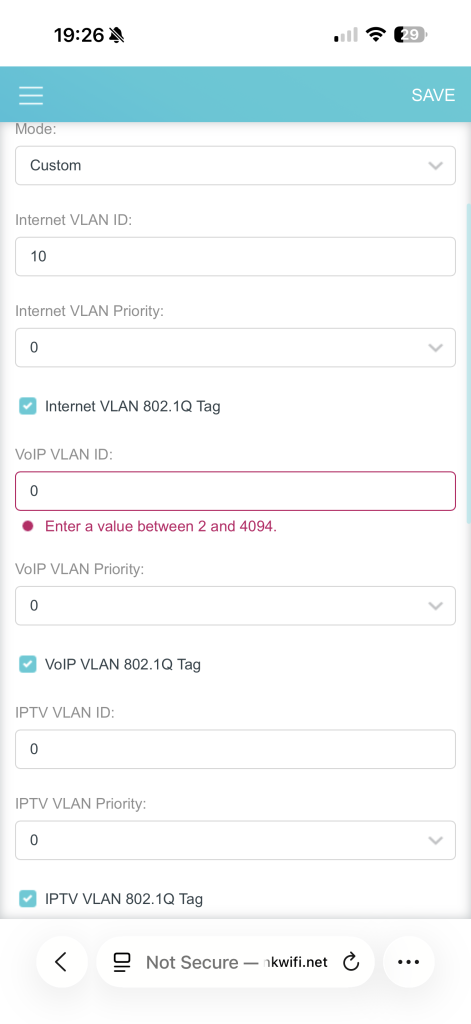
    You need to set VLAN ID 10 also, it should be under Advanced > Network > IPTV/VLAN. Mode - Custom, Internet VLAN ID - 10.


  • Registered Users, Registered Users 2 Posts: 5 DrGonzo2025


    thank you so much for your quick response. When I do that it’s asking me to input values for the rest of the fields. See screen shot

    IMG_8354.png


  • Registered Users, Registered Users 2 Posts: 1,728 ✭✭✭NotShero


    You can just input something random for those - 200, 300 etc.


  • Registered Users, Registered Users 2 Posts: 5 DrGonzo2025


    you are a life saver!!!!!! Thank you so much!!

    I owe you a pint!! Thank you


  • Registered Users, Registered Users 2 Posts: 4,294 ✭✭✭The Ayatolla


    Does the router have VLAN tag settings?

    Did you set that? I think it should be set to VLAN ID = 10


  • Advertisement
  • Registered Users, Registered Users 2 Posts: 5 DrGonzo2025


    sorry for the delayed response. I got it solved thanks to NotShero. But thank you for your reply also.


  • Registered Users, Registered Users 2 Posts: 11 paddyfitz88


    I need help ,

    Recently got Eir Fibre installed to the home , first few weeks were great , I’ve bought 2 eir WiFi boosters for my room and my brothers room to plug into our PlayStations by Ethernet cable , once again first week or so was great getting 500mbs speed with no drops , in the last week the boosters will randomly drop and turn off and on , I presume these eir boosters are just trash.

    I’m looking at getting the TP-LINK Deco M4 for our rooms , is it as easy as buying them and connecting them to the Eir fibre box downstairs and then just moving them up to our rooms and plugging them into our PlayStations by Ethernet again ? I’m just thinking that the TP links are a better product and won’t result in drops!?


  • Registered Users, Registered Users 2 Posts: 1,728 ✭✭✭NotShero


    That's not really how you should be using extenders or mesh. You want to put them about halfway between where the main node/router is and the location where there's bad signal. They're still using WiFi to connect back to the main node/router. At the moment you might as well just use the WiFi on the consoles as the extenders shouldn't be providing a much better expierence as you have them right next to them.

    Powerline adapters use the internal electrical wiring so you would plug those in and connect the consoles with ethernet to them. These would give better latency than WiFi but the download speed would be lower. It can depend on how old the wiring is in your house and how it's configured.

    If you were to get the TP-Link Deco, again place the nodes about halfway between the consoles and the main node. You can remove the Eir router altogether and connect the main node to the ONT, you'd need to set the connection type as Dynamic IP and you'd need to set VLAN ID 10 in VLAN/IPTV settings. You could instead use the Deco in access point mode and connect it to the Eir router, ideally turn the WiFi off on the Eir router then.

    Post edited by NotShero on


  • Registered Users, Registered Users 2 Posts: 11 paddyfitz88


    Thanks for the reply !,

    Using WiFi on the consoles is only giving speeds of 84 mbps and constantly lagging , using the boosters connected to PlayStation by lan cable is giving 495 mbps and no lag at all , either way the booster still drops randomly.

    Maybe I’m better off getting another eir booster and putting it halfway between modem and boosters in our rooms?
    From reading online the general consensus is that the eir booster/fibre box is cheap and that the tp links are much better


  • Registered Users, Registered Users 2 Posts: 1,728 ✭✭✭NotShero


    I would say the PlayStation may be connecting over 2.4GHz when connected to the router over WiFi, that's why you're getting better performance with the extender as it's using 5GHz. Because it wouldn't make much sense otherwise. Unfortunately you can't separate the bands yourself on the Eir router anymore afaik.

    I would just get the Deco as it would be more reliable. Again if you do want to connect it to the Eir router, you'd have to put the Deco in access point mode.


  • Advertisement
  • Registered Users, Registered Users 2 Posts: 11 paddyfitz88


    thank you ! Just happened again today , it’s actually the main modem that randomly drops not just the boosters , any recommendations?


  • Registered Users, Registered Users 2 Posts: 1,728 ✭✭✭NotShero


    Get the Deco and replace the Eir router completely, just connect the Deco directly to the ONT.

    On the Deco, set the connection type to Dynamic IP. Then in advanced settings, under VLAN/IPTV you'll need to set Internet VLAN ID 10.


  • Registered Users, Registered Users 2 Posts: 11 paddyfitz88


    thanks for all your help that’s exactly what I’ll do


  • Registered Users, Registered Users 2 Posts: 2,555 ✭✭✭pizzahead77


    That's of course if you don't use the phone line - replacing the Eir router completely disables any phone line but it is possible to split out the Eir router and keep the phone line and then use the Deco for internet by adding a switch between them and the ONT


  • Registered Users, Registered Users 2 Posts: 2,181 ✭✭✭notahappycamper


    I’m currently on FTTC 40/10 🙄 with FTTH a year away! I opted out of the VoiP at the time you could so have PSTN for the home phone. I think you can tell them to keep the PSTN with FTTH or are they saying no noting they want it phased out?


  • Registered Users, Registered Users 2 Posts: 43 peterwhit


    New to eir fibre parish; was following the instructions (dynamic IP, VLAN=10 etc) to connect directly to my Deco PX50 mesh units, but couldn’t get it working for ages. Ultimately I turned off the ONT for 5 mins as suggested, and rebooted the main deco during this time; everything finally came up hunky dory! Thanks to all for the advice. (Earlier I called up eir and they recommended PPPoE, didn’t have a clue about the dynamic IP approach!).


  • Registered Users, Registered Users 2 Posts: 11 paddyfitz88


    eir WiFi dropping 3/4 times a day , I’ve got 3 Deco M4’s and have tried setting them up by plugging the main straight into the ONT and having eir modem plugged out , the main deco (plugged into ONT) is in my sitting room downstairs (small 3 bedroom house in an estate) the 2nd deco is directly above this sitting room in my bedroom , and the third one is also upstairs in another bedroom , the 2 upstairs don’t get above 80mbps where as before I was using eir boosters up there and getting 450mbps upstairs , I need answers on how to get the same speeds upstairs with the deco boosters as I was with the eir ones please


  • Registered Users, Registered Users 2, Paid Member Posts: 8,920 ✭✭✭ongarite


    The Deco M4 is just not suited to the use case you want. It's too old tech for high speed mesh network. It will share the same 5ghz WiFi band for mesh mode as it does for user data transfer. Even worse if you connect it to the ONT directly to act as a modem as it's weak CPU can't handle both modem & mesh reliability.

    https://www.reddit.com/r/TpLink/comments/1iy1ijs/deco_m4_mesh_system_disappointed/


  • Registered Users, Registered Users 2 Posts: 11 paddyfitz88


    Ah I see , so do you think maybe my best option to stop eir from dropping is to maybe setup the deco’s plugged into the eir router (having both on) and connecting all devices downstairs like tv’s phones etc. to the deco and my gaming devices upstairs to the eir boosters ? Tbh I just want to stop eir from dropping randomly and feel it may be from having too many devices on it ,

    Thanks for your help


  • Registered Users, Registered Users 2 Posts: 1,728 ✭✭✭NotShero


    Try placing the nodes closer to the main router node. You want them to be about half way between where you need better signal and where the main router node is usually, to get the best performance from them.


  • Advertisement
  • Registered Users, Registered Users 2 Posts: 2,181 ✭✭✭notahappycamper


    For anyone with a Deco BE85 or 95, security updates are ceasing this September! I only just bought two 2-packs this month 🙄. It seems crazy for a system just launched 3 years ago.


  • Registered Users, Registered Users 2 Posts: 2,181 ✭✭✭notahappycamper


  • Registered Users, Registered Users 2 Posts: 11 paddyfitz88


    Hi all ,Back again…

    Since I’ve changed to eir 2 months ago it’s been nothing but a mess with WiFi dropping non stop after the first week , I’ve tried everything such as trying a mesh system with tp link deco M4 (only to find out that the M4’s are useless for a mesh system) 

    anyway my current problem is eir have just sent me out a new modem , I’ve set it up and it’s working but now both of my eir boosters will not connect to this new modem no matter what I try , I’ve plugged them into the modem with Ethernet , I’ve tried WPS, I’ve tried resetting the boosters , nothing working. Both boosters are just constantly flashing red (link light) 


    please can somebody help!


  • Registered Users, Registered Users 2 Posts: 1,728 ✭✭✭NotShero


    The M4's should be okay, place the extender nodes halfway between where you need the signal and where the main node is. Have you tried connecting it directly to the ONT, removing the Eir router altogether.

    Connection Type - Dynamic IP

    Advanced > IPTV/VLAN > Manual > Internet VLAN ID - 10 / Internet VLAN Priority - 0

    https://www.tp-link.com/uk/support/faq/2465/


  • Registered Users, Registered Users 2 Posts: 11 paddyfitz88


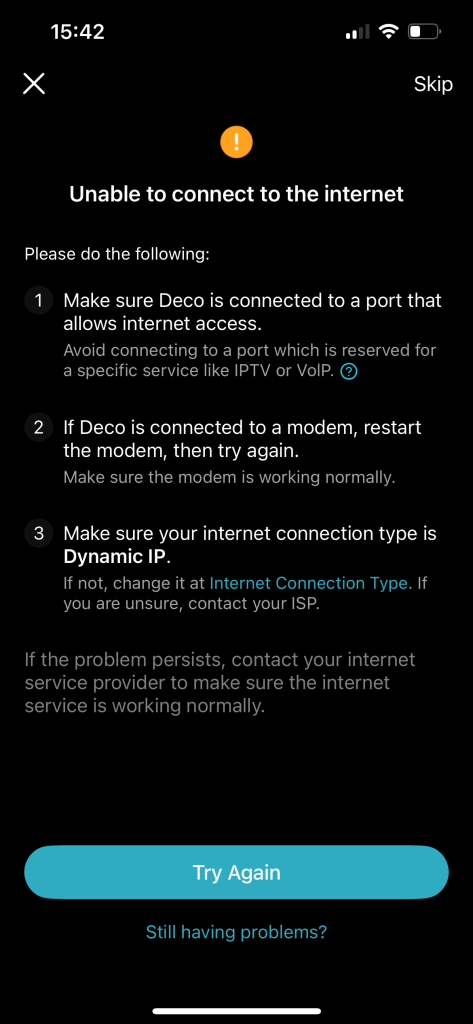
    None of my tp links will connect to internet when setting them up from scratch plugged into eir router , go through the setup and light goes red for no internet connection , I’ve changed the dynamic ip clan to 10 and no joy , I’ve tried access point mode too no joy


  • Registered Users, Registered Users 2 Posts: 1,728 ✭✭✭NotShero


    You connect the Deco directly to the ONT on the wall, not to the Eir router


  • Registered Users, Registered Users 2 Posts: 11 paddyfitz88


    I’ve tried that too , decos still red light , even if I wanted it connected to the router it should still work as it did before but they don’t work at all anymore


  • Registered Users, Registered Users 2 Posts: 11 paddyfitz88


    IMG_5464.png

    this is the message every time


  • Registered Users, Registered Users 2 Posts: 1,728 ✭✭✭NotShero


  • Advertisement
  • Registered Users, Registered Users 2 Posts: 18 ddonlon


    I switched to Eir this morning , I had DECO 9300 with vodafone , all I changed on the app was the login eircom@eircom.net and the password , that looks like all I needed to do , it is working away , speedtest says as the IP.

    It came with a landline number, has anyone got a landline to work on third party routers.

    Could I use the Eir router as another node on my network to use the land line


Advertisement
Advertisement