Advertisement
Help Keep Boards Alive. Support us by going ad free today. See here: https://subscriptions.boards.ie/.
https://www.boards.ie/group/1878-subscribers-forum

Private Group for paid up members of Boards.ie. Join the club.
Hi all, please see this major site announcement: https://www.boards.ie/discussion/2058427594/boards-ie-2026

Virgin Media Launch 5Gb Broadband

1678911

Comments

  • Registered Users, Registered Users 2 Posts: 695 ✭✭✭Dave..M


    Hi there, been quite a while since I posted here, glad to see the scheming is still going on. Reading this thread reminds me of the old THOMSON TWG-870U bridging work around many moons ago... I've been happy out with my 1gb 3.1 public IPV4 bridged connection for quite a while now, recently upgraded to an ASUS BE86U as the core of my network and have absolutely zero interest in the Hub5x making a mess of everything, why do they always have to be so bloody difficult! They're in the process of rolling out here currently and I'm doing my advanced research. Stupid question but has anyone refused the straight fiber point connection and requested an ONT installation from the engineer on the day? Also does anyone know how long they keep the old coax in place after they've completed their roll out ?- many thanks - Dave


  • Registered Users, Registered Users 2, Paid Member Posts: 3,526 ✭✭✭Glaceon


    That takes me back, having to send SNMP commands just to bridge the thing! 😂


  • Registered Users, Registered Users 2 Posts: 695 ✭✭✭Dave..M


    Yes indeed !


  • Registered Users, Registered Users 2 Posts: 1,445 ✭✭✭NotShero


  • Registered Users, Registered Users 2 Posts: 119 ✭✭PH0NER


    He’s installing as we speak. Very sad to say he refused to install the version that connects to my existing ONT. He claimed Virgin doesn’t offer a version of the 5x Hub that uses Ethernet instead of a built in ONT, even though I showed him the Virgin help docs with it. Will update again once it’s running.


  • Advertisement
  • Registered Users, Registered Users 2 Posts: 1,445 ✭✭✭NotShero


    Ah that's annoying! They must be told to only use them for SIRO/NBI installs so.


  • Registered Users, Registered Users 2 Posts: 119 ✭✭PH0NER


    I don’t think it’s a matter of not wanting to, he genuinely did not know there was another way to do it. He says they might be releasing a version that works with an external ONT next year, but to not quote him on that. He’s a third-party installer, not directly from Virgin. He says he installs for all companies


  • Registered Users, Registered Users 2 Posts: 1,445 ✭✭✭NotShero


    That's a bit strange yeah as the ethernet WAN Hub 5x has been out since they started offering Virgin through NBI/SIRO. That engineer must not do SIRO/NBI installs for Virgin.


  • Registered Users, Registered Users 2 Posts: 498 ✭✭tazzzZ


    I wonder if you chose a self install if they would have given you the ethernet Hub 5x… cant imagine they want end users messing with the fibre?


  • Registered Users, Registered Users 2 Posts: 1,445 ✭✭✭NotShero


    I'm pretty sure I've seen people being sent out a fibre patch cable with the Hub 5x and the instructions do tell people how to connect it - Fibre ONT Type 2

    https://www.virginmedia.ie/customer-support/support-by-products/broadband/Fibremodem/

    What would they have asked them to do with the ONT then, I'm not sure. Presumably it wouldn't work then anyway, as the serial number wouldn't be activated on their side.


  • Advertisement
  • Registered Users, Registered Users 2 Posts: 119 ✭✭PH0NER


    I can't get my UniFi Dream Wall to work properly with this Virgin 5x Hub.

    It won't assign an IP address for the Unifi Dream Wall to use if connected via SFP+. I have the 10gig port of the 5x connected to the SFP+ port with ethernet module. Module was working just fine with the old Vodafone provided ONT. I cleared out all of the old Vodafone WAN settings and set it to automatic.

    It will assign an IP address and function if I connect from the 10Gig port to the 2.5G WAN port of the Dream Wall. This defeats the purpose of 5Gig internet, though…

    I've tried the common methods of turning on Modem Mode, but accessing the Virgin 192.168.0.1 menu while connected to the Dream Wall seems impossible.

    Final note, it's very unstable. Speed tests frequently fail regardless of WiFi or ethernet. Sometimes the download will start, but upload will fail. More often, speed tests just outright fail. Weirdly, just browsing the internet seems to mostly function, but there are random hiccups.

    I just ordered this: https://store.betterinternet.ltd/product/x-onu-sfpp/

    Post edited by PH0NER on


  • Registered Users, Registered Users 2 Posts: 1,445 ✭✭✭NotShero


    Yes it's because you are connected to another router that you can't put into modem mode and is using DS-Lite

    Once the WAS-110/X-ONU-SFPP is used to replace the Hub 5x, it should work fine.


  • Registered Users, Registered Users 2 Posts: 121 ✭✭Boards_Member


    my module stays cool in its case for more than a month…cant get it working...i could have sell it to you ;)

    Seems is a random & hit,miss setup for some of the lucky guys here.

    What's the LAN IP range on your unifi ?


  • Registered Users, Registered Users 2 Posts: 119 ✭✭PH0NER


    I changed the UniFi range to start at 192.168.6 — I can access the Virgin Hub at 192.168.0.1 now, but I still can't turn on a modem mode. After another factory reset, internet is stable but still maxing out at 1.5Gbps when connected from the Hub's 10G port to the UDW's 2.5G port. WiFi speed tests seem to max out around 500/500 via U7 Pro, whereas my old Vodafone 2Gig connection would result in 1,400 - 1,600Mbps download speeds from the same access point.

    I'll be excited to see how this changes once the x-onu-sfpp arrives.


  • Registered Users, Registered Users 2 Posts: 498 ✭✭tazzzZ


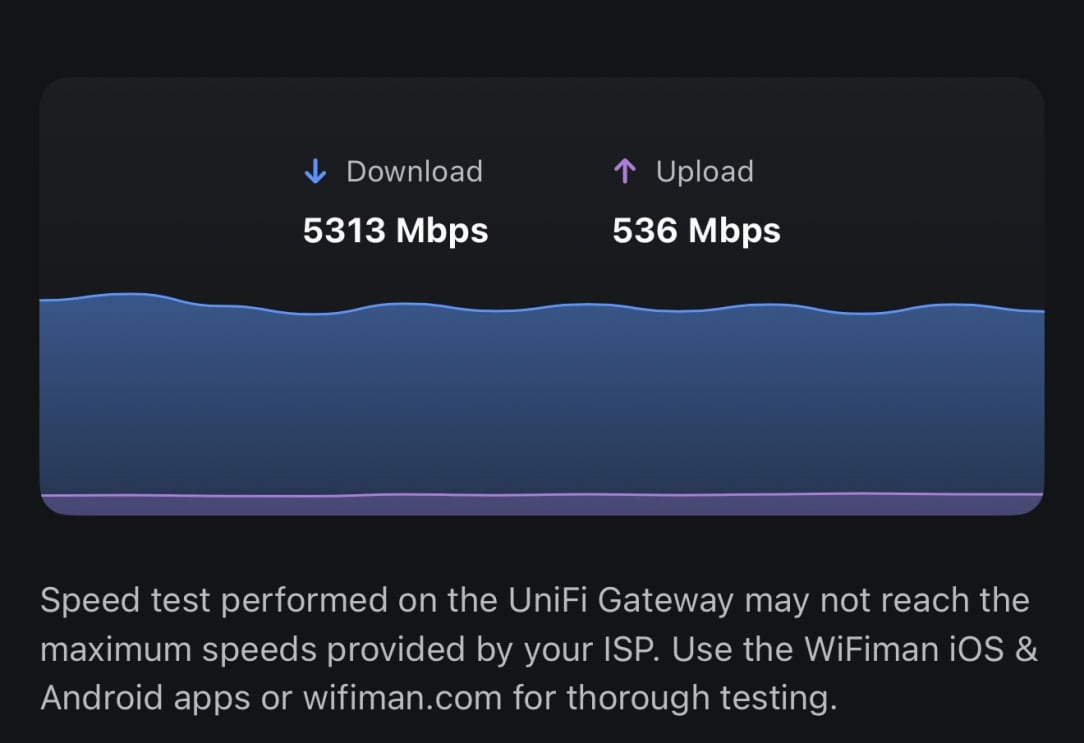
    I only get around those speeds too with IDS/IPS turned on on my UDMP. If you do a speedtest in the router it shows that I am getting the full speeds that are advertised. speedtest.net is obviously subject to all the security features that slow down the speeds significantly. UDMP and UDW are rated for the same IPS/IDS throughput in best case scenarios. So 1.5 seems like the consistent limit for it.

    msedge_EktXStP4Ty.png msedge_7NIaa8VBUn.png


  • Registered Users, Registered Users 2 Posts: 119 ✭✭PH0NER


    image.png

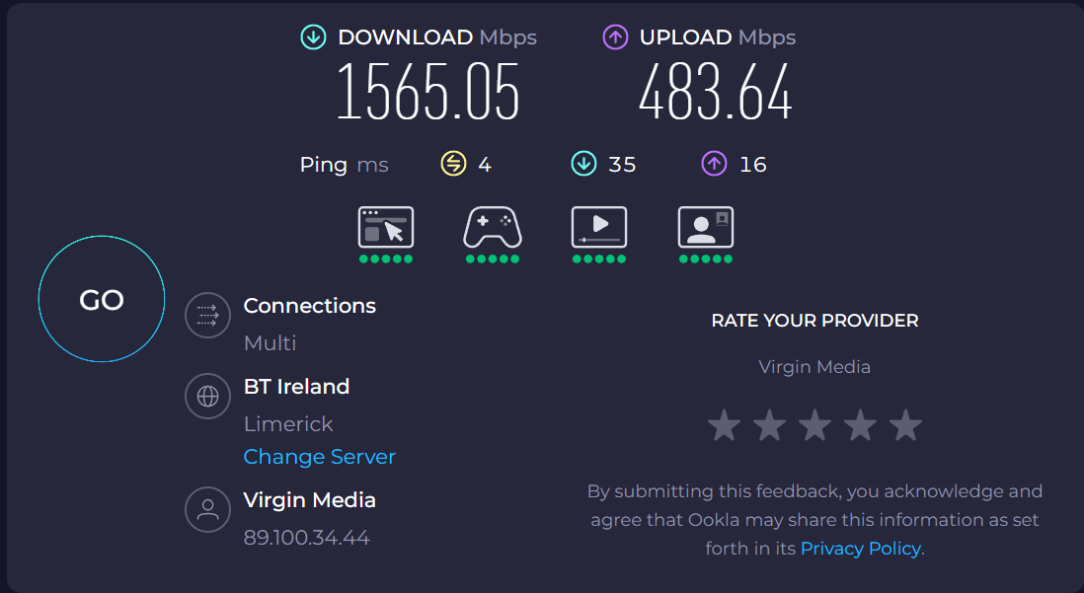
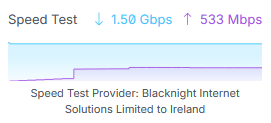
    Even in my UDW, the speeds are maxing out at 1.5 Gbps down. The 5X is connected from its 10G port to the 2.5G WAN port on my UDW, so I don't understand why I'm not at least pulling 2Gbps.

    My Vodafone 2Gig service consistently pulled 2,200Mbps from the 10G port of the Nokia ONT to the 2.5G WAN of my UDW.

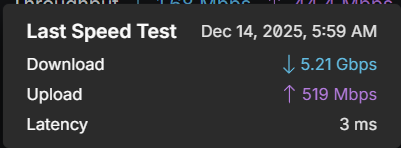
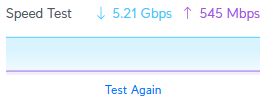
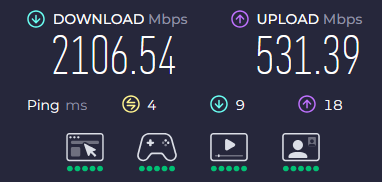
    Update: The 10G to SFP+ WAN just started working randomly. I'm now getting expected speeds at the UDW:

    image.png

    Hardwired to my PC's 2.5G port (upgrade in progress) is also working properly now:

    image.png


  • Registered Users, Registered Users 2 Posts: 121 ✭✭Boards_Member


    Welcome to true sad wireSpeeds reality !

    Unifi UDM gets you in the LAN side up to 2-3Gb in nonLab conditions.

    The Cloud Gateway and the Pro Max may allow you to reach the 5Gb up limit...i may get my hands on two of each for a new project next year.


  • Registered Users, Registered Users 2 Posts: 119 ✭✭PH0NER


    I wish I thought to check that out earlier… Thanks!

    Yep, it looks like my Dream Wall maxes out at around 3Gbps throughput. I've just purchased the Cloud Gateway Fiber, which supports up to 5Gbps. By the time that arrives, I'll have the x-onu-sfpp to bypass the 5X router.


  • Registered Users, Registered Users 2 Posts: 121 ✭✭Boards_Member


    Th SPF module is not gonna so you any magic this side of the fibre cable...


  • Registered Users, Registered Users 2 Posts: 119 ✭✭PH0NER


    It'll let me get rid of the 5X router, and solve the double NAT issue I'm facing now. Hopefully an all around better experience.


  • Advertisement
  • Registered Users, Registered Users 2 Posts: 121 ✭✭Boards_Member


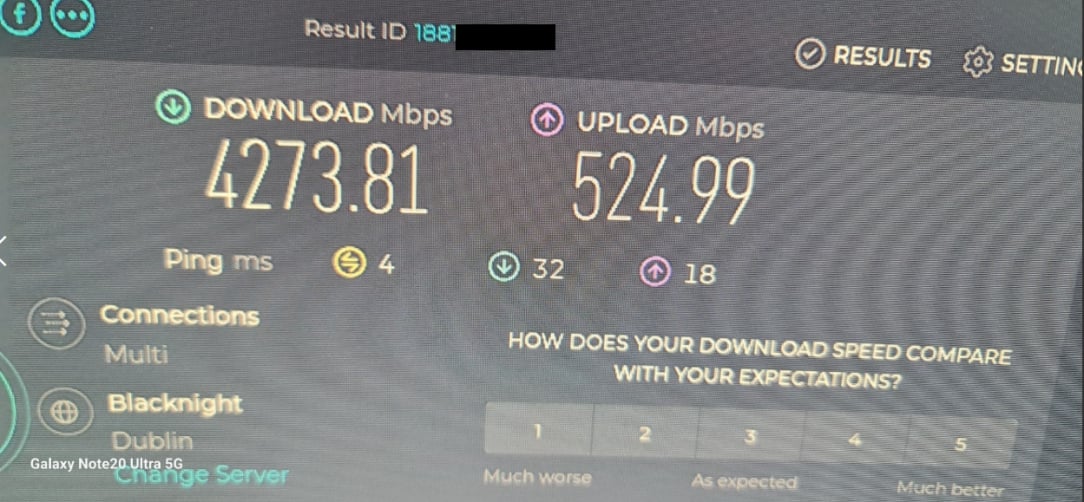
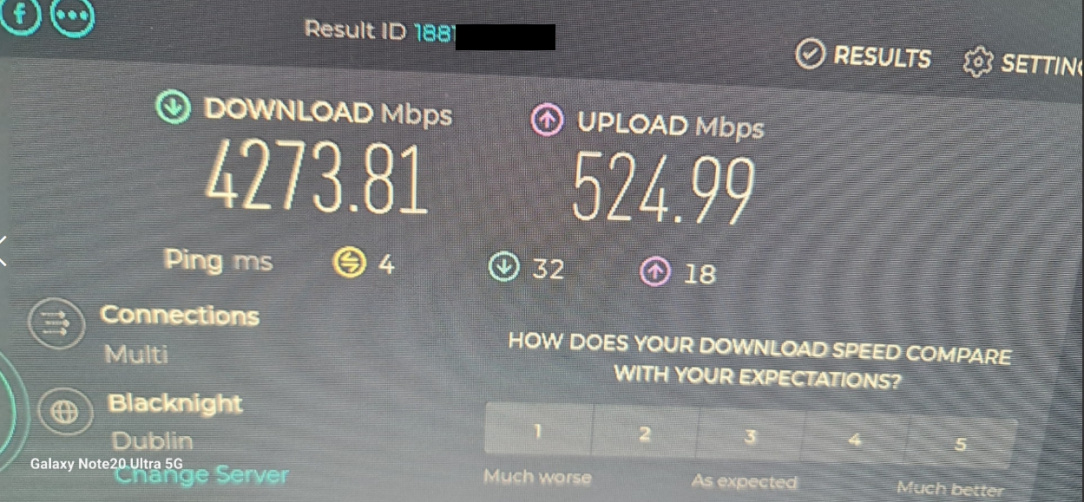
    Not sure how..or…why:

    4273.jpg

    From my PC.


  • Registered Users, Registered Users 2 Posts: 119 ✭✭PH0NER


    IMG_1190.jpeg

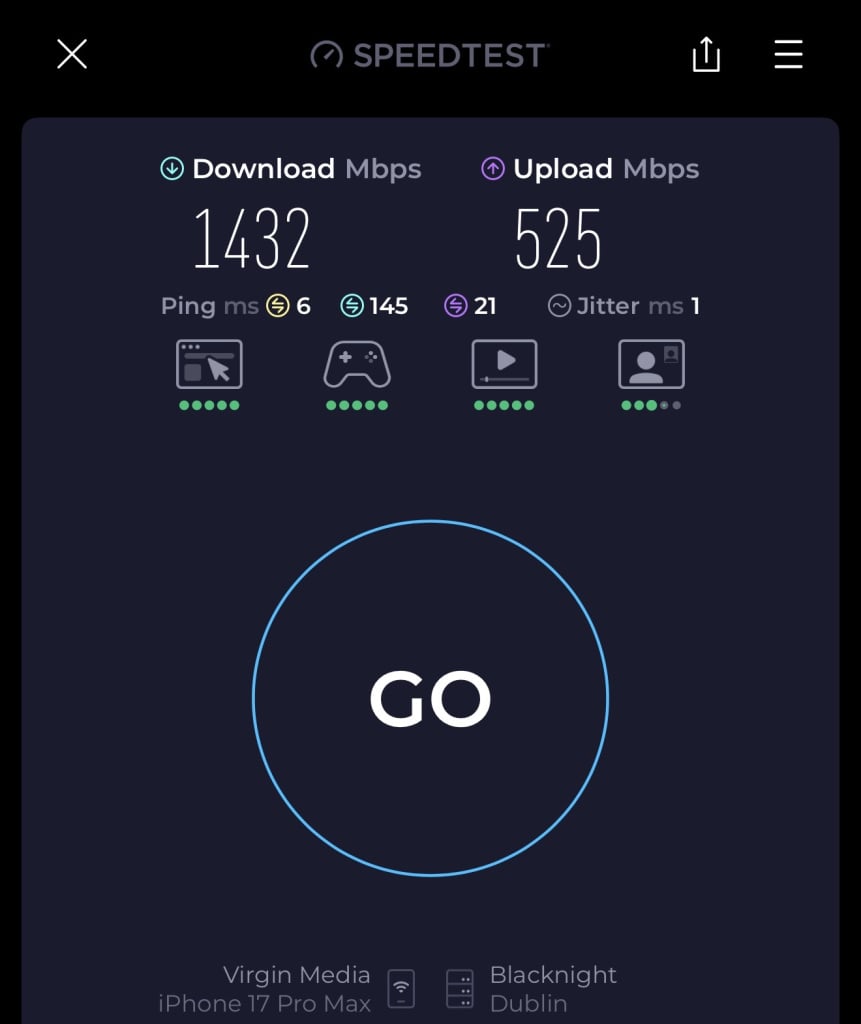
    I forgot to provide an update. I ended up getting rid of the provided Virgin 5x Hub and have been using a WAS-110/X-ONU-SFPP to plug the fibre line directly into my UniFi Fibre Gateway. Speeds reach nearly the full speed when hardwired from to my PC.


    My phone on WiFi 7 connecting to a U7 Pro XG Wall tops out around 1.5Gbps

    IMG_1191.jpeg


    Overall, I’m very happy with the service


  • Registered Users, Registered Users 2 Posts: 121 ✭✭Boards_Member


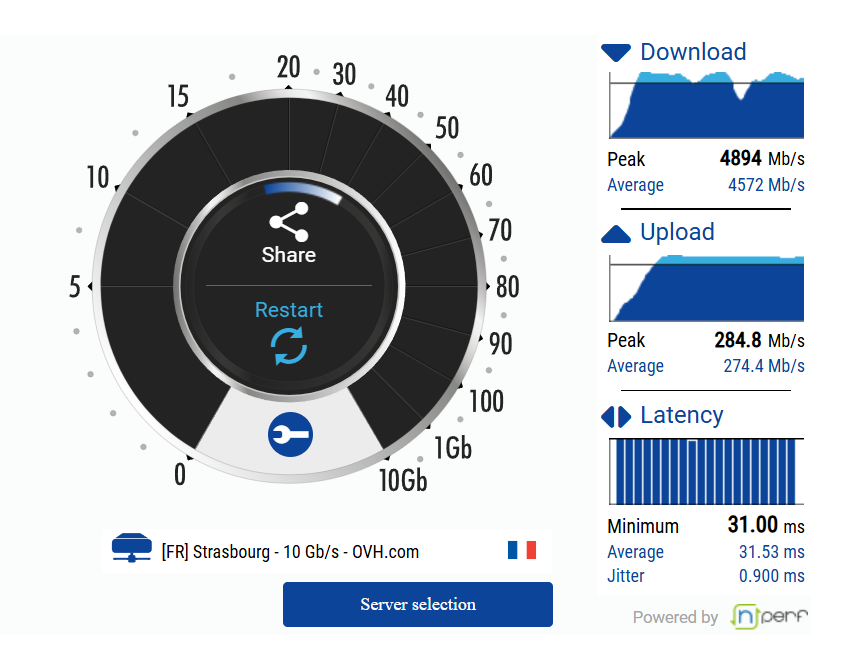
    I did not used "anything" outside of standard equipment: VM router standard, Unifi have been upgraded to latest version,10 i think, fibre optics cards and cables,same.

    Tested on a fresh Endeavour OS instalation,with no firewall or any security packages installed or running.


  • Registered Users, Registered Users 2 Posts: 121 ✭✭Boards_Member


    4273.jpg

    endpoint computer test results.


  • Registered Users, Registered Users 2 Posts: 23 embed


    I have VM's 5Gbps plan with NBI (Nokia X5-010 with the F5685L-VMIE). Download speeds usually range between 2-3Gbps, but have reached 5.1Gbps once. As I work from home, my main problem is dropped MS Teams calls. Calls connect, there is video but no audio, and the call will drop in 20-30 seconds.

    Has anyone had this problem, and any suggestions on how to resolve?


  • Registered Users, Registered Users 2 Posts: 7,507 ✭✭✭naughto


    sounds like it could be a PC problem rather than that an Internet connection


  • Registered Users, Registered Users 2 Posts: 121 ✭✭Boards_Member


    While the downloads may have an impact,the downloads are good quality ? Never had a problem with VM since upgrade.

    check www.ovh.net and report back.

    Are you wireless ? If yes, get a CAT6 asap and use it instead.


  • Registered Users, Registered Users 2 Posts: 23 embed


    Tested on two different laptops, same result. Move to a different room and switch to a mobile hotspot (Vodafone)—no problems on the same call.

    All wired with Cat6 with a 10 Gbps switch.

    image.png


  • Registered Users, Registered Users 2 Posts: 1,445 ✭✭✭NotShero


    Do you by any chance have a third party router/mesh you could try instead of the Hub 5x, you'd connect it directly to the NBI ONT. To rule out if the router is the issue.

    Connection Type - IPoE/DHCP/Dyanmic IP

    VLAN ID 10 in VLAN/IPTV settings

    Look for MAC Address Cloning/Spoofing settings - Enter the MAC address of the Hub 5x, listed on the sticker on the Hub 5x


  • Advertisement
  • Registered Users, Registered Users 2 Posts: 23 embed


    I am in the process of setting up OPNsense on Proxmox, but I wasn't sure if I could bypass the Hub 5x and connect directly to the NBI ONT. Once I spoof the setting, can I control DNS, etc?


Advertisement
Advertisement