Advertisement
Help Keep Boards Alive. Support us by going ad free today. See here: https://subscriptions.boards.ie/.
https://www.boards.ie/group/1878-subscribers-forum

Private Group for paid up members of Boards.ie. Join the club.
Hi all, please see this major site announcement: https://www.boards.ie/discussion/2058427594/boards-ie-2026

Windows 11 upgrade remove windows 10 issues?

  • 09-12-2021 09:10AM
    #1
    Registered Users, Registered Users 2 Posts: 3,063 ✭✭✭


    Hi,

    After long attempts to fix, my windows taskbar / in-folder search and login to windows in windows store are not working... When I try to search in folder of install a new app on Microsoft store the window tab just greys out and closes.

    I've full Avast security and no issues are showing in terms of infections.

    Would an install of Windows 11 remedy these problems I am having?

    Is Windows 11 worth the upgrade?

    Will my apps/settings carry over if I upgrade?

    Thanks!

    Post edited by sticker on


«1

Comments

  • Moderators, Computer Games Moderators, Technology & Internet Moderators, Help & Feedback Category Moderators Posts: 26,927 CMod ✭✭✭✭Spear


    Whether Windows 11 is worth is debatable. While there's some nice under the hood improvements, the changes to the UI, such as the backwards Start Menu, make it awkward to use until you can adjust to it.

    Your programs and files will carry over just fine. Or mine did at least, with no issues at all.

    As to whether it'll fix your issues, that's a dice roll unfortunately. There is a new store system coming to Win11 which may sort that issue for you, but it's very unpredictable.


  • Registered Users, Registered Users 2 Posts: 3,063 ✭✭✭sticker


  • Registered Users, Registered Users 2 Posts: 3,928 ✭✭✭Ozymandius2011


    I recently had some of these problems. They largely went away when I did a clean install of Windows 11. Now its very fast, whereas the version that I installed over Windows 10 was slow. The main reason Windows upgrades can be slow is that the files of the old version of Windows are still on the PC to some extent, and pre-Windows 11 versions of applications.


  • Moderators, Sports Moderators Posts: 6,394 Mod ✭✭✭✭Nowso


    a fresh install of windows 11 will be an improvement things work a bit better in it


  • Registered Users, Registered Users 2 Posts: 4,627 ✭✭✭smuggler.ie


    Fresh install will resolve issues (well, get rid of them as it is fresh), but this way it wont carry settings/apps/files - make backup

    As current windows is "in trouble", in-place upgrade might help, but to same degree might fail. Is your hardware Win11 compatible? Can you post you PC specs?

    Have you attempted ?:
    DISM commands
    SFC /scannow

    Sign-out ALL windows/MS365 related applications, then sign in again. I'd suggest to create another local admin account beside your usual beforehand.


  • Advertisement
  • Moderators, Recreation & Hobbies Moderators, Science, Health & Environment Moderators, Technology & Internet Moderators Posts: 97,885 Mod ✭✭✭✭Capt'n Midnight


    So would a fresh install of Windows 10. By signing up you can get free updates for another year.

    Windows has a half-life. It gradually decays every time you make changes.

    I'd probably remove the anti-virus as windows has one built in. I'd definitely remove it before doing an in-place upgrade.

    If privacy is a concern then you'll have to play whack-a-mole with things like Windows Recall if you go Windows 11.


  • Registered Users, Registered Users 2 Posts: 120 ✭✭Perfidious Cretin


    Getting rid of Avast would help. Horrible A/V.


  • Moderators, Science, Health & Environment Moderators Posts: 20,712 Mod ✭✭✭✭Sam Russell


    I am trying to resurrect an old desktop of mine that runs win 10. I have increased memory from 8gb to 16 gb successfully, but the computer runs slow.

    It will not upgrade to Win 11 saying it is incompatible. It is an HP 500-214cd. The Win 10 was installed 1/12/2020. Processor is Intel i5-4440. Not hyper-threaded. HD is 2,000 GB. It does not report why it is not Win 11 upgradeable.

    I want to keep some of the applications (inc an ancient MS Office).

    Any ideas why it is still slow with the extra memory? Or how I can get it to speed up?


  • Moderators, Computer Games Moderators, Technology & Internet Moderators, Help & Feedback Category Moderators Posts: 26,927 CMod ✭✭✭✭Spear


    It lacks a TPM which Win11 requires (well, insists upon). It can be bypassed and forced to install, but you'd want to read up on that as there's potential pitfalls.

    For the speed issues, does it have an SSD? Is the CPU overheating, has the dust been cleaned out, the thermal paste ever redone?


  • Moderators, Category Moderators, Arts Moderators, Sports Moderators, Paid Member Posts: 55,461 CMod ✭✭✭✭magicbastarder


    what storage is it? HDD or SSD?

    i am running win10 on a 13 year old dell. reinstalling the OS from the original HDD onto an SSD dropped boot times from nearly 5 minutes to about 30s; though it's crept back up a little since. i can't separate the two (disk change and OS reinstall happened at the same time) but i suspect the disk change was the larger part of the benefit.


  • Advertisement
  • Registered Users, Registered Users 2, Paid Member Posts: 3,497 ✭✭✭Glaceon


    The i5-4440 would be considered incompatible too.


  • Moderators, Science, Health & Environment Moderators Posts: 20,712 Mod ✭✭✭✭Sam Russell


    What is TPM?

    The computer is clean and dust free as far as I can tell. The thermal paste has never been touched, but it is running cool as far as I can tell. I upgraded to a new i7 computer some time ago but I want access to some programs on this one.

    [I upgraded because it was so slow!]


  • Moderators, Category Moderators, Arts Moderators, Sports Moderators, Paid Member Posts: 55,461 CMod ✭✭✭✭magicbastarder


    TPM is basically a security chip - trusted platform module. the OS uses it for protection, and certain software, like disk encryption, use it.


  • Registered Users, Registered Users 2 Posts: 4,627 ✭✭✭smuggler.ie


    2TB drive
    Unless upgraded(unlikely) it was original HDD according specs.
    Apart of other hardware being old, but still usable to some degree, HDD would be my suspect #1


  • Registered Users, Registered Users 2 Posts: 4,627 ✭✭✭smuggler.ie


    remove HDD
    install new SATA SSD of 120-250GB with new Win. appoint as primary boot in BIOS
    reconnect HDD for your data.

    I had issues before when Win would be installed with original boot disk present in the system during fresh install


  • Moderators, Science, Health & Environment Moderators Posts: 20,712 Mod ✭✭✭✭Sam Russell


    I have a Samsung SSD 840EVO 120GB which I have never used. Unfortunately I have mislaid the software, but I am sure it is somewhere.

    So I just need to know how to get and install the Win 10 software to it.


  • Registered Users, Registered Users 2 Posts: 4,627 ✭✭✭smuggler.ie


    Samsung soft not needed for Win install - still available online, i believe. It would help if you would go for cloning(mirroring current 2TB disk to new 2TB SSD*).
    * - there are options to clone to smaller size disk , but require to re-do partitions. Don't even start without backup.
    120GB will be sufficient for OS and some basic software. It wont stand long for your data (doc, pic, vid)

    Media creation tool available from M$ online:
    Win10:
    https://www.microsoft.com/en-us/software-download/windows10

    Win11:
    https://www.microsoft.com/en-us/software-download/windows11

    Win 11 will fail as hardware not compatible, unless you take risk and use Rufus for media creation(would not recommend as mentioned earlier - might bite back in time).

    activation:
    If OEM computer - should activate
    If purchased key - should be under your M$ account.

    No harm to "read" activation key before proceed:
    CMD as admin:
    wmic path softwarelicensingservice get OA3xOriginalProductKey

    Powershell as admin:
    powershell "(Get-WmiObject -query 'select * from SoftwareLicensingService').OA3xOriginalProductKey"

    As long HDD is disconnected, you still have it as "roll back" in case something go south
    Once fresh Win installed, you can re-connect HDD and access you data. Your PC might get confused where to boot from as HDD still contain valid Win. Ensure SSD set as first boot in BIOS
    I'd personally would back up data beforehand and then format HDD to be reused as storage once new install confirmed successful.

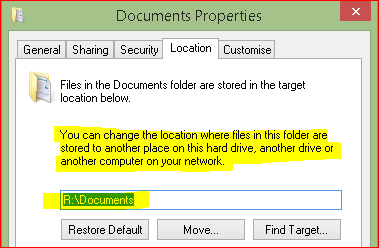
    Personally i have C:\ drive for Win/programs only, even some programs/games installed on separate disk(s).
    Data folders can be re-pointed to be on other storage - in case Win disk fail i still have data on other drive(s) with OS installed on new disk.
    Software would need to be reinstalled/reactivated regardless.

    image.png


    re-pointing your folders (docs, pics,vid, etc) does not substitute as backup - any storage might fail at any time.


  • Registered Users, Registered Users 2 Posts: 4,627 ✭✭✭smuggler.ie


    Almost forgot
    Important!!!
    If you have HDD encrypted (Bitlocker, other), ensure you have valid key recorded or disk decrypted beforehand.

    If you want to have software that is on HDD available and working on new SSD - cloning needed or reinstall/reactivate software will be required
    Cloning will carry all "crap" that have build up over years, but should run faster as its SSD


  • Moderators, Science, Health & Environment Moderators Posts: 20,712 Mod ✭✭✭✭Sam Russell


    Thanks for the answers and suggestions.

    Now, I can install the SSD if only I had a serial data cable. I suspect it was the absence of the cable that caused the SSD not to be installed. The computer was purchased new in 2014.

    This is really at the level of hobby, as I have a fairly decent desktop and laptop. It is the only one that has a R/W DVD/CD. It now has 16GB of memory and 2TB of HDD.


  • Registered Users, Registered Users 2 Posts: 4,627 ✭✭✭smuggler.ie


    old electronics might prove to be expensive hobby :D

    Where your motherboard might have spare SATA data port, OEM power supply could lack second SATA power connector - splitters should be available online. SSD does not add to much power draw
    PC datasheet if not mixing-up stuff :
    https://images-na.ssl-images-amazon.com/images/G/15/electronics/detail-page/samupload/B00IMRCWWM.pdf

    PCIe adapters would allow to expand SATA data ports if needed, just dont fall for m.2 adapter - your speeds still will be limited to standard SATA or thereabout or/and might not be supported by board/firmware


  • Advertisement
  • Moderators, Science, Health & Environment Moderators Posts: 20,712 Mod ✭✭✭✭Sam Russell


    There are four serial ports on the board. One is the HDD, the second is the DVD. The other two are vacant. I need a serial cable to try out the SSD I have, but I can use the DVD one to try it out. (They appear to be about €5).

    The PSU has a couple of free power connectors, so I can see how I get on, but it is on the not rushed queue.


  • Registered Users, Registered Users 2 Posts: 1,812 ✭✭✭MoodeRator


    I would just use Flyby11 to upgrade to Win 11. I have used it on quite a few old machines now


  • Registered Users, Registered Users 2 Posts: 4,627 ✭✭✭smuggler.ie


    IF intend to, you can install SSD instead HDD as i'd disconnect it anyway during install .
    SSD has no moving parts, so can just hang around, not need to screw-in.
    Even without your data from HDD, you could see performance difference in real life.
    Suite yourself


  • Moderators, Science, Health & Environment Moderators Posts: 20,712 Mod ✭✭✭✭Sam Russell


    @smuggler.ie

    Can I do a fresh install of Win 10 from a USB boot, with the HDD disconnected? If I then reconnect the HDD, will it function correctly, or do I have to reinstall all the apps?


  • Moderators, Computer Games Moderators, Technology & Internet Moderators, Help & Feedback Category Moderators Posts: 26,927 CMod ✭✭✭✭Spear


    Yes, barring something weird happening, the SSD alone should install fine, and the HDD will work as before once reconnected including booting back to the old Windows install. You'd need to set the boot order properly in the BIOS to control which ones boots first. I should add a caveat that sometimes Windows will get stupid and fall over when drives change, usually hand in hand with the BIOS being dumb causing drives to appear in different orders which Windows then chokes on.

    In terms of installed programs, they won't show up in the Windows on the SSD, and while many would run manually from the HDD, just about all would want re-installing, even if pointed to the same location on the HDD, as there's things like file associations and registry entries they'd benefit from.


  • Moderators, Science, Health & Environment Moderators Posts: 20,712 Mod ✭✭✭✭Sam Russell


    Thanks for that. The SSD is 120 Gbytes which I assume is enough for a Win 10 install. How much would be left?

    Do I copy the Win 10 install to the USB (which is 16 Gb) and boot from that?


  • Moderators, Computer Games Moderators, Technology & Internet Moderators, Help & Feedback Category Moderators Posts: 26,927 CMod ✭✭✭✭Spear


    A standard Windows install size can vary but usually about 25 to 30 GB, so 80 to 90GB remaining on the drive.


  • Registered Users, Registered Users 2 Posts: 4,627 ✭✭✭smuggler.ie


    I gather main point to retain this PC is to be able to run programs installed on HDD(due to compatibility, activation or other reasons).

    As was explained, with fresh install on SSD, you retain data that is still on HDD, but software wont run from it.

    to achieve goal to have same set of software and data on new SSD( that will perform better than HDD), you'd need to clone your HDD. But for that you need matching size SSD or shrink HDD ( unused space on HDD could be trimmed to required size to fit SSD, however might pose some risk of messing things up)

    how much free space is left on HDD?


  • Moderators, Science, Health & Environment Moderators Posts: 20,712 Mod ✭✭✭✭Sam Russell


    Current HDD is 1,998 GB with just under 256 GB used. I am looking at getting a 512 GB SSD, but keeping the HDD as storage/backup.


  • Advertisement
  • Moderators, Recreation & Hobbies Moderators, Science, Health & Environment Moderators, Technology & Internet Moderators Posts: 97,885 Mod ✭✭✭✭Capt'n Midnight


    Would an install of Windows 11 remedy these problems I am having? A reinstall of 10 would cause less changes. Only try 11 if all else has failed and you're happy with Kill Or Cure

    Is Windows 11 worth the upgrade? On older hardware ? NO

    Things to try - YMMV

    Safe mode

    uninstall most recent program or update - if times match when problems started.

    Setup another user account and try it , profiles get corrupted

    System restore to a time when it worked

    https://alternativeto.net/ - may suggest replacement programs. Is you app supported by 11 ?

    Use https://www.hdtune.com/ to check the drive is OK powershell get-disk for very quick look

    https://www.cpu-upgrade.com/CPUs/Intel/Core_i5/i5-4440.html Better CPU's but only 10% higher clock speed / hyperthreading (only 15-20% better) so not worth shelling out much for.

    Check BIOS is there an upgrade that mentions something ?

    Try turning off the swap file (!) - shouldn't make a difference but ye olde XP used to aggressively swap to disk when it didn't need to.

    Microsoft decreed that anything below 8th gen wouldn't be supported because they can. Your CPU has four times the performance of an entry level W11 compatible CPU , and three times the cache, and can use twice as much RAM. So yeah. 0

    https://www.cpubenchmark.net/compare/2017vs3234/Intel-i5-4440-vs-Intel-Celeron-3965Y


Advertisement
Advertisement