Advertisement
Help Keep Boards Alive. Support us by going ad free today. See here: https://subscriptions.boards.ie/.
https://www.boards.ie/group/1878-subscribers-forum

Private Group for paid up members of Boards.ie. Join the club.
Hi all, please see this major site announcement: https://www.boards.ie/discussion/2058427594/boards-ie-2026

Help - upgraded from copper Cable 50gb (Eir) to Virgin Fibre broadband

  • 07-04-2025 08:00PM
    #1
    Registered Users, Registered Users 2 Posts: 194 ✭✭


    hi

    As title above - I’ve switched to Virgin fibre optic broadband. My issue is the the provided Virgin sagecom modem doesn’t support my Tenda Nova MW3 mesh WiFi system.

    I thought there was an issue with the Virgin modems Ethernet ports but a Virgin broadband engineer came out and said he checked the Ethernet ports and said they are working. He offered no support or advice as to how to get my mesh system working with the Virgin modem. Actually he was downright rude and unhelpful.

    So I’m looking for advice from the experts here (please) - is there any way I can connect the Tenda nova mw3 mesh or is it straight not compatible?

    would it be the same if I upgraded my Tenda Mesh to MW6 ?

    I’m at a loss really - Virgin are the only available option for fibre broadband - but it’s useless if it won’t work with my mesh network

    I’m not a tech guru so but I’ve been reading about bridges / modem mode etc - doesn’t really mean anything to me 👀


    please help


Comments

  • Registered Users, Registered Users 2, Paid Member Posts: 279 ✭✭User567363


    A mesh wifi system should work with any network cable that has internet, the isps contractor cant waste time on your mesh system, they have about 8 houses to do per day, dont put them under that presssure

    Your tenda mesh system might be setup with a static ip, or toconnect to a router in bridge mode

    Maybe best to factory reset all tenda devices and set it up again from scratch

    If you find my comment funny, useful, interesting or even annoying then please like and subscribe to boards.ie


  • Registered Users, Registered Users 2 Posts: 194 ✭✭DFS UTD


    Thanks for the reply - but I didn’t expect him set up the mesh - he just said it isn’t compatible and didn’t offer any alternatives

    the Tenda Mesh mw3 worked with the old Eir copper cable broadband (50gb)

    I’ve tried to play with the settings on Tenda but still nothing worked

    Now I have fibre optic broadband in 3 rooms only - nothing upstairs and sons PlayStation in sitting room lagging constantly on new virgin broadband cos not plugged into mesh system.


    I’m at a loss - tried ringing Virgin support yesterday - was holding for 45 mins before I had to leave it

    I’m going to cancel today - if I get through 👀


  • Registered Users, Registered Users 2, Paid Member Posts: 3,527 ✭✭✭Glaceon


    ISPs won't support anything that they didn't install themselves. While you might have been told that it's "not compatible", it's more like "we can't help you with it, you're on your own".


  • Registered Users, Registered Users 2 Posts: 1,446 ✭✭✭NotShero


    If it's Virgin Media's coax network, the Hub would need to be placed in "Modem Mode". Head to 192.168.0.1 on a web browser and the option is on the list on the left once logged in. I don't see why it wouldn't work once it's in modem mode, maybe a factory reset of the Tenda mesh after you place the Hub in modem mode.

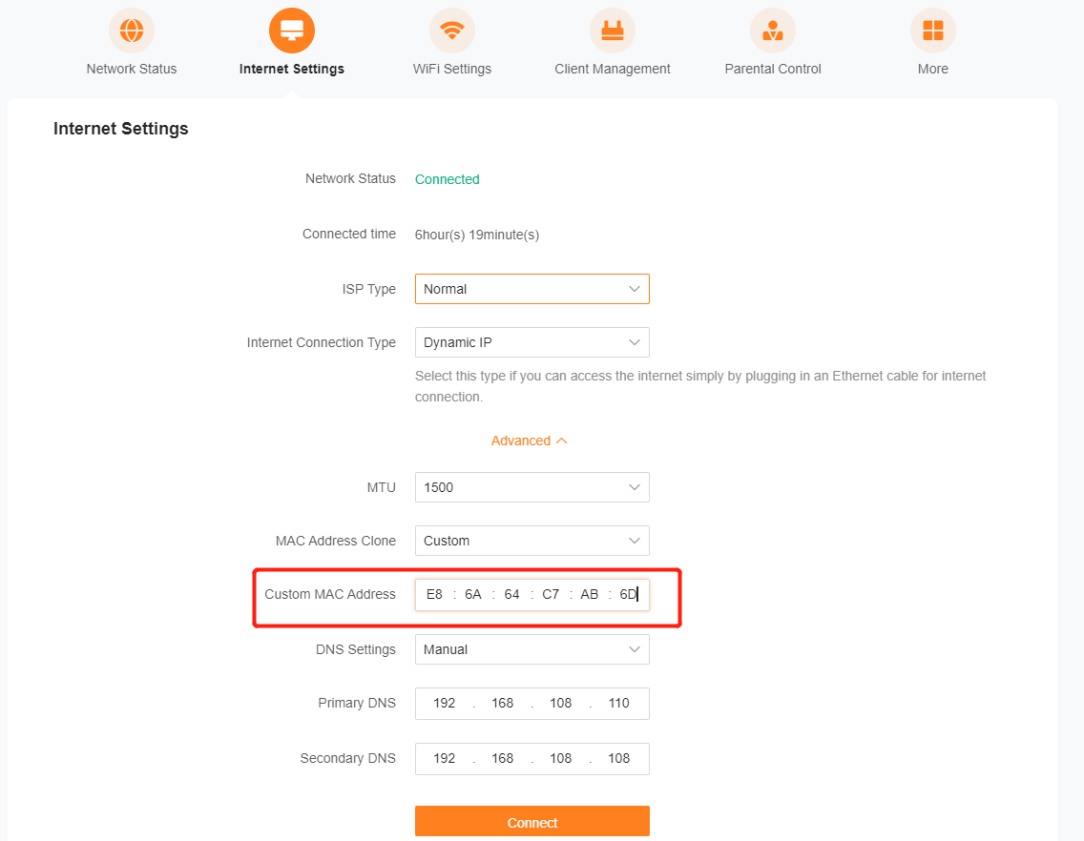
    If it's Virgin Media's FTTP network, you need to call Virgin and ask to enable IPv4 for "Modem Mode" to show up. People have mentioned it can take up to 24hrs but it's usually up to an hour. Then once enabled, plug Tenda into Port 4 (10Gbps). Then you need to get the MAC address of the Virgin Media Hub, which is printed on the sticker on the Hub, and put it into the MAC Address Clone on the Tenda.

    image.png
    Post edited by NotShero on


  • Registered Users, Registered Users 2 Posts: 194 ✭✭DFS UTD


    update

    Virgin provided IPV4 access

    So I was able to connect the Tenda Mesh system - though speeds are very inconsistent.

    I’ve tried to access 192.168.0.1 but it comes up ‘cannot access server’- is there any chance it could have a different 192.168 number ? When I look at the settings on Tenda there’s a different 192.168 number.

    Once I get access I’ll try and switch to the 10gb port and input the MAC to see if that improves the speed.


    maybe though my mesh system is failing ?


  • Advertisement
  • Registered Users, Registered Users 2 Posts: 1,446 ✭✭✭NotShero


    Oh yeah just go to whichever 192.168 that’s listed on the Tenda, I meant to say that was just an example. It should be listed on the sticker on the main Tenda aswell. The last number should be 0, 1 or 254.

    Post edited by NotShero on


  • Moderators, Category Moderators, Arts Moderators, Business & Finance Moderators, Entertainment Moderators, Society & Culture Moderators Posts: 18,647 CMod ✭✭✭✭Nody


    Click on your windows button and write "CMD" and press enter; this will open a dos prompt window (black window with white text)
    Type "ipconfig" and press enter
    It will display the "Default gateway" with a xxx.xxx.xxx.xxx IP adress

    That's what you want to connect to to get the current first unit (model/Tenda etc.) that the PC is connecting to.


  • Moderators, Regional Midwest Moderators, Paid Member Posts: 11,392 Mod ✭✭✭✭MarkR


    Your tenda should be able to act as a subnetwork of your virgin media device. Your VM box is on 192.168.0.1. I'd connect the tenda device to one of the VM box ethernet ports, and go through the initial setup of the tenda box. You might have static addresses listed in the tenda device which are incorrect. The tenda I think will have an ip in a different range, like 192.168.1.1. That should be fine, just set the main tenda device to get it's ip from 192.168.0.1, and either set up an external dns like google or cloudflare (8.8.8.8 / 1.1.1.1). Then connect by another cable to the tenda, and make sure your internet is working. After that, you're just setting up the wifi and the mesh network.


  • Registered Users, Registered Users 2 Posts: 1,446 ✭✭✭NotShero


    The Virgin Media Hub is not reachable by any IP Address once in "Modem Mode". As long as the Tenda is set up to be in router mode it will be able to be reached by it's default IP address. You would have double NAT if the Virgin Media Hub wasn't placed in "Modem Mode" and the Tenda was connected to it, still in it's router mode, which just causes issues.

    But @DFS UTD you could place your Tenda in Access Point mode - https://www.tendacn.com/in/faq/3269.html

    If the Tenda was in access point mode then you disable modem mode on the Virgin Media Hub and just leave it at it's default settings, connecting the Tenda to it. You might want to disable the WiFi (2.4Ghz & 5Ghz) on the Virgin Media Hub, so they don't interfere with your existing mesh.


  • Registered Users, Registered Users 2 Posts: 194 ✭✭DFS UTD


    sorry for all the questions

    I’m in the Virgin modem settings now

    How do I change the IPV4 settings to modem mode

    Currently I’m in DHCP

    And the DHCPv4 server is ticked as enabled - should that be ticked ‘disabled’ does that switch the IPv4 to modem mode?


  • Advertisement
  • Registered Users, Registered Users 2 Posts: 1,446 ✭✭✭NotShero


    I’m not quite sure what you mean? If the Virgin Media Hub is in modem mode it won’t be accessible from an IP address anymore. Once it’s in modem mode you log onto your Tenda through its IP address located on the sticker on the main Tenda node, where you just enter the Clone MAC Address of the Virgin Media Hub.

    You’ve asked Virgin Media to enable IPv4 so the Modem Mode option shows up within the Hub’s settings, you’ve said you already put the Virgin Media Hub into Modem Mode so it’s just a case of entering the MAC address on the Tenda. The light on the Hub will be green, not white, if it’s in Modem Mode.

    I’ll attach a video of how to put the Hub into Modem Mode -

    https://youtu.be/O3QipJtSk8Y?si=RJB0eeTp_7lBa053

    Post edited by NotShero on


  • Registered Users, Registered Users 2 Posts: 194 ✭✭DFS UTD


    I don’t appear to have the same options on the VM hub5 log in screen as what’s in the video


  • Registered Users, Registered Users 2 Posts: 1,446 ✭✭✭NotShero


    Is Modem Mode setting missing? If it is missing, Virgin Media didn’t enable IPv4 for you.

    You might be better off putting your Tenda into Access Point mode instead, it’s more straightforward - https://www.tendacn.com/in/faq/3269.html


  • Registered Users, Registered Users 2 Posts: 1,446 ✭✭✭NotShero


    @DFS UTD I’ve heard of someone pushing the reset button on the Hub while plugging out the fibre cable and leaving it disconnected and once reset going to 192.168.0.1 and apparently Modem Mode showed up once the fibre wasn’t connected so they enabled Modem Mode, the hub restarted and the green light was on so they then could reconnect the fibre cable and plug in their router.

    But still as i said Access Point mode on the Tenda might be just less hassle for you and should work no problem alongside the Hub - https://www.tendacn.com/in/faq/3269.html

    Post edited by NotShero on


Advertisement
Advertisement