Advertisement
Help Keep Boards Alive. Support us by going ad free today. See here: https://subscriptions.boards.ie/.
https://www.boards.ie/group/1878-subscribers-forum

Private Group for paid up members of Boards.ie. Join the club.
Hi all, please see this major site announcement: https://www.boards.ie/discussion/2058427594/boards-ie-2026

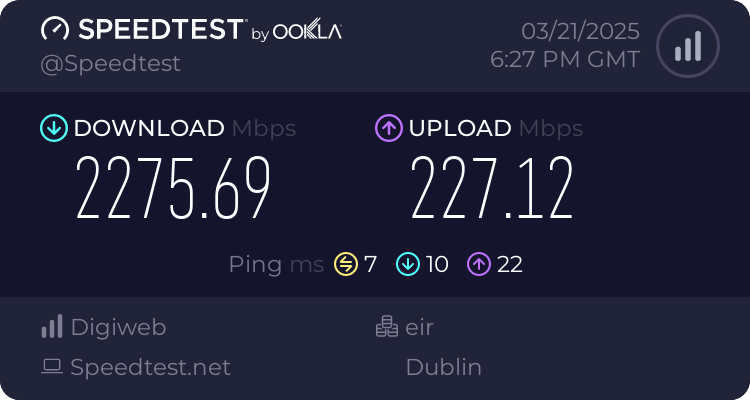
2GB Now Available - Which Provider

  • 20-03-2025 11:18AM
    #1
    Registered Users, Registered Users 2 Posts: 90 ✭✭


    Hi,

    Please delete if necessary.

    2GB is now available through the NBI and looking to upgrade from Starlink. (As good as the internet is, fibre / cable is better).

    Looking at Virgin Media, Eir or Digiweb.

    Would anyone have any recommendations?

    I've currently got a ASUS ZenWiFi Pro ET12 mesh wifi system in the house.

    Thanks

    J


Comments

  • Registered Users, Registered Users 2 Posts: 7 KevinG224


    100% Digiweb, great staff, Irish based and a great range of mesh repeaters etc if needed. They also do a referral scheme that you can get €30 off your bill if somebody refers you 👍🏼


  • Registered Users, Registered Users 2, Paid Member Posts: 1,445 ✭✭✭Batesy


    Anyone actually received 2GB Siro yet from DigiWeb that can give some idea of the service / performance? Personally, I have 1GB with them but rarely get over 500MB where I am. (Wicklow)

    I agree with the comment on the company themselves, they are indeed very good to deal with.


  • Registered Users, Registered Users 2 Posts: 2,544 ✭✭✭pizzahead77


    How are you testing your speeds? Over WiFi or Ethernet cable?


  • Registered Users, Registered Users 2, Paid Member Posts: 1,254 ✭✭✭heavydawson


  • Registered Users, Registered Users 2, Paid Member Posts: 1,445 ✭✭✭Batesy


    I've replaced the Fritzbox with a direct connection to the ONT with a Deco M9 Mesh. The speed tests via the Deco app are on the LAN cable connection to the Main unit and they regularly hit around 500MB. I think the highest I ever seen was about 650MB but never any where near 1GB.

    WiFi tests would be more like a stable 300MB. Don't get me wrong it's a very stable service but if I do decide to go for 2GB I'd be pushing for closer to that next time.


  • Advertisement
  • Registered Users, Registered Users 2 Posts: 1,447 ✭✭✭NotShero


    The Deco M9 is only WiFi 5 which wouldn’t help and make sure you have any QoS options disabled because the processor inside probably wouldn’t be able to keep up with processing on a 1Gb connection. The included FritzBox router with Digiweb does have WiFi 6 or maybe you could swap out to a WiFi 6 mesh system.


  • Registered Users, Registered Users 2, Paid Member Posts: 1,445 ✭✭✭Batesy


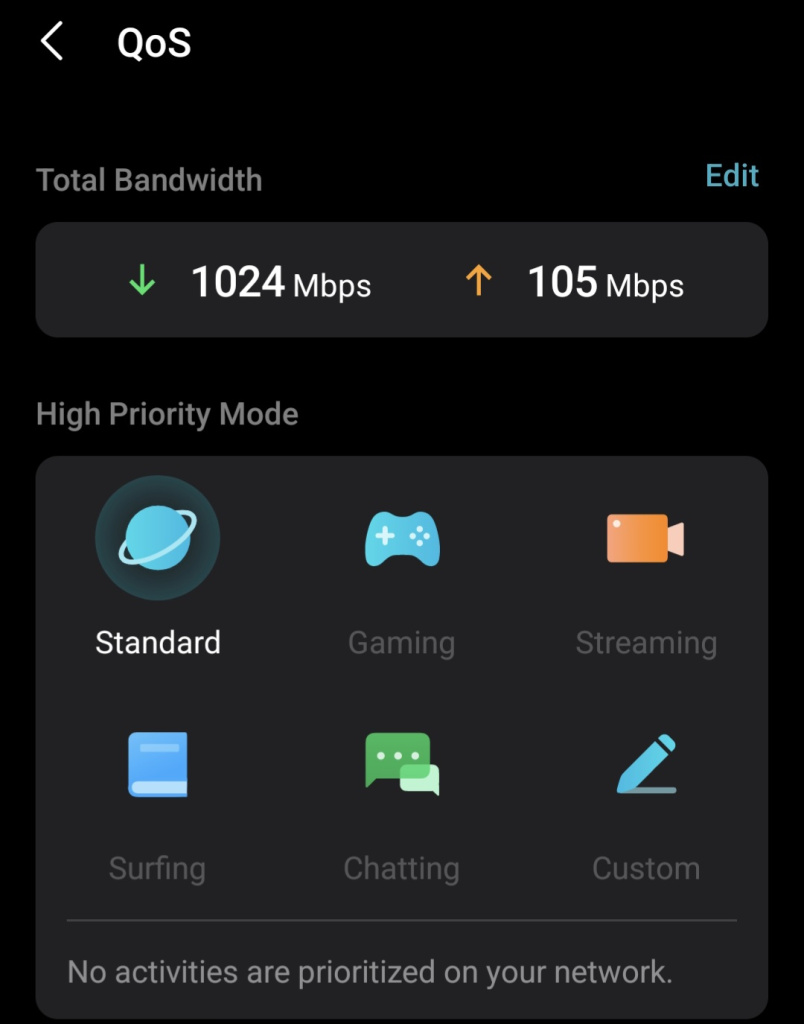
    Yeah, I've no QOS rules set. Have the bandwidth set to max 1024 down and 105 up. The Deco Mesh gives way more coverage and stability that the Fritzbox did.

    At one point I was convinced that I was mistakenly provided a 500MB line but I did see speeds around 650MB at one point so ruled it out.

    Screenshot_20250321_201450_Deco.jpg


  • Registered Users, Registered Users 2, Paid Member Posts: 1,445 ✭✭✭Batesy


    You can see the tests via the Deco app are higher as they take the speed from the main unit input from the ONT but the WiFi test is significantly less but again consistently 200 - 300 over wifi all over the house so no complaints from anyone.

    It's really just the whole 1GB package advertised vs the actual package received that just bugs me.


  • Registered Users, Registered Users 2 Posts: 1,447 ✭✭✭NotShero


    Yeah I would take away those speeds in the QoS settings though because it might be turned on with them in there. You would get higher speeds with a WiFi 6 mesh system but you should be getting the full 1Gb on wired, which seems to me that your QoS is on. I am getting 940Mb on wired and 600 - 700 on WiFi on an ASUS WiFi 6 router.

    Post edited by NotShero on


  • Registered Users, Registered Users 2 Posts: 494 ✭✭in2dark


    I also have 2 asus wifi6 routers on a mesh. Can i please ask you, do you still use the isp modem or do you have the asus router directly connected to the ont? I guess you are siro like myself. TIA


  • Advertisement
  • Registered Users, Registered Users 2, Paid Member Posts: 1,445 ✭✭✭Batesy


    Ah I get you now, the fact that the bandwidth is set at all means that QOS is actually running even with no priority settings. It may be time to start looking at WiFi 6 alternatives then as it looks like a major flaw in TPLink software that there doesn't seem to be any way to switch QOS off completely once set! That is really annoying


  • Registered Users, Registered Users 2, Paid Member Posts: 1,445 ✭✭✭Batesy


    As a final test, I might reinstate the Fritzbox at some point and perform a wired test just to see what I'm getting from that. It's been disconnected about 18months at this point though :)


  • Registered Users, Registered Users 2 Posts: 1,447 ✭✭✭NotShero


    No I don’t use the included ISP router, just plugged in directly to the ONT. Just entered the Digiweb PPPoE settings then you need VLAN 10 set in LAN > IPTV > Manual setting > Internet VID 10.


  • Registered Users, Registered Users 2 Posts: 1,447 ✭✭✭NotShero


    You can’t leave them blank and save? No? If not then maybe a factory reset but i know that’s annoying to do! Yeah maybe a test with the FritzBox just to see what you get on wired would be a good idea just to know.


  • Registered Users, Registered Users 2, Paid Member Posts: 1,445 ✭✭✭Batesy


    No option to set to blank unfortunately. You have to have something in there and 1024 Up is the max. I'll set aside some time to play around with Fritzbox 1st and if I see increased speeds then look to maybe delete the Deco network config and start again and hopefully that clears QOS.

    Just thinking back to when I first got the M9, I believe I was on a Virgin media 500MB plan at the time and am starting to wonder if the embedded QOS settings are lingering around since then and that's why I'm seeing closer to a 500MB performance on the 1GB DigiWeb line. Can't recall if I started a new network then just reconfigured the old one to work with the ONT.


  • Registered Users, Registered Users 2 Posts: 1,885 ✭✭✭Deagol


    I have Digiweb 1Gb Lightning (OpenEir) in rural area (west clare) and I'm getting the full 1Gb. Speedtests via LAN typically 950Mb / 100Mb.

    If you're only getting 500Mb I'd be definitely suspicious there's something else holding you up. Whether that's SIRO though rather then the Digiweb side of it?

    I find Digiweb much more responsive and easy to deal with than the other companies (Eir, Vodafone) I've had.

    Example was during the recent storm recovery Digiweb happily sent me an email explaining to my company that I wasn't taking the piss about my internet still being down after several weeks! (waiting for Openeir to repair the infrastructure). Doubt I'd have got that from any of the larger providers.

    They also gave me a ~80eur credit for the time the service was offline, took one 2 minute call to get that. Somehow doubting I'd have had a similar ease with some others….


  • Registered Users, Registered Users 2 Posts: 494 ✭✭in2dark


    What is this vlan 10?

    My router under LAN has IP BINDING

    nothing like vlan 10

    I have pure telecom not digiweb


  • Registered Users, Registered Users 2 Posts: 1,447 ✭✭✭NotShero


    You need to log on to it through 192.168.50.1 etc. or whatever is at the bottom of the router, the app doesn’t show the option. Then it’s under LAN > IPTV > Manual setting > Internet VID 10. The Pure Telecom PPPoE details I’m pretty sure are

    Username - puretelecom@puretel.ie

    Password - broadband1


  • Registered Users, Registered Users 2, Paid Member Posts: 1,445 ✭✭✭Batesy


    Just to update, I under estimated the hassle of running a wired speed test from where the ONT is :D

    However, I reinstated the Fritzbox and ran a wifi test from right beside the unit and got 624/103. This is better than any recent results from the M9 Mesh and probably even higher over wired so I decided to delete the M9 network and start again.

    I'm now back up on the M9 Mesh Network with QOS disabled and seeing a slight improvement in WiFi speeds.

    I'm thinking I might upgrade the main Deco unit to WiFi 6e and use the M9's as backhaul to cover the house. The WiFi 6e should be a decent upgrade anyway and capable of handling 2GB if and when I go for that.


Advertisement
Advertisement