Advertisement
Help Keep Boards Alive. Support us by going ad free today. See here: https://subscriptions.boards.ie/.
https://www.boards.ie/group/1878-subscribers-forum

Private Group for paid up members of Boards.ie. Join the club.
Hi all, please see this major site announcement: https://www.boards.ie/discussion/2058427594/boards-ie-2026

Virgin Media fibre setup

  • 17-03-2025 06:05PM
    #1
    Registered Users, Registered Users 2 Posts: 21


    Hi all,

    Could someone explain the setup with the Virgin Media Fibre broadband I have, please.

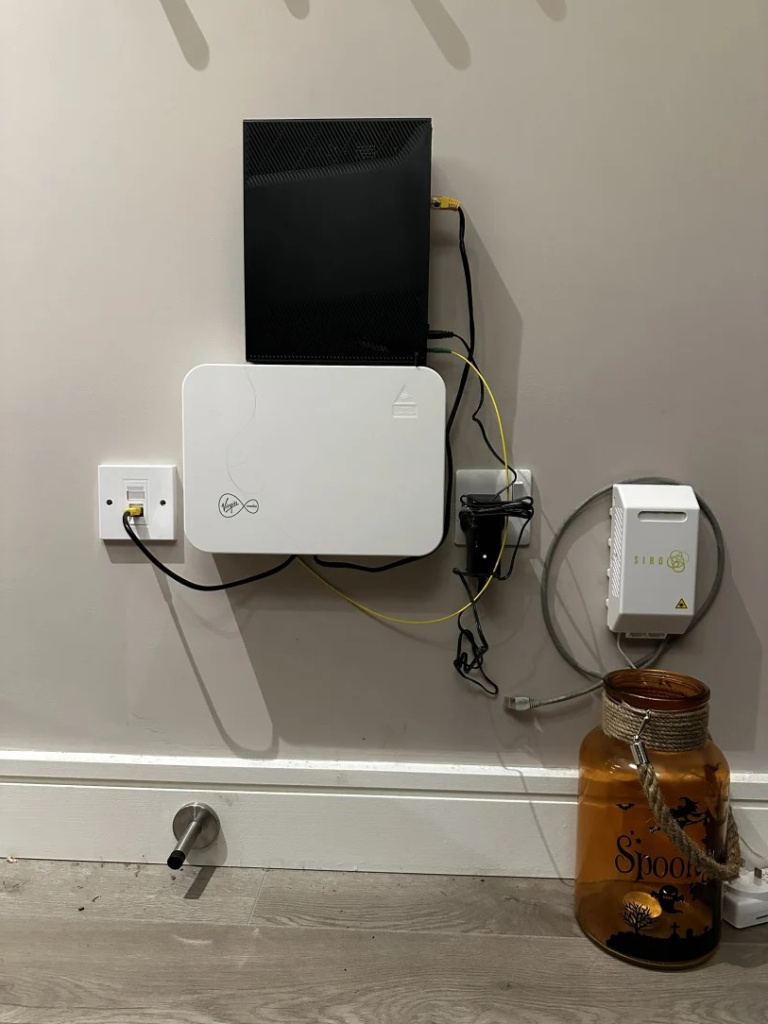
    This is a new apartment, with a Virgin box already installed (see pic).

    The router says I just have to stick the thick end of the fibre cable into the VM box, but there is no insert point on the VM box I have, it's a sealed unit?

    Do I need to get a call-out from a VM engineer?

    Regards
    Melt


Comments

  • Registered Users, Registered Users 2, Paid Member Posts: 8,865 ✭✭✭ongarite


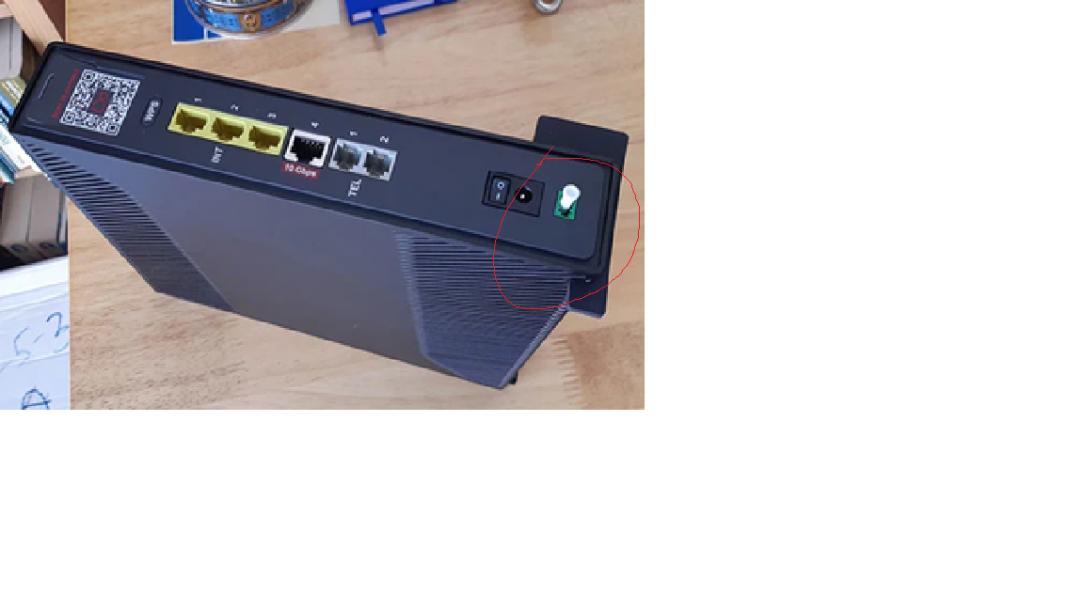
    Take the white plastic bung out of the green port on bottom of the Virgin hub.

    Then green fibre cable to green port on Hub & other end to white box on wall.


  • Registered Users, Registered Users 2 Posts: 21 Meltdown


    Hi, There is no white plastic bung on bottom of the Virgin box. There is no external connection point on this box?

    Regards

    Melt


  • Registered Users, Registered Users 2 Posts: 14,324 ✭✭✭✭LambshankRedemption


  • Registered Users, Registered Users 2, Paid Member Posts: 8,865 ✭✭✭ongarite


    Your last photo, the white plastic straw like thing on the green port is a protective bung. Take it out & plug the green fibre cable into port


  • Registered Users, Registered Users 2 Posts: 10,167 ✭✭✭✭spookwoman


    Check the bottom or sides of the wall unit to see if there is a area to plug in the fiber optic cable. The faceplace might just come off. Looks like Virgin media strike again, they haven't a clue what they are doing


  • Advertisement
  • Registered Users, Registered Users 2 Posts: 21 Meltdown


    Firstly, thanks for all the replies.

    I see the bung/fibre point on the router, but the VM Wall unit does not have any external connection points, bung or no bung!

    Maybe I am supposed to yank off the faceplate of the wall unit, but that's not what the instructions are.

    Might be best to just get them out.

    Regards

    Melt


  • Registered Users, Registered Users 2, Paid Member Posts: 8,865 ✭✭✭ongarite


  • Registered Users, Registered Users 2 Posts: 21 Meltdown


    Hi, thanks for the link.

    There should be port on the bottom of the wall unit, but there isn't, it's a sealed unit as far as I can tell.

    Could it be an unfinished installation?

    Regards

    Melt


  • Registered Users, Registered Users 2, Paid Member Posts: 8,865 ✭✭✭ongarite


    https://www.boards.ie/discussion/2058296617/virgin-media-ftth-any-info

    Check out the photos near the end of this discussion.


  • Registered Users, Registered Users 2 Posts: 21 Meltdown


    Thanks for the link.

    The image I've attached has come from that thread and the VM wall unit does look like the one I have. All I see is the fibre cable going in behind the box. Not sure where that leaves me, except a VM call-out — a huge waste of time for connecting a single cable.

    Regards

    Melt


  • Advertisement
  • Registered Users, Registered Users 2 Posts: 10,167 ✭✭✭✭spookwoman


    Mine has the same Data blanking plate at you and there is a power like cable coming from the back of it into the main White box on the left side and there is a bit of a cable inlet on the left to also allow the Optic cable to go from the inside of it into the modem.

    When you call them make sure they send out the right engineer. An White modem box engineer will not be able to do the work. They have only 1 or 2 Full Fibre guys and they travel around the country. Friday is usually the South East. Going through hell with them over our setup.

    Good Luck


  • Site Banned Posts: 1,745 ✭✭✭Raichų


    likely yes you will need to pop off faceplate. Should just be clipped on easy enough to take off.


Advertisement
Advertisement