Advertisement
Help Keep Boards Alive. Support us by going ad free today. See here: https://subscriptions.boards.ie/.
https://www.boards.ie/group/1878-subscribers-forum

Private Group for paid up members of Boards.ie. Join the club.
Hi all, please see this major site announcement: https://www.boards.ie/discussion/2058427594/boards-ie-2026

New build Budget Gaming PC for 15 year old

  • 20-09-2025 09:07AM
    #1
    Registered Users, Registered Users 2 Posts: 49


    Hi All

    Looking for advice here on building a new Gaming PC for a teenager.

    Mother has agreed MAX budget to be no more than €1,000.

    Only need actual PC, not monitor or keyboard etc, will connect to TV (TCL 120hz 4k display) initially and will buy monitor at later date.

    Request is for a gaming PC that will play GTA 4(yes, 4) and Minecraft, maybe some newer games also, child is not interested in max frame rates / resolution and only wants to play the games on PC as friends have PCs now. I know the budget is a tight one so might have to compromise for a lower spec machine / experience.

    There is no preference for AMD vs Intel.

    I assume will need at least 1TB SSD for OS, don't need a copy of Windows as I have Win 11 key for it. I also have a spare 1TB SATA drive can be used for storage.

    No preference for Case Size - Also doesn't need RGB lighting, will be going under a desk. But if fans etc come with RGB no issues.

    Bonus: Would like a DVD/Bluray writer to burn backups of Photos(Mothers request) if its possible to add to build - not a priority though.

    I will help build machine but no idea where to start, last PC I built was back in early 2000s before SATA was common.

    Any questions let me know.

    Thanks in advance for all help!


«1

Comments

  • Moderators, Computer Games Moderators, Technology & Internet Moderators, Help & Feedback Category Moderators Posts: 26,618 CMod ✭✭✭✭Spear


    On the matter of the Blu Ray burner. It's often cheaper to get an external USB one, rather than an internal one. Doing so would also make the case choice easier, as it's very common for cases to not include a 5.25 inch bay for them anymore.


  • Registered Users, Registered Users 2 Posts: 49 alex.krycek


    Yeah good point, okay can leave it out and will get at a later date!


  • Registered Users, Registered Users 2 Posts: 19,055 ✭✭✭✭K.O.Kiki


    PCPartPicker Part List: https://ie.pcpartpicker.com/list/d8T474

    CPU: AMD Ryzen 5 7500F 3.7 GHz 6-Core OEM/Tray Processor (€165.00)
    CPU Cooler: Thermalright Assassin X 120 R Digital ARGB 70.84 CFM CPU Cooler (€19.00)
    Motherboard: MSI B840M GAMING PLUS WIFI6E Micro ATX AM5 Motherboard (€149.46)
    Memory: Patriot Viper Venom 32 GB (2 x 16 GB) DDR5-6000 CL30 Memory (€99.95)
    Storage: Kingston NV3 1 TB M.2-2280 PCIe 4.0 X4 NVME Solid State Drive (€57.55)
    Video Card: MSI INSPIRE 2X OC GeForce RTX 5060 8 GB Video Card (€300.51)
    Case: Asus Prime AP201 MicroATX Mini Tower Case (€69.05)
    Power Supply: Corsair RM650e (2025) 650 W Fully Modular ATX Power Supply (€91.97)
    Total: €952.49
    All prices from Amazon.ie
    Generated by PCPartPicker 2025-09-21 03:15 IST+0100

    Also of note, Sony shut down production of recordable Blu Ray discs earlier this year (and recordable consumer discs in 2024) so the format is EOL.

    Cloud + external drive should be your backup format now.


  • Registered Users, Registered Users 2 Posts: 2,792 ✭✭✭Ozymandius2011


    I recommend Gameforce.ie because you can configure it to stay within a budget by choosing what parts you want.

    Personally I got a PC from them when they were (I think) called Custompc.ie years ago.

    However nowadays I prefer to build my own PC. I got parts like a MAGS Forge 110 case, a MSI AMD B550M Pro vdh with wif motherboard, 32GB DDR4 RAM (many motherboards also have DDR5 or even DDR6 RAM), and a NVIDIA RTX 3050 6GB OC graphics card. Im using a 500W power supply. I great great performance even in the Assassins Creed Unity/Odyssey/Origins games. The RAM is important to speed though. When I was only using 8GB it was very slow. So I use 32GB RAM. I was able to keep the price around 700 by buying the other parts and putting them together (first PC I have built) but I was using an old Power Supply I had left over from 4 years ago that hadn't got much use. My processor is AMD Ryzen 5 5600X.


  • Registered Users, Registered Users 2 Posts: 49 alex.krycek


    This is great, huge thanks to @K.O.Kiki for the parts list and to @Ozymandius2011 for your input also.

    Few questions about the list

    Motherboard: According to Amazon it looks like this supports Supports AMD Ryzen 9000/8000/7000 Processors, if he wants to upgrade CPU in future could he just swap out the 7500F? I see for an extra 20euro on amazon the AMD Ryzen 5 9600X is available, would this be worth it in your opinion?

    RAM: The 32GB in the list is 2x16, does this mean if he wants to double to 64GB he could just get another 2x16GB as there are 4 slots on the motherboard? Just mentioning it as Ozymandius2011 mentions more RAM is important for games.

    Graphics Card: I see there are different prices for the Black and White MSI INSPIRE 2X OC GeForce RTX 5060 8 GB cards, the one you specced is Gold, I assume either would work is it just pricing based on aesthetics?

    I like the case and form factor, not taking up too much space and looks neat in the white colour. Is there anything else we need as in thermal paste, screws(do they come with case or MB?) and cables?

    Really appreciate all the help here!


  • Advertisement
  • Moderators, Computer Games Moderators, Technology & Internet Moderators, Help & Feedback Category Moderators Posts: 26,618 CMod ✭✭✭✭Spear


    Yes, that's an AM5 socket, so it supports the later CPUs too. It may need a BIOS update in advance, but that's just a few minutes.

    Yes, it has 4 slots, so another 2 DIMMs can be added. But 64GB is overkill currently, 32GB is enough as things stand.

    And yes, aesthetics plays a role in prices, as rarer colours benefit less from economies of scale etc. It can even be more expensive to a non-RGB version of something.

    Cases includes screws, stand offs etc. Motherboards includes a basic few cable, usually just the ever present SATA cables.


  • Registered Users, Registered Users 2 Posts: 2,762 ✭✭✭dan_ep82


    A 9060xt and 9600x should be do able on your budget, becasue your inital screen will be 4k I would push for them or some games will be unplayable with an 8GB GPU

    A quick mock up on caseking, you can tweak it to cut some cost

    case king


  • Registered Users, Registered Users 2 Posts: 19,055 ✭✭✭✭K.O.Kiki


    Minecraft & GTA4 will be easily playable at 4K even on a 5060.


  • Registered Users, Registered Users 2 Posts: 2,762 ✭✭✭dan_ep82


    The OP did mention newer games, if they picked up a 1080p monitor sooner it would negate most of the issues, for the €60 premium I think it’s worth it considering most 1440p monitors are so cheap now.


  • Registered Users, Registered Users 2 Posts: 49 alex.krycek


    Thanks @dan_ep82 for putting that machine together, great to get another option.

    I can see how this can be an expensive hobby, each time just pushing the spec up a little, can be tempting!

    Will show the teenager in question these 2 machines and I have a feeling that even though RGB was not an initial request it will be the deciding factor.

    Really appreciate all the help here, I am learning a lot.

    One question about thermal paste, is it necessary on these AMD sockets? I wasn't sure if it was needed or not and is the only thing I am apprehensive about in this build as I have never used it before. My prior experience is with Intel CPUs and a block heatsink clipped on top!


  • Advertisement
  • Registered Users, Registered Users 2 Posts: 2,762 ✭✭✭dan_ep82


    Thermal paste is always handy to have either way and inexpensive while being easy to use.

    You can have a look on amazon.de/.ie/.co.uk to see if you can pick up something a little cheaper, coolers, cases and hard drives will probably be on the upcoming sale. Be wary of cheap power supplies though. If you can grab a 1080p/1440p monitor soon the 5060 will be fine , it’s the 4k monitor that is pushing the requirements up, although I would still use the 9600x cpu.
    As for RGB, loads of cases and coolers with rgb, just make sure they cool better than they flash 😂

    Also the board I recommended does not come with WiFi so would need a cable or a WiFi adaptor, the other poster included a WiFi capable board in his build. Depending on your house it may not be realistic to run a cable but I’d recommend it.


  • Registered Users, Registered Users 2 Posts: 19,055 ✭✭✭✭K.O.Kiki


    Ryzen 7500F (my first recommendation) doesn't include a heatsink so aftermarket is required, but Thermalright makes them so cheap I see little reason not to include one. Plus they cool better & have a quieter fan.

    Any heatsink you buy will include paste (either pre-applied or in a syringe/sachet) but a new tube costs as little as €5 for 4g.

    Ryzen 9600X is technically better but at 4K the CPU performance doesn't matter, any game is limited by GPU.

    Agreed on power supply, I will always recommend a Corsair RM or be quiet Pure Power 12/13 when budget allows. Cheap PSU a the first thing I upgraded when I started way back when.


  • Registered Users, Registered Users 2 Posts: 49 alex.krycek


    Hi Guys I am back,

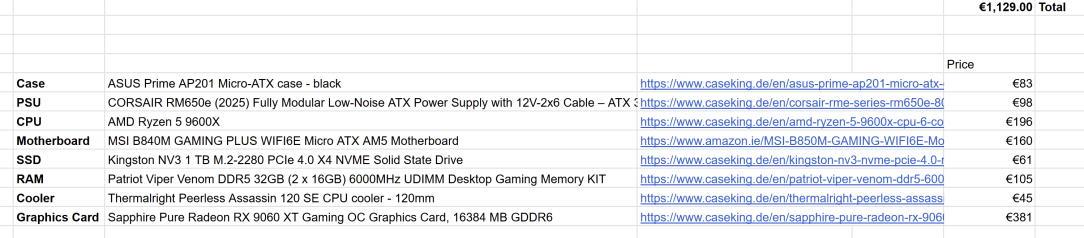
    After speaking with the mother and going over the info given earlier I have come up with the following spec. It is slightly over the 1k mark, but that has been okayed. I would just like to know if all these components will work together or if there are any issues compatibility wise etc.

    List:

    image.png

    Most parts I have seen on caseking /amazon from the part lists given earlier and I have tweaked a tiny bit.

    I assume these sites are reputable and ok to buy from?

    Thanks a million


  • Registered Users, Registered Users 2 Posts: 202 ✭✭Anois_


    What sites? All I see is Caseking links and one amazon. If you are talking about them yes they are a reputable site.


  • Registered Users, Registered Users 2 Posts: 2,762 ✭✭✭dan_ep82


    The ram is not on the QVL list for that motherboard.

    https://www.caseking.de/en/asus-tuf-gaming-b650-plus-wifi-motherboard-socket-am5-amd-b650-atx-ddr5/MBAS-661.html

    It works with this one.


  • Registered Users, Registered Users 2 Posts: 2,792 ✭✭✭Ozymandius2011


    Well certainly for games to run faster RAM is important.

    The MSI B840M GAMING PLUS WIFI6E Micro ATX AM5 Motherboard (€149.46) has a capacity of 256GB and has 4 slots. That means you can have up to 64GB DDR5 RAM per slot. However each slot that you put RAM into have to be the same amount. I believe.

    My motherboard (MSI B550M with Wifi) is older and van only take DDR4 RAM.

    Although 32GB RAM does make my games run fast, I sometimes find that this is not always so for video of my gameplay that I record with apps like Steam or NVIDIA. But DDR5 might be better than my DDR4.

    Another thing. Regarding the "Frozr". That only works I think if you are using a M2.SSD, which is a new form of drive that looks like a tiny wafer. I'm using an old style SSD that looks like the old hard drives but is better for avoiding lag in games. The new M2.SSDs though work with Frozr to cool down the drive and are probably better with games but I have never installed an M2.SSD before so I didnt risk it in case I messed it up.

    Regarding the BIOS update. I updated the BIOS on my motherboard when I was trying to figure out why my Kingston Fury 32GB DDR4 RAM (2 c 32GB DDR4 RAM) didnt work in it. Eventually it did work in slots 1 and 2, but not 4. I temporarily put in an old 8GB DDR4 RAM to get thr PC started up and then went to the msi website and downloaded the latest bios updates onto a memory stick. Then I restarted the PC, pressed F12 to go into Bios settings, and setting the Flash Bios option. I then scrolled down to the correct files (you may need to check the dates on the files to see which is needed as some may already been Intalled) and then select it. Then the PC will install them and maybe restart or shut down.

    When its shut down, I then took out my old 8GB RAM, and put in the DDR4 16GB RAM in the second slot as a test. It worked and actually Assassins Creed Unity ran quite fast with it. I then put the second 16GB ram into Slot 1. It works.

    But ideally, I would have liked to use slots 2 and 4, because that activates Dual Channel mode which is faster. But my 4th slot appears not to work so it will suffice to use 1 and 2 for me. I sometimes think about trying slot 3 aswell though.

    My motherboard also has a Flash bios button but I dont really understand it.


  • Registered Users, Registered Users 2 Posts: 49 alex.krycek


    Sorry, the original list had a few more sites before whittling down. Good to know about Caseking. Thanks


  • Registered Users, Registered Users 2 Posts: 49 alex.krycek


    I had a quick google and that MB seems to be favoured over a B840 over on some reddit posts.

    Would that fit the mATX case I selected? It says its an ATX form factor on your link.


  • Registered Users, Registered Users 2 Posts: 49 alex.krycek


    WWould This Motherboard be good with the cpu I chose and would the ram work?

    https://www.caseking.de/gigabyte-b850m-ds3h-motherboard-am5-socket-amd-b850-matx-ddr5/MBGB-651.html


  • Registered Users, Registered Users 2 Posts: 2,762 ✭✭✭dan_ep82


    Sorry I read the Asus board as mATX, no it wouldnt fit that case.

    That motherboard doesnt have the ram on the QVL either. Seems very few CL30 kits are on the gigabyte qvl

    https://www.caseking.de/en/asus-prime-b650m-a-wifi-ii-motherboard-socket-am5-amd-b650-micro-atx-ddr5/MBAS-696.html

    That would work, its hard to find a board and ram to fit your budget in the b850 whilst staying mATX


  • Advertisement
  • Registered Users, Registered Users 2 Posts: 19,055 ✭✭✭✭K.O.Kiki


    QVL doesn't really matter for DDR5 6000 CL30 kits on a gaming machine.


  • Registered Users, Registered Users 2 Posts: 49 alex.krycek


    Ok thanks for the suggested board, will add that to the list and get the parts ordered this week. It ticks all the boxes, AMD 5 9600x compatible, WIFI and 4 RAM slots.

    On a separate note about actually building the machine, do i need to get a grounding strap so i dont damage the components? I never see people on youtube with the grounding wrist straps are they using a different method, its been 20years since I built a machine.


  • Registered Users, Registered Users 2 Posts: 19,055 ✭✭✭✭K.O.Kiki


    Not really. Just touch a radiator every now and then to discharge static, don't wear a wooly jumper/socks, don't place the motherboard on top of the anti-static bag (just cardboard/table).


  • Registered Users, Registered Users 2 Posts: 49 alex.krycek


    Ok cool thanks @K.O.Kiki


  • Registered Users, Registered Users 2 Posts: 49 alex.krycek


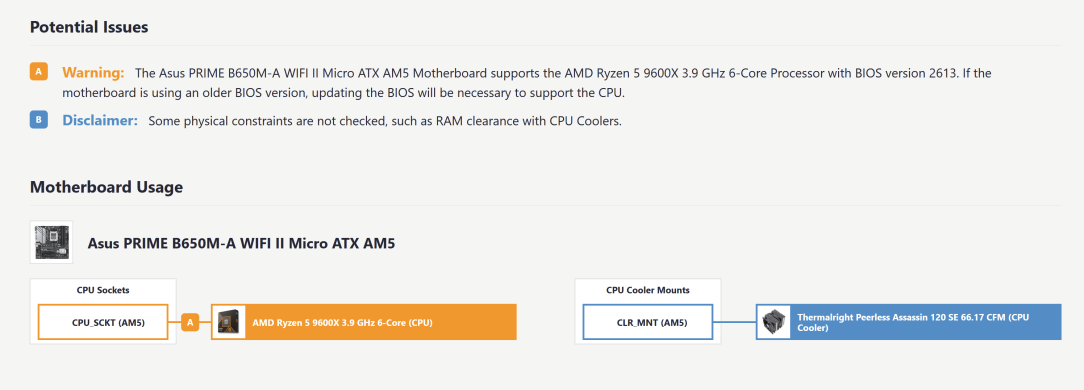
    Quick one, to update the BIOS is it just a matter of building the machine and updating with a USB Stick in the BIOS menu after getting the latest file from manufacturer site?

    Only asking as I put all the parts in to partpicker and this came up:

    image.png

    This is what I have so far: https://ie.pcpartpicker.com/list/wshX4p


  • Registered Users, Registered Users 2 Posts: 49 alex.krycek


    Quick question number 2, is there any difference between these:

    Sapphire Pure Radeon RX 9060 XT Gaming OC Graphics Card, 16384 MB GDDR6

    Sapphire Pulse Radeon RX 9060 XT Gaming OC Graphics Card, 16384 MB GDDR6

    The first one is White and the 2nd one is Black, as the PC is pretty much all Black in colour I was wondering if I could swap one for the other and have all Black. I cant see any difference in Spec both 16GB etc.

    Would it be ok to swap out the White one for the Black one?


  • Registered Users, Registered Users 2 Posts: 202 ✭✭Anois_


  • Registered Users, Registered Users 2 Posts: 827 ✭✭✭minitrue


    Roughly yes to your bios question though you don't even go into the menus just have the stick with the file plugged in and then hold the flashback button on the back for 3 seconds until the light blinks to show it's starting the update then wait for the lights to go out: https://www.asus.com/support/faq/1038568/

    As for the gpus they are a little different and the white one is meant to be a little better with the real thing I've spotted being it has dual bearing fans instead of sleeve fans (there is also a little RGB on the white one). They claim the fans last longer and are quieter. So it's ok to swap it out but given it's an aesthetic choice that's going to be pretty well hidden inside a mesh case (and arguably the rgb could make it aesthetically more pleasing but I've no taste) I'd personally pay the €3 white tax for the fan improvement.


  • Registered Users, Registered Users 2 Posts: 49 alex.krycek


    Thanks for the info on the Bios, the video in the link makes it look fairly straight forward.

    The GPU fan information is also good to know.

    Cheers


  • Advertisement
  • Registered Users, Registered Users 2 Posts: 1,254 ✭✭✭Qwerty?


    Evening all,

    I logged in to Boards to make a post about building a gaming machine for my 15 year old son, and this post almost matches what I was going to post, except budget 1000-1200 max.

    Are you sorted Alex.krycek? I don't want to start a new thread/hijack this one as it could cause confusion.


Advertisement