Advertisement
Help Keep Boards Alive. Support us by going ad free today. See here: https://subscriptions.boards.ie/.
https://www.boards.ie/group/1878-subscribers-forum

Private Group for paid up members of Boards.ie. Join the club.
Hi all, please see this major site announcement: https://www.boards.ie/discussion/2058427594/boards-ie-2026

Can my Techwood TV be powered up without remote?

  • 14-07-2025 10:24PM
    #1
    Registered Users, Registered Users 2 Posts: 1


    it is a Techwood model TEC32LEDT16,

    My issue: powering up my TV when I don’t have my remote control

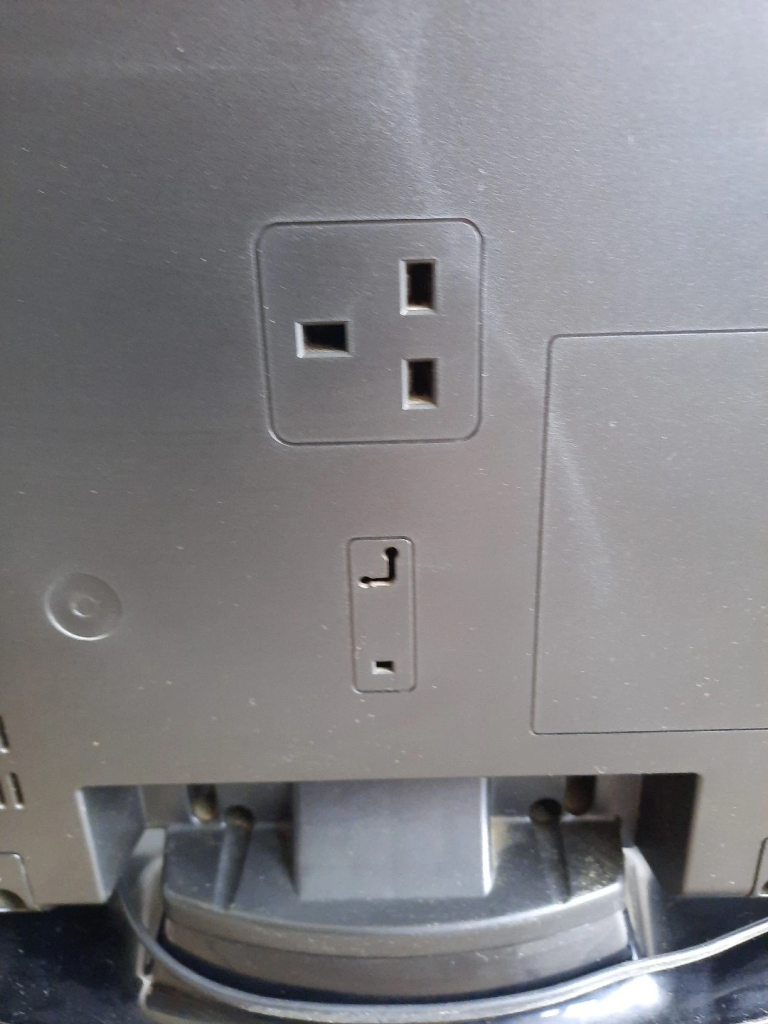
    I do not see any obvious push or switch. However I notice in the back of the frame a socket holder for a an ordinary three prong plug. Could that be a solution


Comments

  • Moderators, Regional North West Moderators, Paid Member Posts: 19,225 Mod ✭✭✭✭byte
    byte


    I think that Techwood might be a Vestel-made TV.

    Most of them have a tiny rocker switch down one side where USB and CI slots are (sometimes extra HDMI or headphone port), at the bottom. Pushing it should turn on TV.


  • Registered Users, Registered Users 2, Paid Member Posts: 6,696 ✭✭✭Archeron


    Perhaps try universal TV remote app on the play store. I recently lost my sky remote and found an app that switches it on and controls it. It has annoying ads but it works perfect from the phone.


  • Registered Users, Registered Users 2, Paid Member Posts: 23,768 ✭✭✭✭dxhound2005


    This is a picture from a Ebay listing of the three pin socket on the back of the TV mentioned by the OP. What is it for?? There are also listings for replacement remotes for the TV, but the postage makes them expensive. It is a very old TV.

    image.png


  • Registered Users, Registered Users 2 Posts: 74,588 ✭✭✭✭L1011


    That 'socket' in the back is to hold the plug when in motion. It does nothing.


  • Registered Users, Registered Users 2 Posts: 2,924 ✭✭✭Ten Pin


    Thought there was always physical buttons on any TV frame to turn it on and change channel / volume.

    If not then you could try a One for All universal, that TV model isn't listed but Techwood brand is and provides a few codes to try.
    There's 2 models that might suit:
    One for All URC1210 that controls 1 TV.
    One for All URC1240 that controls up to 4 devices (including TV).

    The 1240 is probably more useful if you have other receivers you can use it for if it doesn't work for the Techwood.

    The 1210 is cheaper and is probably the one to buy if this TV is the only use you have for it.

    c€15 for the 1210 and c€18 for the 1240 in the usual chain electrical shops.


  • Advertisement
  • Registered Users, Registered Users 2, Paid Member Posts: 297 ✭✭peneau


Advertisement