Advertisement
Help Keep Boards Alive. Support us by going ad free today. See here: https://subscriptions.boards.ie/.
https://www.boards.ie/group/1878-subscribers-forum

Private Group for paid up members of Boards.ie. Join the club.
Hi all, please see this major site announcement: https://www.boards.ie/discussion/2058427594/boards-ie-2026

Excel Conditional formatting

  • 25-06-2009 12:45PM
    #1
    Closed Accounts Posts: 22


    Have a spread sheet with over 10,000 enteries want to format ones that just have "_something" at the end with red colour font.Ctrl F and "_something" will find all the enteries i wan to format, so how do i format it text in conditional formatting???surely its something simple....Using 2003 btw


Comments

  • Registered Users, Registered Users 2 Posts: 1,456 ✭✭✭FSL


    Look up conditional formatting in Excel Help. you can choose a range of cells and apply a format and a condition. The format is applied if the condition is true.


  • Registered Users, Registered Users 2 Posts: 3,091 ✭✭✭Antar Bolaeisk


    Not sure how to do it with the conditional formatting but a macro, as demonstrated in the sample file, should work for you.

    _something.xls

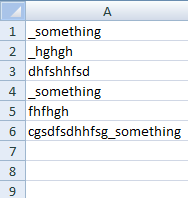
    Turning this:

    _something1.png

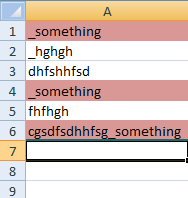
    into this:

    _something2.png

    Basically it'll work down through column A applying the formatting where appropriate until it reaches an empty cell. Let me know if you have a problem with it or want something explained.


Advertisement