Advertisement
Help Keep Boards Alive. Support us by going ad free today. See here: https://subscriptions.boards.ie/.
https://www.boards.ie/group/1878-subscribers-forum

Private Group for paid up members of Boards.ie. Join the club.
Hi all, please see this major site announcement: https://www.boards.ie/discussion/2058427594/boards-ie-2026

Cubase Questions

  • 04-01-2007 12:16AM
    #1
    Closed Accounts Posts: 16


    Anybody know if u can and maybe how to add effects to midi in cubase LE. Also it says I can disable tracks from the "track context" menu. Anyone know what that menu looks like or how to get to it? anyone familiar with the program who can answer my question please let me know.

    Thanx


Comments

  • Closed Accounts Posts: 936 ✭✭✭Beecher


    You add midi effects the same way you add vst effects to the audio channels with the insert strip.


  • Registered Users, Registered Users 2 Posts: 6,790 ✭✭✭cornbb


    Do you mean MIDI effects (like arpeggiators, panners and stuff) applied to MIDI tracks or audio effects (like reverb, distortion, compression etc.) applied to the output of your MIDI instruments? Cos there is a difference. I think you mean the latter but let me know


  • Closed Accounts Posts: 936 ✭✭✭Beecher


    Im presuming he means the autopan and chorder etc. Here's a pic for the op to aid any confusion on where to locate the effects:

    midieo7.jpg


  • Closed Accounts Posts: 16 restin84


    the later one reverb/echo and such. its cubase le(don't know if that matters or not) Which version of cubase can u do video with as well.? And what about disabling tracks.


  • Registered Users, Registered Users 2 Posts: 167 ✭✭electro.ie


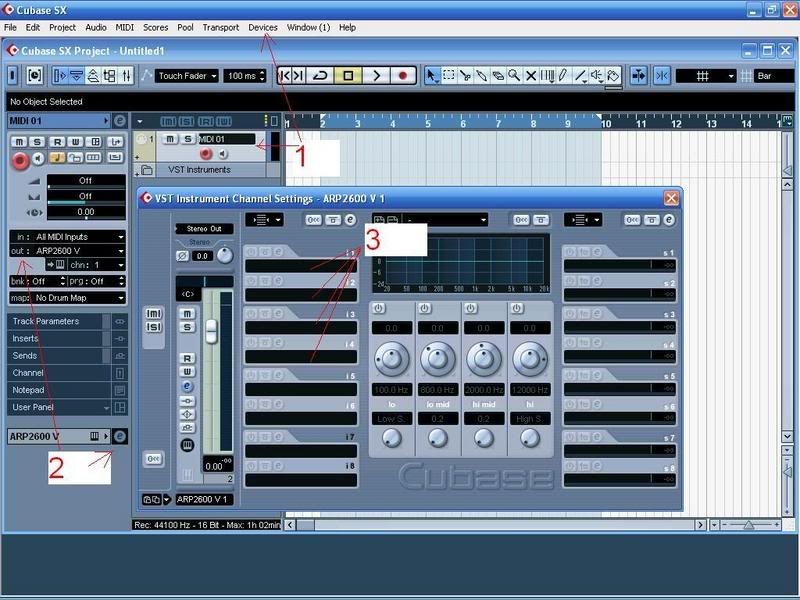
    cubase.jpg

    Effecting midi is only the process of manipulating the notes and chords played, you're talking about adding fx to the output audio. So here you are in 3 easy steps:

    1. Insert your track (Stay with me!) for example I've selected a midi track and added a vst instrument (Arturia Arp) to it by selecting it from the "devices" drop down menu (F11 is the shortcut key)

    2. Route your midi out to the Instrument (In this case it is out to the Arturia Arp) Doing this will then bring up a new menu for the instrument just above the red number 2. Click on the E icon opening up the "VST Instrument Channel settings"

    3. Left clicking on any of these happy little fellas will bring up your effects!

    Simple As!


  • Advertisement
  • Registered Users, Registered Users 2 Posts: 167 ✭✭electro.ie


    Also regarding your Q about Video, Read this soundonsound article


Advertisement
Advertisement