Advertisement
Help Keep Boards Alive. Support us by going ad free today. See here: https://subscriptions.boards.ie/.
https://www.boards.ie/group/1878-subscribers-forum

Private Group for paid up members of Boards.ie. Join the club.
Hi all, please see this major site announcement: https://www.boards.ie/discussion/2058427594/boards-ie-2026

GermanFront Mod Error

  • 23-06-2005 10:44AM
    #1
    Closed Accounts Posts: 8,613 ✭✭✭


    Ok guys have been having this problem for a while but didnt bother because BF2 demo came out but said I would try and get problem resolved now......

    Ok see someone from the forum on xfire playing Cod so I try to join the server....verification of CD key goes ok and then goes to splash screen where the laod bar usually goes across bottom.....sits there for 10-30 secs and then crashed to GermanFrontMod Desktop with the error in the middle of screen

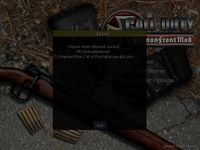
    Unpure client detected. Invalid .PK3 files referenced C:\Program Files\Call of Duty\gfm\zzz.gfm.pk3

    Now I uninstalled and reinstalled CoD;UO and GFM adn still had same problem so downloaded the files again and done a full uninstall and reinstall of CoD:UO and GFM but still the same....strange thing is on one occasion it loaded one of the maps but then on the change of map I got same error again

    Will post up pic of error:


Comments

  • Closed Accounts Posts: 8,613 ✭✭✭Big Nelly


  • Registered Users, Registered Users 2 Posts: 315 ✭✭wideband


    Hi Big Nelly,

    I can't make out the error message as the pic is too small......is it the same message as before i.e
    Unpure client detected. Invalid .PK3 files referenced C:\Program Files\Call of Duty\gfm\zzz.gfm.pk3


  • Closed Accounts Posts: 8,613 ✭✭✭Big Nelly


    wideband wrote:
    Hi Big Nelly,

    I can't make out the error message as the pic is too small......is it the same message as before i.e

    Yeah thats the one....tried wat u said before and didnt work mate!! not sure where to put the pk3 files.....left all the installs at the defaults


  • Closed Accounts Posts: 2,542 ✭✭✭kinkstr


    This is the route to where the GFM .pak should be
    F:\Call of Duty\gfm

    /also i dont have "zzz.gfm.pk3" any where in my COD folder and i have no problems connecting to servers.


  • Closed Accounts Posts: 8,613 ✭✭✭Big Nelly


    Ok had to reload system because of BF2 problem(see battlefield forum) so any hints on installing to solve these problems? I usually leave to defaults!


  • Advertisement
  • Registered Users, Registered Users 2 Posts: 5,906 ✭✭✭Steffano2002


    Ok, this might sound stupid (and it probably does) but when I was having this Error Message it was because the servers I was trying to join were not GFM servers but normal UO servers.

    Are you sure the server(s) you are trying to join are GFM servers?


  • Closed Accounts Posts: 8,613 ✭✭✭Big Nelly


    Ok, this might sound stupid (and it probably does) but when I was having this Error Message it was because the servers I was trying to join were not GFM servers but normal UO servers.

    Are you sure the server(s) you are trying to join are GFM servers?

    Yeah because I only try to join servers that I can see people playing on thru xfire so it picks up GFM once I try to load it!!


  • Registered Users, Registered Users 2 Posts: 5,906 ✭✭✭Steffano2002


    Well I'll advise trying to connect to GFM servers through All Seeing Eye after manually creating a filter to find GFM servers. See if that works


  • Closed Accounts Posts: 8,613 ✭✭✭Big Nelly


    Well I'll advise trying to connect to GFM servers through All Seeing Eye after manually creating a filter to find GFM servers. See if that works

    Any tips on how to create this? thanks


  • Registered Users, Registered Users 2 Posts: 5,906 ✭✭✭Steffano2002


    Big Nelly wrote:
    Any tips on how to create this? thanks

    I have Dcully to thank for that one.

    You can easily search for German Front Mod servers with the All Seeing Eye. Here's how to do it:

    - In the toolbar, go to "Filter" -> "New..." to create a new filter
    - Name this new filter GFM
    - In the large field below the "Name" enter the following:

    1 if fs_game ~== "gfm" goto 3
    2 remove


    You now have a folder on the left hand side called "My Filters" which contains your new "GFM" filter. And voilà! ;)


  • Advertisement
  • Registered Users, Registered Users 2 Posts: 6,374 ✭✭✭Gone West


    yep I use a similar method to this.


  • Closed Accounts Posts: 8,613 ✭✭✭Big Nelly


    Will install CoD and everything back onto PC tonite and check it out!!


  • Registered Users, Registered Users 2 Posts: 5,906 ✭✭✭Steffano2002


    I hope it works for you Big Nelly, let us know! ;)


  • Closed Accounts Posts: 8,613 ✭✭✭Big Nelly


    I hope it works for you Big Nelly, let us know! ;)

    Will do!! Thanks for all the tips!!


  • Registered Users, Registered Users 2 Posts: 372 ✭✭cerbeus


    It may not work as I use ASE the same filter that DCULLY has specified and am getting the same error when I try to connect.

    The server I'm trying to connect to is running the GFM mod as well.


Advertisement
Advertisement