Advertisement
Help Keep Boards Alive. Support us by going ad free today. See here: https://subscriptions.boards.ie/.
https://www.boards.ie/group/1878-subscribers-forum

Private Group for paid up members of Boards.ie. Join the club.
Hi all, please see this major site announcement: https://www.boards.ie/discussion/2058427594/boards-ie-2026

Vodafone 2Gbps plan but still only getting 1Gbps.

  • 26-03-2026 04:35PM
    #1
    Registered Users, Registered Users 2 Posts: 442 ✭✭


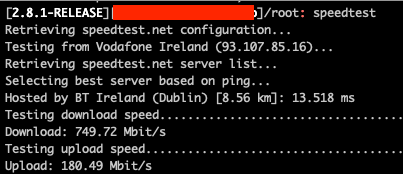
    I recently upgraded from 1Gbps to 2Gbps but my download speed has stayed the same but my upload speed has increased to close to 200Mbits per second so the upgrade did take effect. In my case i use a pfsense firewall instead of their router/modem and was getting maximum speeds for years with 1Gbps but i cant break the 1Gbps download mark even though i have a 2Gbps connection.

    Does Vodafone throttle the connection if you dont use their router/modem?

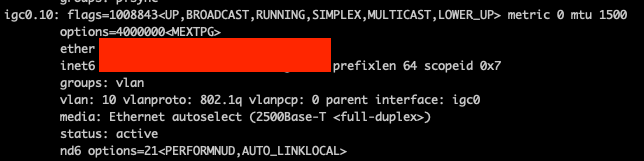
    The WAN NIC on the pfsense is a 2.5Gbps intel NIC and i am carrying out the tests on the pfsense firewall so there should be nothing that could be affecting it. In pfsense sense it shows the connection between the Pfsense and ONT is 2.5Gbps so that means it can not be the cable think its the cable. I have ordered a few cat6 cables to make sure its not the cable and will test once they come.

    Screenshot 2026-03-26 at 3.39.46 p.m..png


    Anyone have any idea what the issue could be?

    Screenshot 2026-03-26 at 3.32.49 p.m..png


Comments

  • Registered Users, Registered Users 2 Posts: 819 ✭✭✭IrishStuff09


    Which ONT do you have?

    Is it possible that you have a GPON ONT and not XGS-PON? (seems unlikely if the link is auto-negotiating to 2.5Gb though)


  • Registered Users, Registered Users 2 Posts: 442 ✭✭grimeire


    ONT is Huawei HN8010T

    I thought the same but googled it and it says it has a 10GB port.


  • Registered Users, Registered Users 2, Paid Member Posts: 1,254 ✭✭✭heavydawson


    Have you checked the OS-negotiated duplex speeds? I found in some cases I had to force full duplex 2.5gbps in Windows for some machines as it had negotiated back to 1gbps….


  • Registered Users, Registered Users 2 Posts: 442 ✭✭grimeire


    on the pfsense it states the 2.5Gbps full duplex so i dont think that would be an issue. All the speed tests are taking place on the pfsense which is directly connected to the ONT


  • Registered Users, Registered Users 2 Posts: 1,450 ✭✭✭NotShero


    Your speed test didn't look like it was able to get 1Gb either. Do you by any chance have another router to try? Did the Vodafone router get you to 2Gb, yeah? The connection wouldn't be throttled by using a third party router.


  • Advertisement
  • Registered Users, Registered Users 2 Posts: 442 ✭✭grimeire


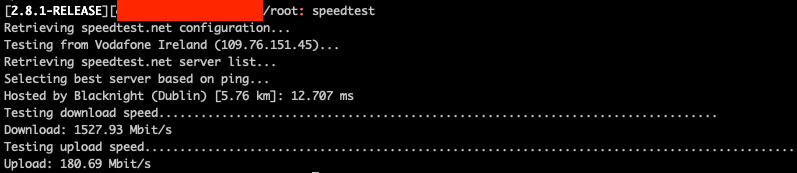
    just got another cable and fitted it and can see now i am getting over the 1Gbps so it was the cable that came with the Vodafone router that was the problem.

    Weird the connection was able to negotiate at 2.5Gbps but the cable was not able to support it? I have never seen that before. A bit odd that Vodafone give me a WAN cable that does not support the actual WAN connection speed.

    Screenshot 2026-03-30 at 11.39.43 a.m..png


  • Registered Users, Registered Users 2 Posts: 5 RianKellyIT


    The pfSense hardware is the most likely culprit here. At 2Gbps throughput you need enough CPU headroom to handle stateful firewall tracking plus NAT, and the sweet spot depends heavily on what processor you have.

    A few things to check:

    First, during the speed test run top or check System > Activity in pfSense and see if any CPU cores are spiking to 100%. If they are, that is your bottleneck - the connection is capable of more but pfSense cannot process packets fast enough.

    Second, check if hardware offloading is enabled. Go to System > Advanced > Networking and make sure Hardware Checksum Offloading and Hardware TCP Segmentation Offloading are checked. Some older pfSense versions had these off by default on certain NICs.

    Third, check if you have any traffic shaping or limiters configured under Firewall > Traffic Shaper. If you had a 1Gbps limiter set up when you were on the old plan, it would still be enforcing that cap.

    Worth also trying: connect a laptop directly to the ONT bypassing pfSense entirely and run a speed test from there. If you are getting 2Gbps directly, it confirms pfSense is the constraint.


  • Registered Users, Registered Users 2 Posts: 442 ✭✭grimeire


    Thank you for the AI answer.

    Clearly did not read the last post that details the root cause and solution of the issue.


Advertisement
Advertisement