Advertisement
Help Keep Boards Alive. Support us by going ad free today. See here: https://subscriptions.boards.ie/.
https://www.boards.ie/group/1878-subscribers-forum

Private Group for paid up members of Boards.ie. Join the club.
Hi all, please see this major site announcement: https://www.boards.ie/discussion/2058427594/boards-ie-2026

Very basic NAS hardware

  • 25-08-2025 04:24PM
    #1
    Registered Users, Registered Users 2 Posts: 1,623 ✭✭✭


    Hi,

    I am looking for some kind of storage solution for my media. Today I have a desktop PC and a Firestick connected to the TV. I run Plex server on the desktop and use Plex on the Firestick to watch content that is stored on the desktop. It is a bit of a pain to have the desktop PC running whenever I want to watch media.

    I would like something that I could move the media from the PC onto, and then use that device as the media server/host. But I want to keep it small and fairly simple, I do not have terabytes of media, I tend to watch and delete. One or two gigabytes would be more than enough. Would like something low power or is capable of sleep mode.

    I was thinking maybe a Raspberry Pi? I don't really know anything about NAS operating systems but I assume I will need something running Linux to host the Plex server app.

    Anyone got any ideas or pointers to some hardware options. I don't minding building something but if there are out-of-the box options around the €100 - €150 price range I would be interested. If I look for NAS they all seem to start around the €400 mark which is a waste for my use case.

    Thanks


Comments

  • Moderators, Computer Games Moderators, Technology & Internet Moderators, Help & Feedback Category Moderators Posts: 26,624 CMod ✭✭✭✭Spear


    What kind of drives are you targetting? m.2 NVME, 2.5inch SSDs or 3.5 spinning rust HDDs?


  • Registered Users, Registered Users 2, Paid Member Posts: 4,451 ✭✭✭KeRbDoG


    If you are doing this to learn, grab a recient Pi and a USB hard drive and start to tinker. Many guides on YouTube (example). If/when you find its awesome and you hit the limitations of the Pi setup, then look at a higher powered machine or a off the shelf home NAS. No need to jump in that deepend just yet


  • Registered Users, Registered Users 2, Paid Member Posts: 9,783 ✭✭✭10-10-20


    I have a number of NAS' at home. The physically smallest is a Pi 4 with a 10TB spinning drive. Works a treat and the external drive spins the media down when it's not being used. The rest are office desktops or 1L micro-PC's with various drive configs, these run at 25w roughly, while the Pi runs at around 3w when not spun-up, but ~14w when spinning.


  • Registered Users, Registered Users 2 Posts: 1,623 ✭✭✭Sconsey


    I am thinking of starting with one 2.5 inch SSD or maybe NVME if I see a good deal. Performance is not a huge concern, low read/write speeds should not really be an issue should it if just streaming 1080p to another device?


  • Moderators, Computer Games Moderators, Technology & Internet Moderators, Help & Feedback Category Moderators Posts: 26,624 CMod ✭✭✭✭Spear


    Even 2.5 inch SSDs are way more then enough speed wise for just streaming video.

    Is there any need for resiliency, such as a RAID array? Or is it okay to lose data if a drive dies?


  • Advertisement
  • Registered Users, Registered Users 2 Posts: 1,623 ✭✭✭Sconsey


    Nah no need for resiliency, it will just be movies and TV shows that will not have any real need to keep long-term. I think one disk will be enough.


  • Registered Users, Registered Users 2, Paid Member Posts: 6,567 ✭✭✭CalamariFritti


    Was in the same situation couple of years ago. Went with PI4 and got myself a nice Argon EON PI NAS case for it with 4 drive slots. Running linux based 'openmediavault' on it and its brill. Have everything shared locally via NFS and it runs my shared KodiDB (mariaDB/mySQL) too. Set me back about €250 without hard drives and I see no need to upgrade to a 'more serious' NAS. This works flawlessly and with ample performance for what I want it to do.


  • Registered Users, Registered Users 2 Posts: 1,623 ✭✭✭Sconsey


    SOLD! I watched that video, it looks like it will work great for me, thanks for sharing.


  • Registered Users, Registered Users 2, Paid Member Posts: 1,889 ✭✭✭Dublin Calling


    Raspberry Pis have gotten expensive post Covid. You can buy a second hand Dell/HP mini PC for less. Especially when you tot up the cost of the PSU, Case, SD card etc.


  • Registered Users, Registered Users 2, Paid Member Posts: 9,783 ✭✭✭10-10-20


    The foundation is still a charity but the board is sold by a publicly traded company, so the price reflects the commercial positioning of the product (or so they say).


  • Advertisement
  • Registered Users, Registered Users 2, Paid Member Posts: 6,567 ✭✭✭CalamariFritti


    You buy an RPI4 with 4GB RAM for €60 which is plenty for NAS. If you want 8GB it's under €80. A decent case can be had for €35 which will do you for just playing around with it and some USB based mini-NAS. A proper good NAS case costs €150. Thats not so bad.

    And there are other considerations like the low energy profile, too. RPIs are built for always on.

    Post edited by CalamariFritti on


  • Registered Users, Registered Users 2 Posts: 15,820 ✭✭✭✭Supercell


    The Raspberry Pi is very pricey for what you get these days.

    When my weather station computer died (Raspberry Pi - the second time one did in three years) I replaced it an Optiplex 9020M which I got off adverts.ie.

    The seller below sells them with a 128 or 256Gb versions (ssd), 8gb ram and a Intel i5-4590T for €99 or €129 depending on disk capacity.

    Stick DietPI (Native PC for BIOS/CSM version) onto that and either mount the share directly in the OS (there is dietpi documentation on this) or install NAS server software using the dietpi-software installer. Cheap and easy and will work better and cheaper than a Raspberry PI. DietPi is frankly awesome, check it out.

    https://www.adverts.ie/desktops/dell-optiplex-9020m-intel-i5-4590t-2-00ghz-8gb-ram-256gb-ssd-windows-10-pro/37806657

    https://dietpi.com/#home


  • Registered Users, Registered Users 2, Paid Member Posts: 6,567 ✭✭✭CalamariFritti


    Not dissing your approach, but I don't see it being superior. An Intel i5 is hopelessly overpowered and that reflects in energy consumption. 50-80w vs 3-5w, RPIs are low-power devices designed for always on. Also the i5 costs way more and thats for used units.

    As for software openmediavault is a powerful and mature purpose built NAS solution based on RaspiOS Lite/Debian. It does all that and more out-of-the-box in a fully integrated software suite.

    https://www.openmediavault.org

    https://pimylifeup.com/raspberry-pi-openmediavault/

    Having said that dietPI does look interesting. I have another RPI running libreElec/Kodi and I'm only soso about it. I might have a look at this.


  • Registered Users, Registered Users 2, Paid Member Posts: 9,783 ✭✭✭10-10-20


    Let's be careful with the numbers here. The Optiplex 9020M series only take the embedded/micro processors and their (i3, i5 and i7) TDP is 35W. The average idle consumption of an 9020M is around 12w, not 50 to 80w. It would rise to ~30w under a moderate load such as transcoding using the GPU. I see it as a valid option where more CPU performance is required than from a Pi.

    That chassis also has capacity for an M.2 and SATA drive and is dynamically cooled (but very quiet) and has 8 USB ports on the reas. Far more scope for expansion than a Pi. 👍️


  • Registered Users, Registered Users 2, Paid Member Posts: 1,889 ✭✭✭Dublin Calling


    ..


  • Registered Users, Registered Users 2 Posts: 267 ✭✭redshift-rider


    My simplest NAS at home is just an old NUC-style mini PC with an external HDD plugged in. I run samba on it and a few docker containers like Jellyfin, Sonarr.

    The modern equivalent would be an N100 system, which you can get for under 100 on Aliexpress (Beelink, GMKTec etc). You'll pay slightly more for the same system on Amazon but you'll get it quicker. The N100 has a 6W TDP, so it doesn't use much power when idle. The GPU can handle video transcodes fine.

    A raspberry pi will do the job also, but by the time you buy the recommended PSU, case, heatsinks etc they're the same price for much less capability. Their advantage is low power consumption and a very small footprint, it's up to you how important those are.

    If you want to run Plex server I would steer you away from the Pi, there's no hardware transcode.


  • Registered Users, Registered Users 2 Posts: 1,790 ✭✭✭celtic_oz


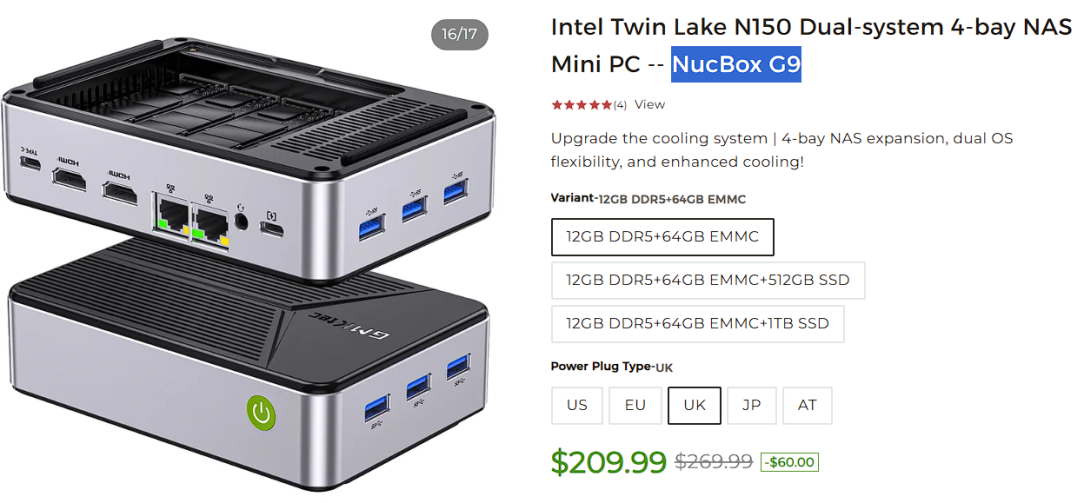
    This had heat issues in version 1.. the newer version has a cooling upgrade apparently tho I dont see reviews

    €180 bare bones, though is this discussion there was a rare customs charge from a GMKtec delivery..

    image.png

    Should start at the plex install review here running in a docker container.


Advertisement