Advertisement
Help Keep Boards Alive. Support us by going ad free today. See here: https://subscriptions.boards.ie/.
https://www.boards.ie/group/1878-subscribers-forum

Private Group for paid up members of Boards.ie. Join the club.
Hi all, please see this major site announcement: https://www.boards.ie/discussion/2058427594/boards-ie-2026

Solis inverter settings

1181921232426

Comments

  • Registered Users, Registered Users 2 Posts: 230 ✭✭soram


    Sorry forgot to report back on this. After I disabled the Daylight Saving switch as above it still happened. Solis logged in and just turned it (DLS) back on again and it has been good since then. Maybe it just needed to be toggled or something :(

    Thanks for the input.


  • Registered Users, Registered Users 2 Posts: 230 ✭✭soram


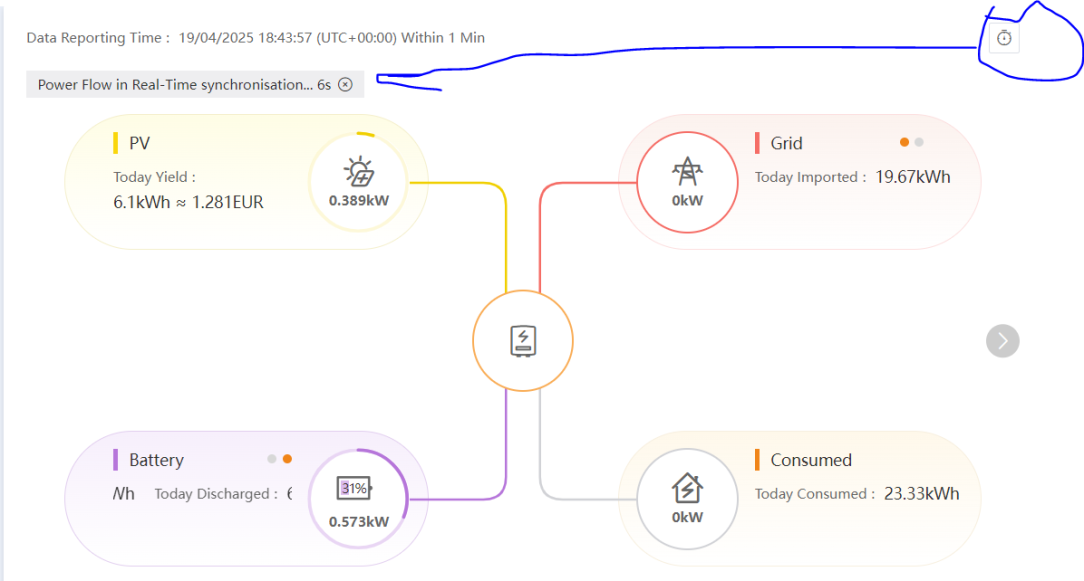
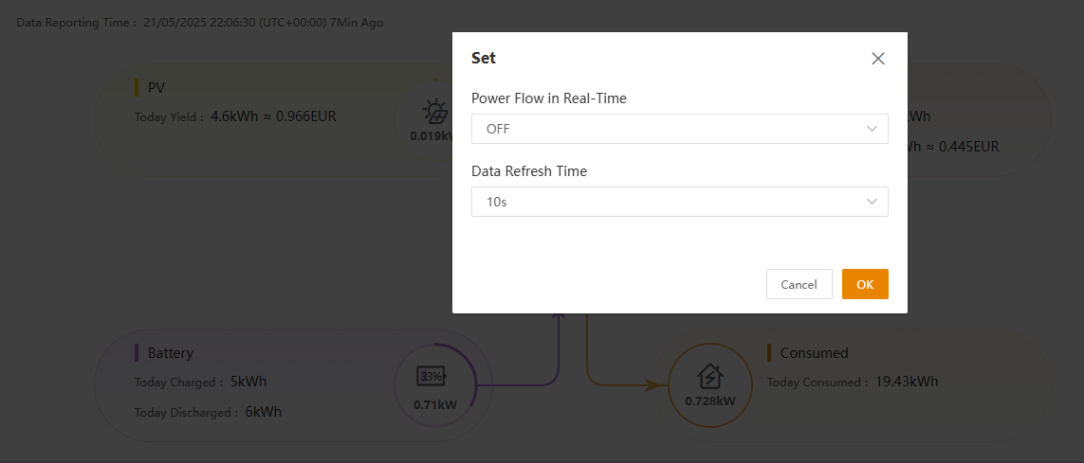
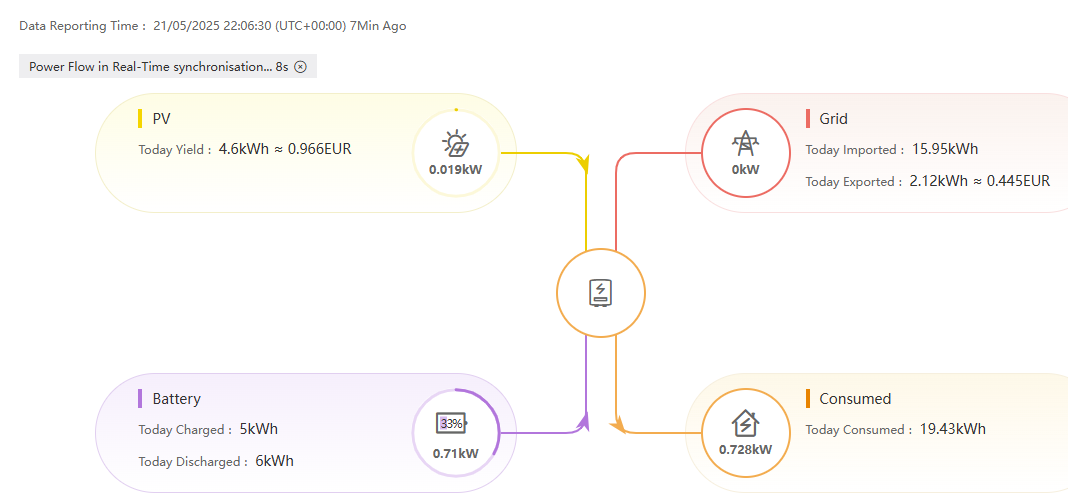
    I haven't heard this discussed but was just on the Solis portal and I see a new (to me) icon to get 'Real Time' information!

    Clicking the clock allows me to select a 10second interval for the refresh. Which seems to work…..

    I wonder how this could be enabled through the Solis HA integration….?

    I'll get on the Solis Git later and see what the story is.

    image.png


  • Registered Users, Registered Users 2 Posts: 2,050 ✭✭✭jkforde


    it's in the latest version of the app as well, it asked me to upgrade the datalogger firmware so let's see 👍

    🌦️ 6.7kwp, 45°, SSW, mid-Galway 🌦️

    "Since I no longer expect anything from mankind except madness, meanness, and mendacity; egotism, cowardice, and self-delusion, I have stopped being a misanthrope." Irving Layton


  • Registered Users, Registered Users 2 Posts: 518 ✭✭✭Cuauhtemoc


    Hi,

    Should the inverter be able to draw 5kw(or near enough) from the batteries?

    Seems to max out around 3.5kw atm.

    Thanks.

    Edit. Just to clarify that the inverter is a 5kw one


  • Registered Users, Registered Users 2 Posts: 230 ✭✭soram


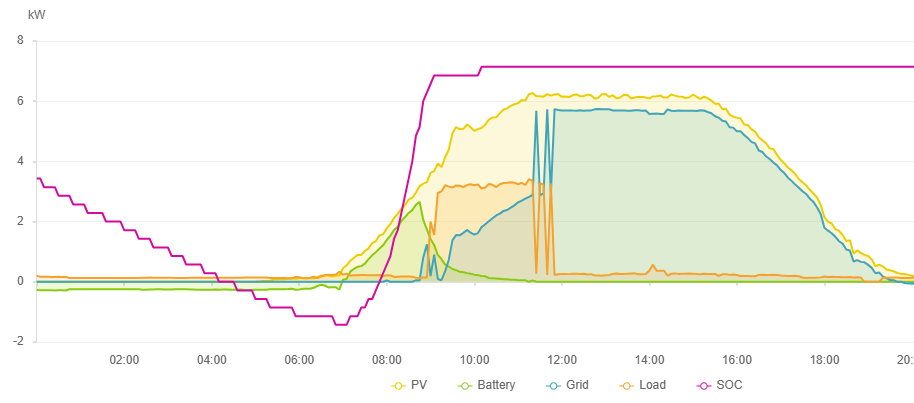
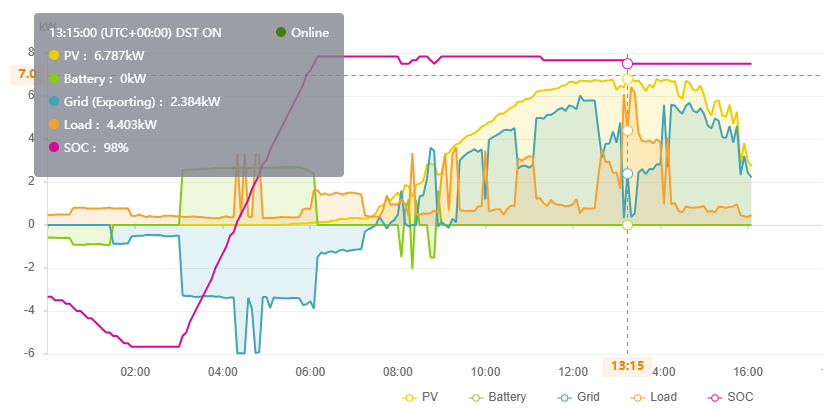
    So I reported here last year that something had changed in my Solis. It is a 6kW hybrid and previously it produced more than 6kW AC. Last year it obviously clipped at 6kW as can be seen in the first screenshot below. This year it is back to overproducing and made over 6.7kW AC today - you can see the battery is full and is not charging. I have not changed any settings but Solis may have or flashed a newer firmware. I don't have a record of that though.

    Thoughts?

    image.png image.png


  • Advertisement
  • Registered Users, Registered Users 2 Posts: 870 ✭✭✭iknorr


    Could this be something got to do with the difference between 6kw and 6kva ?

    Say the voltage goes high as everyone is producing or maybe the power factor drops? Just guessing..


  • Registered Users, Registered Users 2 Posts: 230 ✭✭soram


    The grid power factor was stable during htat time at 0.99.

    image.png


  • Moderators, Home & Garden Moderators Posts: 7,319 Mod ✭✭✭✭graememk


    Have you anything connected to the EPS Port of the inverter?

    House load is a calculation on the Solar, battery Charge/discharge, and export
    Load = Solar - battery charge +battery discharge + grid(+ve for import, -ve for export).

    If its rated for 6kW It shouldnt be outputting more than that.

    (you should try Feed in priority mode the next good day, it will only charge the battery when it starts to clip because of inverter output limitiations. )


  • Registered Users, Registered Users 2 Posts: 230 ✭✭soram


    No, I don't have anything connected to the EPS port. And as stated I have changed nothing in two years. Year one I reported here that I got more than 6kW generation regularly and that last year that changed and obvious 6kW clipping started happening under the same circumstances. This was dismissed as something that could not happen. However, evidence the graphs above, I am seeing the same again and the clipping is gone.

    I don't really care it is generating more, in fact this to me is a good thing as I am getting 800W+ more than I 'should'! So long of course as it honours the 6kW export limit. I don't know if this is the case yet as the overproduction is consumed by the house - or near enough so I can't see clipping under that scenario yet. Maybe later in the year with the sun higher. Maybe never as the over production has to have some physical limit - maybe overtemperature. It is interesting that the Solis device graph has a '1.2 nominal' dotted power line indicated. Why?

    If I were to guess I would say the inverter has extra headroom that was made available in the past. Last year with the whole 6kW / 5kW thing and the Irish grid requirements changes they pushed down the new standard to properly limit the export. This may have had other consequences which they have now changed back or tweaked. Who knows!

    Anyway, I'm pretty happy with what it is doing and won't be calling Solis anytime soon to complain or change anything to limit it!


  • Registered Users, Registered Users 2 Posts: 230 ✭✭soram


    A question on the Solis and the Emergency Port.

    We had a power cut a week or so ago so I decided to power my switches and HA server from the EPS. We have work being done this Wednesday by Networks and the supply will be down for the day. I decided to actually check the EPS function by turning off the main house supply.

    So the EPS works before and after the power is cut BUT the transition is not seamless :(

    The EPS supply output goes down momentarily so causing my server to reboot along with all the other attached bits. This is a pain as my HA server does not like the power being cut. Well, more accurately, the Sonos Zigbee dongle does not come back up and prevents HA restarting. The only way I found to get it back is to pull out the dongle., power HA back up and then reinsert the dongle. This is a pain.

    So should the inverter blip like this does anybody know or am I missing a setting?

    (Not related to Solis but if anybody knows how to get the Sonos thing to not hang on power up that would be a bonus!)

    Cheers


  • Advertisement
  • Registered Users, Registered Users 2, Paid Member Posts: 10,722 ✭✭✭✭con747


    If it's a manual changeover switch it works that way AFAIK, that's how mine works anyway. I think with the auto changeovers it's seamless but could be wrong.

    Don't expect anything from life, just be grateful to be alive.

    Help Keep Boards.ie Alive sign up here

    https://subscriptions.boards.ie/ Keep Boards Subscribed To.


  • Registered Users, Registered Users 2 Posts: 230 ✭✭soram


    Its not really a changeover though I would have thought. I'm not trying to changeover per se. The server is continually connected to the EPS port and is continually powered up with the grid connected. When the grid goes down I would have expected that EPS port output to remain constant but it seems to drop for an instant - enough to reboot my IT bits. I don't have to do anything - most of the equipment comes back up immediately but my HA server is some way sensitive and does not. I have to take out the Zigbee dongle and power cycle the server, then with the server up HA crashes. I the reinsert the dongle and restart the HA docker using Portainer. Then all is good. Well not really as if I am away from home I cannot do that.

    Anyway, my server is a laptop but the battery is buggered. I've just ordered a new one which will alleviate the issue but not answer the question as to why there is a blip in the supply!


  • Registered Users, Registered Users 2, Paid Member Posts: 10,722 ✭✭✭✭con747


    You just have a double socket from the port? I think that works the same and briefly cuts out, it did before I upgraded to the full changeover switch on mine.

    Don't expect anything from life, just be grateful to be alive.

    Help Keep Boards.ie Alive sign up here

    https://subscriptions.boards.ie/ Keep Boards Subscribed To.


  • Moderators, Home & Garden Moderators Posts: 7,319 Mod ✭✭✭✭graememk


    It is classed as an EPS rather than a UPS, I don't think they guarantee a changeover time unfortunately.

    Possibly a small ups to carry you over the blip.


  • Registered Users, Registered Users 2 Posts: 230 ✭✭soram


    Ok thanks all - looks like I need to live with the blip. I've ordered a replacement laptop battery for the server so hopefully that will resolve most issues. I might look into small UPS too at a later stage though power cuts here really are infrequent.


  • Registered Users, Registered Users 2 Posts: 230 ✭✭soram


    funnily though when the grid comes back on there is no blip!


  • Registered Users, Registered Users 2, Paid Member Posts: 10,722 ✭✭✭✭con747


    That's the way it is when I turn off my changeover switch when the powers back, everything stays on.

    Don't expect anything from life, just be grateful to be alive.

    Help Keep Boards.ie Alive sign up here

    https://subscriptions.boards.ie/ Keep Boards Subscribed To.


  • Registered Users, Registered Users 2 Posts: 230 ✭✭soram


    So I emailed Solis on the off chance. They came back and seemed to think it was not normal behaviour and did a FW upgrade! I won't get to test it for a while though…….


  • Registered Users, Registered Users 2 Posts: 1,407 ✭✭✭iwb


    Hi All. I had a scheduled power outage coming up recently, so I wired a double socket to the backup power outlet. I enabled it in the inverter and it did the job for the day, while the power was out. I noticed the next day that the batteries weren't charging though! I have tried everything I can think of including ChatGPT to take me through settings and I can't get it to come back. I did disable the backup port and reboot the inverter a few times also. Any thoughts?


  • Registered Users, Registered Users 2 Posts: 230 ✭✭soram


    Did you try 'waking' them up though the app? Sometimes the battery itself can go asleep!

    image.png


  • Advertisement
  • Registered Users, Registered Users 2 Posts: 1,407 ✭✭✭iwb


    Sorry, I should have said: When I switch of the AC isolator, the batteries charge no problem. I have used that to charge them in the meantime, when we're using very little power. They discharge normally when the isolator goes back on too.


  • Registered Users, Registered Users 2 Posts: 230 ✭✭soram


    Did you by any chance select 'Feed In Priority' mode rather than 'Self Use'?


  • Registered Users, Registered Users 2 Posts: 1,407 ✭✭✭iwb


    Yes! I think that was it. Not sure how I managed to change it like that but I have changed it back now and will see tomorrow when we're generating more than using. Thanks for your help.


  • Registered Users, Registered Users 2 Posts: 230 ✭✭soram


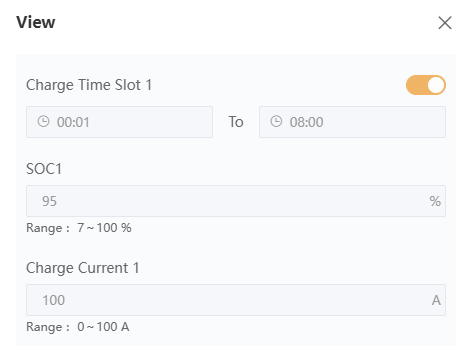
    I haven't been able to test the failover yet but my battery didn't charge last night as expected. I checked a few things and found the software update had change the Charge/Discharge functionality. I can now choose the SOC and Current for each charge/discharge block individually. You all probably have this already but it was new to me!

    image.png


  • Registered Users, Registered Users 2 Posts: 230 ✭✭soram


    So just to follow up. My power went out this morning as planned by ESB and came back on again 20 minutes later. Both transitions did not cause any blips on the EPS port and my server and networking equipment did not see any outage. The new FW seems to function as I want! Happy days….


  • Registered Users, Registered Users 2 Posts: 129 ✭✭Scoopsire


    @soram did you have to request for this functionality or it just appeared?


  • Registered Users, Registered Users 2 Posts: 230 ✭✭soram


    It just appeared! I haven't managed to do anything with it yet though - I'm afraid to touch my Solis integration due to the volume of comments and pull requests on a daily basis for it on Github! I'll let that all stabilise for a while if possible…..


  • Registered Users, Registered Users 2 Posts: 19,359 ✭✭✭✭VinLieger


    If i click the little stopwatch icon in the top right of the overview screen it gives me a message "The current Datalogger version is not supported at the moment, do you need to upgrade?"

    Its tricky to find concrete support info on anything Solis so im very wary of making any changes or clicking yes on anything.


  • Registered Users, Registered Users 2 Posts: 1,407 ✭✭✭iwb


    All working again. Thanks for your help!


  • Advertisement
  • Registered Users, Registered Users 2 Posts: 230 ✭✭soram


    Mine is just the recent Gen 3 WIFI one installed just over 2 years ago. As I said it just appeared. Tried again just now and gives this when I click the clock icon.

    image.png image.png


Advertisement