Advertisement
Help Keep Boards Alive. Support us by going ad free today. See here: https://subscriptions.boards.ie/.
https://www.boards.ie/group/1878-subscribers-forum

Private Group for paid up members of Boards.ie. Join the club.
Hi all, please see this major site announcement: https://www.boards.ie/discussion/2058427594/boards-ie-2026

Any Excel Heads Here?

  • 12-12-2025 09:02AM
    #1
    Registered Users, Registered Users 2, Paid Member Posts: 102 ✭✭


    Scratching my meagre Excel head with this one….

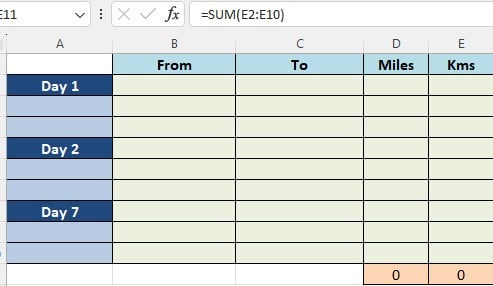
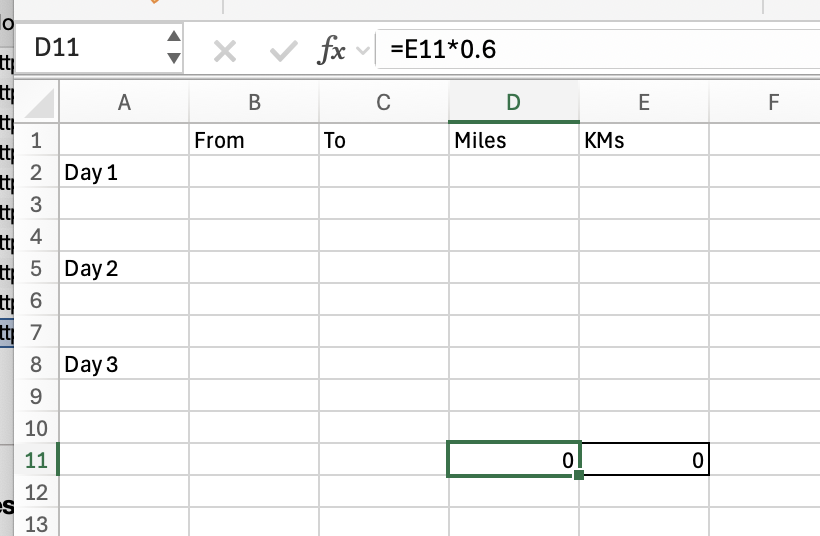
    Cell E11 is total of E2:E10.

    Cell D11 is E11 converted from Kms to Miles. =IF(E11="","",CONVERT(E2,"km","mi")) But this currently also shows 0 as E11 is filled.

    I want the D11 & E11 to be blank if there is nothing in E2:E11.

    I tried =IF(E2="","",SUM(E2:E10)) which works fine if you enter a value in E2, but obviously if you enter anything in any other cell in the column, except E2, E11 stays blank.

    I also tried using IF & ISBLANK with the range E2:E10 but it didn't like that either.

    Any ideas?

    Many thanks


Comments

Advertisement