robfowler78 wrote: » Hey lads whats the easiest emulator setup to use with the pi. I mean the one that needs the least messing around with code to get controllers etc to work. Im a complete idiot in relation to linux or programming. Any help appriciated. Thanks
MrVestek wrote: » This handsome lad's tutorial series may be able to assist you:https://www.youtube.com/channel/SWYCo8oX3jw-M ;-)
robfowler78 wrote: » Only tutorial that I could follow that got me as far as having everything installed and running but ran into trouble getting screen sizes to fit and the controllers to work. I'm not great with code and getting that far took me a weekend. But welldone on the vids very easy to follow even for a thick like me. Was hoping I could download a finished image some were with controls and screen set looks like ill stick to PC for now.
MrVestek wrote: » Unfortunately that's not really possible to do considering that different people have different controllers with different drivers and different driver mappings etc. Which bit are you stuck on? Feel free to PM me if you need a hand. Messing with cfg files is awkward alright I will give you that. What resolution are you running everything in? 720p? 1080p? I think Emulation Station from the bat is designed to run rather well with composite resolutions so some emulators are set to 480p (or 480i) on purpose in order to make it look pretty on older CRT TVs. Should be easy enough to change though. If you need a full desktop to work with quit back to the command like and type in 'startx'. This will start the regular Raspbian desktop which should be easier for you to work with in regards to editing cfg files etc. It'll certainly make it easier to navigate instead of using bash (the command line).
Standard default Pi:
arm_freq=700
core_freq=250
sdram_freq=400
over_voltage=0

Stable Overclock on my B+:
arm_freq=1000
core_freq=500
sdram_freq=600
over_voltage=6
eddhorse wrote: » Very nice Steve. Any particular project you have in mind for this?
Steve SI wrote: » All very nerdy stuff I’m afraid
CiDeRmAn wrote: » What's the most recent stuff that'll run on Raspberry Pi via mame?
CiDeRmAn wrote: » So, Metal Slug = Yes Ibara = No
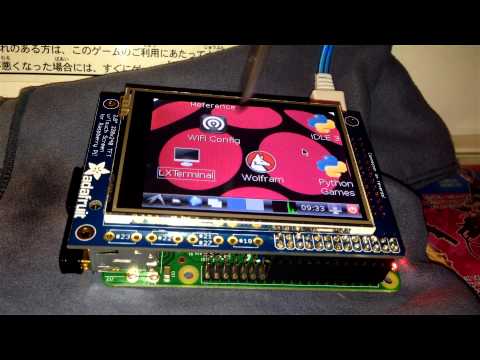
Steve SI wrote: » Thanks, it’s the first time I’ve used this new soldering iron and it’s a bit too big for this kind of job I think. This B+ is for testing and playing around with this type of screen and some other stuff I want to try out on it. I’ve 3 other B+ boards and one is going into a very small mini arcade machine(hopefully I can use something as the shell for the mini cab as I don’t fancy building one up from MDF etc) and another will replace another older type Raspberry Pi that’s currently in a little boat drone project I’m working on and finally the third is going into an old Kodak camera body from the 1930’s/40’s that I’ve installed the RPi camera module in. All very nerdy stuff I’m afraid
kkontour wrote: » I have a similar setup except with the B. I think you need to use advance Mame as it will output to FRAMEBUFFER /dev/fb1. /dev/fb0 is the hdmi. I could get cupcade working but its just a NES emulator. One way to get the SNES emulator ( and others I assume ) is to use https://github.com/tasanakorn/rpi-fbcp to copy /dev/fb0 to /dev/fb1. This works but I dont think the touchscreen works.
Francie Barrett wrote: » Sorry to dredge up an old topic, but I am running ZSNES and am wondering is there any way to exit the application when using a controller? Think I need to map a button, but have no idea how. Help?
robfowler78 wrote: » Soarview is there a "legal" option? Mods if not allowed just delete I'm not sure if soar view is available on pi or not just wondering.
brianorourke wrote: » I just got a Playstation 3 Play TV tuner, it's usb and is supported by the pi. Took a bit of tinkering but yeah it works great, never tried recording though. Saorview is free, all you need is a saorview device
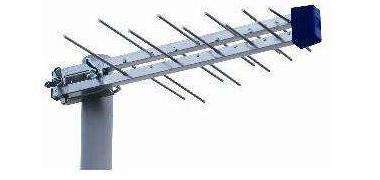
Ste- wrote: » What kind of aerial do you have plugged into that then ?