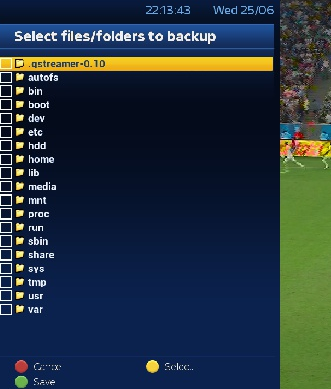
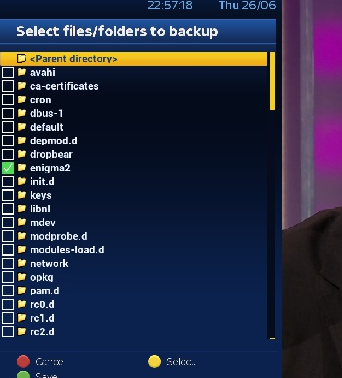
fat-tony wrote: » In the ViX menu on Apollo there is a backup manager. There you can save your settings etc. to a connected drive. After flashing from Apollo 8 you can then use the backup manager to restore your settings.
byte wrote: » I've a USB stick plugged in the back, and used a seperate USB stick to reflash plugged into the front. Didn't remove it (never even thought about it), flashed grand.
fat-tony wrote: » To clarify the issue regarding USB sticks when flashing VixX images: The recommendation from WoS in their guides is that you disconnect any external drives or other USB sticks when flashing a new image. The issue with USB sticks is that some boxes are particularly "picky" with regard to recognising them and flashing from them. I have a particularly ancient hp stick with a capacity of 4GB formatted to FAT32 and this seems to work on everything - Humax Foxsat, Mvision and now the Enigma based machines so I use it exclusively. Once you find a stick that works reliably, keep it safe! I have a Quad Plus with an internal HDD, so I use the front USB port for flashing as it's more convenient. The USB stick with the flashed image also contains a folder with picons and a couple of test audio and video files. I leave the stick in the machine most of the time so anytime it boots I get a warning message that an image is found, but I ignore it (unless I'm actually flashing a new image) and the boot process continues after a few minutes. As regards the backups that the ViX backup manager takes - yes they are compressed and the ViX manage will decompress them on restore, so you don't need to do anything. I keep the EPG on the HDD and also the backups. I usually keep the picons in the flash, although I have them on the USB stick also if I'm trying a new set on another machine.
fat-tony wrote: » ext3 or ext4 is the native disk file system for linux boxes. FAT32 comes from the MS Windows PC environment. linux will read and write ordinary files from the FAT32 file system. Your .ext stick was presumably initialised in the box and is mounted as ext3 or 4 by it. Stuff like swap files (if you're short of RAM) would only work on ext file systems and it's probably best to keep system files on such a stick or external disk. That said, my picon set is on the FAT32 stick in a folder and the Quad Plus manages just fine with it. There is 512MB of flash on the Quad Plus, so there is no issue with storing picons there as they are just written occasionally when you add a new set, otherwise they are just read from. You are recommended not to store the EPG in the box flash, though, as there is a re-write of megabytes of data every time you refresh the EPG, usually several times per day, which could cause premature wear issues or use up your available flash. It's better to have the EPG on a separate USB flash drive or a HDD. As for your steps 5/6, you are correct - insert the .ext formatted USB stick into the back port and, once it's recognised and mounted by the system, you can restore from it. You may find that it's ok to leave it installed permanently. It's just that the recommendation to remove attached devices when flashing is there to eliminate any potential issues.
lfc84 wrote: » in laymans terms whats the benefit of gonig from 3 to 8 ?
fat-tony wrote: » @iba - I thought the channel lists were backed up as part of the process, but I've been mostly doing fresh flashes, no restores in order to check the builds.
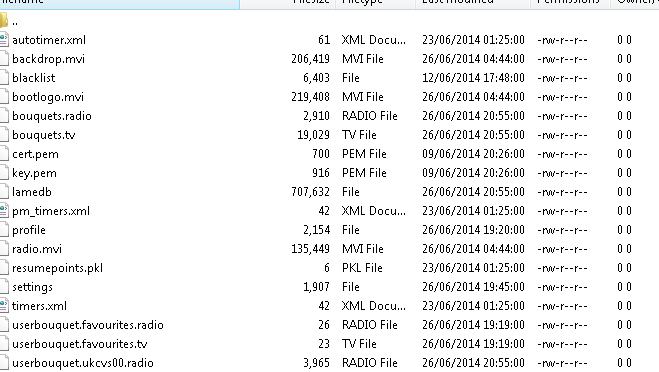
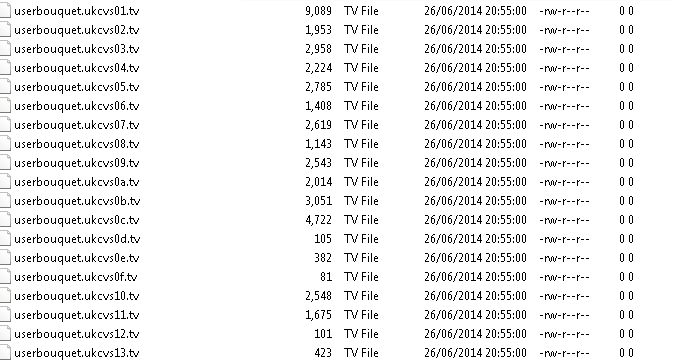
daneparkinson wrote: » With Openvix bouquet files are stored in directory /etc/enigma2 It also contains auto timers + other setting related files. A normal backup (backup manager -> new backup) will do the same thing, then you can just restore the backup or unzip the backup file and pick n choose the files to copy in.
radiowaves wrote: » Am I missing something? Why not just use DreamboxEdit to save and upload your services and bouquet list?
iba wrote: » Probably will have to do it that way because the proper way is not working.
radiowaves wrote: » FTP is the "proper" way I find applying backups to fresh installs can cause issues and bloat the receiver. Using FTP for your services files ensures they are clean and always available
iba wrote: » Thanks for the info about applying backups to fresh installs bloating the box. Ok, maybe I should have said easiest for me rather than proper. But it does bug me that I Am following the instructions correctly but not getting the results As you will have gathered from this thread I have only been learning about backup manager this week. So I will have to learn your method. I have another thread open called skins and vix where I tried to download mymetrix skin but I don't have enough memory left on the box . Sounds like bloating. Typing slowly and with lots of mistakes coz I'm on my phone. Not good with phones :-(
radiowaves wrote: » I wasn't trying to be smart BTW I always prefer fresh installs - everything is clean that way. I have a checklist to go through and all Plugins etc ready to go. To get a new image back to my favoured state usually takes 15-20 minutes (obviously too long for lots of people ) What box are you using btw? If you are low on memory it is quite possible that your box just can't deal with applying backups. Having said that MyMetrix in its raw state is quite bloated anyway. In addition Vix is a little unstable right now because of its well-documented political situation
iba wrote: » I didn't think you were being. Everything you said makes perfect sense to me. In fact I am just about convinced to forget about this backup option altogether Just I was getting tired having to reinstall everything with all these new vix flash updates lately, zeus, helios, apollo etc It's a gigablue hd 800 se. I don't know about this political situation Send me ur check list please, I'm sure it would help me a lot
fat-tony wrote: » @iba - I've been away on holidays the past week so didn't keep up to date with threads! I see now that you are using E2 Autobouquets, rather than AutoBouquetMaker (ABM) which is packaged with the newer ViX images, so it's entirely possible that the E2 AB plugin settings are not being retained, although the actual bouquets should be ok if you are restoring them. E2 AB requires you to have a complete scan of 28.2 in place so that it works properly, I believe. ABM does not require this as it has the main satellite transponder settings for SKY and Freesat built in and then it rebuilds the bouquets everytime you run it. It doesn't handle Saorview at all, so there is an element of copy and paste required to keep your own custom bouquet working properly. I think E2 AB might be the better choice for Irish terrestrial and satellite, though. I haven't had time to play with E2 AB due to the number of image releases happening! Because ViX is supporting so many boxes there have been issues with failed or withdrawn releases and also because of the need to merge changes from other Open Alliance images there have been stability problems also. Hopefully it will settle down, but I'd suggest sticking with a particular image if you are not getting issues. Because I'm actually testing the Quad Plus box I do a fresh flash each time (no restores) in order to check the initial state of everything and then I run through setting the tuners and plugins manually.