irishchris wrote: » hi roger is this the one for defo as i have ordered it from amazon http://www.amazon.co.uk/Hauppauge-WinTV-NOVA-T-USB-Stick-freeview/dp/B000F8RPQE/ref=sr_1_2?ie=UTF8&s=electronics&qid=1276012538&sr=1-2 i do not see the model number on it that you mention. or if its mpeg 4 capable? have you tried pointing your ariel towards the galway area as its available on wideband and should be available from your area
Item Weight: 763 gBoxed-product Weight: 454 gDelivery Destinations: Visit the Delivery Destinations Help page to see where this item can be delivered. Find out more about our Delivery Rates and Returns PolicyItem model number: 294ASIN: B000F8RPQE Date first available at Amazon.co.uk: 29 Mar 2006
VINNIEB wrote: » Just placed my order today for the vu+duo. I have been keeping an eye on this and other vu forums and i am very impressed now they have both USB Wireless and DTT working. Just a couple of questions though, Can i use a USB hub with this? e.g. USB Hard Drive,USB Tuner and USB Wireless there goes all three USB slots. Also is there emu for the SKY White FTV Card? Vinnie For Sale:http://www.adverts.ie/234309/satellite/edison-argus-mini-2in-1-ip/
irishchris wrote: » i have feeling that this is the wrong dtt tuner for ireland as rte is been broadcast in dtt mpeg4 and this is a mpeg2 tuner :eek::eek: Device Type DVB-T receiver Enclosure Type External Interface Type Hi-Speed USB Video Type TV tuner Form Factor External Interface Type Hi-Speed USB Digital Video Format MPEG-2, DVB Features Time shift function
gan23 wrote: » Is there anything you need to do to configure the tuner before it will work, i.e. plug it into your laptop and change settings etc.? Im just guessing here.... If it does only work for mpeg2 you should still be able to scan for the channels and pick them up (with no picture) as stated in a previous post. When its in the vuplus can you see anything to indicate signal strenght etc??
irishchris wrote: » i installed the hauppage dtt nova stick in the vu+ but find it jittery on channels. dont know why as seems perfect on laptop. i must have a proper look tomorrow at it and maybe try improving signal. am hoping its a signal prob and not a vu+ prob!
irishchris wrote: » yes mine is working ok now but earlier when i was recording two shows with both sat tuners and when i went to watch the froggies playing on rte 2 dtt it froze really bad. all is ok now but really bad lip sync! would this be vu problem or is it a prob with the dtt transmission??
irishchris wrote: » yes i tried on my win 7 laptop using win media centre and is flawless. perfect picture and perfect synched sound. retried in vu and picture is perfect but audio on all dtt channels is out of synch! bummer!!
stanley1 wrote: » Been rock steady so far but lipsync is way out.
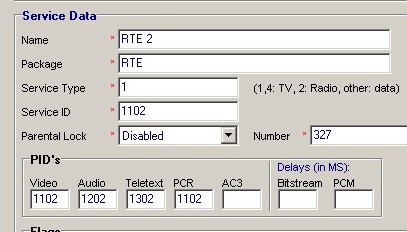
Apogee wrote: » Lipsync problems are probably a result of driver issues, although there could be other reasons. You can play around with the delay in video/audio using a channel editor like Dreamboxedit, assuming the delay is a fixed time interval and isn't drifting or fluctuating. Delay values in bottom, right-hand corner: If you record a DTT channel, and play it back, do you still have a lip sync problem? Similarly, if you record a DTT channel, and then ftp the file to a PC and play it back, are there lip sync issues?
irishchris wrote: » hi mate. yes i checked by recording or streaming it through laptop from vu+ and audio problems are gone - no sync probs but watching it direct on vu+ and there is a 1-2 second delay on audio!! very frustrating!!
Apogee wrote: » You can still try the channel editor as a temporary fix, but you should report back your findings above to the Vu+ Support people, as it may allow them to isolate the problem more quickly.
irishchris wrote: » hi mate is it the bitstream or pcm that i change delay for?? - bout 100 ms should be enough??