They're nice for a certain type of person for sure, I think there's some easy methods now for non tech-savy people too to be able to mod these I'm pretty sure as it was pretty difficult at one point I believe for some. They're okay value really, nice art and the newer cab designs are pretty neat. I just find them personally quite small (I need a stool to play on one even with a riser). Most of the really cool ones cost a fortune then as they have to be imported from the states (like the Star Wars one). I see why some people prefer the 1Ups, especially for the ones with unique controls like Star Wars, Tron and I'd actually nearly buy that Atari Tempest one myself for home as it has cool games and unique controls and not having to maintain the WG6100s for it.
Honestly, if someone has a rough idea of what they're doing, buying a Jamma cab for 250/300 and sticking a Pandoras box or upgrading to a Pi would probably be cheaper if you found one at the right price. But may come with a trade-off maintenance-wise. Size-wise there's a big difference with them and they'll hold their value most likely. I guess it's each to their own though!
I built a nice Raspberry Pi Bar top a while back too for about half the price of a 1up, another good option too.
I've the Tempest one, with an upgraded spinner, and it's pretty good.
Just never play it!
The SF2 one is still sitting there, unmodded, despite all the parts being right there to do so.
And I haven't turned on the AWSD in a long time, the RPi that used to live within cannibalised for another project.
Thanks Dav,
He isn't much of a modder and I know that if he wants anything added, it will be me sourcing the parts and doing it for him.
I have no issue with that, but ideally I'd have him giving it a try himself. Now given he even drops his bloody Kodi box to me, still to sort for him every couple of months 😉 I know I'll be on the hook for tech support whatever he buys.
Keep trying to talk him into a nu-gen or nice jap cab with a multi game set up...
But! He's a tight bástard 🤣
Get a MISTer into that thing man....it deserves no less
No!
But I do think I might make it a dedicated cab, find a Raiden/II board and leave it there, maybe emulate only those, probably get more use from the thing that way.
I only need so many ways to play arcade/console games.
I was talking about your AWSD....leave the 1up for collecting dust :)
I'm talking about that myself!
Could just throw a RPi back into it, but limit it to shooters only....
Might be nice to just chuck one PCB in there alright, I'd say you'd probably end up using it more.
I found even with an MVS multigame board, I was playing it a hell of a lot less than I did when I was using original carts. Kind of keep the multigame board now for when people come over.
A Pi though....a MISTer would do it so much better :)
Hello,
I'm hoping someone can help me.
I carried out the conversion work on my arcade 1 up and resolved all issues, bar the sound.
The amp listed in the youtube tutorial was no longer available, and so I bought this.
All I am getting is a hissing noise. Has anyone encountered this? if so, what was the solution?
Thank you
Hi there, what type of output is coming from you device, is it a jack out? Maybe first check the output with headphone if it is a jack (if it's a Pi something similar you've to change the audio from HDMI out to Jack Out), if you've that ruled out mess around with the device and see if you can get and signal into it, the fact that the speakers are hissing must mean it's up loud and is probably getting power to the speakers, check it's set to the correct input too on the sound device.
Fantastic suggestion, thank you.
Unfortunately, I plugged a headphones jack into the pi and nothing, and into the VGA board and nothing.
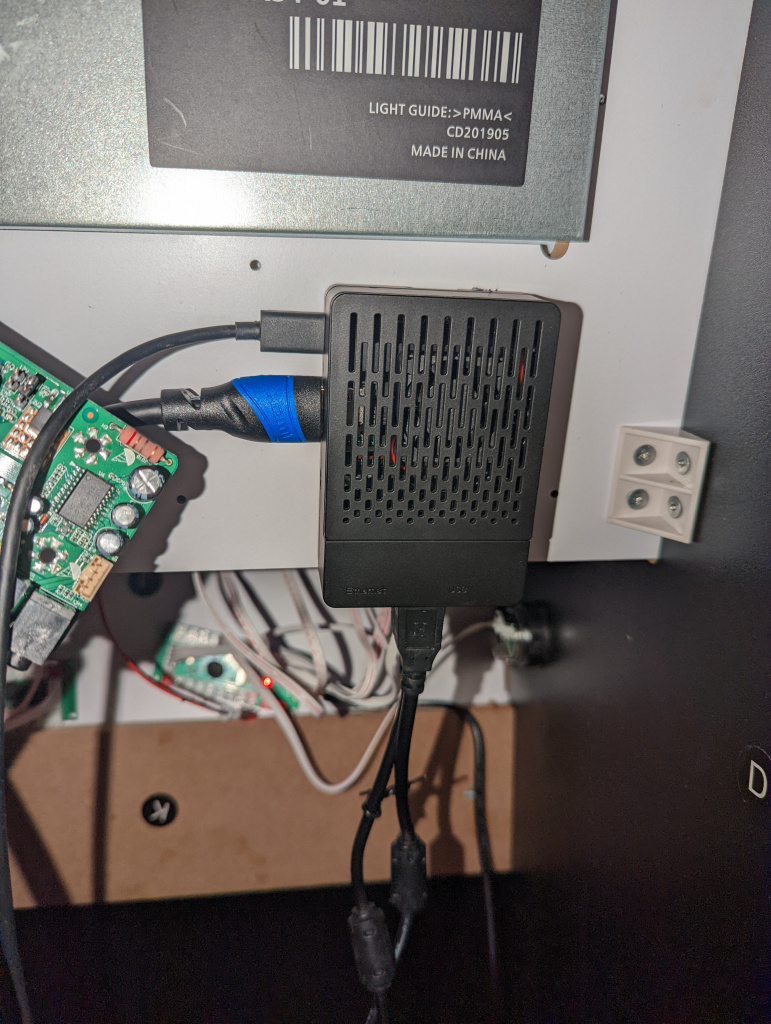
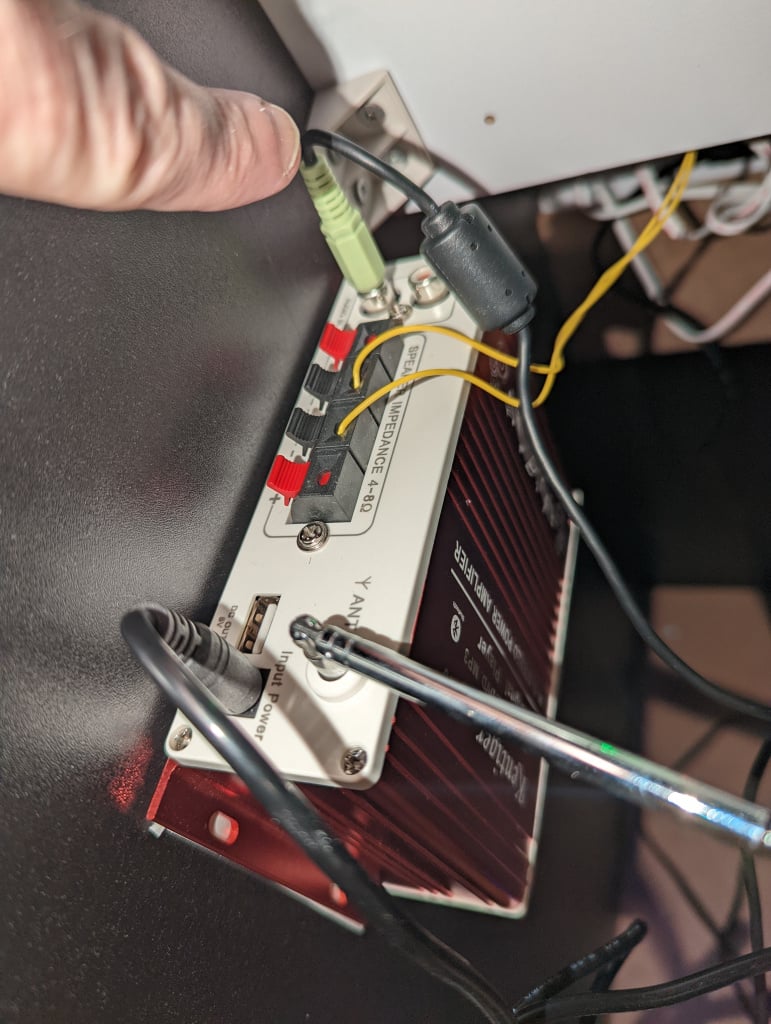
Here are pictures of the pi with hdmi cable, the board with Jack out and the sound amplifier with Jack and two yellow cables from the speaker.
Ah, you probably need to go into the RPi and its config file and tell it to output audio from the 3.5mm jack.
Otherwise it just keeps pumping the sound out of the HDMI only
Yep I was thinking the same, either in emulation setting go to menu and setup or if it's console based "cd .." a couple of times until you're in root and then enter:
sudo /home/pi/RetroPie-Setup/retropie_setup.sh
It should be in "audio options" or something there. One thing you could try is plugging your phone's/laptop headphone jack into the audio amp to see if sound is coming out, or plug headphones into the raspberry pi's headphone jack and see if you can hear any audio
Also I'm not sure you're using the right audio jack, hard to tell by the photo.? Depending on your cable/ amp but it looks like it's a 3.5mm jack to jack you have which is plugged into an RCA input on an audio amp, I can't be certain from the image. But if it is you need a 3.5mm jack to RCA connector, any audio should show have them
Legends, both of ye!
I'll try those suggestions and come back to ye 🙂
Btw - do you have to reconfigure the buttons every time you play?
No problem, and no they should stay the same, if you're not using Emulation Station you may need to force a reboot for it to save some settings in an emulator, just press escape and type "reboot" and hit enter and it should have them saved when you reopen again (if my memory serves me correct)
Okay, I tested the headphones in the pi and it worked on start up (rather cool Marvel music). No sound in game at all?
It depends what emulator you're using, if its something like Mame4ALL or similar emulators you might need to turn up the volume, the tab button (or a button above or below it, I can't remember exactly) will let you. If it's emulator station it should have it in the settings, sometimes too if it's an old rom or corrupted or that implementation of mame may not support sound on that romset so test other roms too.
This is the one I bought...
Ok folks,
Trying to use a bit of that small brain of mine to figure out what's what.
1) on start up, there is sound from the pi via a set of headphones
2) I plugged a jack into the aux in the amp and played music through. I changed the mode on the amp and moved the two yellow wires around until I had sound coming through the speakers
3) I then plugged the headphone jack to jack from the amp to the pi and got my sound on start up. Success!
So, the only problem is that there is no sound in game from the pi, whether through the headphones or the amp.
Any ideas?
(I've still to reformat and also, I found the joystick and buttons recommended on the YouTube build to be not great at all. One of the sticks is not returning to centre 😒)
https://retropie.org.uk/forum/topic/19946/no-sound-in-es-with-3-5mm-port
I'll give that a shot later, thank you!
(Can I just say that the 25 odd minute YouTube video does not take anywhere near 25 mins)
I was having very similar problems to you with the no sound and sometimes only playing in the start up screen and not in game
I followed loads of guides of going into emulation station and reconfiguring in there but in the end the only thing to fix the issue was I put a different rom image onto a different sd card
a rebuild might just work as well
Hey Guys,
Bought a Street Fighter Arcade 1UP machine for cheap and it's amazing, but there is only so much losing I can do.
Does anyone have any recommendations on where or how to upgrade this to have a library of games.
I've seen kits made available, but the only proper nice one I saw was $350 before shipping and it took some putting together on my part, which is my a skill of mine.
Any where in ireland do upgrades?
Thanks guys
Have a look at the video. You'll get all the parts on Amazon.
You can buy other sticks and buttons with quick connectors so there's no complicated wiring. It's a piece of piss to put together.
For the most basic setup like that think it cost me about 250-300 euro at the time.
I'm sure if you can shop around you could get it done cheaper.
Could always for a pandoras box too.
Just had a look today and Smyth's have the Star Wars Pinball on preorder. It's pricey, €850 (!) but it's not coming until September so I have time to save up!
Its pricey, but I was just looking at the price of actual pinball machines there as im thinking of selling one of mine and they have gone through the roof.
I've had all the parts to convert my SF2 Arcade1up cab into a Pi cab for that last year and a half...
Nope, didn't do a thing to it!
I wonder how much those DIY virtual pinball machines cost compared to this, €800 is expensive enough. I've seen some fairly basic ones that look pretty good but obviously you can buy full kits with artwork and everything.