Button stays but either "like" breaking through in background(#1 code) or no count (#2)
Cant get my head arrount how to keep count with "Thanks"
poping "like" once hover over is annoying too
Remove this - its doing nothing
.ReactButton-Like {
text-indent: -9999px;
line-height: 0; }
Add
span.ReactLabel {
display: none;
}
You'll need to set a width on the button to counter the extra text
Almost perfect , few side effects
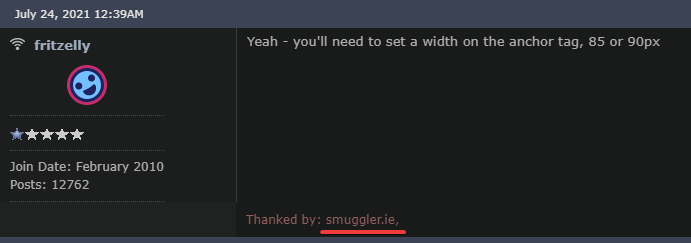
Yeah - you'll need to set a width on the anchor tag, 85 or 90px
Perfect!!!!, adjusted to a 100px and had to do ":after" for "Flag" as it still would not comeback. Thanks a lot
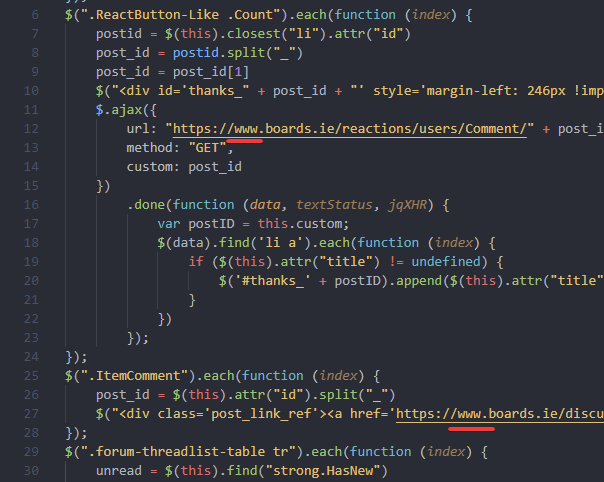
If anyone's styling addon is no longer working it's because Boards redirect is now pushing www.boards.ie instead of boards.ie - you will need to edit the url
can i pick your brain once again guys?
Thanks for mentioning that. Some of the JS I was using stopped working because of it, just added in the 'www' and it's back working again.
Users had stopped showing but back now. 🙂
@Andrew76 Users had stopped showing but back now. 🙂
This one is cool, is there way to do it with CSS ? Thanks
No I don't think so. The code is by @fritzelly but looking at what it's doing - I'm pertty sure CSS can't do that.
/Edit: I got from this post: https://www.boards.ie/discussion/comment/117647347#Comment_117647347
I added a small addition to your code to open the link in a new tab, hopefully it has no adverse affects. 🙂
Although it's strange, even with the above JS disabled, some links automatically open in a new tab with no 'Leaving boards...' page, others open in the same tab. Examples:
Opens in new tab - the url in this post: https://www.boards.ie/discussion/comment/117648205#Comment_117648205
Opens in same tab - the chrome extension url in this post: https://www.boards.ie/discussion/comment/117644624#Comment_117644624
Thanks all, huge improvements in usability and readability from using the CSS and JS here.
Shocking to see all the effort that's being put in here is needed after the migration to a brand new shiny platform that was going to fix all the problems with the old one!
What exactly did the early morning downtime achieve?
@Gadgetman496 - What exactly did the early morning downtime achieve?
Not sure but I've not gotten any popup warnings saying the site is unresponsive when trying to post a comment, that's a plus I guess. 🙂
To do?
You can just remove the "https//www.boards.ie" part from the url - in case they change it around again
Couple of quick customizations for discussion pages might spend more time with it, (using stylus extension on opera with the page addon so it only targets ../discussion)
/* center posts to window */
.Container .Frame-row {
  display: flex;
  padding: 0;
  flex-wrap: wrap;
  justify-content: center;
}
/* sticky breadcrumps */
.pre-header {
  position: fixed;
}
.BreadcrumbsBox {
  position: fixed;
  width: 100%;
  top: 48px;
  height: 20px;
}
#titleBar {
  position: fixed;
  top: 0px;
  width: 100%;
}
.Container {
  margin-top: 20px
}
/* smaller reaction buttons lighter colour */
.Reactions .ReactButton.Quote,
.Reactions .ReactButton.ReactButton-Like,
.Reactions .FlagMenu.ToggleFlyout {
  width: 69px!important;
  height: 25px!important;
  background: linear-gradient(#fdfdfd, #d8d8d8);
  border: 1px solid #d8d8d8;
  display: flex!important;
  justify-content: center!important;
  margin: 4px!important;
}

.Reactions .ReactButton {
  color: rgb(151, 148, 148);
}
/* in between post spacing */
/* after */
.Section-Discussion .Content .pageBox .pageBox .pageBox::after {
  content: "";
  display: block;
  height: 8px;
  width: calc(100% + 2px);
  margin-left: -2px;
  border-bottom: 3px solid #3b5586
}
/*before*/
.Section-Discussion .Content .pageBox .pageBox .pageBox::before {
  content: "";
  display: block;
  height: 8px;
  width: calc(100% + 6px);
  margin-left: -3px;
  border-top: 1px solid rgb(211, 212, 213);
}
/* postbit colour and font size, as well as spacing from side and top i.e. post time & background colour */
.postbit-header {
  color: #f4f4f4!important;
  background-color: #3b5586a8!important;
  padding: 0 15px 0 5px!important;
  height: 28 px!important;
  line-height: 27px!important;
  font-size: 14px!important;
}
Cheers.
I wonder could you tell me what I'm doing wrong here, I've been trying to add a basic 'Top' url (which jumps to the top of the page) after the existing post Id/Url that you added to the post header. I was being noobish and just tried to add the href inside your div, but it appears before the post Id not after. It does jump to the top of the page which is great, just looks rubbish though. 😊
/* Display post id & url in post header. */
$(".ItemComment").each(function (index) {
    post_id = $(this).attr("id").split("_");
    $("<div class='post_link_ref'><a href='https://www.boards.ie/discussion/comment/" + post_id[1] + "#" + $(this).attr("id") + "'>" + post_id[1] + "</a><a href='#'> | Top</a></div>").appendTo($(this).find(".postbit-header"));
});
So I was hoping the below would look like '117656270 | Top' for example.
@iLikeWaffles - not sure if this is what you mean re: codeblock all of it - you click the pilcrow icon to the left of the comments box (you must have your browser maxmised to this see afaik) and select the quotes then code block option, you can then paste your code into the block that appears. Or just paste in your code, select all of it and then click pilcrow - quote - code block to wrap your code.
Apologies if you knew this already and I misunderstood. 🙂
P.S. I'm not sure about anyone else, but any time I need to use the formatting options I always press Enter a few times to make sure there are blank lines after whatever I'm going to format - otherwise I've no way to add more comments after it.
Thank for comeback.
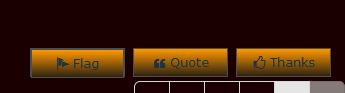
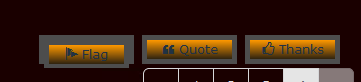
As per screenshot - double "Falg" button once certain font colouring applied . It seam that Flag has some coding independant from other two despite all are " .Reactions . ReactButton"
/*reaction buttons design*/
.Reactions .ReactButton.Quote,
.Reactions .ReactButton.ReactButton-Like,
.Reactions .ReactButton.ReactButton-Flag, /*once anabled gives "shadow"/double button for FLAG */
.Reactions .FlagMenu.ToggleFlyout {
width:95px!important;
height:30px!important;
background:linear-gradient(#ff9900,#2f2310/* #ffa31a*/);
color: #213244; /*this effects only Quote and Thanks buttons font if .Reactions .ReactButton.ReactButton-Flag disabled" */
border:1px solid #4d4d4d;
display:flex!important;
justify-content:center!important;
margin:4px!important
.Reactions { padding: 0 !important; margin: 0 !important; margin-right: 10px !important; position: relative !important; float: right !important;}
.Reactions .ReactButton {color: #213244} /* this effect Flag button font alone */
Why make it complicated - style the button as you want
CSS
.buttonTop {
position:fixed;
bottom:50px;
right:50px;
width:50px;
height:50px;
background:orange;
JS
$('<a class="buttonTop"></a>').appendTo($("body"))
$('.buttonTop').on('click', function(e) {
e.preventDefault();
$('html, body').animate({scrollTop:0}, '300');
});
@fritzelly - Why make it complicated
Because JS is not my language of choice. Thank you though, that will work very nice indeed. 🙂
@fritzelly for troubleshooting i have disabled ALL other code related to react buttons - culprit still there.
Magic! Had no idea that quote icon had hidden away features.
Remove the 2 commented styles
.Reactions .ReactButton.Quote, .Reactions .ReactButton.ReactButton-Like, .Reactions .ReactButton.ReactButton-Flag, .Reactions .FlagMenu.ToggleFlyout {
width: 95px!important;
height: 30px!important;
background: linear-gradient(#ff9900,#2f2310/* #ffa31a*/);
color: #213244;
/* border: 1px solid #4d4d4d; */
display: flex!important;
justify-content: center!important;
/* margin: 4px!important; */
@fritzelly briliant !!
Still remain mystery to me how other two buttons not effected in same manner.... As you might notice, only "Flag" button has no bottom border once changed code.
So i have reenabled border: line as well as all other tweaks and now it looks ok
Thanks
PS: typing comment freezing again, was not to bad in the morning
I'm seeing the border fine
Out curiocity increased border:5px solid #4d4d4d; give me this. There is still some code somewhere that effect "Flag" alone
Remove
Not it. with 5px border remaining