Hello!
Is it planned to enable selective quoting of posts in the future? Currently you must quote the entire post even if it is just one small part of it you wish to address. This I think may lead to confusion and unnecessary arguments.
Many thanks.
I've seen it mentioned in various threads and it may be worth mentioning in the "Just bugs / missing functionality reports - no griping" thread.
I would very much imagine it is on the list of things to be addressed though. It's certainly a setback when you wish to address one or two lines of what a poster has said, without quoting a wall of text to do so, and as you said, confusing as to what specific point you are responding to.
I do know that the current focus is on speed/navigation, so bear with us.
It kinda does make the quote feature entirely useless, except for the fact that it pings/"notifies" the person quoted, apparently.
Can’t multi quote either
You can on desktop, just scroll back up and select Quote on each mesage. 🙂
If you click there paragraph icon on the left the text being edited a response, there's a special formats option (the one with quote marks). With that you can selectively mark pieces of text of your choice as quotes. It's way more clunky than the single quote button, or the vbulletin method, but it's an option at least.
Spear7:47 pm wrote
Ah I see now!
It's the inverted bold P and I symbol to the left of the response test. I should note that I've seen someone else comment that the icon wasn't appearing for them.
Many thanks for your suggestion. I see it now!
if quoting, the entire thing should be viewable and highlight the thing you want to focus on.
else, this turns into a disaster of a website where people pick and choose what they want others to see by cutting out the other persons posts.
It can also help bypass the 6(?) line limit that's the default on a quoted post. But as mentioned it's a bit cumbersome.
And the symbol is formally called a pilcrow,as I've just learned.
Now for some long-winded dissection of others' posts!
Still confused and wandering about.... I open the home page and am faced with selection of options, Discussions, Categories, Groups, Latest Posts then My Forums and My Threads amd 'trending' and 'thanks'.
I just want to hop into the topics I am subscribed to and see what new comments are posted so opt for My threads/My forums but recent posts are not highlighted, all in 'bold' and dates that go way back. Then I look at my profile and I see a list called 'Bookmarks' ? and My Discussions... so another set of categories? Simplify please!
y0ssar1an22 8:19 pm wrote:
Yes it is something that can potentially be abused but I think nevertheless it is a useful feature.
else, this turns into a disaster of a website where people pick and choose what they want others to see by cutting out the other persons posts."
You mean the way boards has worked since it opened? Yes, that's what we'd like, please. Absolutely no need to quote a whole 5-paragraph post if the only point I'm addressing is one line.
On first reading, I thought you meant you could use this to highlight parts of the text you're quoting - I see now you mean you can just mark something to be in style of a quote. So copy and paste the bit of text from an earlier post I want to highlight. Not as useful as the old quote box, and won't ping the person you're replying to, but somewhat better than nothing.
Another issue with "quote style" rather than quote box: when you are using the quotation style in your post which and your post is then quoted, text appears unquoted in the subsequent post when really you don't want it to be seen at all.
If you @ the user as well as using the quote format it should still ping them and give the appearance of quoting them. Somethng like this:
@TaurenDruid - Not as useful as the old quote box, and won't ping the person you're replying to, but somewhat better than nothing.
Just quoting the above post to illustrate that the the quote style disappears when quoting a post that uses the style. This can cause confusion as subsequent readers may misinterpret the text as coming from the wrong user.
Another problem is that the paragraph symbol (the pilcrow) only appears when editing a post you have already made - not when you initially reply.
I think it's an improvement.
Some posters are absolutely awful for doing line-by-line rebuttals of posts, which in turn sees the other posters replying line by line. Fisking I believe it's called. It's poor bulletin board etiquette in my mind, and leads to thread meltdowns.
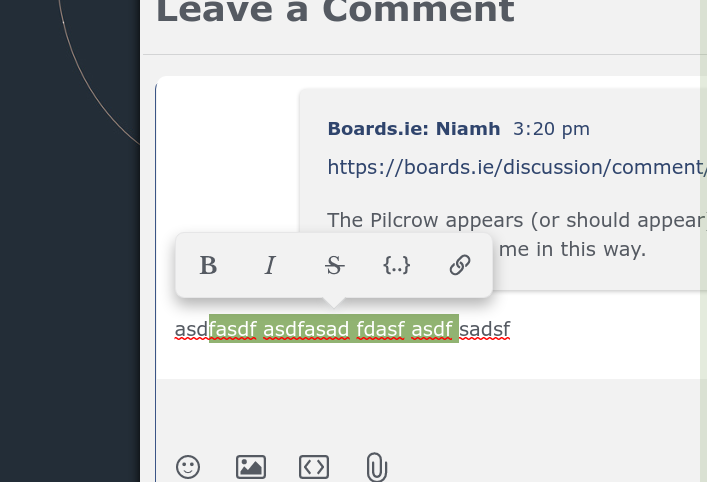
The Pilcrow appears (or should appear) as soon as you click into the Reply text box. Working here for me in this way.
Not here for me, but if I edit the post after posting it then it appears. Using Chrome browser.
Below is a screenshot of what happens when I reply to a post. The dark area on the left is the desktop outside the browser.
You need to maximise your browser window for the pilcrow to appear when you click into the comment box.
@Yurt! wrote
I disagree.
Some posters are absolutely awful for doing line-by-line rebuttals of posts, which in turn sees the other posters replying line by line.
True, but anyone motivated enough to do a line-by-line rebuttal won't be stopped by this. It does nothing to stop the trolls but inconveniences well-intentioned users.
Fisking I believe it's called.
You're not wrong there.
It's poor bulletin board etiquette in my mind, and leads to thread meltdowns.
That remains to be seen. ;-)
maximise your browser
Thank you. That works now.
I'm am hoping for abit of advise.
I created a new post this morning ans i cannot see meaning no-one else can either.
What am i doing wrong....
The post heading "removal"
Just bookmark the thread. I found it by clicking on your profile and scrolling down to 'Discussions'. Discussions is the new name for threads you start.
https://boards.ie/discussion/2058200372/removal#latest <<- Here it is, in the Motoring & Transport forum. If you have accidentally posted it in the wrong area it might be worth reporting the post & asking it to be moved to where you meant it to be posted initially.
Thanks for that but i cannot contact mod, is there a link...
Thanks for that but its not showing in my threads so i am not sure if others seeing..
There is no Discussions on a profile page for me, just About, Reactions and Activity.
You have to bookmark it, it doesn't automatically subscribe you any more.
ETA: report your post to contact a mod. Click on the flag at the bottom, select 'report' and explain you want it moved in the comment box.