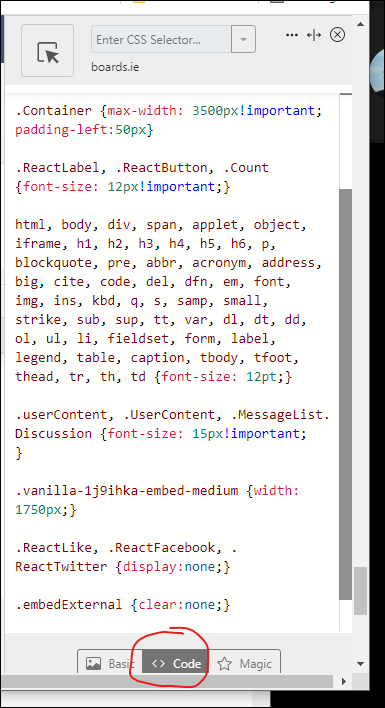
Attached the full Stylus CSS I'm currently using. Features:
Use this at your own risk, I wrote it for personal use only, it may not work on all configurations, and it will occasionally break as the site gets more updates. And if you're complaining about Boards bugs, make sure you can reproduce the bug with this off.
Thanks a mil for this. Working perfectly on Chrome for me.
Especially for users like me who wouldn't have a clue what to do with it.
it is really straightforward to use the CSS posted. I copied these instruction from a thread on after hours
install Stylebot in Chrome (https://chrome.google.com/webstore/detail/stylebot/oiaejidbmkiecgbjeifoejpgmdaleoha?hl=en)
Visit Boards.ie, and then open the plugin and click "Open Stylebot"
Make sure you've got the "Code" tab selected, and paste in the CSS from my attachment (or write your own).
It auto saves, so just hit the X to close the code window. The CSS will only apply to boards.ie, not any other sites.
Try this
.pre-header{position: fixed;}
.BreadcrumbsBox{position: fixed; width: 100%; top: 68px;height: 20px;}
#titleBar{position: fixed; top: 20px; width: 100%;}
.Container{margin-top:70px}
I was just about to ask if it was possible to remove those icons - thanks a mil!
cheers. I changed it slightly because there was a gap between the header and the top of the page
.pre-header{position: fixed;}
.BreadcrumbsBox{position: fixed; width: 100%; top: 48px;height: 20px;}
#titleBar{position: fixed; top: 0px; width: 100%;}
.Container{margin-top:70px}
@28064212 thanks for your work for Stylus edits. Is there a way to add the forum structure when scrolled at the top. - Say I want to go from this thread out to the Feedback forum. There is no current option. It's currently blank. (Thanks in advance 😁)
IE: Home› Talk to...› Boards.ie› Help & Feedback› Feedback
add this to the top of the CSS. This is he version i am using and it keeps those breadcrumbs fixed when the page scrolls. i have changed it slightly from what @28064212 originally posted. His had 68px instead of 48px and 20px instead of 0px. try both versions and see which works best for you.
how does one edit a CSS in stylus?
I did try to create a new thread but the new discussion button doesn't work. we should really have a separate thread for the CSS stuff
grand I'm using Stylus seems to be a similar thing
I just found the edit CSS icon, so all good now
the "floating" breadcrumbs is nice
@28064212 you're genius! I owe you a beer! Or even more! ;-D
I've 2 questions regarding twitter, facebook flag and quote buttons though:
– where exactly in the CSS should I add aforementioned code to rid of FB and Twitter icons?
– is there any workaround to have all buttons close to the bottom line of post's window? It currently looks like all them buttons are located right below each post's content rather than just above bottom line. Example below (partially blurred to protect posters identity).
I put the CSS to hide those buttons after the CSS to make the breadcrumbs fixed. I don't think it matters really where you put it.
The only way to get extensions on android is use something like Kiwi browser, it's same base code as Chrome, dunno about firefox
Thanks, much appreciated, fair play to you!
You're right it doesn't matter (I hope), I put it after postbit thing and it works! :-D
If you use this extension instead of Stylus you can add some javascript
Show full date and time for all posts
$(".postbit-header time").each(function(index) {
 $(this).text($(this).attr("title"));
});
Show thanks on a post - Vanilla only returns 10 thanks but its better than nothing
$(".ReactButton-Like .Count").each(function(index) {
	postid=$(this).closest("li").attr("id")
	post_id=postid.split("_")
	post_id=post_id[1]
	$("<div id='thanks_"+post_id+"' style='margin-left: 246px !important;background:#fff;padding:10px;color:#c12525'>Thanks by: </div>" ).insertAfter($(this).closest(".postbit-wrapper"));
$.ajax({ url: "https://boards.ie/reactions/users/Comment/"+post_id+"/like?DeliveryType=VIEW",
   method: "GET",
   custom: post_id })
.done( function(data, textStatus, jqXHR) {
	var postID = this.custom;
	$(data).find('li a').each(function(index) {
		if($(this).attr("title")!=undefined){
			$('#thanks_'+ postID).append($(this).attr("title")+", ");
	}})
});});
Auto bookmark threads when you first post a comment - thanks to Ads By Google
$('#Form_Comment').submit(function(){
  if (!$('.Bookmark').eq(0).hasClass('Bookmarked')) {
    $('.Bookmark').eq(0).click();
  }
});
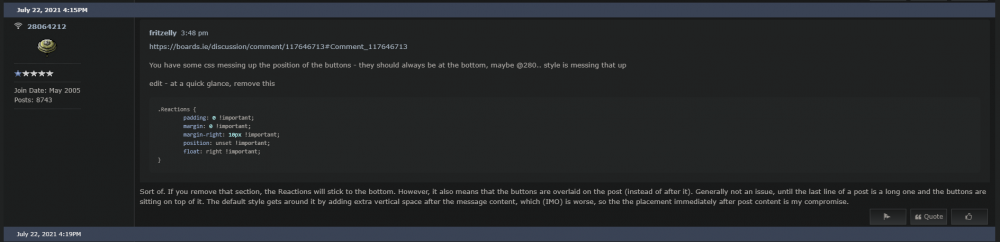
You have some css messing up the position of the buttons - they should always be at the bottom, maybe @280.. style is messing that up
edit - at a quick glance, remove this
.Reactions {
	padding: 0 !important;
	margin: 0 !important;
	margin-right: 10px !important;
	position: unset !important;
	float: right !important;
}
Noob question: Can this code be added with the previous code posted using the ext you linked to?
Yeah, the extension i posted has two panels - left for JS and right for CSS
so i changed to the extension that does both the CSS and JS and it messes up some of the CSS that was working with the other extension. Specifically it messes up the CSS that fixes the header and breadcrumbs. the breadcrumbs are still fixed but the header now scrolls with the page. I moved the CSS back to Stylebot and it works properly. I'm still using it for the JS and it works well so thanks very much to @fritzelly
Ive switched and added the JS code Fritzelly posted. Working perfect. Thanks !
Curious its the extension I use with that css (but my original css)
the only difference between mine and yours is with the items in bold below. I removed 20px from the values you used because it pushed the breadcrumbs too far down the page and left a gap between the header and breadcrumbs
Sort of. If you remove that section, the Reactions will stick to the bottom. However, it also means that the buttons are overlaid on the post (instead of after it). Generally not an issue, until the last line of a post is a long one and the buttons are sitting on top of it. The default style gets around it by adding extra vertical space after the message content, which (IMO) is worse, so the the placement immediately after post content is my compromise.
Now im finding the "flag" "quote" "like" FB/TW buttons are hovering over longer posts
@GBX - I get the same so I prefer to leave that .Reactions block of code in and have the buttons float a little in some posts.
P.S. I'm using this piece of JS to hide the 'Flag' and 'Like' text - I prefer not having them. It's a modified version of someone else's code on here but I can no longer find his post. Haven't got the Quote removal working yet.
$(document).ready(function() {
	$(".ReactLabel").text(function(index, text) {
	  if (text === 'Flag' || text === 'Quote' || text === 'Like') return '';
	});
});
This is my CSS - which works fine for me
.Section-Discussion .Content .pageBox .pageBox .pageBox::after{height:0 !important}
.Section-Discussion .Content .pageBox .pageBox .pageBox::before{height:0 !important}
#PagerAfter a,#PagerAfter span ,.MessageList .ItemComment .Item-BodyWrap, .MessageList .ItemDiscussion .Item-BodyWrap{border:0}

#Item_0 h1 {
  font-size: 20px !important;
  padding-bottom: 10px;
}
.ReactButton.PopupWindow,.Panel.Panel-main {
  display: none !important;
}
.postbit-message {
  padding-top: 5px !important;
}
.Content.MainContent {
  width: 100% !important;
}
.Section-Discussion .Content .pageBox .pageBox::before{height:0em}
.js-embed.embedResponsive > div
{margin:0 !important;}

.postbit-postbody{background:#fafafa !important}
.pageHeadingBox h2 {font-size:20px !important;}
.richEditor-textWrap.ql-container{
	flex-direction: inherit !important;
}

.Message.userContent {font-size:14px !important}
.postbit-postdetails {
	border-right:1px solid #a6a6a6;
	border-left:1px solid #a6a6a6;
}
.js-embed.embedResponsive [class*="userLabel-compact"] {
  border-bottom: 1px solid !important;
}
.userContent.userContent > p:not(:first-child), .UserContent.UserContent > p:not(:first-child){margin:0 !important}

.userContent.userContent.userContent.userContent > :not(:last-child):not(.embedResponsive), .UserContent.UserContent.UserContent.UserContent > :not(:last-child):not(.embedResponsive){margin:0 !important}

.pre-header{position: fixed;}
.BreadcrumbsBox{position: fixed !important; width: 100%; top: 68px;height: 20px;}
#titleBar{position: fixed; top: 20px; width: 100%;}
.Container{margin-top:70px}

.userShadow{
border:1px solid #c4c4c4;
box-shadow: 5px 5px #c4c4c4;
margin-bottom: 20px !important;
}
.MessageForm.CommentForm.FormTitleWrapper.Role_RegisteredUsersCommentFormWrap.pageBox {padding-left:30px;}
Sorted now. Re added the above. Cheers
This is for "popping" out quoted posts
JS
$(window).load(function() {
$(".embedExternal-content:has(article)").addClass("userShadow")
});
CSS
.userShadow{
border:1px solid #c4c4c4;
box-shadow: 5px 5px #c4c4c4;
margin-bottom: 20px !important;
}