shovel wrote: » No flicker on the screen. I bought the grey. I have black speakers on a surround system and they really show any speck of dust. I replaced a clock radio with this and found it ideal. we have echo dots and one echo show in other rooms in the house and this is the best for a bedroom.
feet of flame wrote: » Would you really want a device thats constantly listening and recording what it hears in your bedroom????
k123456 wrote: » Can you set a Mon to Friday alarm, (ie does not go off at weekends)
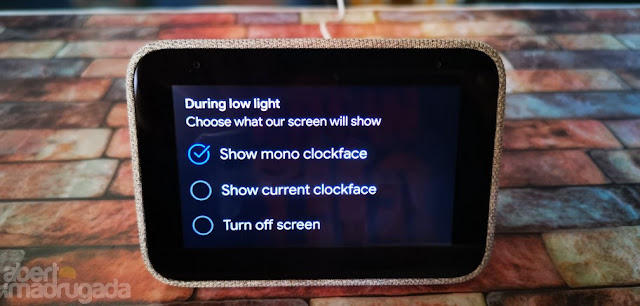
drogon. wrote: » Anyone know if this can be set to turn off the display at 10pm and turn back on at say 6am ? Would hate to have it on all the time, even if was at a low brightness.
JDxtra wrote: » On the Google hub, it can be configured to turn off the display during low light or 5 minutes after activity. This may have similar options.
It also does an excellent job of automatically adjusting the brightness
of the screen for the available light in the room, so it doesn’t become blinding
or distractingly bright in the middle of the night when you’re trying to sleep.
_Kaiser_ wrote: » I'm wavering here guys! I'm been thinking of getting some Smart devices (bulbs mostly) but was looking at Amazon's Alexa/Dot offerings I'm already pretty much all in on Google anyway. I guess I could still buy bulbs and this would manage at least some of them?
Deleted User wrote: » From a quick Google it seems you can have the screen turn completely off automatically in low light.https://old.reddit.com/r/googlehome/comments/gz7ru8/can_you_turn_off_the_screen_of_the_lenovo_smart/
nephster wrote: » I kinda don't see the point of a bedside alarm clock that turns off showing the time at night, but that's just me
JDxtra wrote: » You will need a phone or tablet with the Google Home app installed (and on the wifi) plus a Google account.
garyfleming7 wrote: » Can you view your Ring Door bell on the screen?
dinneenp wrote: » Hi How you you get photos to display on it please? Directly from phone or need USB & load into Lenovo?
kaahooters wrote: » from your google account photos.
drogon. wrote: » Unless any recent updates it doesn’t seem possible per this article https://www.theverge.com/2019/6/3/18647606/lenovo-smart-clock-review-specs-price-featuresDoesn’t display Google Photos albums
dinneenp wrote: » Hi yet again, Last question. I read a review that said for Essential you have to go into your phone to change alarm volume. Is this the case with Smart Clock (non-essential version) as well? Thanks, Pa.
Deleted User wrote: » Nope.https://forums.lenovo.com/t5/Lenovo-Smart-Display-Lenovo-Smart-Clock-with-Google-Assistant/Volume-issues-with-my-new-Smart-Clock-with-google-assistant/m-p/4449230?page=1#4450926
PreCocious wrote: » Good price drop on these: Smart Clock (€34.99) https://www.lenovo.com/ie/en/smart-clock/ Smart Clock Essential (€24.99) https://www.lenovo.com/ie/en/smart-devices/smart-home/smart-home-series/Smart-Clock-Essential/p/ZZISZSDCD05


![Photo of [Deleted User]](https://wd.vanillicon.com/v2/d78fd5f5292e11c2974bcd779ad2a2f0.svg)