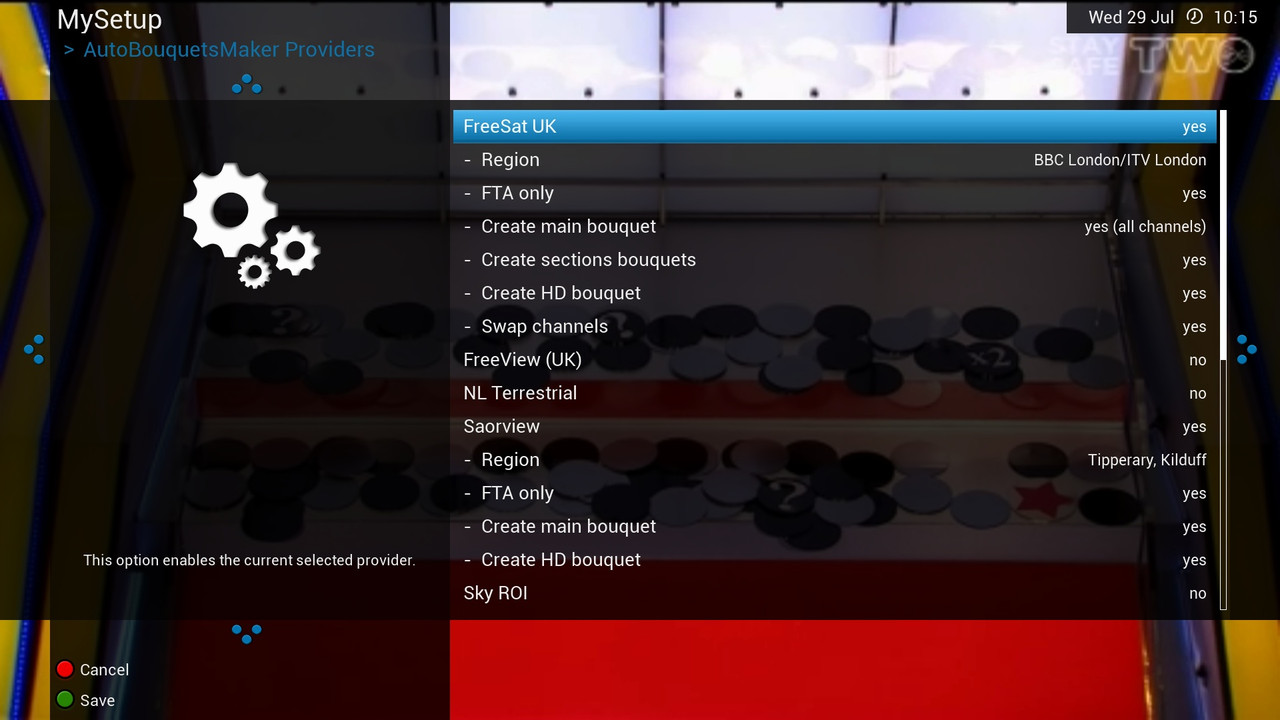
Johnboy1951 wrote: » More details of what you mean would be helpful. I use Kodi for all media devices in the home, including LiveTV and video files distributed on the LAN.
swoofer wrote: » I dont have the zgemma but I might get one for interest. I have same image and skin so thats a start. Someone who has the zgemma will no dount be along with the answer but you took a bit of time to post so I'll have a go. 1. 554 is CH31 so thats easy but I cant find 544!! No worries. 2. You dont need cable enabled so turn that off. 3. You should be able to find your transmitter by going here and put in eircode, that will give you the 2 channels.https://www.saorview.ie/en/changes 4. Where you have tuner configured if you go to region and arrow right your transmitter should appear, green to save. 5. Now how to get channel scanned, go to menu,setup, tuners/scanning. signal finder, then arrow to the t2 tuner, down to tune and right arrow changes it to user defined, down to channel type in 31 it over writes, press green to scan, green to save, do same for other channel. 6. now go to autobouuets, select providers, check saorview and make region your region, press green. 7. exit out and you can now do a scan and all should be fine. If I was you I would turn off schedule scan. Hope this helps, if confused post back.
swoofer wrote: » comer1 go into abm and select providers, do a screenshot. Some channels may disappear but they are few and far between recently it was sky news, the new frequency is usually posted on here and you just us signal finder. kaiser run ABM ie autobouquets but you must configure it first and set up providers, have a look as its pretty self explanatory. The scan you did picks up all the reqions and saorview has mass of useless channels. If unsure post back. Out if interest how did you configure the terrestial tuner? Be careful with skins I think you have openatv so theoretically in the plugins they should show skins that work. Do you know what image you have loaded?
Morrisseeee wrote: » @ _Kaiser_ > "Oh.. and I've installed a brand new 256GB SSD but can't see how to set it up?" You might be having a similar issue to me, ie. not picking up drive, you should be able to see HDD or SSD in : MENU > Information > Devices > Detected Devices. If not, or if it does see something, next try : Menu > Setup > System > Storage Devices. Note : Storage Devices won't show up if it doesn't see a drive (in my experience). You can also use : Extras > Terminal (in OpenWebif) or telnet/SSH into box and use linux commands : eg. 'df -h' (if it's mounted) or 'blkid' Q. Could someone check for me, in Storage Devices > Initialisation, do you see drive(s) as External or Internal ?
_Kaiser_ wrote: » EDIT 2: Opened it up and I had the power connector plugged into the non-HD one. Hoping that might be the problem.
Morrisseeee wrote: » that could be it alright The other connector is RS232, it should be labeled on the PCB
Gerry Wicklow wrote: » @_Kaiser_ In the webif web interface there is an option to "edit bouquets" from there you can mix and match the Freesat list with your Saorview list into a "favourites" list in any order you like. Bouquets is the fancy name for channel lists
_Kaiser_ wrote: » That'll teach me not to look closer at the board Sorted now OK cheers Gerry. Some work ahead then. Is the Web GUI the best/only way, or is there a 3rd party app/editor? I see the option to Export/Import in the Web editor. I'm still not thrilled with the UI though. That Blue HD one from 2014 I mentioned above.. is that the right version or is there something that looks/feels like Sky without all the wasted space on adverts? It's a pity you don't get previews of the ones under the Plugin menu! And one more... the remote control for this box. Can it be set to control a TV as well? I may not have gotten to that part of the manual yet but just thought I'd ask
_Kaiser_ wrote: » That'll teach me not to look closer at the board Sorted now OK cheers Gerry. Some work ahead then. Is the Web GUI the best/only way, or is there a 3rd party app/editor? I see the option to Export/Import in the Web editor.
_Kaiser_ wrote: » I'm still not thrilled with the UI though. That Blue HD one from 2014 I mentioned above.. is that the right version or is there something that looks/feels like Sky without all the wasted space on adverts?
_Kaiser_ wrote: » And one more... the remote control for this box. Can it be set to control a TV as well? I may not have gotten to that part of the manual yet but just thought I'd ask
_Kaiser_ wrote: » That'll teach me not to look closer at the board Sorted now
_Kaiser_ wrote: » .... It's a pity you don't get previews of the ones under the Plugin menu! And one more... the remote control for this box. Can it be set to control a TV as well? I may not have gotten to that part of the manual yet but just thought I'd ask
paulhardman wrote: » There is software called E-Channeliser which I've used to create a custom bouquet - Windows only though. Personally what I did was use the Freesat listing as the main one, and put the Saorview channels at 401+ - I can export my bouquets through the web UI and send them to you if you want. I'm on OpenVix but I don't think that will matter.
Blue HD is the one in the plugin>skins menu that looks the most like Sky. I don't see any adverts though? Can you post a screenshot?
I haven't figure that out either, I don't think it's possible...
_Kaiser_ wrote: » That would be great if you don't mind? Do you also have the few FTA channels that don't show on the official Freesat EPG (like the Now music channels for example)
phil49 wrote: » I got one of these boxes and have all the cahnnels set up ok through webif. My problem is that when I look at Network on my computer I can see the zgemmah7. When I click on it a window opens looking for "Enter Network credentials" ie User name and Password. I've tried numerous names and passwords but nothing works. Anybody got any ideas
dulpit wrote: » Change your provider from freesat UK to sky UK, and make sure its set to FTA only. Should include all channels, including music. It also has (in my opinion) a better order on the channels than freesat
_Kaiser_ wrote: » I assume you mean in ABM? If so I'm not seeing the same options I don't think But I found 2 versions of ABM in plugin downloads.. - one under extensions (autobouquets 2.2+git186) - another under systemplugins (autobouquetsmaker 3.1+git787) The first works but seems to be only designed for Astra 28.2 and has less options than screenshots above The second seems to install but I can't find it listed?
DopeTech wrote: » Question for anyone who has this box. Does the box slow down or does the spinner appear repeatedly when watching Saorview? Thinking of getting it for the parents house but I know certain images handle Saorview better. I know on the Amiko Alien 2 I could only use Hyperion as all the others had the above issue for example. Just curious has anybody encountered this with Openvix.